
0xMarioNawfal · Launch Video Breakdown: Hook, Pacing & Motion Design
CLIPPERS ARE DONE. Drop a YouTube link. AI finds the viral cuts, edits, captions, and posts.
Scene-by-scene timeline & spoken transcript
The Hook
The Problem: Manual Clipping & Scheduling
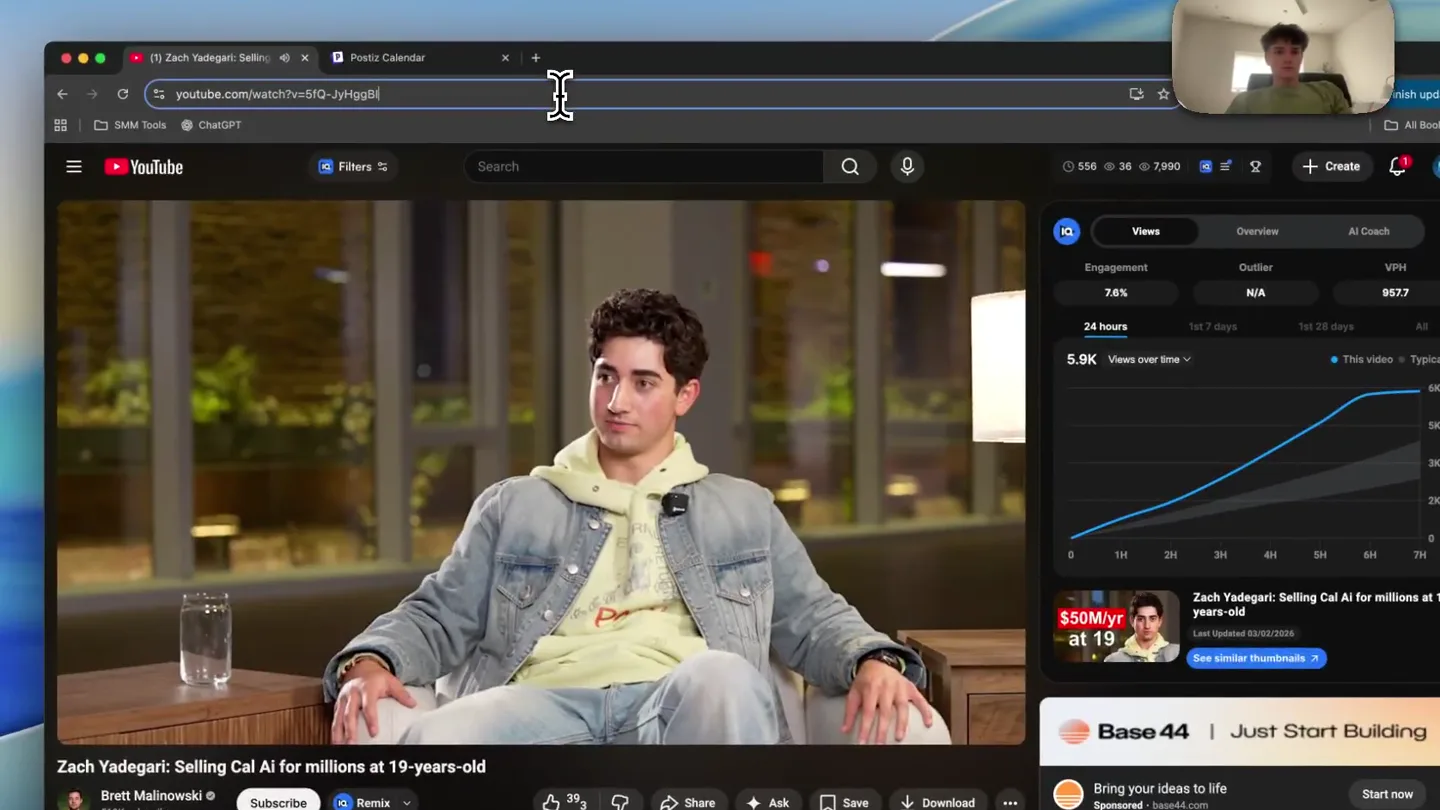
“So what's your annual recurring revenue right now?”
- On screen
- (No on-screen text)
- Camera
- Static wide shot of a person speaking in a podcast setting, then a screen recording of a YouTube video with a person speaking.
- Motion
- Screen recording with a picture-in-picture of the user, simulating a desktop environment.
Problem Agitation
The Tedious Workflow of Content Creation
“I'm not going to tell you that. I'm going to tell you that we're doing about 100k a month in sales.”
- On screen
- CLIPPING! https://youtu.be/5fQ... - top 5 clips, 3:30pm-7:30pm CST. Running in c113-f1Q tmux. Schedule copy Clip Time CST 1 3:30pm 2 3:30pm 3 3:30pm 4 6:30pm 5 7:30pm Telegram ping per clip. 22 clips found. Downloading top 5... 2:33pm. Clip 1 + 3:30pm CST | Scaling to $50M ARR at 19 Years Old. Clip 2 + 4:30pm CST | Why We Paid $100k to Sponsor MrBeast. Clip 3 + 5:30pm CST | The Facebook Ad Hack for App Builders. Clip 4 + 6:30pm CST | The Speed as a Core Value Growth Strategy. Clip 5 + 7:30pm CST | The Speed as a Core Value Growth Strategy.
- Camera
- Screen recording of a Telegram chat, showing messages related to video clipping and scheduling. The user's picture-in-picture remains in the top right.
- Motion
- Desktop screen recording, showcasing a simulated content management workflow with text messages appearing and scrolling.
Product Reveal
Introducing the Automated Content Calendar
“(No spoken dialogue — The audio continues with background speech, but no distinct dialogue is heard in this segment.)”
- On screen
- Calendar Channels Add Channel + Create Post Vugola Vugola Vugola < 03/02/2026 - 03/08/2026 > Today Monday 03/02/2026 Tuesday 03/03/2026 Wednesday 03/04/2026 Thursday 03/05/2026 Friday 03/06/2026 Saturday 03/07/2026 Sunday 03/08/2026 Day Week Month Create Post Post Preview The Speed as a Core Value Growth Strategy Vugola Settings Add New Tag Repeat Post Every... Delete Post 03/02/2026 07:30 PM Save as draft Update
- Camera
- Screen recording transitions to a calendar interface, then to a 'Create Post' interface, showing content being scheduled and previewed. The user's picture-in-picture remains.
- Motion
- Desktop screen recording, demonstrating the product's UI with interactive elements like clicking and scrolling, revealing scheduled content.
Feature Teaser
AI-Powered Viral Cut Generation
“(No spoken dialogue — The audio continues with background speech, but no distinct dialogue is heard in this segment.)”
- On screen
- CLIPPERS ARE DONE. Drop a YouTube link. AI finds the viral cuts, edits, captions, and posts.
- Camera
- The screen recording continues, focusing on the 'Create Post' interface, then zooms out to reveal the product's tagline. The user's picture-in-picture remains.
- Motion
- Desktop screen recording, with a final zoom-out to reveal the product's core value proposition as on-screen text.
Motion design primitives
Synthesizable in Remotion · key components of the desktop-workflow-ai-agent template.
DesktopScreenCapture
A full-screen recording of a desktop interface, showing various applications and browser tabs, with a small, rounded picture-in-picture of the user in the top right corner.
+ Code construction recipe
Use a <Video> component for the main screen recording. Overlay a small, rounded <Video> or <Img> component for the user's webcam feed, positioned with CSS 'position: absolute' and 'border-radius: 50%'.
UIInteractionHighlight
A subtle visual indicator, like a glowing circle or a brief color change, appears where the mouse cursor clicks or hovers on interactive UI elements.
+ Code construction recipe
Implement with <AbsoluteFill> and <Sequence> components. Use 'interpolate' for opacity and scale changes on a circular <Div> element, triggered at specific 'frame' values corresponding to mouse clicks in the screen recording. Apply a 'box-shadow' for the glow effect.
TextOverlayReveal
Key product messages or taglines appear as bold, white text overlays, often with a subtle fade-in or scale-up animation, against the background of the screen recording.
+ Code construction recipe
Utilize a <Text> component with 'position: absolute' and 'color: white'. Animate 'opacity' and 'transform: scale' using 'interpolate' or 'spring' functions over a short duration. Ensure a high 'z-index' for visibility.
Style DNA & aesthetic system
Visual aesthetic
Typography
Motion
Special effects
Pacing & rhythm
Conceptual story rhythm
- 1
The Manual Grind
Purpose. Establish the current, inefficient workflow of content creation, highlighting the pain points of manual clipping and scheduling.
Execution. Screen recording of a YouTube video, then a Telegram chat showing manual instructions for clipping and scheduling, emphasizing the complexity and time investment.
- 2
The Promise of Automation
Purpose. Introduce the product as the solution, demonstrating how it streamlines the content creation process.
Execution. Transition to the product's calendar interface, showing pre-scheduled content blocks, implying automation and organization.
- 3
Effortless Publishing
Purpose. Showcase the ease of creating and previewing posts within the platform.
Execution. Demonstration of the 'Create Post' interface, where content is automatically populated and previewed, minimizing user input.
- 4
The Core Value Proposition
Purpose. Deliver the ultimate benefit and breakthrough of the AI agent.
Execution. A final, bold text overlay summarizing the product's core function: 'CLIPPERS ARE DONE. Drop a YouTube link. AI finds the viral cuts, edits, captions, and posts.'
Remix in Animatiq Studio
Master remix prompt · agent-ready
Sample remix
Objective
An AI agent that automates customer support email responses.How the recipe adapts
The video would start with a screen recording of a cluttered email inbox, showing a user manually drafting responses. It would then transition to the AI agent's dashboard, demonstrating how it automatically drafts and sends replies based on incoming emails. UI interactions would highlight the agent's setup and approval process. A final text overlay would state: 'EMAIL OVERLOAD GONE. AI drafts, personalizes, and sends customer support replies.'Remix blueprint · desktop-workflow-ai-agent
Scene durations (4 scenes, 51s)
Key Remotion components
Related AI Agents Product Launches
Explore all AI Agents launches →
To ensure that artificial general intelligence benefits all of humanity

Gopuff introduces Go, an AI shopping assistant built with SpaceXAI: say what you need and the order is placed.

Iliad (Troy) trailer made by Grok Imagine 1.5, which was just released