
Anu Anuja · Launch Video Breakdown: Hook, Pacing & Motion Design
A free tool that generates 3D shot references for AI filmmakers: 450+ combinations of camera, angle, FOV, motion and poses. Download a reference and feed it to image models with a character sheet to improve AI-generated shots — no Blender required.
Scene-by-scene timeline & spoken transcript
The Hook
AI Filmmaking Challenge & Solution Tease
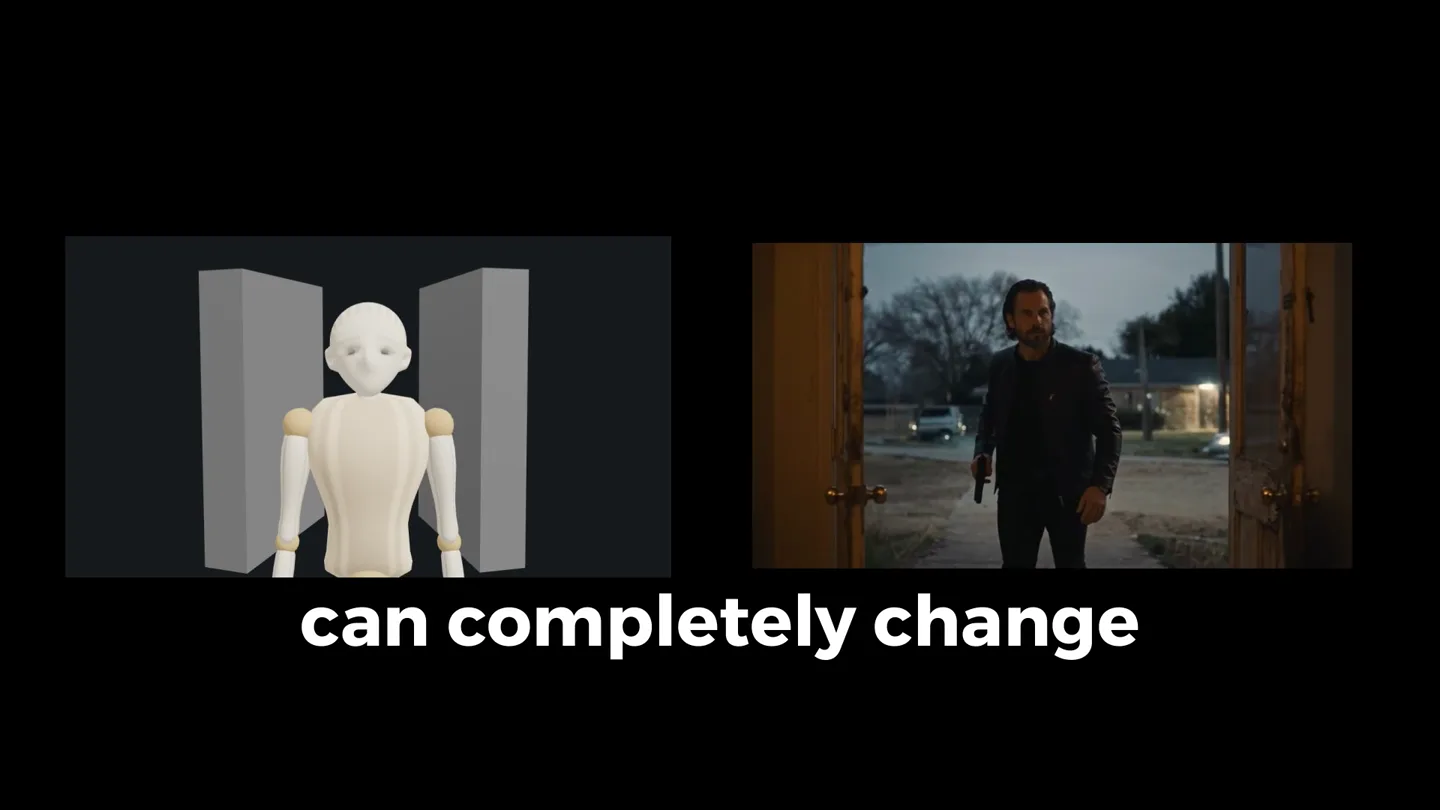
“AI output can completely change how you direct every shot.”
- On screen
- can completely change direct every shot
- Camera
- Split screen showing a 3D mannequin and a live-action shot of a man entering a room. The live-action shot transitions to a close-up of the man's face.
- Motion
- Split-screen comparison, quick cuts, and a zoom-in on the presenter's face to establish a personal connection.
Product Reveal
Introducing Anu Anuja: 3D Shot Composer
“(No spoken dialogue — Energetic, percussive beat with 808s and a 'tick-tock' sound. High-energy audio transition with a riser and sub-bass drop.)”
- On screen
- Open Media Open-source toolkit for AI filmmakers 3D Shot Composer Create and compose cinematic shots using 3D characters and objects Launch Composer 2D Storyboarding Storyboarding and scene planning soon COMING SOON fullyopenmedia.space/composer?shotSize=wide&angle=front&elevation=eye&composition=center Shot Composer Shot Library Undo Redo Grid Composition Save Pose Save Scene Clear Scene Static SCENE CHARACTERS + Male + Female + Child Male 01 FEMALE 02 Child 03 Hide Lock Duplicate Delete PRIMITIVES + Cube + Plane + Cylinder + Sphere Move Rotate Scale Pose Capture Shot Move Rotate Scale Pose
- Camera
- Starts with a wide shot of the 'Open Media' interface, then zooms into the '3D Shot Composer' section. Subsequent shots are close-ups of the software interface, demonstrating character and object manipulation.
- Motion
- Zoom-in transitions, rapid UI element highlights, and direct screen recordings showcasing interactive features. A brief 3D axis animation is used as a visual break.
Feature Teaser
Camera Control & Composition
“(No spoken dialogue — The driving beat continues, maintaining high energy.)”
- On screen
- Shot Composer Shot Library Undo Redo Grid Composition Save Pose Save Scene Clear Scene Static Motion Capture Shot SHOT SIZE Wide Full Medium MCU Close-Up CAMERA ANGLE Front 3/4 Left 3/4 Right Profile Back Over the Shoulder ELEVATION Eye Level Low High COMPOSITION Center Left Third Right Third Upper Third Lower Third Negative Space
- Camera
- A montage of live-action shots of the presenter, followed by rapid-fire UI interactions demonstrating camera angle, elevation, and composition controls within the software.
- Motion
- Quick cuts between live-action and UI, highlighting interactive buttons and dropdowns with subtle hover effects and click animations. The live-action shots are presented as a grid of small, floating images.
Call to Action
Motion & Field of View Controls
“(No spoken dialogue — The energetic music builds slightly before a final sound design flourish.)”
- On screen
- fullyopenmedia.space/composer?shotSize=wide&angle=front&elevation=eye&composition=center Shot Composer Home Shot Library Undo Redo Grid Composition Save Pose Save Scene Clear Scene Static Motion + Cube + Plane + Cylinder + Sphere + Capsule + Cone + Torus No primitives CAMERAS + Camera Camera 02 Hide Lock Duplicate Delete Camera 02 - 0 keyframe(s) Play Pause Stop 0.00s / 6.0s Speed 1 Duration 6 Download Shot Object Motion Select a mannequin in the scene to compose a shot for it. CAMERA Field of View 10 22 Select Move Rotate Scale Pose + Keyframe Camera 02 - 1 keyframe(s) Play Pause Stop 5.83s / 6.0s Speed 1 Duration 6 Delete Keyframe fullyopenmedia.space
- Camera
- Close-up on the software interface, demonstrating camera motion keyframing and field of view adjustments. The final shot is a clean white screen with the product URL.
- Motion
- Interactive UI demonstration with mouse clicks and slider adjustments. The final URL reveal uses a simple, clean text animation on a solid background.
Motion design primitives
Synthesizable in Remotion · key components of the ai-filmmaker-toolkit-launch template.
SplitScreenReveal
Two distinct video feeds or images are displayed side-by-side, often with a central dividing line. One side might show a problem, the other a solution or comparison.
+ Code construction recipe
Use Remotion's <AbsoluteFill> for each panel. Animate the 'width' or 'x' position of each panel using `interpolate` with `spring` for a smooth, slightly bouncy reveal. Ensure content within each panel scales appropriately.
UIInteractionHighlight
Specific UI elements (buttons, sliders, text fields) are highlighted, clicked, or manipulated with a visible cursor, often accompanied by a subtle glow or scale animation.
+ Code construction recipe
Overlay a transparent video of screen recording. Use `AbsoluteFill` and `spring` animations for `scale` and `opacity` on SVG shapes or `div` elements to simulate button presses or hover states. A custom cursor component can be animated along a path.
FloatingImageGrid
Multiple images or video clips appear as small, distinct cards, often with subtle shadows, and arrange themselves into a dynamic grid or collage, sometimes with a slight parallax effect.
+ Code construction recipe
Render individual image components, each wrapped in a `div` with `box-shadow`. Animate `x`, `y`, `z` (for parallax), and `rotate` properties using `spring` to create a dynamic, floating effect. Stagger the animations for a cascading entrance.
Style DNA & aesthetic system
Visual aesthetic
Typography
Motion
Special effects
Pacing & rhythm
Conceptual story rhythm
- 1
The AI Filmmaker's Dilemma
Purpose. Agitate the problem of controlling AI-generated visuals and establish the need for a precise tool.
Execution. Split-screen comparison of AI output vs. desired shot, followed by the founder directly addressing the camera, creating a personal connection to the problem.
- 2
Introducing the Control Panel
Purpose. Reveal the product as the solution, showcasing its intuitive interface and core functionalities.
Execution. Clean UI reveal, zooming into the 'Shot Composer' and demonstrating character and object manipulation with clear, guided mouse interactions.
- 3
Mastering the Shot
Purpose. Highlight advanced features like camera angles, composition, and motion controls, demonstrating granular control.
Execution. Rapid-fire UI demonstrations of camera settings (shot size, angle, elevation, composition) and motion keyframing, interspersed with a dynamic grid of example shots.
- 4
Your Creative Power Unleashed
Purpose. Reinforce the product's value proposition and provide a clear call to action.
Execution. Final UI demonstration of motion controls, culminating in a clean, full-screen display of the product URL, inviting users to explore.
Remix in Animatiq Studio
Master remix prompt · agent-ready
Sample remix
Objective
Launch a new cloud-based IDE for collaborative coding.How the recipe adapts
The SplitScreenReveal primitive would show a cluttered local development environment versus the clean, collaborative cloud IDE. UIInteractionHighlight would demonstrate real-time code editing, debugging, and version control within the IDE. The FloatingImageGrid would display various code snippets or project dashboards. The dark-mode UI and energetic soundtrack would be retained, with typography adapted to a developer-friendly monospace font for code examples.Remix blueprint · ai-filmmaker-toolkit-launch
Scene durations (4 scenes, 20s)
Key Remotion components
Related Creative AI & Video Product Launches
Explore all Creative AI & Video launches →
AI is already smart enough. Real-world tasks are still slow, expensive and unreliable, because we hand AI a computer built for humans, then wrap it in a heavy harness. AI doesn’t need to get smarter

Big day 🔥 🚀 Introducing Dolphin AI - an agentic AI studio for complete video production. The story of Dolphin is very interesting. It didn’t start as a product. It started as an internal tool. W
Today Reactor is coming out of stealth. We’ve raised $59M in Seed and Series A funding, led by @lightspeedvp, with participation from @AmplifyPartners, @wndrco, @Sky9Capital, and @FPVventures. Reactor is the platform for building in the World Model era: the infrastructure that https://t.co/YEe0UnqmW2