
AceDataCloud · Launch Video Breakdown: Hook, Pacing & Motion Design
x402 payments are live in Ace Studio: connect a Solana or Base wallet and pay in USDC for chat, image, video, and music generations across 30+ models.
Scene-by-scene timeline & spoken transcript
The Hook
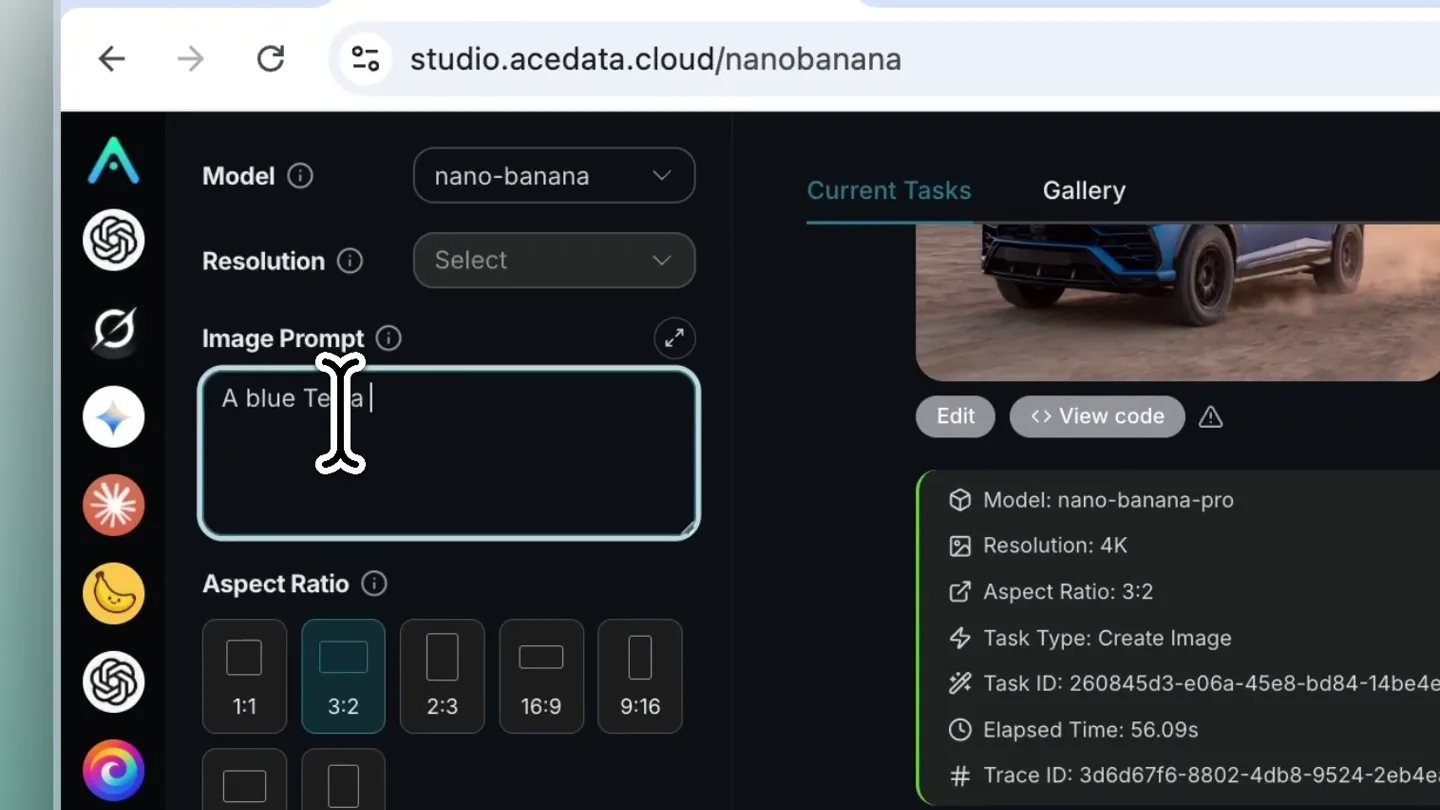
AI Image Generation & Wallet Connection
“(No spoken dialogue — The track features a driving, rhythmic synth bassline and arpeggiated synth melodies. A high-energy riser builds towards the end of this segment.)”
- On screen
- Model nano-banana Resolution Select Image Prompt Enter prompt, e.g., a white Siamese cat Aspect Ratio 1:1 3:2 2:3 16:9 9:16 4:3 3:4 Reference Images Upload Current Tasks Gallery Edit View code Model: nano-banana-pro Resolution: 4K Aspect Ratio: 3:2 Task Type: Create Image Task ID: 260845d3-e06a-45e8-bd84-14be4ea8 Elapsed Time: 56.09s # Trace ID: 3d6d67f6-8802-4db8-9524-2eb4ea8 Nano Banana 2026-08-25 22:58:09 A Yellow Lambo Truck in NY city A blue Tesla truck in NY streets 2K 4K 0.35 Credit Generate Credits USDC Wallet Base Solana Connect Wallet The exact USDC price is shown before your wallet signs. Connected 6M0qgKL...wV2pPa Disconnect Pay each time Continuous payments
- Camera
- Static screen capture, with mouse cursor movements highlighting UI elements.
- Motion
- Screen recording with animated cursor, UI element highlighting, and subtle zoom-ins on interactive components.
Product Reveal
Confirming Payment & AI Generation
“(No spoken dialogue — A sub-bass drop/impact at 0:10. The rhythmic synth bassline continues, with a subtle sweep at 0:19.)”
- On screen
- Confirm Payment Pay 0.033325 USDC on Solana for this generation? Cancel Pay with wallet Phantom Wallet @AceX402 Account 1 This domain is new. Only proceed if you trust this site. USD Coin -0.033325 USDC Network Solana Network Fee 0.00001 SOL Advanced set_compute_unit_limit Compu...11111 Program set_compute_unit_price Program Compu...11111 transfer_checked Token Confirm Amount 33325 decimals 6 destination CVTMD...XxXUM mint EPJFW...TDt1v owner 6M0qgK...wV2pPa createMemo Memos...mFChr Me... 3b04d89d...d854b147e1847... Only confirm if you trust this website. Transaction studio.acedata.cloud Successfully initiated generation task Elapsed Time: 99.84s # Trace ID: c95c7a-a05-4b73-a2a8-381fcd76347 Nano Banana 2018-09-25 23:01:30 A Yellow Ferrari Truck in NY city Edit View code Model: nano-banana-pro Resolution: 4K Aspect Ratio: 3:2 Task Type: Create Image Task ID: f05f8bca-9f90-4696-8980-9a6e284810d Elapsed Time: 67.22s # Trace ID: c387a086-ff6e-42f4-8555-1769612a67c9 Nano Banana 2018-09-25 23:30:54 A blue Tesla truck in NY streets Edit View code Model: nano-banana-pro Resolution: 4K Aspect Ratio: 3:2 Task Type: Create Image Task ID: 58f375b8-4f96-4458-82f5-307fcf1baa10 Elapsed Time: 99.52s # Trace ID: c82920c9-0cb0-4371-9f81-55f56a9f7d84
Feature Teaser
Generated Image Display & Detail View
“(No spoken dialogue — A powerful sub-bass drop/impact at 0:30. The ambient electronic score continues with evolving pads and pizzicato synths.)”
- On screen
- (No on-screen text)
- Camera
- Close-up on the generated image, then a full-screen transition to the image, followed by a return to the UI.
- Motion
- Seamless transition from UI element to full-screen image, simulating a user clicking to view details. Subtle camera push-in on the full-screen image.
Call to Action
Final Product Showcase
“(No spoken dialogue — An extended riser from 0:50 to 0:54, culminating in a final sub-bass impact at 0:55.)”
- On screen
- (No on-screen text)
- Camera
- Static shot of the generated image, then a quick cut back to the UI.
- Motion
- Quick cuts between the generated image and the UI, emphasizing the result of the interaction. The final impact aligns with the last visual cut.
Motion design primitives
Synthesizable in Remotion · key components of the acedatacloud-ui-flow template.
UIDialogueFlow
Simulates user interaction within a web application, including mouse clicks, text input, dropdown selections, and modal pop-ups. Focuses on highlighting active UI elements.
+ Code construction recipe
Use Remotion's <Sequence> and <AbsoluteFill> for screen layout. Implement cursor movement with `interpolate` and `spring` for natural easing. Text input can be animated with `typewriter` effect. Modals can use `spring` for scale and opacity transitions. Highlight active elements with animated `border` or `box-shadow`.
WalletConnectOverlay
Displays a wallet connection modal, showing connection status, network selection, and transaction confirmation steps. Features dynamic data updates and interactive buttons.
+ Code construction recipe
Create a dedicated component for the wallet modal. Use `interpolate` for smooth entry/exit animations (e.g., slide-up or fade-in). Dynamic text fields can be rendered with `Text` components, updating based on props. Button interactions can be simulated with `spring` for hover/click states.
ImageGenerationReveal
Transitions from a pending generation state to a completed image, then expands the image to full screen for detailed viewing, and finally returns to the UI context.
+ Code construction recipe
Utilize `AbsoluteFill` for the full-screen image. Animate the image's `scale` and `position` using `spring` or `interpolate` for a smooth zoom-in/out effect. Use `Sequence` to manage the timing of the pending state, completion, and full-screen reveal. Cross-fade or wipe transitions can be used for scene changes.
Style DNA & aesthetic system
Visual aesthetic
Typography
Motion
Special effects
Pacing & rhythm
Conceptual story rhythm
- 1
Interactive Introduction
Purpose. To immediately demonstrate the core functionality of AI image generation and the initial steps of the payment process.
Execution. Screen recording of a user typing a prompt, selecting resolution, and initiating the 'Generate' action, leading to the wallet connection prompt.
- 2
Secure Transaction Flow
Purpose. To showcase the secure and integrated blockchain payment mechanism.
Execution. Detailed walkthrough of connecting a Solana wallet, confirming payment details, and approving the transaction via a Phantom Wallet pop-up.
- 3
Instant Gratification & Result
Purpose. To highlight the speed and quality of the AI generation.
Execution. Transition from the payment confirmation to the generated image appearing in the UI, followed by a full-screen view of the high-resolution output.
- 4
Seamless Integration & Value
Purpose. To reinforce the product's value proposition of easy, on-demand AI content creation with crypto payments.
Execution. Quick cuts between the generated image and the UI, emphasizing the successful completion of the task and the overall user experience.
Remix in Animatiq Studio
Master remix prompt · agent-ready
Sample remix
Objective
Launch a new DeFi lending platform, 'YieldFlow', highlighting its intuitive UI and secure, high-yield staking.How the recipe adapts
The UIDialogueFlow primitive will be adapted to show a user navigating YieldFlow's dashboard, selecting a staking pool, and initiating a deposit. The WalletConnectOverlay primitive will demonstrate connecting a MetaMask wallet and confirming a USDC deposit transaction. Instead of image generation, the ImageGenerationReveal primitive will be repurposed as a 'Yield Confirmation Reveal', showing an animated graph of accumulating yield or a success message with a visual representation of the staked assets, then returning to the YieldFlow dashboard.Remix blueprint · acedatacloud-ui-flow
Scene durations (4 scenes, 56s)
Key Remotion components
Related AI Agents Product Launches
Explore all AI Agents launches →
To ensure that artificial general intelligence benefits all of humanity

Gopuff introduces Go, an AI shopping assistant built with SpaceXAI: say what you need and the order is placed.

Iliad (Troy) trailer made by Grok Imagine 1.5, which was just released