
Addys AI · Launch Video Breakdown: Hook, Pacing & Motion Design
Addys AI turns meetings and messages into action items, then gets them done for you.
Scene-by-scene timeline & spoken transcript
The Hook
Meetings In, Action Out
“Addis turns your meetings into action items.”
- On screen
- MEETINGS IN. Addys.ai
- Camera
- Static shot on text, then quick cut to logo on blue background.
- Motion
- Text wipe-on, quick cut, logo reveal with subtle bounce.
Problem Agitation
The Meeting Ends, The Work Begins
“Okay, see you next week. Bye bye. Your call ends.”
- On screen
- (No on-screen text)
- Camera
- Medium shot of a person on a video call, then a quick cut to a desktop UI.
- Motion
- Live-action footage, followed by a rapid transition to a digital interface.
Product Reveal
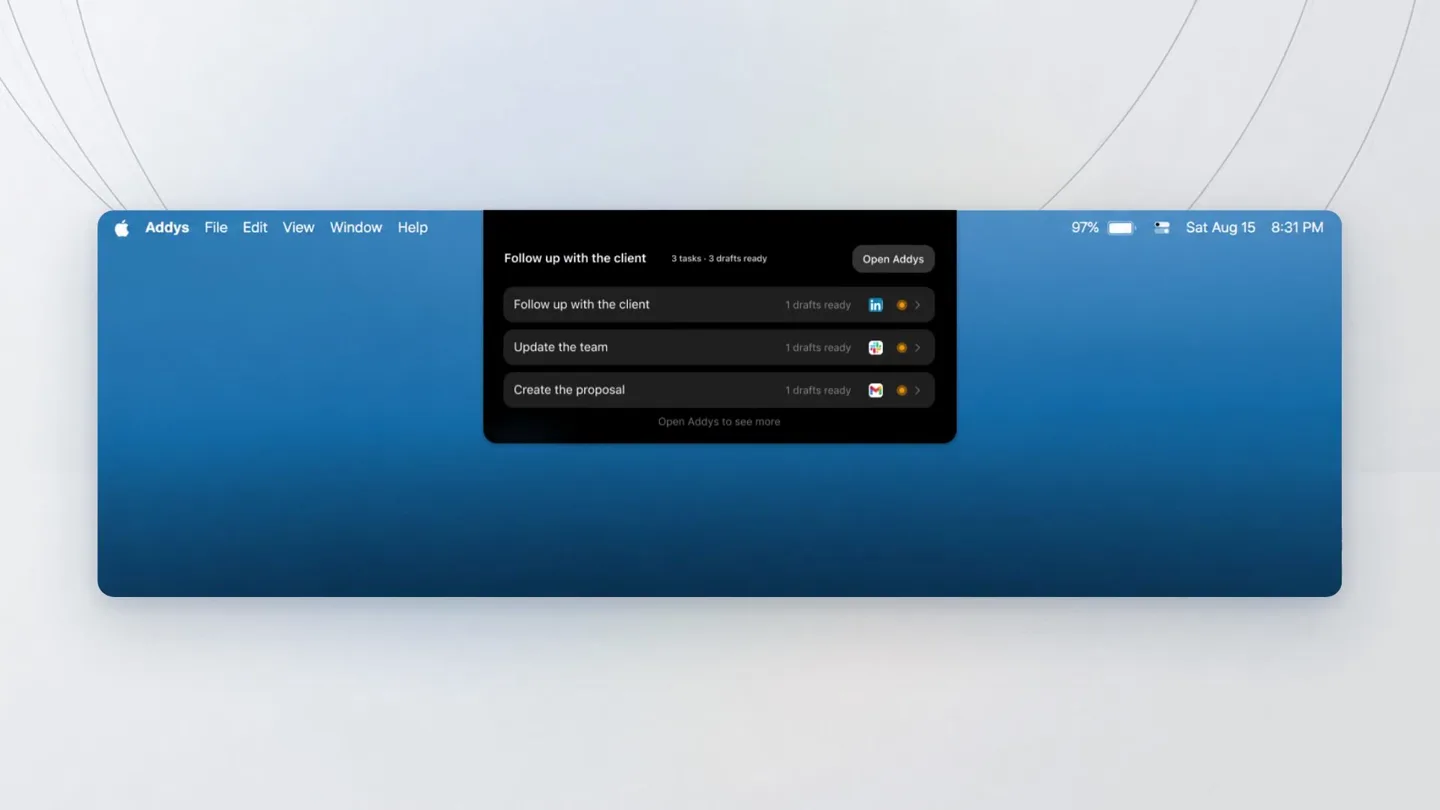
Addys AI: Instant Action Items & Drafts
“The work is already written. Follow-ups, updates, recaps, sent where they belong.”
- On screen
- Addys File Edit View Window Help 97% Sat Aug 15 8:31 PM Follow up with the client 3 tasks 3 drafts ready Open Addys Update the team 1 drafts ready Create the proposal 1 drafts ready Open Addys to see more. Sales Discovery Sync Follow-up with the client Draft Send I've prepared a Slack draft for the #sales channel to update the team on our call with Dana W. It summarizes her requirements and lets everyone know the proposal is currently in progress. Please review the draft card below and post it when you're ready. Slack message To: #sales_sync Hey team! Just wrapped up a great discovery call with Dana W. My Updates - Client is very interested in our solution for [Project/Product Name] - I'm currently drafting the proposal and will post the preview link here once ready. Target to send the final version to Dana by EOD. Let me know if anyone has specific notes to include? Cancel Send Email draft Dana@... Follow-ups from today's sync Reply to Follow-up & Proposal BIUS H1 H2 H3 Hi Dana, Thank you for speaking with us today! It was great learning more about your team's current priorities and requirements. As promised, I've put together a summary of our discussion along with the proposed next steps: • Key Focus: Streamlining your team's workflow and integration requirements. • Proposal Overview: Attached/linked is our custom proposal outlining the scope, timeline, and deliverables. Please take a look at your convenience, and feel free to reply directly to this email or schedule a quick follow-up call if you have any questions. Best regards, Cancel Send
- Camera
- Zoom into a desktop UI, then a series of UI elements animate into view, simulating user interaction.
- Motion
- UI elements slide in and out, pop-up animations, cursor interaction, and a 'send' button animation.
Feature Teaser
Seamless Integration & Automated Routines
“Running every day. No new prompts. Take your Addis, your job is done.”
- On screen
- ROUTINE: Running every day. Every day 9:00 AM LinkedIn Message Daily Review recent LinkedIn connections and messages, draft replies and follow-ups, and identify important people. LinkedIn drafts
- Camera
- Wide shot of various app icons orbiting the Addys logo, then a zoom into a 'routine' card, followed by a live-action shot of the presenter closing a laptop.
- Motion
- Orbital animation of app icons, card flip/reveal, live-action with on-screen text overlay, and a dramatic laptop close with logo reveal.
Call to Action
Addys AI: Your Automated To-Do List
“Addis turns every meeting into your to-do list, then does the work for you.”
- On screen
- Addys turns every meeting into a to-do list, then does the work for you addys.ai
- Camera
- Close-up on the laptop with the Addys logo, which then animates into a 3D cat mascot, followed by a final static shot of the Addys logo and tagline.
- Motion
- 3D logo transformation, character animation, and a final text reveal with subtle background animation.
Motion design primitives
Synthesizable in Remotion · key components of the ai-productivity-launch template.
TextWipeReveal
Text appears with a horizontal wipe effect, revealing characters from left to right, often accompanied by a subtle scale or bounce.
+ Code construction recipe
Use Remotion's `Sequence` and `spring` for character-by-character animation. `interpolate` for `translateX` and `opacity` based on `frame` and `delay` per character. Masking with `overflow: hidden` on a container for the wipe effect.
OrbitalAppIconCarousel
Multiple application icons orbit around a central product logo, creating a dynamic visual representation of integration.
+ Code construction recipe
Implement using `AbsoluteFill` for positioning. Each icon can be a `Comp` with `transform: rotate()` and `transform: translateX()` to simulate an elliptical orbit. Use `loop` and `durationInFrames` for continuous motion. `z-index` and `scale` can be interpolated for depth.
UIDialogSlideUp
User interface dialogs or cards slide up from the bottom of the screen or pop into view with a slight overshoot and bounce.
+ Code construction recipe
Utilize `spring` for `translateY` and `opacity` properties. Set `damping` and `stiffness` to achieve a quick, responsive bounce. `delay` can be used to stagger multiple dialogs.
Style DNA & aesthetic system
Visual aesthetic
Typography
Motion
Special effects
Pacing & rhythm
Conceptual story rhythm
- 1
The Problem Hook
Purpose. Immediately identifies a common pain point (meetings leading to more work) and introduces the product as the solution.
Execution. Rapid text reveal 'MEETINGS IN.' followed by the product tagline and logo, setting a quick, problem-solution tone.
- 2
Solution Demonstration
Purpose. Visually walks through how the product solves the problem by showing its core functionality in action.
Execution. Detailed UI animations demonstrating automatic action item generation, drafting, and sending across various platforms.
- 3
Integration & Automation
Purpose. Highlights the product's seamless integration with other tools and its ability to automate routine tasks.
Execution. Animated app icons orbiting the central logo, followed by a 'routine' card reveal, emphasizing continuous, effortless operation.
- 4
Transformative Benefit & CTA
Purpose. Reinforces the ultimate benefit to the user (job done, peace of mind) and provides a clear call to action.
Execution. Presenter closing laptop, revealing a glowing 3D mascot, culminating in the final tagline and website URL.
Remix in Animatiq Studio
Master remix prompt · agent-ready
Sample remix
Objective
Launch a new AI-powered financial planning tool, 'WealthFlow AI', targeting busy professionals.How the recipe adapts
The video would open with 'FINANCES IN.' text, then transition to a founder discussing the complexity of personal finance. UI animations would show WealthFlow AI automatically categorizing transactions, suggesting investment strategies, and drafting budget reports. An OrbitalAppIconCarousel would feature banking and investment app logos. The 3D mascot, perhaps a stylized owl, would appear on a tablet screen, symbolizing wisdom and automation. The final tagline would be 'WealthFlow AI turns your financial data into actionable insights, then grows your wealth for you.'Remix blueprint · ai-productivity-launch
Scene durations (5 scenes, 30.5s)
Key Remotion components
Related Productivity Product Launches
Explore all Productivity launches →
AI is already smart enough. Real-world tasks are still slow, expensive and unreliable, because we hand AI a computer built for humans, then wrap it in a heavy harness. AI doesn’t need to get smarter

Big day 🔥 🚀 Introducing Dolphin AI - an agentic AI studio for complete video production. The story of Dolphin is very interesting. It didn’t start as a product. It started as an internal tool. W

Don't type, just speak. Flawless voice-to-text across every app at 240 WPM.