
After Effects Tricks! · Launch Video Breakdown: Hook, Pacing & Motion Design
Adobe illustrator 2026 tips: Draw a tree
Scene-by-scene timeline & spoken transcript
The Hook
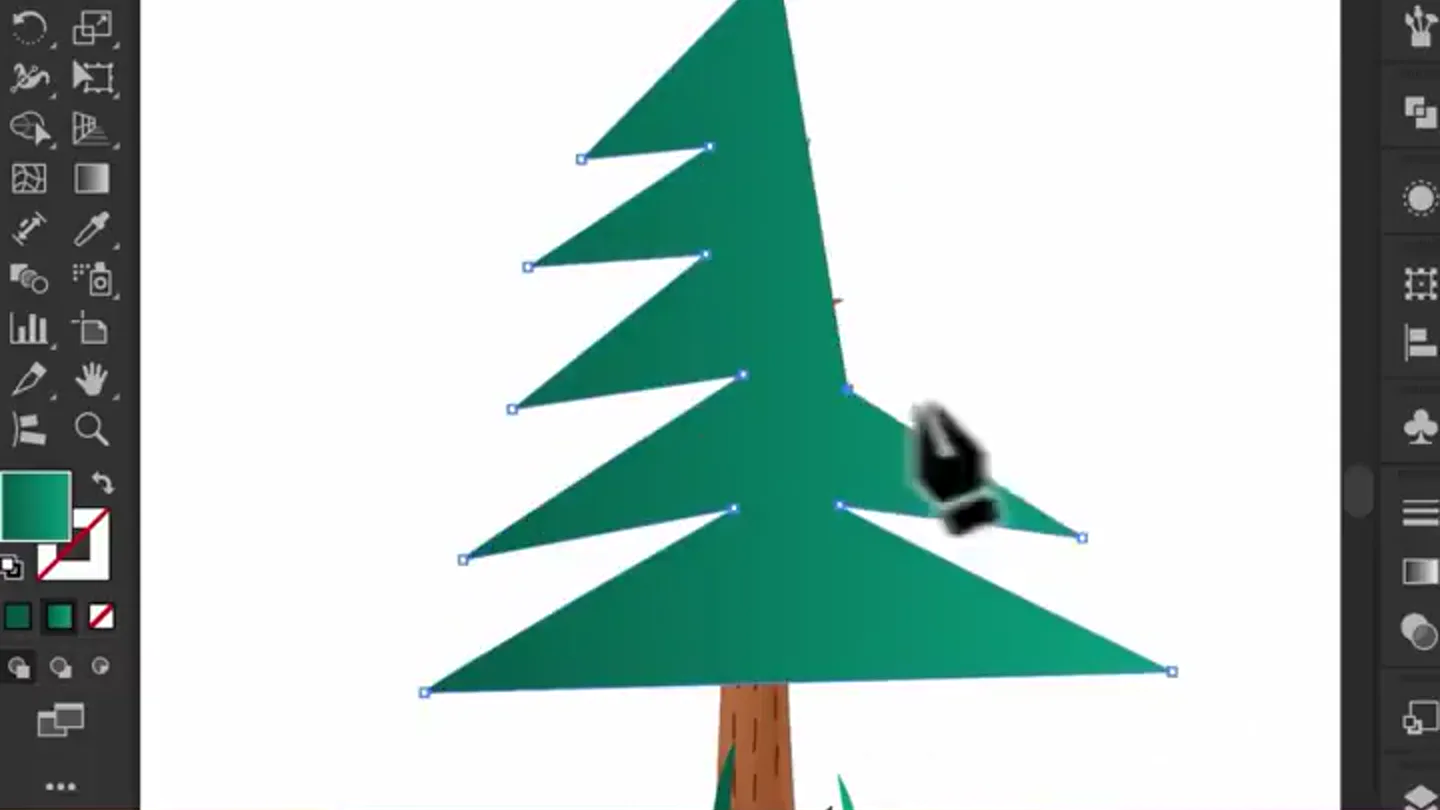
Initial Tree Construction
“(No spoken dialogue — The track features a driving electronic beat with a prominent sub-bass line and rhythmic synth arpeggios. Subtle orchestral synth pads provide an ambient layer. A noticeable riser occurs at 0:04.)”
- On screen
- Adobe Illustrator 2025 Anchor Point Convert: Handles: Anchors: Gradient Type: Edit Gradie 2211.ai* @ 58.06 % (RGB/Preview) File Edit Object Type Select Effect View Window Help No Selection Stroke: Opacity: 100% 5点圆形 Ellipse Blend Opacity: 100% Gradient Type: Edit Gradient Align Transform Options Size: 18% Relative Absolute Detail: 21 /in Points Smooth Corner Preview Cancel OK Roughen Adobe Illustrator 2025 File Edit Object Type Select Effect View Window Help Anchor Point Convert: Handles: Anchors: Align Transform 2211.ai* @ 58.06 % (RGB/Preview) INSURICARE DANGER HIGH VOLTAGE
- Camera
- Static screen capture of Adobe Illustrator, with a picture-in-picture of a man reacting below. The camera focuses on the software interface.
- Motion
- Rapid UI element manipulation, path creation, and shape transformation within a software environment. The lower frame shows a static, meme-like reaction shot.
Product Reveal
Blending for Volume
“(No spoken dialogue — A sub-bass drop/impact occurs at 0:05. The driving electronic beat continues with rhythmic synth arpeggios and orchestral synth pads.)”
- On screen
- Adobe Illustrator 2025 File Edit Object Type Select Effect View Window Help No Selection Stroke: Opacity: 100% 5点圆形 2211.ai* @ 58.06 % (RGB/Preview) Blend Options Spacing: Specified Steps 140 Orientation: HHH Preview Cancel OK Blend Opacity: 100% Gradient Type: Edit Gradient Align Transform HOLD SHIFT Show All Expand... Expand Appearance Crop Image Rasterize... Create Gradient Mesh... Create Object Mosaic... Create Trim Marks Flatten Transparency... Make Pixel Perfect Slice Generate Vectors (Beta)... Path Shape Gen Shape Fill (Beta)... Pattern Intertwine Repeat Object on Path Blend Envelope Distort Perspective Live Paint Mockup Image Trace INSURICARE DANGER HIGH VOLTAGE
- Camera
- Static screen capture of Adobe Illustrator, with a picture-in-picture of a man reacting below. The camera remains fixed on the software interface.
- Motion
- Interactive menu navigation, tool selection, and application of the 'Blend' tool to create a volumetric effect. Text overlays ('HOLD SHIFT') appear dynamically.
Feature Teaser
Adding Organic Texture
“(No spoken dialogue — The driving electronic beat continues with rhythmic synth arpeggios and orchestral synth pads.)”
- On screen
- Adobe Illustrator 2025 File Edit Object Type Select Effect View Window Help Effect View Window Help Apply Roughen Roughen... Document Raster Effects Settings... Illustrator Effects 3D and Materials Convert to Shape Crop Marks Distort & Transform Free Distort... Pucker & Bloat... Path Pathfinder Rasterize... Stylize SVG Filters Warp Photoshop Effects Effect Gallery... Artistic Blur Brush Strokes Options Size: 18% Relative Absolute Detail: 21 /in Points Smooth Corner Preview Cancel OK Roughen Size: 32% Relative Absolute Detail: 27 /in Points Smooth Corner Preview Cancel OK Blend Opacity: 100% Corners Gradient Type: Edit Gradient Align Transform A INSURICARE DANGER HIGH VOLTAGE
- Camera
- Static screen capture of Adobe Illustrator, with a picture-in-picture of a man reacting below. The camera maintains a consistent view of the software.
- Motion
- Menu navigation to 'Roughen' effect, slider adjustments with real-time preview, and final application of the effect to create a natural, textured appearance. Dynamic text 'A' appears.
Problem Agitation
Advanced Detailing & Refinement
“The audio contains faint, indistinct human speech, primarily in the background, making it difficult to discern specific words or full sentences. It sounds like muffled conversations or incidental chatter rather than clear dialogue.”
- On screen
- Adobe Illustrator 2025 File Edit Object Type Select Effect View Window Help No Selection Stroke: Opacity: 100% 5点圆形 2211.ai* @ 58.06 % (RGB/Preview) INSURICARE DANGER HIGH VOLTAGE
- Camera
- Static screen capture of Adobe Illustrator, with a picture-in-picture of a man reacting below. The camera remains fixed on the software interface.
- Motion
- Continued detailed manipulation of paths and shapes, demonstrating advanced techniques for adding depth and realism to the illustration. The lower frame shows a static, meme-like reaction shot.
Call to Action
Final Polish & Reveal
“(No spoken dialogue — A riser occurs at 0:48 leading into a final sub-bass impact at 0:49. The driving electronic beat continues with rhythmic synth arpeggios and orchestral synth pads.)”
- On screen
- Adobe Illustrator 2025 File Edit Object Type Select Effect View Window Help No Selection Stroke: Opacity: 100% 5点圆形 2211.ai* @ 58.06 % (RGB/Preview) INSURICARE DANGER HIGH VOLTAGE
- Camera
- Static screen capture of Adobe Illustrator, with a picture-in-picture of a man reacting below. The camera remains fixed on the software interface.
- Motion
- Final adjustments and refinements to the illustration, showcasing the completed 'tree' with all applied effects. The lower frame shows a static, meme-like reaction shot.
Motion design primitives
Synthesizable in Remotion · key components of the ai-tutorial-meme-split template.
SoftwareUIInteraction
Simulates precise mouse clicks, drag operations, and menu selections within a software interface, highlighting active tools and parameters. Elements like sliders and dropdowns animate to reflect user input.
+ Code construction recipe
Utilize Remotion's `Sequence` and `AbsoluteFill` for screen layout. Implement `interpolate` for cursor movement (`x`, `y` coordinates) and `spring` for button/menu highlight animations. Use `Img` components for UI elements and `Text` for dynamic labels. SVG paths can represent selection boxes and tool outlines.
DynamicTextOverlay
Short, instructional text phrases (e.g., 'HOLD SHIFT', 'A') appear and disappear with a subtle scale and fade animation, guiding the viewer through specific actions.
+ Code construction recipe
Employ `AbsoluteFill` for positioning. Animate `opacity` and `scale` properties of `Text` components using `spring` or `interpolate` with `easing.outCubic`. Control visibility with `Sequence` and `delay` props to synchronize with UI actions.
RealtimeEffectPreview
Visual effects (like 'Roughen') are applied to an object, with parameters (e.g., 'Size', 'Detail') being adjusted via sliders, showing the immediate visual transformation of the object.
+ Code construction recipe
Render the base object as an SVG or `Img` component. Apply SVG filters dynamically using `interpolate` to change filter parameters (e.g., `feTurbulence` frequency, `feDisplacementMap` scale) based on slider values. Use `spring` for slider handle movement.
Style DNA & aesthetic system
Visual aesthetic
Typography
Motion
Special effects
Pacing & rhythm
Conceptual story rhythm
- 1
Initial Setup & Problem
Purpose. Introduces the basic elements of the illustration and hints at the complexity of achieving a desired look manually.
Execution. Shows the initial, simplistic construction of the tree using basic shapes and paths in Illustrator, with the reaction shot emphasizing the 'struggle'.
- 2
Introducing the Solution
Purpose. Demonstrates a key feature or technique that simplifies or enhances the illustration process.
Execution. Highlights the 'Blend' tool, showing how it quickly adds volume and structure to the tree, with dynamic text overlays guiding the action.
- 3
Refinement & Mastery
Purpose. Showcases advanced tools and techniques for adding detail and realism, elevating the illustration's quality.
Execution. Applies the 'Roughen' effect and other detailed manipulations, transforming the blended shapes into a more organic, textured tree, with the reaction shot shifting to 'amazement'.
- 4
Final Polish & Impact
Purpose. Presents the completed, high-quality result, reinforcing the effectiveness of the demonstrated techniques.
Execution. The final, fully rendered tree is displayed, with subtle adjustments, culminating in a satisfying visual conclusion, accompanied by a strong audio impact.
Remix in Animatiq Studio
Master remix prompt · agent-ready
Sample remix
Objective
A new AI-powered photo editing software that automatically enhances images with a single click.How the recipe adapts
The top screen will show the AI photo editor's UI, demonstrating a user uploading a photo, clicking an 'Enhance' button, and seeing the image transform in real-time. Dynamic text overlays will highlight features like 'One-Click Enhance' and 'AI Magic'. The bottom screen will feature a user reacting with increasing awe and satisfaction as the photo improves. The fast-cut editing will emphasize the speed and efficiency of the AI, with sound design cues marking each enhancement step.Remix blueprint · ai-tutorial-meme-split
Scene durations (5 scenes, 61s)
Key Remotion components
Related Tech & SaaS Product Launches
Explore all Tech & SaaS launches →
Against all odds. Congrats @elonmusk and @SpaceX.
Unreal Engine 6 has been announced with Rocket League.

Trade 24/7 with a social feed and onchain signals.