
Agnost AI · Launch Video Breakdown: Hook, Pacing & Motion Design
Agnost AI (YC S26) launches on Product Hunt: it finds silent agent failures that return 200, pass evals, and still churn users in production conversations.
Scene-by-scene timeline & spoken transcript
The Hook
The Silent Failure Problem
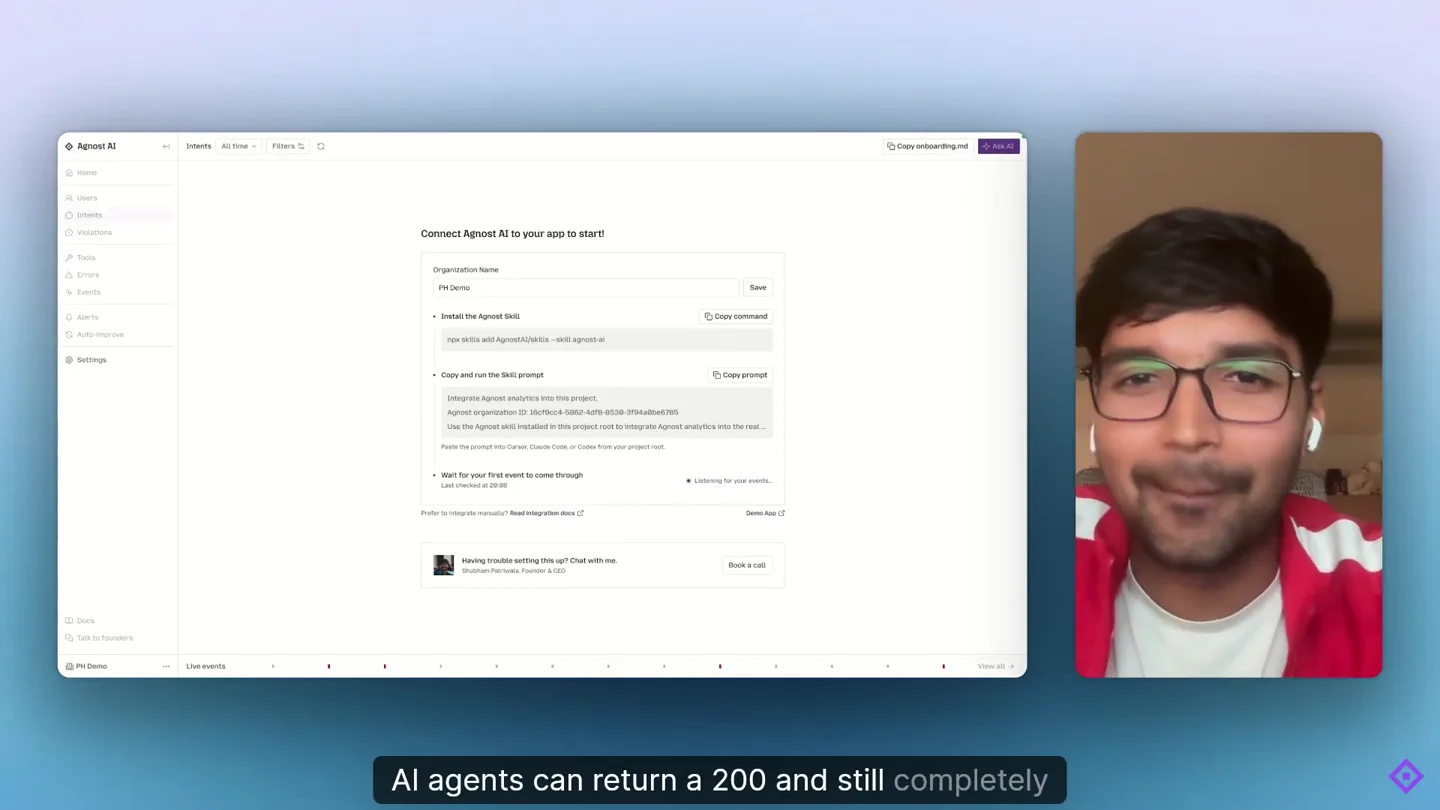
“AI agents can return a 200 and still completely lose a user's trust halfway.”
- On screen
- AI agents can return a 200 and still completely lose a user's trust halfway
- Camera
- Medium close-up of the founder speaking, framed within a rounded rectangle on the right, with a blurred background. The main screen shows a product UI.
- Motion
- Split-screen with a live speaker overlaying a product UI. Subtle text animation for spoken words.
Problem Agitation
Understanding User Intent & Failures
“You have no idea what your users are trying to do. Come integrate us with our skill. Who's talking to your agent, understand every part of it, what these users were actually trying to get done, these behavioral failures your agent is making in.”
- On screen
- You have no idea what your users are trying to do. Come integrate us with our skill. who's talking to your agent, Understand every part of it, what these users were actually trying to get done these behavioral failures your agent is making in
- Camera
- The founder's video feed shrinks and moves to the bottom right, becoming a circular overlay. The product UI takes center stage, showcasing different views and data tables.
- Motion
- Dynamic resizing and repositioning of the speaker's video. UI elements are highlighted and scrolled to demonstrate features.
Product Reveal
Tracking Errors and Alerts
“You can see where it actually failed, we track errors too, the core part is your agent returning success but you can configure any alert in any format, getting alerted anytime a user rages at your”
- On screen
- You can see where it actually failed, We track errors too, The core part is your agent returning success but You can configure any alert in any format, getting alerted anytime a user rages at your
- Camera
- The product UI continues to be the main focus, transitioning between 'Errors' and 'Alerts' sections. The founder's circular video remains in the bottom right.
- Motion
- Smooth UI navigation and content changes. Text highlights specific data points within the UI.
Call to Action
Auto-Improvement & Efficiency
“turning these exact failures from production into for the task where your agent is imprecise, faster and cheaper. love your support.”
- On screen
- turning these exact failures from production into For the task where your agent is imprecise, faster and cheaper. love your support.
- Camera
- The product UI shows the 'Auto-improve' section. The founder's video expands back to a full-screen, rounded rectangle, similar to the opening shot, for the final call to action.
- Motion
- UI demonstration of auto-improvement features. The speaker's video transitions from small circle to larger rounded rectangle, signaling a concluding statement.
Motion design primitives
Synthesizable in Remotion · key components of the founder-led-saas-ui-demo template.
SpeakerOverlayUI
A live speaker's video feed is dynamically positioned and resized as an overlay on top of a full-screen product UI. It transitions between a prominent rounded rectangle and a smaller circular avatar.
+ Code construction recipe
Use Remotion's <AbsoluteFill> for the UI, and a <Video> component for the speaker. Animate 'x', 'y', 'width', 'height', and 'borderRadius' properties using 'interpolate' with 'spring' for smooth transitions based on current frame.
DynamicTextHighlight
On-screen text appears and highlights key phrases in sync with the spoken dialogue, often with a subtle background fill or color change.
+ Code construction recipe
Render text using <Text> components. Use 'Sequence' and 'spring' to animate 'opacity' and 'backgroundColor' of individual words or phrases, triggered by specific 'from' and 'duration' values in the timeline.
UIDataScrollFocus
The product UI scrolls, highlights specific rows or elements, and navigates between different tabs or sections, drawing attention to relevant data points.
+ Code construction recipe
Simulate UI interactions using <AbsoluteFill> and <Img> for static UI elements. Animate 'scrollTop' for scrolling, and use 'interpolate' for 'opacity' and 'backgroundColor' on specific data rows or tabs to create focus effects.
Style DNA & aesthetic system
Visual aesthetic
Typography
Motion
Special effects
Pacing & rhythm
Conceptual story rhythm
- 1
The Unseen Problem
Purpose. Establish the core, often overlooked, problem of silent AI agent failures that erode user trust.
Execution. Founder introduces the problem with a direct address, while the UI subtly hints at complex data, setting a serious tone.
- 2
Diagnostic Deep Dive
Purpose. Demonstrate how Agnost AI uncovers and visualizes these hidden behavioral failures and user intents.
Execution. The UI takes center stage, showcasing detailed user conversations, intent analysis, and violation tracking, with the founder guiding the viewer through the data.
- 3
Proactive Prevention
Purpose. Showcase Agnost AI's capabilities for error tracking, custom alerts, and proactive monitoring.
Execution. Transition to error logs and alert configuration screens, emphasizing control and real-time insights, maintaining the founder's presence as a guide.
- 4
Automated Improvement & Call
Purpose. Highlight the auto-improvement features and conclude with a direct call to action.
Execution. The 'Auto-improve' section is demonstrated, followed by the founder returning to a prominent frame for a personal appeal, reinforcing trust and inviting engagement.
Remix in Animatiq Studio
Master remix prompt · agent-ready
Sample remix
Objective
Launch 'Synapse CRM', a new AI-powered CRM that predicts customer churn before it happens.How the recipe adapts
The founder will introduce Synapse CRM, explaining the problem of reactive customer retention. The UI will then demonstrate predictive analytics dashboards, showing churn risk scores and recommended interventions. The founder's video will dynamically resize as they walk through the UI, highlighting features like automated outreach configurations and success metrics. On-screen text will emphasize phrases like 'predictive churn' and 'proactive engagement'. The video will conclude with the founder inviting viewers to try Synapse CRM, maintaining the clean aesthetic and deliberate pacing.Remix blueprint · founder-led-saas-ui-demo
Scene durations (26 scenes, 112s)
Key Remotion components
Related AI Agents Product Launches
Explore all AI Agents launches →
To ensure that artificial general intelligence benefits all of humanity

Gopuff introduces Go, an AI shopping assistant built with SpaceXAI: say what you need and the order is placed.

Iliad (Troy) trailer made by Grok Imagine 1.5, which was just released