
Hasan Toor · Launch Video Breakdown: Hook, Pacing & Motion Design
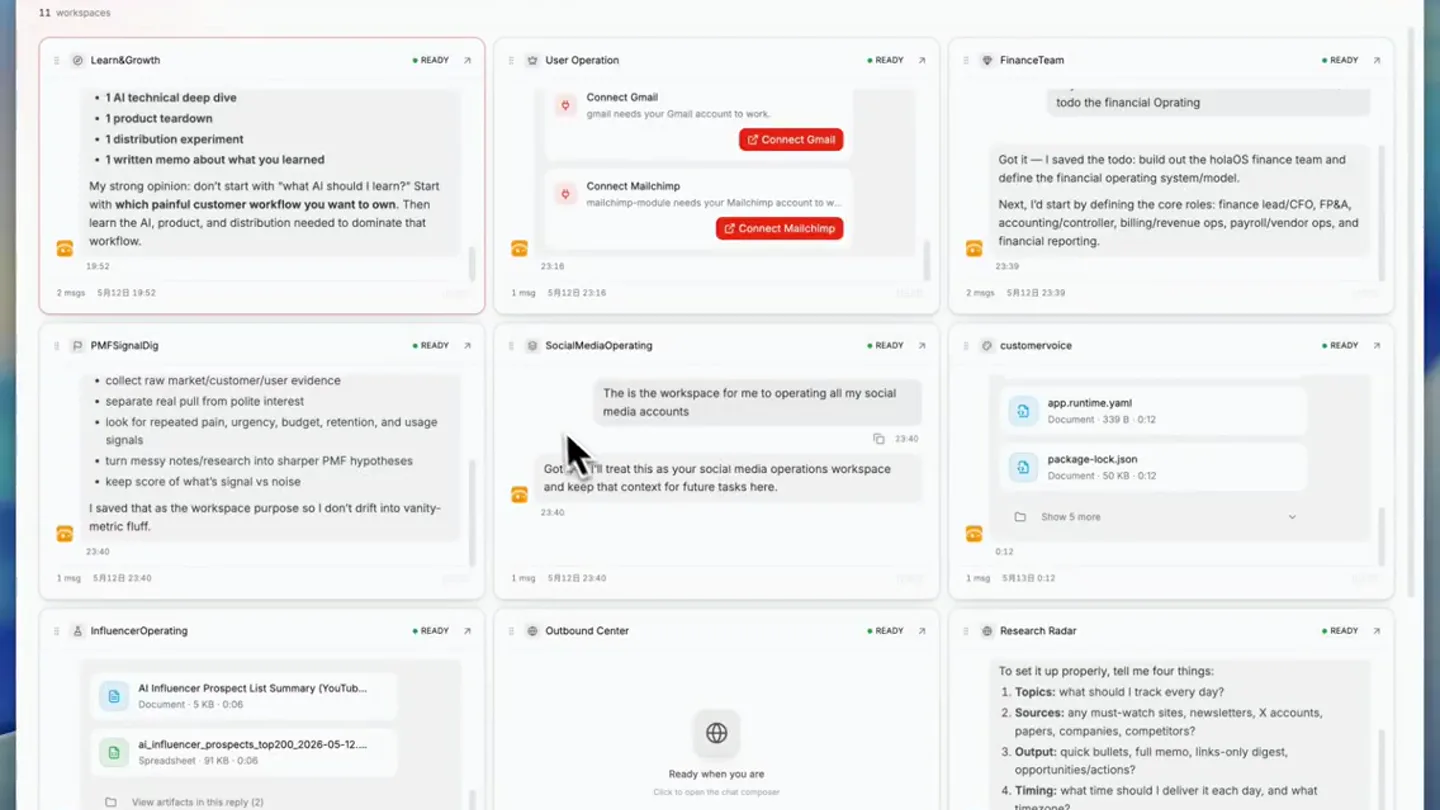
This screenshot is what a solo founder's "team" actually looks like in 2026. Not one giant AI assistant. A set of dedicated AI workspaces, each responsible for a specific function in the business.…
Scene-by-scene timeline & spoken transcript
The Hook
Introducing the AI Workspace Grid
“(No spoken dialogue — ambient UI sounds, mouse clicks, and typing sounds create a focused, productive atmosphere.)”
- On screen
- Holaboss 11 workspaces Learn&Growth • 1 AI technical deep dive • 1 product teardown • 1 distribution experiment • 1 written memo about what you learned My strong opinion: don't start with "what AI should I learn?" Start with which painful customer workflow you want to own. Then learn the AI, product, and distribution needed to dominate that workflow. 18:52 2 msgs 5月12日 18:52 PMFSignalDig • collect raw market/customer/user evidence • separate real pull from polite interest • look for repeated pain, urgency, budget, retention, and usage signals • turn messy notes/research into sharper PMF hypotheses • keep score of what's signal vs noise I saved that as the workspace purpose so I don't drift into vanity-metric fluff. 23:40 1 msg 5月12日 23:40 InfluenceOperating AI Influencer Prospect List Summary (YouTub... Document 5 KB 0:06 ai_influencer_prospects_top200_2026-05-12... Spreadsheet 91 KB 0:06 View artifacts in this reply (2) User Operation Connect Gmail gmail needs your Gmail account to work. Connect Mailchimp mailchimp-module needs your Mailchimp account to w... Connect Mailchimp 23:16 1 msg 5月12日 23:16 SocialMediaOperating The is the workspace for me to operating all my social media accounts Got it — I'll treat this as your social media operations workspace and keep that context for future tasks here. 23:40 1 msg 5月12日 23:40 Outbound Center Ready when you are Click to open the chat composer FinanceTeam todo: the financial Operating Got it — I saved the todo: build out the holabOS finance team and define the financial operating system/model. Next, I'd start by defining the core roles: finance lead/CFO, FP&A, accounting/controller, billing/revenue ops, payroll/vendor ops, and financial reporting. 23:39 2 msgs 5月12日 23:39 customervoice app.runtime.yaml Document 339 B 0:12 package-lock.json Document 50 KB 0:12 Show 5 more 0:12 1 msg 5月13日 0:12 Research Radar To set it up properly, tell me four things: 1. Topics: what should I track every day? 2. Sources: any must-watch sites, newsletters, X accounts, papers, companies, competitors? 3. Output: quick bullets, full memo, links-only digest, opportunities/actions? 4. Timing: what time should I deliver it each day, and what timezone? READY READY READY READY READY READY READY READY READY GPT-5.5 so download twitter and ins for me and build a spreadsheet and dashboard for me to manage
- Camera
- Static, wide shot of a desktop interface, then a subtle zoom and pan to focus on the 'SocialMediaOperating' and 'Outbound Center' workspaces.
- Motion
- Subtle camera pan and zoom, cursor interaction with text input, and text typing animation.
Product Reveal
AI Agents in Action
“(No spoken dialogue — ambient UI sounds, mouse clicks, and typing sounds continue, emphasizing the seamless interaction.)”
- On screen
- Holaboss 11 workspaces 1 working Learn&Growth • 1 AI technical deep dive • 1 product teardown • 1 distribution experiment • 1 written memo about what you learned My strong opinion: don't start with "what AI should I learn?" Start with which painful customer workflow you want to own. Then learn the AI, product, and distribution needed to dominate that workflow. 18:52 2 msgs 5月12日 18:52 PMFSignalDig • collect raw market/customer/user evidence • separate real pull from polite interest • look for repeated pain, urgency, budget, retention, and usage signals • turn messy notes/research into sharper PMF hypotheses • keep score of what's signal vs noise I saved that as the workspace purpose so I don't drift into vanity-metric fluff. 23:40 1 msg 5月12日 23:40 InfluenceOperating AI Influencer Prospect List Summary (YouTub... Document 5 KB 0:06 ai_influencer_prospects_top200_2026-05-12... Spreadsheet 91 KB 0:06 View artifacts in this reply (2) User Operation Connect Gmail gmail needs your Gmail account to work. Connect Mailchimp mailchimp-module needs your Mailchimp account to w... Connect Mailchimp 23:16 1 msg 5月12日 23:16 SocialMediaOperating WORKING The is the workspace for me to operating all my social media accounts Got it — I'll treat this as your social media operations workspace and keep that context for future tasks here. so download twitter and ins for me and build a spreadsheet and dashboard for me to manage Working 2 msgs 5月13日 16:11 Outbound Center Ready when you are Click to open the chat composer FinanceTeam todo: the financial Operating Got it — I saved the todo: build out the holabOS finance team and define the financial operating system/model. Next, I'd start by defining the core roles: finance lead/CFO, FP&A, accounting/controller, billing/revenue ops, payroll/vendor ops, and financial reporting. 23:39 2 msgs 5月12日 23:39 customervoice app.runtime.yaml Document 339 B 0:12 package-lock.json Document 50 KB 0:12 Show 5 more 0:12 1 msg 5月13日 0:12 Research Radar To set it up properly, tell me four things: 1. Topics: what should I track every day? 2. Sources: any must-watch sites, newsletters, X accounts, papers, companies, competitors? 3. Output: quick bullets, full memo, links-only digest, opportunities/actions? 4. Timing: what time should I deliver it each day, and what timezone? READY READY READY READY READY READY READY READY READY GPT-5.5 what is todays news you get?
- Camera
- Continued subtle zoom and pan, focusing on the 'SocialMediaOperating' workspace as it transitions to 'WORKING' status.
- Motion
- UI state changes (READY to WORKING), text typing animation, and a subtle 'working' spinner/indicator.
Feature Teaser
Multi-Agent Collaboration
“(No spoken dialogue — ambient UI sounds, mouse clicks, and typing sounds persist, highlighting the ongoing AI activity.)”
- On screen
- Holaboss 11 workspaces 2 working Learn&Growth • 1 AI technical deep dive • 1 product teardown • 1 distribution experiment • 1 written memo about what I learned My strong opinion: don't start with "what AI should I learn?" Start with which painful customer workflow you want to own. Then learn the AI, product, and distribution needed to dominate that workflow. 18:52 2 msgs 5月12日 18:52 PMFSignalDig WORKING • collect raw market/customer/user evidence • separate real pull from polite interest • look for repeated pain, urgency, budget, retention, and usage signals • turn messy notes/research into sharper PMF hypotheses • keep score of what's signal vs noise I saved that as the workspace purpose so I don't drift into vanity-metric fluff. 23:40 1 msg 5月12日 18:11 InfluenceOperating AI Influencer Prospect List Summary (YouTub... Document 5 KB 0:06 ai_influencer_prospects_top200_2026-05-12... Spreadsheet 91 KB 0:06 View artifacts in this reply (2) User Operation Connect Gmail gmail needs your Gmail account to work. Connect Mailchimp mailchimp-module needs your Mailchimp account to w... Connect Mailchimp 23:16 1 msg 5月12日 23:16 SocialMediaOperating WORKING The is the workspace for me to operating all my social media accounts Got it — I'll treat this as your social media operations workspace and keep that context for future tasks here. so download twitter and ins for me and build a spreadsheet and dashboard for me to manage Working 2 msgs 5月13日 16:11 Outbound Center Ready when you are Click to open the chat composer FinanceTeam todo: the financial Operating Got it — I saved the todo: build out the holabOS finance team and deline the financial operating system/model. Next, I'd start by defining the core roles: finance lead/CFO, FP&A, accounting/controller, billing/revenue ops, payroll/vendor ops, and financial reporting. 23:39 2 msgs 5月12日 23:39 customervoice app.runtime.yaml Document 339 B 0:12 package-lock.json Document 50 KB 0:12 Show 5 more 0:12 1 msg 5月13日 0:12 Research Radar To set it up properly, tell me four things: 1. Topics: what should I track every day? 2. Sources: any must-watch sites, newsletters, X accounts, papers, companies, competitors? 3. Output: quick bullets, full memo, links-only digest, opportunities/actions? 4. Timing: what time should I deliver it each day, and what timezone? READY READY READY READY READY READY READY READY READY GPT-5.5 what is todays news you get?
- Camera
- A subtle camera pan and zoom to highlight the 'PMFSignalDig' workspace also transitioning to 'WORKING' status.
- Motion
- Multiple UI elements changing state simultaneously, indicating parallel processing by different AI agents.
Call to Action
The Future of Solo Founding
“(No spoken dialogue — ambient UI sounds, mouse clicks, and typing sounds continue, building to a sense of comprehensive AI assistance.)”
- On screen
- Holaboss 11 workspaces 2 working Learn&Growth • 1 AI technical deep dive • 1 product teardown • 1 distribution experiment • 1 written memo about what I learned My strong opinion: don't start with "what AI should I learn?" Start with which painful customer workflow you want to own. Then learn the AI, product, and distribution needed to dominate that workflow. 18:52 2 msgs 5月12日 18:52 PMFSignalDig WORKING • collect raw market/customer/user evidence • separate real pull from polite interest • look for repeated pain, urgency, budget, retention, and usage signals • turn messy notes/research into sharper PMF hypotheses • keep score of what's signal vs noise I saved that as the workspace purpose so I don't drift into vanity-metric fluff. 23:40 1 msg 5月12日 18:11 InfluenceOperating AI Influencer Prospect List Summary (YouTub... Document 5 KB 0:06 ai_influencer_prospects_top200_2026-05-12... Spreadsheet 91 KB 0:06 View artifacts in this reply (2) User Operation Connect Gmail gmail needs your Gmail account to work. Connect Mailchimp mailchimp-module needs your Mailchimp account to w... Connect Mailchimp 23:16 1 msg 5月12日 23:16 SocialMediaOperating WORKING The is the workspace for me to operating all my social media accounts Got it — I'll treat this as your social media operations workspace and keep that context for future tasks here. so download twitter and ins for me and build a spreadsheet and dashboard for me to manage Working 2 msgs 5月13日 16:11 Outbound Center Ready when you are Click to open the chat composer FinanceTeam todo: the financial Operating Got it — I saved the todo: build out the holabOS finance team and deline the financial operating system/model. Next, I'd start by defining the core roles: finance lead/CFO, FP&A, accounting/controller, billing/revenue ops, payroll/vendor ops, and financial reporting. 23:39 2 msgs 5月12日 23:39 customervoice app.runtime.yaml Document 339 B 0:12 package-lock.json Document 50 KB 0:12 Show 5 more 0:12 1 msg 5月13日 0:12 Research Radar To set it up properly, tell me four things: 1. Topics: what should I track every day? 2. Sources: any must-watch sites, newsletters, X accounts, papers, companies, competitors? 3. Output: quick bullets, full memo, links-only digest, opportunities/actions? 4. Timing: what time should I deliver it each day, and what timezone? READY READY READY READY READY READY READY READY READY GPT-5.5 what is todays news you get?
- Camera
- A final subtle zoom out, revealing the full grid of workspaces, emphasizing the comprehensive nature of the AI system.
- Motion
- Overall system view, highlighting the interconnectedness of the AI agents and their collective impact on productivity.
Motion design primitives
Synthesizable in Remotion · key components of the ai-workspace-grid-flowstate template.
GridWorkspaceReveal
Individual workspace cards subtly animate into view or highlight, simulating a user's focus shifting across different AI agents. Text content within cards appears with a soft fade-in.
+ Code construction recipe
Use `spring` for card position and opacity, with a slight delay for each card to create a staggered reveal. Text can use `interpolate` for opacity and `y` translation from a small offset.
TypingCursorInteraction
A realistic cursor moves across the screen, clicks into text input fields, and types out commands character by character. The typed text appears with a subtle, quick animation.
+ Code construction recipe
Implement cursor movement using `interpolate` for `x` and `y` coordinates. Text typing can be achieved by rendering characters sequentially with `delay` and `duration` for each character, or by using a `typewriter` effect component.
StatusIndicatorTransition
UI elements like 'READY' or 'WORKING' badges change color and text, often accompanied by a small, subtle animation (e.g., a spinner or a pulse effect) to indicate active processing.
+ Code construction recipe
Use `interpolate` for color changes and `opacity` for text transitions. A `loop`ing `spring` animation can be applied to a spinner SVG or a pulsing background for the 'WORKING' state.
Style DNA & aesthetic system
Visual aesthetic
Typography
Motion
Special effects
Pacing & rhythm
Conceptual story rhythm
- 1
The Overview
Purpose. Introduce the comprehensive AI workspace concept and its modular nature.
Execution. Wide shot of the entire grid of workspaces, with a subtle initial pan to establish the breadth of the system.
- 2
Initiating a Task
Purpose. Demonstrate how a user interacts with an AI agent to assign a specific function.
Execution. Cursor interaction, typing a command into a specific workspace, and the workspace transitioning to an active state.
- 3
Parallel Processing
Purpose. Showcase the simultaneous operation of multiple AI agents handling different business functions.
Execution. Multiple workspaces displaying 'WORKING' status and subtle animations, indicating concurrent AI activity.
- 4
The Integrated Solution
Purpose. Conclude by reinforcing the idea of a fully integrated, multi-agent AI team for solo founders.
Execution. A final, slightly zoomed-out view of the entire workspace grid, with several agents actively working, conveying a sense of complete automation.
Remix in Animatiq Studio
Master remix prompt · agent-ready
Sample remix
Objective
Demonstrate a new collaborative project management tool called 'FlowState' that uses AI to automate task assignments and progress tracking.How the recipe adapts
The GridWorkspaceReveal primitive would be adapted to show individual project boards or task lists animating into view. The TypingCursorInteraction would demonstrate a user assigning a task or commenting, with AI suggestions appearing. The StatusIndicatorTransition would show tasks moving from 'To Do' to 'In Progress' to 'Done', with AI-driven progress updates and user avatars appearing next to completed tasks. The overall camera movement would subtly pan across different project views, highlighting the collaborative flow.Remix blueprint · ai-workspace-grid-flowstate
Scene durations (4 scenes, 40s)
Key Remotion components
Related AI Agents Product Launches
Explore all AI Agents launches →
To ensure that artificial general intelligence benefits all of humanity

Gopuff introduces Go, an AI shopping assistant built with SpaceXAI: say what you need and the order is placed.

Iliad (Troy) trailer made by Grok Imagine 1.5, which was just released