
Vishal Lohar · Launch Video Breakdown: Hook, Pacing & Motion Design
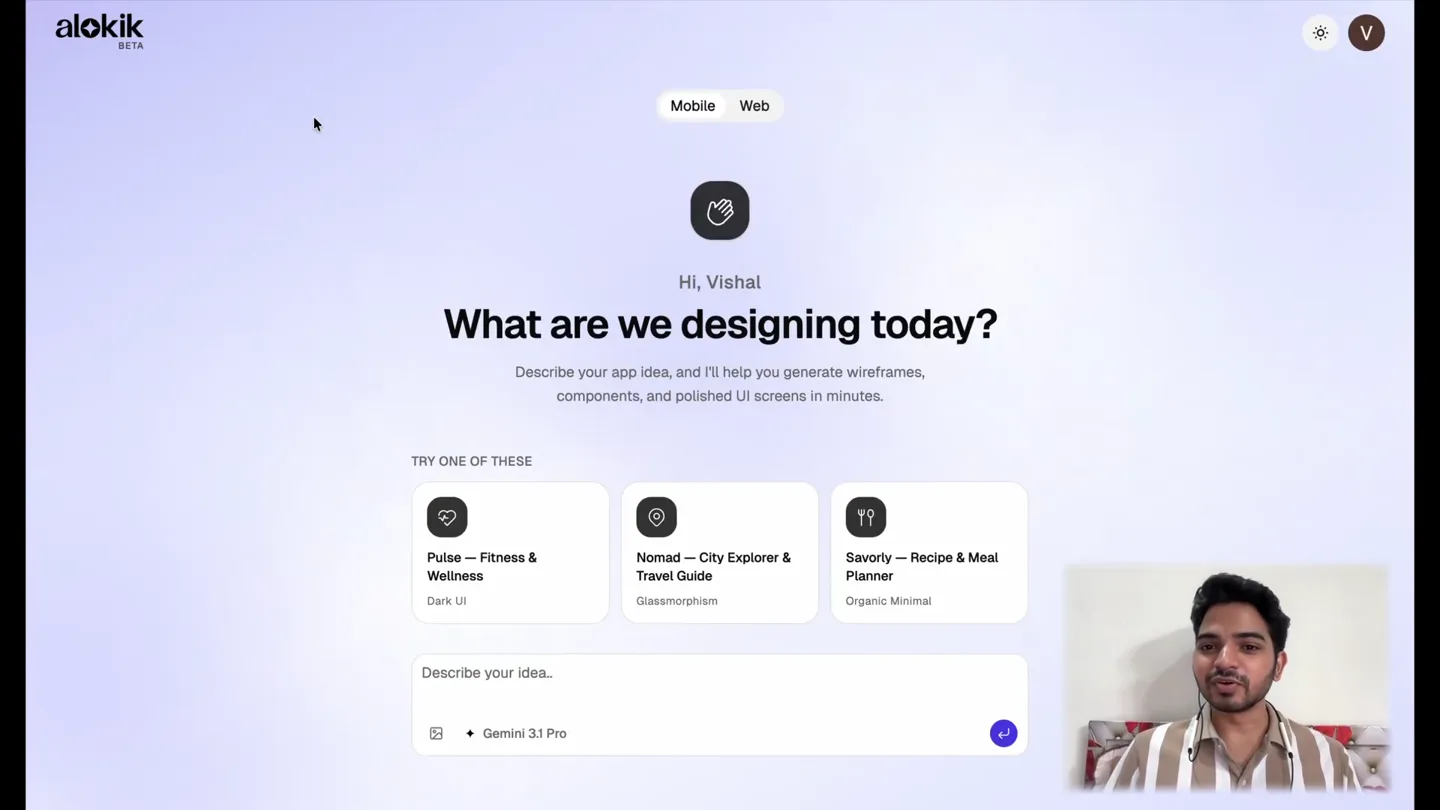
Today, I am launching Alokik. It's an AI app design tool that supports both Mobile and Web designs. It's the first beta version of the app. There are many updates planned, and I will be building in public from now on. It's my first big product launch, and I worked really hard https://t.co/ldCNcKVFRd
Scene-by-scene timeline & spoken transcript
The Hook
AI App Design Tool Introduction & Model Selection
“Today, I am launching Alokik. It's an AI app design tool that supports both Mobile and Web designs. It's the first beta version of the app. There are many updates planned, and I will be building in public from now on. It's my first big product launch, and I worked really hard.”
- On screen
- alokik BETA Mobile Web Hi, Vishal What are we designing today? Describe your app idea, and I'll help you generate wireframes, components, and polished UI screens in minutes. TRY ONE OF THESE Pulse — Fitness & Wellness Dark UI Nomad — City Explorer & Travel Guide Glassmorphism Savorly — Recipe & Meal Planner Organic Minimal Describe your idea... + Gemini 3.1 Pro Google + Gemini 3.1 Pro + Gemini 3 Flash Anthropic Claude Sonnet 4.6 OpenAI GPT 5.4 Design a premium fitness and wellness mobile app called 'Pulse'. The home screen opens with a personalized greeting and today's workout plan displayed as a vertical timeline with exercise cards showing reps, sets, and muscle group tags. At the top, show a weekly activity ring (calories, active minutes, workouts completed) inspired by Apple's activity rings but with a modern twist. Below the timeline, add a 'Mind & Body' section with horizontally scrollable cards for meditation sessions, breathing exercises, and sleep stories. Use a dark theme with a near-black background (#0A0A0F), electric blue (#3R82F6) as the primary accent, and subtle warm gradients on active elements. Cards + Gemini 3.1 Pro Recent Projects New INTERSTELLAR: REBORN Book Seats TRENDING NOW SEE ALL SCUDERIA MASTER TELEMETRY STREAM AVAILABLE TRAINS Cinevibe Scuderia & Papaya RailVibe Booking Hub Where to next? Plan Journey
- Camera
- Static wide shot of the UI with the presenter in the bottom right corner. Slight zoom out to reveal more UI elements.
- Motion
- Subtle UI element reveals via opacity and scale, dropdown menu animation, and content pop-in. Smooth scrolling of the UI.
Product Reveal
Live Preview & Customization
“So, you can see the live preview of the app. You can customize the colors, the fonts, the radius, and you can share it. You can export it as a ZIP file, or you can move it to Figma.”
- On screen
- Chat Theme Cinevibe Preview Export Edits analyzed. COMPLETE Updated Movie Details Gemini 3 Flash COMPLETE Updated Checkout Gemini 3 Flash COMPLETE Updated My Ticket Gemini 3 Flash Fix the movie details screen. The movie title interstellar reborn is overlapping the icons COMPLETE Edits analyzed. COMPLETE Updated Movie Details Gemini 3 Flash Describe your idea... + Gemini 3 Flash Now Playing INTERSTELLAR: REBORN Book Seats TRENDING NOW Movie Details INTERSTELLAR: REBORN 9.4 10K REVIEWS MAX R-RATED 2H 15M SYNOPSIS A generation after the original mission faces a new cosmic anomaly. A rogue navigate the shimmering gates of a c wormhole to retrieve lost data that ha Earth's final survival in this epic contin CAST REEL SCIFI UNIVERSE EXPLOR Choose Seats THE BIG SCREEN AVAILABLE BOOKED SELECTED SEATS Row 1, Seat 12, 13 TOTAL PRICE $32.00 CONFIRM SEATS PAYMENT FINAL STEP: SECURE CHECKOUT APPLE PAY CREDIT CARD Cinevibe Credits CARDHOLDER NAME Marcus Theme EXPIRY DATE MY TICKET Add to Apple Wa Dark mode UTILITY Muted #3F3F46 Muted Foreground #1A1A1A Border #202035 Input #202035 Ring #88FFB9 Destructive #7F1D1D CHART Chart 1 #FF2663 Chart 2 #FFFFF9 Chart 3 #F3F3F7 Chart 4 #1A1A1A Chart 5 #3F3F46 FONTS Sans Outfit Serif Outfit Mono Outfit Heading Syne RADIUS 1.5rem Preview Public preview Copy link Open preview Export 4 of 5 selected All screens 1 Now Playing 2 Movie Details 3 Choose Seats 4 Checkout 5 My Ticket Continue with 4 screens Download ZIP All screens as HTML files Copy to Figma Paste as screens into Figma Export to Anything Build designs in Anything Saved
- Camera
- Static wide shot of the UI with the presenter. Cursor interaction with UI elements.
- Motion
- Interactive UI animations: dropdowns, color picker changes, font selection, radius adjustment, and export menu reveals. Smooth transitions between UI states.
Feature Teaser
Light/Dark Mode & Responsive Design
“It also supports light and dark mode, and the AI agent will determine what is the appropriate mode. You can also test the responsive design for tablets and mobile devices.”
- On screen
- Chat Theme RailVibe Preview Export Light Dark Saving... BASE Background #030617 Foreground #F8F8FC Card #F1F3F9 Card Foreground #F8F8FC Popover #F1F3F9 Popover Foreground #F8F8FC BRAND Primary #3B82F6 Primary Foreground #FFFFFF Secondary #1E39F8 Secondary Foreground #F8F8FC Accent #F5960E Accent Foreground #F1F3F9 UTILITY Muted #1E293B Muted Foreground #44638E Border #1E293B Ring #3B82F6 Plan Journey NDLS BCT New Delhi Mumbai Departure Date 24 Oct, Thu Search Trains QUICK FILTERS Recent Searches NDLS BCT All Classes General Tempo continuous roll of receipt paper or a printed ledger, using the monospace font. Footer: The footer should look like the back panel of a high-end electronic device. Include tiny, engraved-lookinq legal text. The email newsletter signup should look like a physical input port, with a button labeled "CONNECT" Output: Provide a structured outline detailing the visual hierarchy, the specific CSS/styling directions needed to achieve the "tactile/hardware" look (like inset shadows and matte textures), and the scroll- triggered animations. COMPLETE Designed 2 screens: The Console (Home) The Specification (Pricing) COMPLETE Generated The Console (Home) Claude Sonnet 4.6 COMPLETE Generated The Specification (Pricing) Claude Sonnet 4.6 Describe your idea... + Claude Sonnet 4.6 Available Trains MUMBAI RAJDHANI 16:55 08:35 2A 1A SL 12:45 04:15 2A 1A SL PUNJAB MAIL 21:49 08:00 2A 1A SL FESTIVAL SPL 17:15 10:00 2A 1A SL AK TEJAS RAJ EX Passenger Info 8245192034 Rahul Sharma Add New Passenger CONNECT DETAILS rahul.sharma@example.com +91 98765 43210 PREFERENCES Mobile Tablet Desktop Live Status 08:35 Rahul Sharma New Delhi 18:00 Rate in DIGITAL 55% Book Now Tempo Turn down the noise. Do your best work. Tempo is the precision-engineered workspace for people who build things that matter. No pings. No chaos. Just signal. START YOUR BEST TRIAL WATCH DEMO Linear Video Figma Tempo Set your operating mode. Three positions. Total control over how you work. Flip them and feel the difference. Tempo GET ACCESS Select your module. Three precision-configured tiers. No hidden fees. No feature gating designed to frustrate. Choose the module that fits your operation. BASIC $12 ACTIVATE BASIC PRO $49 ACTIVATE PRO SOLO FREE TRIAL ACTIVATE SOLO SHOW 55%
- Camera
- Static wide shot of the UI with the presenter. Cursor interaction with UI elements.
- Motion
- Toggle animations for light/dark mode, responsive design preview changes, and content generation reveals. Smooth UI transitions.
Motion design primitives
Synthesizable in Remotion · key components of the ai-app-design-showcase template.
UIDropdownReveal
A menu or list of options smoothly expands downwards from a clicked UI element, revealing choices with a slight bounce or spring effect.
+ Code construction recipe
Use `spring()` for `height` and `opacity` interpolation. Animate `y` position with `interpolate()` for a subtle downward slide. Ensure `overflow: hidden` on the container.
ContentPopIn
New UI elements or generated content appear on screen with a quick scale-up and fade-in, giving a sense of immediate presence.
+ Code construction recipe
Combine `interpolate()` for `scale` from 0.9 to 1.0 and `opacity` from 0 to 1.0. Apply a `spring()` function for a slight overshoot on the scale.
ThemeToggleTransition
When switching between light and dark modes, the entire UI background and foreground elements smoothly transition their colors, often with a subtle crossfade or quick color shift.
+ Code construction recipe
Utilize `interpolateColor()` for background and text colors. Apply a `spring()` or `ease-in-out` timing function for a smooth, non-linear color change across all affected elements.
Style DNA & aesthetic system
Visual aesthetic
Typography
Motion
Special effects
Pacing & rhythm
Conceptual story rhythm
- 1
Introduction & Problem
Purpose. Introduce the product and its core value proposition: simplifying app design with AI.
Execution. Founder introduces the product while the UI shows the initial 'What are we designing today?' screen, highlighting AI model selection.
- 2
AI Generation & Customization
Purpose. Demonstrate the AI's ability to generate designs and the user's control over customization.
Execution. UI shows a detailed app design being generated, followed by interactive demonstrations of changing colors, fonts, and radius settings.
- 3
Export & Collaboration
Purpose. Showcase the seamless integration with existing design workflows and sharing capabilities.
Execution. UI demonstrates exporting designs as ZIP files or directly to Figma, and options for sharing live previews.
- 4
Advanced Features & Responsiveness
Purpose. Highlight additional powerful features like light/dark mode and responsive design testing.
Execution. UI transitions between light and dark modes and displays responsive design previews for different device types.
Remix in Animatiq Studio
Master remix prompt · agent-ready
Sample remix
Objective
Launch an AI-powered data visualization tool that generates interactive dashboards from raw data.How the recipe adapts
The video would open with the founder introducing the data visualization tool, showing the initial data input screen. The UIDropdownReveal primitive would be used for selecting data sources or AI models. ContentPopIn would animate the generated dashboards appearing on screen. ThemeToggleTransition would be adapted for switching between different dashboard themes or color palettes. The export functionality would demonstrate downloading interactive dashboards or embedding them into presentations, maintaining the clean UI and subtle animations.Remix blueprint · ai-app-design-showcase
Scene durations (5 scenes, 70s)
Key Remotion components
Related AI Agents Product Launches
Explore all AI Agents launches →
To ensure that artificial general intelligence benefits all of humanity

Gopuff introduces Go, an AI shopping assistant built with SpaceXAI: say what you need and the order is placed.

Iliad (Troy) trailer made by Grok Imagine 1.5, which was just released