
Google · Launch Video Breakdown: Hook, Pacing & Motion Design
The latest Android Drop: track untagged items in Find Hub with Gemini, and Motion Assist to help reduce motion sickness for passengers.
Scene-by-scene timeline & spoken transcript
The Hook
Android Drop Title Reveal
“(No spoken dialogue — A sustained, evolving pad sound with a bright, shimmering quality, reminiscent of a synth choir or ethereal strings, begins. A prominent sub-bass element provides a deep, resonant foundation.)”
- On screen
- Android Drop
- Camera
- Static, centered framing on text.
- Motion
- Text appears with a subtle, soft-focus blur and then sharpens, accompanied by a background gradient shift.
Feature Teaser
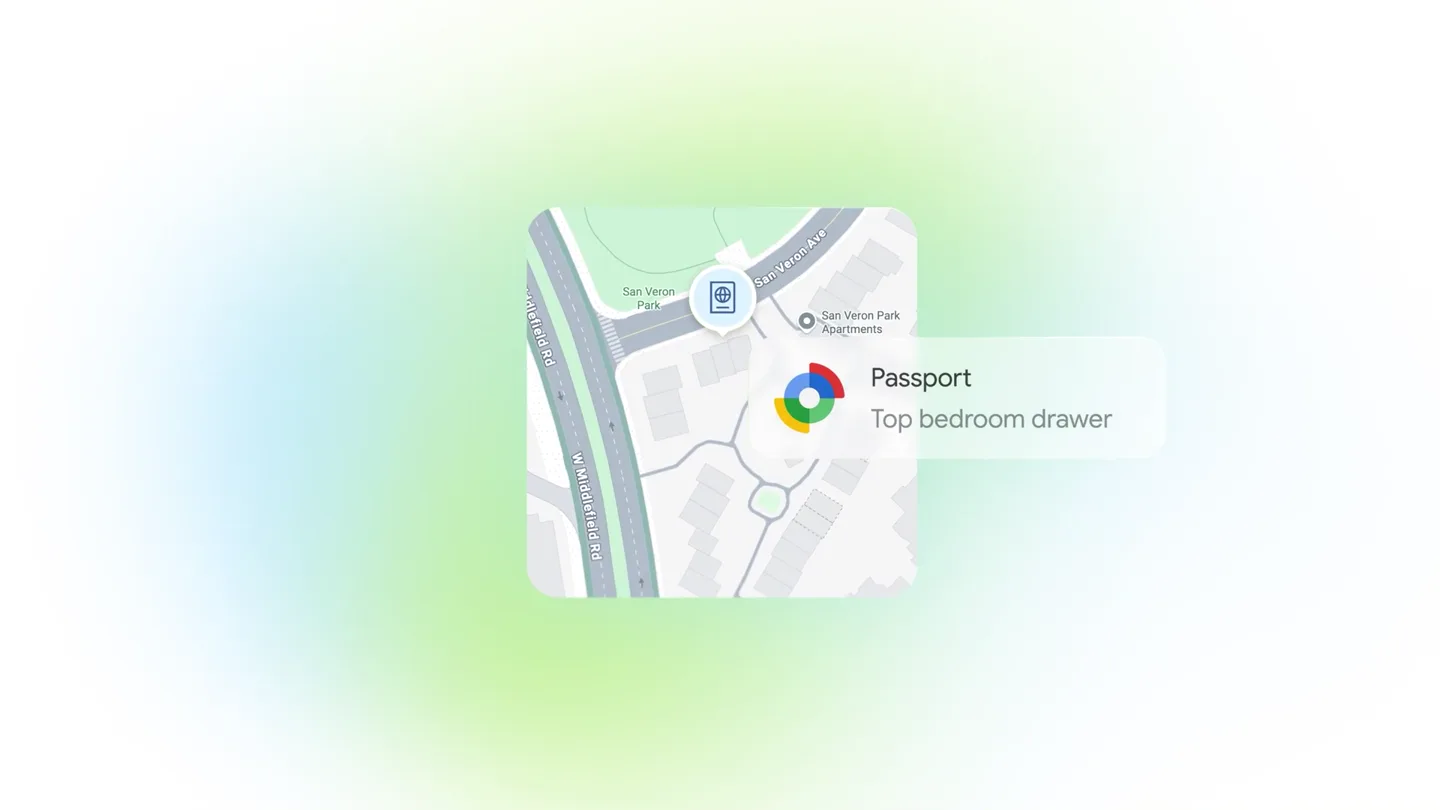
Find Hub Item Tracking
“(No spoken dialogue — The sustained pad and sub-bass continue.)”
- On screen
- Passport Top bedroom drawer
- Camera
- Static, centered framing on a UI card.
- Motion
- A map-like UI card with a location pin and text label animates into view with a soft, bouncy entrance. The background gradient subtly shifts.
Feature Teaser
Gemini Shopping List Integration
“(No spoken dialogue — A high-energy riser/sweep effect builds from 0:03 to 0:05, culminating in a significant sub-bass drop/impact at 0:05.)”
- On screen
- Here's a shopping list! Store list Beef Green onions Noodles Garlic Shared note Edited 9:30AM
- Camera
- Static, centered framing on a UI card, with a slight upward pan at 0:04.
- Motion
- A shopping list UI card animates in, replacing the previous card. A chat bubble appears above, and the card slightly pans up and fades out, indicating a transition.
Feature Teaser
Motion Assist for Passengers
“(No spoken dialogue — The sub-bass drop/impact at 0:05 is followed by a sustained, resonant decay and a subtle, high-frequency shimmer.)”
- On screen
- Motion assist On
- Camera
- Static, centered framing on a phone held by a person.
- Motion
- A new UI card featuring a person holding a phone appears with a soft entrance. Blue dots animate around the card, suggesting a field or effect. A 'Motion assist On' bubble appears.
Call to Action
New Features Call to Action
“(No spoken dialogue — The sustained decay and high-frequency shimmer fade out.)”
- On screen
- New features have landed
- Camera
- Static, centered framing on text.
- Motion
- Text appears with a subtle blur and then sharpens, similar to the opening, with a background gradient shift to pink.
Motion design primitives
Synthesizable in Remotion · key components of the soft-gradient-feature-showcase template.
SoftEntranceCard
UI cards or elements animate into view with a gentle, slightly bouncy scale and opacity transition, often accompanied by a subtle background gradient shift.
+ Code construction recipe
Use Remotion's 'spring' function for scale and position, combined with 'interpolate' for opacity. Implement a 'LinearGradient' component for background color transitions, animating its stops or colors.
GradientShiftBackground
The background features a soft, evolving radial or linear gradient that subtly changes color and position throughout the scenes, providing an ethereal and dynamic backdrop.
+ Code construction recipe
Utilize Remotion's 'LinearGradient' or 'RadialGradient' components. Animate the 'colors' array or 'start'/'end' points of the gradient using 'interpolate' over time to create smooth, evolving color shifts.
TextRevealBlur
Text elements appear initially blurred or slightly out of focus, then quickly resolve into sharp, clear typography, often with a subtle scale or position adjustment.
+ Code construction recipe
Apply an SVG 'feGaussianBlur' filter to the text. Animate the 'stdDeviation' attribute of the blur filter from a higher value to 0 using 'interpolate'. Combine with 'spring' for a slight scale-in effect.
Style DNA & aesthetic system
Visual aesthetic
Typography
Motion
Special effects
Pacing & rhythm
Conceptual story rhythm
- 1
Introduction
Purpose. Establish the product line and set an inviting tone.
Execution. Title card 'Android Drop' with a soft blur-in effect and evolving gradient background.
- 2
Feature Showcase 1
Purpose. Demonstrate the first key feature (item tracking).
Execution. Animated UI card showing a map and item location, with a soft entrance.
- 3
Feature Showcase 2
Purpose. Highlight the second key feature (Gemini integration/shopping list).
Execution. Animated UI card with a shopping list and chat bubble, transitioning smoothly.
- 4
Feature Showcase 3 & Conclusion
Purpose. Present the third feature (motion assist) and provide a concluding statement.
Execution. Animated UI card with a phone and 'Motion assist' bubble, followed by a concluding text 'New features have landed' with a blur-in effect.
Remix in Animatiq Studio
Master remix prompt · agent-ready
Sample remix
Objective
Launch a new smart home device called 'Aura Hub' that integrates with various smart appliances and offers personalized ambient lighting.How the recipe adapts
The 'Aura Hub' launch video would open with the product name 'Aura Hub' appearing with a soft blur-in over an evolving gradient background, shifting from cool blues to warm oranges. Subsequent scenes would feature UI cards demonstrating integration with smart lights (e.g., 'Bedroom Lights: On', 'Mood: Relax'), each card animating in with a gentle bounce. Another card would show a simplified interface for controlling multiple devices, using the same clean sans-serif font. The final scene would display 'Experience Aura Hub' with a blur-in effect, all accompanied by a sustained, ambient electronic score with subtle sound design cues for transitions.Remix blueprint · soft-gradient-feature-showcase
Scene durations (5 scenes, 8s)
Key Remotion components
Related Consumer & Apps Product Launches
Explore all Consumer & Apps launches →
Grand Theft Auto VI: An Extended Look premieres on Netflix Thursday, August 27.
Polymarket Perps is live with up to 20x leverage on crypto, stocks, commodities, and more. Long BTC, predict the Fed, or short the S&P reaction.

Pump.fun launches GO, a marketplace for posting and completing paid bounties for any task.