
Angular Native · Launch Video Breakdown: Hook, Pacing & Motion Design
Angular Native is in alpha. It brings Expo's developer experience to Angular, with native iOS and Android, the Expo SDK, Angular components, signals, dependency injection, and CSS and Tailwind.
Scene-by-scene timeline & spoken transcript
The Hook
Introducing Angular Native
“(No spoken dialogue — High-energy audio transition and riser, driving electronic beat begins)”
- On screen
- Introducing Angular Native Angular apps, rendered as real native iOS and Android views.
- Camera
- Static shot, then subtle zoom out as text animates in.
- Motion
- Text reveal with scale and opacity, logo animation with glow effect.
Product Reveal
Expo Integration & Module Support
“(No spoken dialogue — Rhythmic electronic beat continues, high-energy audio transition and riser at 0:04 and 0:08)”
- On screen
- Built on Expo. readonly camera = inject(Camera); Every Expo module. Supported out of the box. readonly db = inject(Database); File system Haptics Secure storage Location Notifications Camera Clipboard Sign-in Network On-device AI Video Sensors SQLite Updates Biometrics
- Camera
- Static overhead shot, then subtle camera push-in.
- Motion
- Icon and text pop-in animations, code snippet typing effect, highlight animation on icons.
Feature Teaser
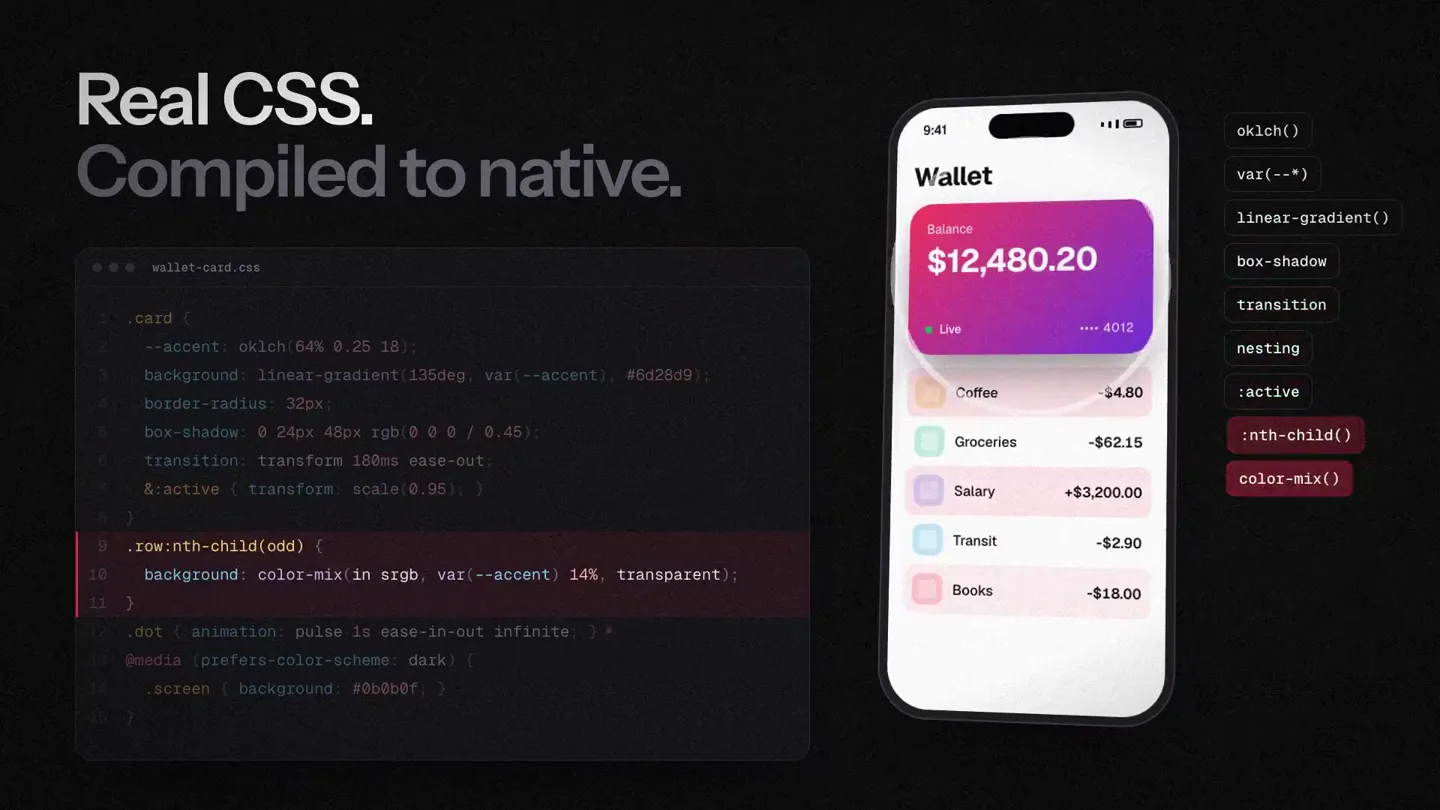
CSS & Tailwind Integration
“(No spoken dialogue — Rhythmic electronic beat continues, high-energy audio transition and riser at 0:12 and 0:16)”
- On screen
- Real CSS. Compiled to native. Wallet Balance $12,480.20 Live 4012 Coffee -$4.80 Groceries -$62.15 Salary +$3,200.00 Transit -$2.90 Books -$18.00 Tailwind, built in. class="" iOS Android class="rounded-3xl bg-linear-to-br from-rose-500 to-violet-600 ios:shadow-2xl android:rounded-lg" @media (prefers-color-scheme: dark) .screen { background: #0b0b0f; } .dot { animation: pulse is ease-in-out infinite; } :nth-child() color-mix() @keyframes nesting transition box-shadow linear-gradient() var(--*) oklch()
- Camera
- Static shots, then a subtle pan to reveal a second phone screen.
- Motion
- Code highlighting, UI element animation (balance update), text typing, side-by-side comparison with animated styling.
Feature Teaser
Web & Native Interoperability
“(No spoken dialogue — Rhythmic electronic beat continues, high-energy audio transition and riser at 0:20, 0:24, 0:28, 0:32. Sub-bass drop/impact at 0:34)”
- On screen
- @ng-native/web Your app, in the browser. mount(root, App); Wallet Balance $12,480.20 Live 4012 DOM components The browser, in your app. <dom-component [src]="signature" /> Native views Web view Sign as Ada Lovelace DOM component @angular/forms Signal Forms. Name Ada Lo| Notify me Save @ng-native/testing Test in Node. renders the balance saves the form
- Camera
- Static shots, then a subtle zoom out to reveal a browser window, followed by a pan and zoom on a phone screen.
- Motion
- Split-screen reveal, code snippet animation, UI interaction (typing, toggle), checkmark animation.
Call to Action
Launch & Availability
“(No spoken dialogue — Sub-bass drop/impact at 0:34, then driving electronic beat fades out with a final synth flourish)”
- On screen
- components Tailwind Hot reload Signals SwiftUI Camera Transitions Media queries Gestures Splash screen Testing Library Clipboard Worklets Native stacks Angular Native Now available in alpha ng-native.com $ npx create-expo-app@latest --template @ng-native/template
- Camera
- Dynamic camera pan and zoom through a word cloud, then a static shot.
- Motion
- 3D word cloud fly-through, text reveal with scale and opacity, call to action with product logo.
Motion design primitives
Synthesizable in Remotion · key components of the devtool-fastcut-reveal template.
CodeHighlightReveal
Code snippets appear with a typing effect, and specific lines or keywords are highlighted with a colored background or outline, often accompanied by a subtle glow.
+ Code construction recipe
Use `Sequence` and `spring` for typing animation. Implement `AbsoluteFill` with `LinearGradient` or `BoxShadow` for highlights, animating `opacity` and `scale` or `width` based on `interpolate` from `frame`.
IconPopInGrid
Icons and associated text labels pop into view from a central point, fanning out into a grid or radial layout, often with a slight bounce or overshoot.
+ Code construction recipe
Utilize `spring` for `scale` and `translateY` on each icon/text pair. Stagger `delay` for each element within a `Sequence` to create the fanning effect. Position elements using `AbsoluteFill` and calculated `transform` properties.
DeviceScreenReveal
Mobile device screens or browser windows slide into view, often from the side or bottom, and then populate with UI elements or code, sometimes with a split-screen effect.
+ Code construction recipe
Animate `translateX` or `translateY` with `spring` for the device container. Inside, use `Sequence` and `interpolate` for UI elements to fade in or slide in after the device is in place. For split-screen, use `AbsoluteFill` with `width` and `height` animations.
Style DNA & aesthetic system
Visual aesthetic
Typography
Motion
Special effects
Pacing & rhythm
Conceptual story rhythm
- 1
The Grand Entrance
Purpose. Immediately establish the product name and its core value proposition.
Execution. Product logo and name animate in with a bold, glowing effect, followed by a concise tagline.
- 2
Under the Hood
Purpose. Showcase the foundational technology and extensive feature set.
Execution. Interactive diagram of Expo modules with code snippets and highlighting, demonstrating breadth of support.
- 3
Developer's Delight
Purpose. Highlight key developer experience features like styling and cross-platform compatibility.
Execution. Side-by-side comparisons of CSS/Tailwind code affecting native UI, and web/native app synchronization.
- 4
The Ecosystem Advantage
Purpose. Emphasize integration with existing Angular tools and testing capabilities.
Execution. Quick cuts demonstrating forms, testing, and a dynamic word cloud of features, leading to the call to action.
Remix in Animatiq Studio
Master remix prompt · agent-ready
Sample remix
Objective
Launch a new Rust-based web framework called 'FerrisFrame'.How the recipe adapts
The dark background and vibrant red accent will be replaced with a dark gray and a bright orange, reflecting Rust's branding. Code snippets will feature Rust syntax with animated typing and highlighting. UI components will pop in with the same snappy spring physics. Instead of Expo modules, a radial burst of FerrisFrame's core features (e.g., 'Macros', 'Async', 'WASM') will animate in. The final call to action will use a word cloud of Rust ecosystem terms, culminating in the FerrisFrame logo and installation command.Remix blueprint · devtool-fastcut-reveal
Scene durations (5 scenes, 39s)
Key Remotion components
Related Developer Tools Product Launches
Explore all Developer Tools launches →
Agentic CLI for coding, building apps, and automating workflows.

New in Claude Code: your sessions can now message each other. Tell Claude to send a summary (not your history or files), and the other session picks it up mid-task.

Meet Qwen3.8-Max: A New Bar for Coding and Cowork. https://t.co/mJaA8vr6xT