
Aomi · Launch Video Breakdown: Hook, Pacing & Motion Design
Aomi lets specialized agents work together as one workflow while each stays inside its own security boundary. Now live.
Scene-by-scene timeline & spoken transcript
The Hook
Intuitive AI Agent Orchestration
“(No spoken dialogue — Driving electronic beat with subtle synth arpeggios.)”
- On screen
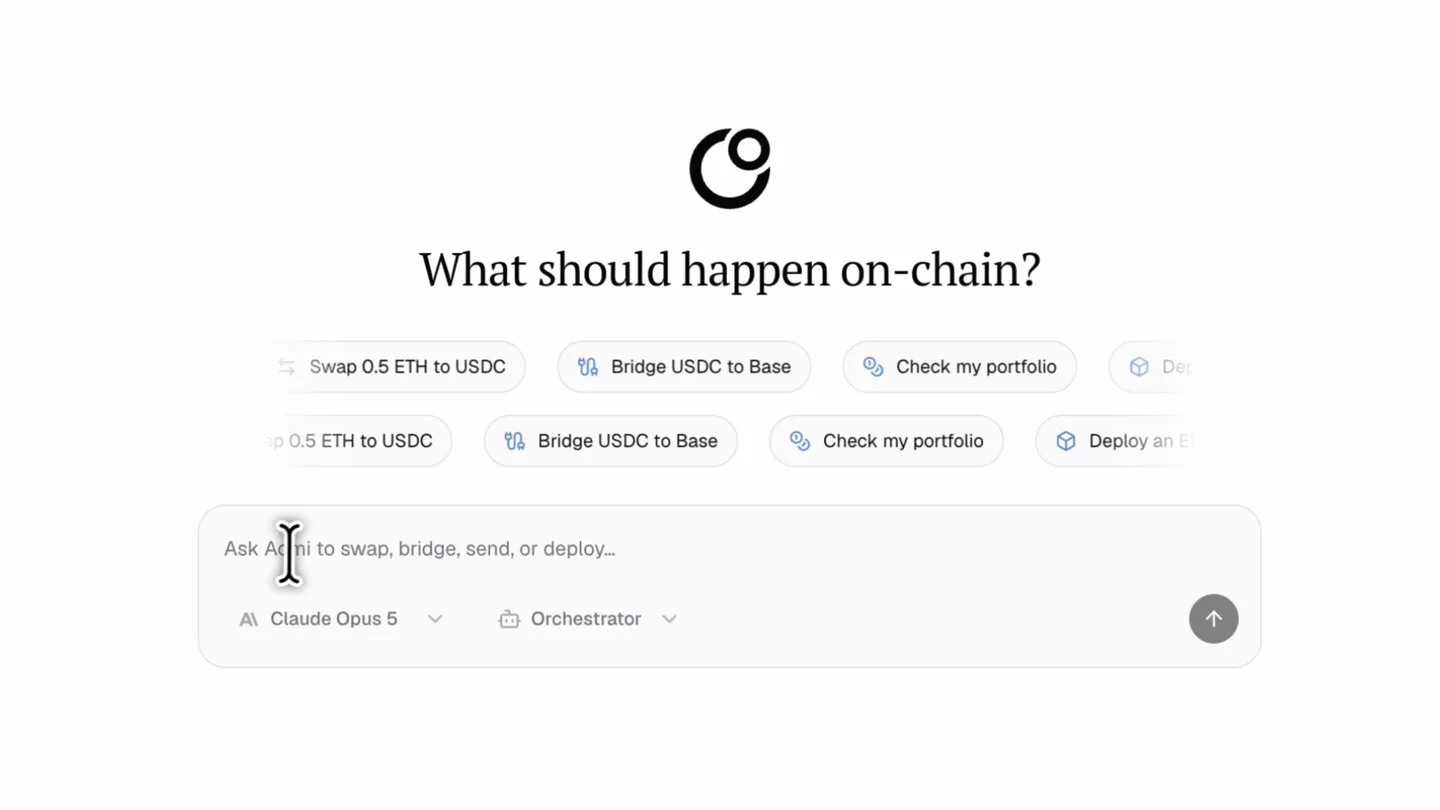
- Search apps... Basic Use Basic without selecting an app Orchestrator Coordinate work across any number of apps Centralized Exchanges Binance Bybit OKX DEX & Swaps What should happen on-chain? ETH yield Swap 0.5 ETH to USDC Bridge USDC to Base Check my portfolio Deploy an ERC-20 token Ask Aomi to swap, bridge, send, or deploy... AI Claude Opus 5 Orchestrator Take 20 USDC, swap half to staked ETH and put the other half in Aave to earn some yield
- Camera
- Static overhead shot of a web application interface. The camera remains fixed, focusing on the user's interaction with the AI agent.
- Motion
- UI element reveals, text typing animation, and dropdown menu interactions. Smooth, responsive UI animations simulate real-time user input and system feedback.
Product Reveal
Multi-Step Workflow Execution
“(No spoken dialogue — Consistent electronic beat continues, building subtle tension.)”
- On screen
- Aomi Labs chat-staging.aomi.dev New chat Recent New Chat USDG Swap into NVDA, MSF... NVDA to USDG Swap on Robi... Bridge USDG Base to Aave Across Bridge Tools on Arbitr... Deposit ETH into Aave on Arb... Bridge ETH from Arbitrum to... Sell LILUNI for USDG WETH to NVDA Swap on Robi... 0x568d6966... d17... 0 eth - 538,996,000 us... What should happen on-chain? ERC-20 token Find the best ETH yield Swap 0.5 ETH to USDC Bridge U... Check my portfolio Deploy an ERC-20 token Find the best ETH yield Take 20 USDC, swap half to staked ETH and put the other half in Aave to earn some yield Working ORCHESTRATOR 4 steps Plan: 10 USDC → wstETH (swap on Base), 10 USDC → Aave V3 supply on Base. Delegating both now. USDC→wstETH swap 2 steps 13s I'll check the balance first. Get time and onchain context Get erc20 balance Base Lifi prepare swap batch EVM stage tx Simulate batch Show all 7 steps Aave USDC supply 1 step 4s I'll start by checking context and balances. Get time and onchain context Get erc20 balance Encode and call Encode and call Show all 12 steps Working ORCHESTRATOR 14 steps Encode and call Encode and call EVM stage tx Simulate batch Show all 14 steps
- Camera
- The camera zooms out slightly to reveal the full browser window, then remains static as the AI agent's detailed plan unfolds.
- Motion
- Progressive disclosure of information, checklist-style step completion, and dynamic content loading. Checkmarks and expanding sections animate smoothly to indicate progress.
Feature Teaser
Seamless Wallet Integration
“(No spoken dialogue — Electronic beat maintains a steady rhythm, with subtle synth pads.)”
- On screen
- Aomi Labs chat-staging.aomi.dev New chat Recent New Chat USDG Swap into NVDA, MSF... NVDA to USDG Swap on Robi... Bridge USDG Base to Aave Across Bridge Tools on Arbitr... Deposit ETH into Aave on Arb... Bridge ETH from Arbitrum to... Sell LILUNI for USDG WETH to NVDA Swap on Robi... 0x568d6966... d17... 0 eth - 538,996,000 us... Working ORCHESTRATOR 15 steps Plan: 10 USDC → wstETH (swap on Base), 10 USDC → Aave V3 supply on Base. Delegating both now. USDC→wstETH swap 5 steps 34s Aave USDC supply 6 steps 4s Commit staged Base MetaMask Imported Account 1 Imported accounts Transaction request Estimated changes Network Base Request from chat-staging.aomi.dev Interacting with LIFIDiamond Method Swap Tokens Multiple V3 E R C20 To E R C20 Network fee Cancel Confirm You send - 10 USDC $9.98 You receive + 0.00348 wstETH $9.91 Working for 2m 6s ORCHESTRATOR 25 steps Both legs are staged, simulated clean, and sent to your wallet for approval (one batch, tx-1 + tx-2 on Base): Tx-1: swap 10 USDC → wstETH via LIFI (Baxri), expected -0.0034973 wstETH, min 0.0034798 (0.0 bps slippage) Tx-2: supply 10 USDC to Aave v3 Base pool (0xa238...c7c5), ~0 aBauUSDC, ~3.3% variable APY No approvals needed — existing allowances cover both. USDC balance before: 54769354. Approve in your wallet and I'll confirm the hashes — want me to watch the wstETH balance after? Done — both legs confirmed on Base in one batch. Tx: 0x74ec128e1c2276119330ba86f0df934e1537d8a8f8a33 (Success) 10 USDC → wstETH via LIFI (-0.0034973 wstETH expected) 10 USDC supplied to Aave v3 Base → ABauUSDC accruing ~3.3% variable APY Want me to read your post-trade wstETH and ABauUSDC balances to confirm the exact amounts received? Reply to Aomi... AI Claude Opus 5 Orchestrator
- Camera
- A new UI element (MetaMask pop-up) slides in from the right, overlaying the existing interface. The camera remains static.
- Motion
- Slide-in transitions for modal windows, real-time data updates within the UI, and subtle glow effects on interactive elements. The MetaMask pop-up animates in with a smooth ease-out curve.
Call to Action
Aomi: Agents Working as One
“(No spoken dialogue — High-energy audio transition/riser at [00:26], followed by a sub-bass drop/impact at [00:27]. Another subtle riser at [00:30].)”
- On screen
- Aomi lets specialized agents work together as one workflow while each stays inside its own security boundary. Now live.
- Camera
- The camera slowly zooms out, revealing the full browser window and then transitioning to a clean, minimalist title card. The final shot is a static display of the company name and tagline.
- Motion
- Subtle background gradients, text reveals with a slight scale and fade, and a final impactful title card animation. The transition to the title card is a quick, clean cut.
Motion design primitives
Synthesizable in Remotion · key components of the aomi-ui-orchestrator-launch template.
TypewriterTextReveal
Text appears character by character, simulating typing, often accompanied by a blinking cursor. This is used for user input fields and AI responses.
+ Code construction recipe
Use `interpolate` for `opacity` and `width` of a text container, driven by `frame` and `durationInFrames`. A blinking cursor can be achieved with a `spring` animation on `opacity` for a vertical bar element.
ProgressiveChecklist
List items appear sequentially, often with a checkmark animation, and sections expand to reveal more details. This visualizes multi-step processes.
+ Code construction recipe
Employ `sequence` to stagger the appearance of list items. Each item's checkmark can use a `spring` animation for a satisfying 'pop' effect. Expanding sections can use `height` interpolation with an `ease-out` curve.
ModalSlideIn
New UI elements, like pop-up windows or side panels, slide smoothly into view from the edge of the screen, overlaying existing content.
+ Code construction recipe
Animate `translateX` or `translateY` properties using `spring` or `ease-out` interpolation. Ensure a slight `scale` and `opacity` fade-in for a more natural feel. Z-index management is crucial for layering.
Style DNA & aesthetic system
Visual aesthetic
Typography
Motion
Special effects
Pacing & rhythm
Conceptual story rhythm
- 1
Problem Introduction
Purpose. Showcases the complexity of multi-step on-chain actions.
Execution. User typing a complex command into the AI chat interface, highlighting the problem of manual execution.
- 2
AI Solution Unveiled
Purpose. Demonstrates the AI agent's ability to break down and orchestrate complex tasks.
Execution. The AI agent generating a detailed, step-by-step plan in response to the user's prompt, with progressive checklist animations.
- 3
Seamless Execution
Purpose. Illustrates the smooth integration with external systems and the efficiency of the solution.
Execution. MetaMask pop-up appearing for transaction confirmation, followed by the successful completion of all steps within the AI interface.
- 4
Brand Reinforcement
Purpose. Solidifies the product's value proposition and brand identity.
Execution. Final title card with the company name and tagline, accompanied by a high-energy audio transition.
Remix in Animatiq Studio
Master remix prompt · agent-ready
Sample remix
Objective
A new cloud-based data analytics platform that automates complex data pipeline creation.How the recipe adapts
The TypewriterTextReveal primitive would show a user typing a natural language query for a data pipeline. The ProgressiveChecklist would animate the automated steps of data ingestion, transformation, and visualization. The ModalSlideIn would be used for a pop-up showing a generated dashboard or a configuration panel. The color palette would remain muted, perhaps with a focus on cool blues and grays, and the electronic soundtrack would underscore the platform's efficiency and intelligence.Remix blueprint · aomi-ui-orchestrator-launch
Scene durations (4 scenes, 38.5s)
Key Remotion components
Related AI Agents Product Launches
Explore all AI Agents launches →
To ensure that artificial general intelligence benefits all of humanity

Gopuff introduces Go, an AI shopping assistant built with SpaceXAI: say what you need and the order is placed.

Iliad (Troy) trailer made by Grok Imagine 1.5, which was just released