
AppZapper · Launch Video Breakdown: Hook, Pacing & Motion Design
AppZapper 3000 is on the Mac App Store, a 20-year follow-up to the original uninstaller. The team shipped it as a thank-you to people who stuck with the app.
Scene-by-scene timeline & spoken transcript
The Hook
Effortless App Deletion
“(No spoken dialogue — A sharp, percussive electronic impact signals the start, followed by a sustained low-frequency synth tone.)”
- On screen
- AppZapper 3000 Drag Apps Here iMovie
- Camera
- Static overhead shot of a macOS window, with a stylized 3D raygun cursor.
- Motion
- App icon drag-and-drop animation into a designated area, revealing associated files.
Product Reveal
Precision Zapping Action
“(No spoken dialogue — Rapid, rhythmic electronic impacts accompany each 'zap', maintaining urgency.)”
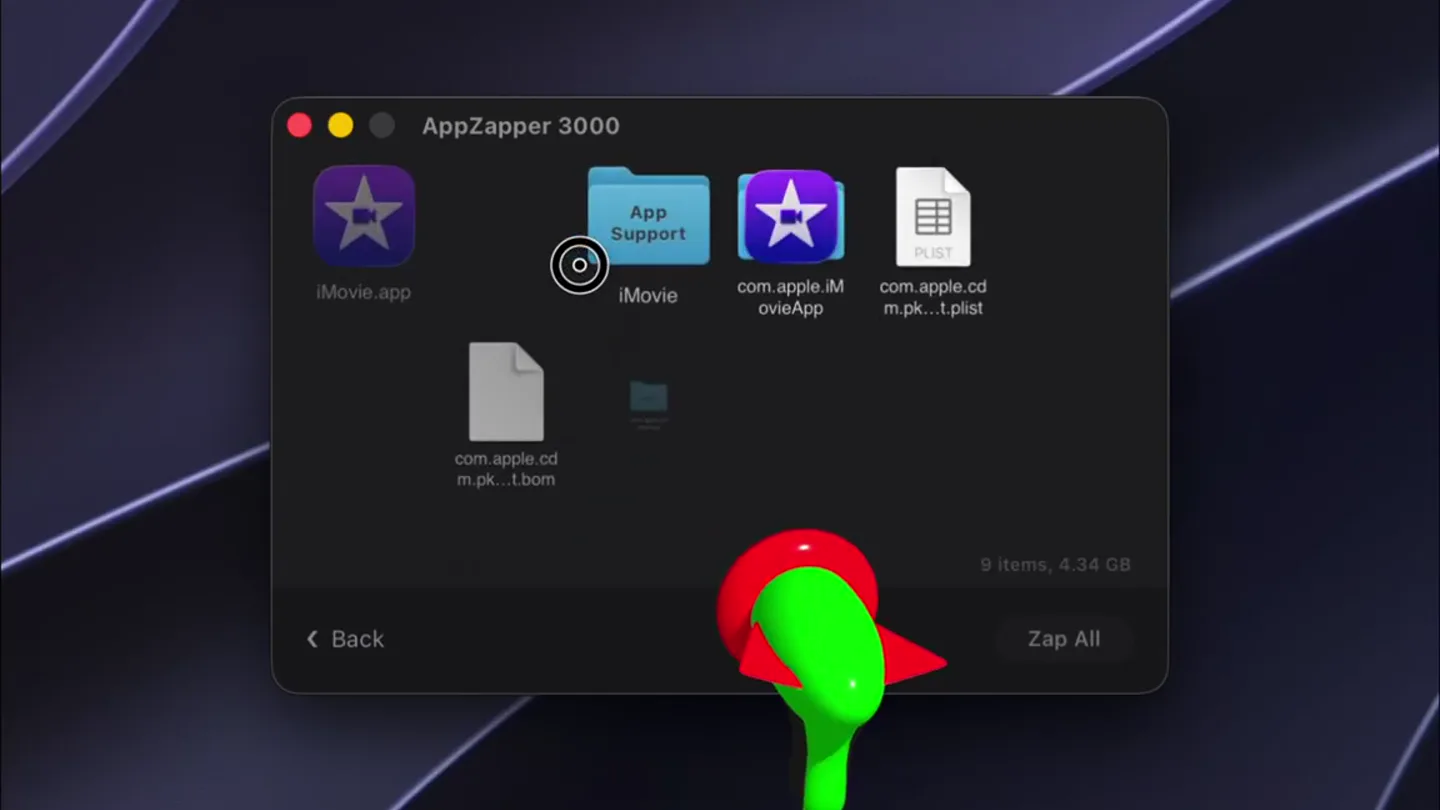
- On screen
- AppZapper 3000 iMovie.app App Support iMovie com.apple.iMovie.app PLIST com.apple.iMovie.plist com.apple.cdm.pk...t.bom Cache com.apple.iMovieApp 9 items, 4.34 GB Back Zap All
- Camera
- Static overhead shot, focusing on the app window. The raygun cursor remains prominent.
- Motion
- A green laser beam emanates from the raygun cursor, disintegrating individual files with a particle effect. Files fade out and disappear.
Feature Teaser
Systematic Cleanup
“(No spoken dialogue — The rapid electronic impacts continue, emphasizing the speed of deletion.)”
- On screen
- AppZapper 3000 PLIST com.apple.pk...g.iMo...e.plist com.apple.cdm.pk...t.bom Cache com.apple.iMovieApp 6 items, 27 MB Back Zap All
- Camera
- Static overhead shot, maintaining focus on the app window as files are removed.
- Motion
- Continued rapid deletion of remaining associated files, each 'zapped' with a laser and particle effect. Item count and size update dynamically.
Call to Action
Complete Uninstallation
“(No spoken dialogue — The electronic impacts culminate as the final files are removed, followed by a brief sustained synth tone.)”
- On screen
- AppZapper 3000 Cache com.apple.iMovieApp 1 item, 133 KB Back Zap All Drag Apps Here 0 items, 0 bytes
- Camera
- Static overhead shot, concluding with an empty 'Drag Apps Here' state.
- Motion
- The final files are zapped, leaving the application window empty. The 'Drag Apps Here' prompt reappears, signifying completion.
Motion design primitives
Synthesizable in Remotion · key components of the secure-file-shredder-pro template.
DragAndDropReveal
An application icon is dragged into a designated area within a macOS window, triggering the display of all associated files and folders.
+ Code construction recipe
Use `interpolate` for the icon's path and scale. Implement a `spring` animation for the file list reveal, with `staggerChildren` for individual file entries. Utilize `useCurrentFrame` to synchronize with audio cues.
LaserZapDisintegrate
A stylized laser beam emits from a cursor, striking and disintegrating on-screen elements (files/icons) into a burst of green particles.
+ Code construction recipe
Animate a `Path` or `Line` SVG for the laser, with `opacity` and `scale` interpolation. For disintegration, use a `Canvas` or `WebGL` shader to render particle effects, triggered by the laser's impact. Synchronize particle burst with sound design using `useCurrentFrame`.
DynamicItemCountUpdate
Numerical and textual information (e.g., 'X items, Y MB') updates in real-time as elements are added or removed from a list.
+ Code construction recipe
Implement a `Text` component with `interpolate` for number transitions, potentially using a custom `ease` function for a snappy update. Ensure data binding is reactive to the underlying state changes of the file list.
Style DNA & aesthetic system
Visual aesthetic
Typography
Motion
Special effects
Pacing & rhythm
Conceptual story rhythm
- 1
The Setup
Purpose. Introduce the problem of app clutter and the product's core function.
Execution. Show an app being dragged into the uninstaller, immediately revealing its hidden associated files.
- 2
The Action
Purpose. Demonstrate the product's primary feature: efficient uninstallation.
Execution. The raygun cursor 'zaps' the main app file, showing its instant disintegration.
- 3
The Cleanup
Purpose. Highlight the thoroughness of the uninstallation process.
Execution. Rapid, sequential zapping of all remaining associated files, with item counts updating.
- 4
The Resolution
Purpose. Show the complete and clean state after using the product.
Execution. The window becomes empty, returning to the 'Drag Apps Here' state, signifying a full cleanup.
Remix in Animatiq Studio
Master remix prompt · agent-ready
Sample remix
Objective
Securely delete sensitive documents and folders from a desktop.How the recipe adapts
The 'DragAndDropReveal' primitive will show a document being dragged into the DataShredder Pro window, revealing its sub-files. The 'LaserZapDisintegrate' primitive will be re-skinned as a 'ShredderConsume' effect, where a stylized shredder icon appears and rapidly 'eats' the files, replacing the green laser with a visual of paper strips or digital fragments. The 'DynamicItemCountUpdate' will track the number of files remaining to be shredded, providing real-time feedback.Remix blueprint · secure-file-shredder-pro
Scene durations (4 scenes, 15.1s)
Key Remotion components
Related Productivity Product Launches
Explore all Productivity launches →
Don't type, just speak. Flawless voice-to-text across every app at 240 WPM.

One workspace for knowledge scattered across Slack, email, Docs, and Notion. Connect your tools and build apps and agents that stay live with your data.

Notion positions itself as the backbone of your dock — a brand film of the Notion icon among everyday apps, ending on “Works with everything.”