
Bew Browser · Launch Video Breakdown: Hook, Pacing & Motion Design
Bew Browser is a developer-friendly browser with a custom interface built on WebKit. It is clean, fast, and made for Mac.
Scene-by-scene timeline & spoken transcript
The Hook
Introduction to Bew Browser
“(No spoken dialogue — ambient visual with subtle UI sounds implied)”
- On screen
- introduction
- Camera
- Static shot, centered text on a gradient background.
- Motion
- Simple fade-in text animation.
Product Reveal
Seamless Workflow Integration
“(No spoken dialogue — ambient visual with subtle UI sounds implied)”
- On screen
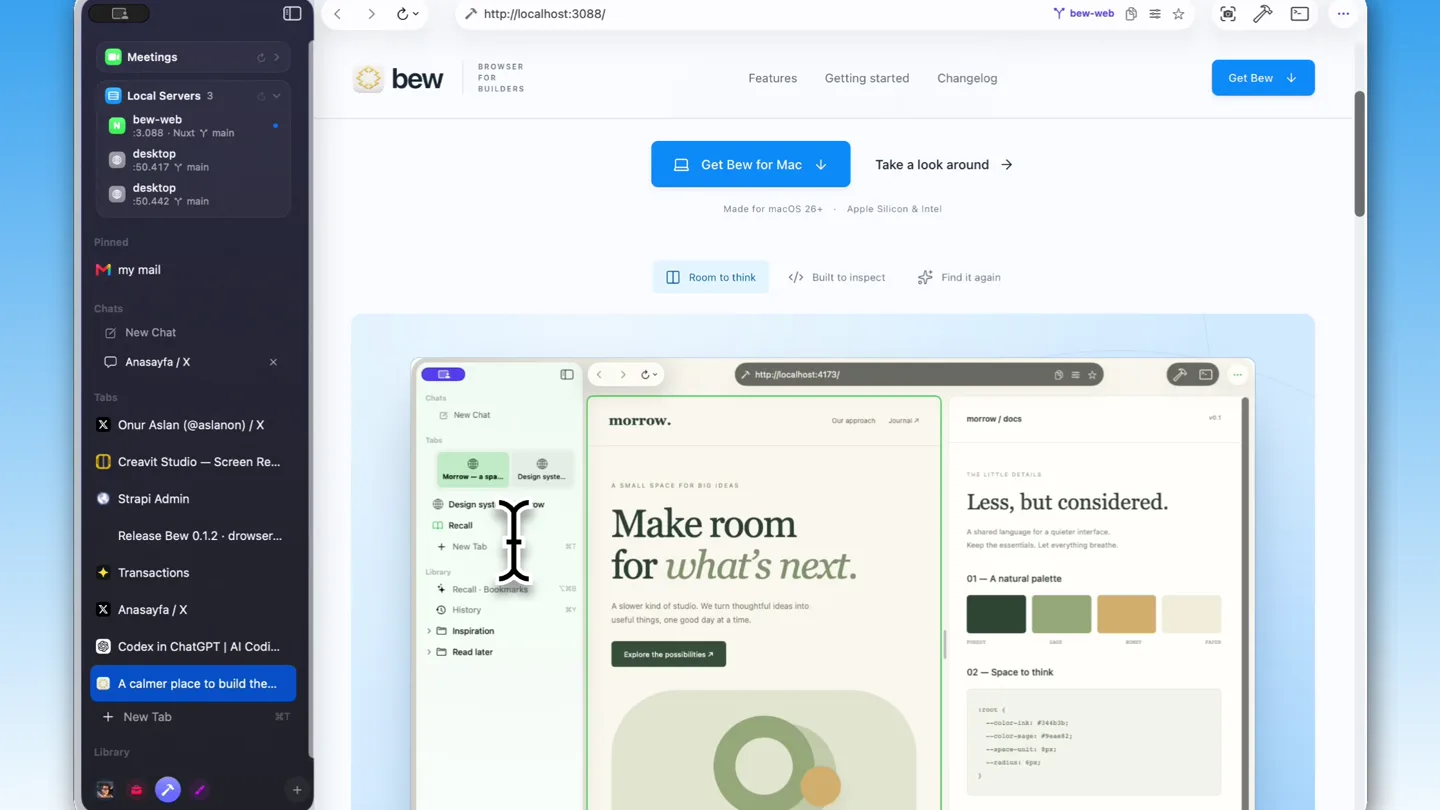
- Meetings Local Servers bee-web desktop Pinned My mail Chats New Chat Onur Aslan (@aslanon) / X Creavit Studio - Screen Re... Strapi Admin Release Bew 0.1.2 - drowse... Transactions Anasayfa / X Codex in ChatGPT | AI Codi... A calmer place to build the... + New Tab Library https://jx.com/aslanon Onur Aslan Creavit Studio Turn boring screen recordings into beautiful videos Onur Aslan @aslanon building @taskmandev @creavitstudio, developer @yolcu380 Bilim ve Teknoloji creavit.studio Temmuz 2010 tarihinde kaydı 976 Takip edilen 20,2 B Takipçi Gönderiler Yanıtar Yeniden Medya Sabitlendi Onur Aslan @aslanon 29 Eyl 2025 Hey everyone! Creavit Studio is ready to use You can download it to create video content Unlike other screen recorders, it comes with Camera that follows your cursor Dynamic camera layouts Background removal for your camera Daha fazla göster Title X'e Canlı Gasihaneden Kefen Çaldılar #borsa #fon ... +949 Bunları beğenebilirsin Hasan YILDIZ | @h... seni takip ediyor Takip et Mustafa Akın @mustafaakin Takip et sulan @sulansart Takip et Daha fazla göster Neler oluyor? Saka Mobil'de Fırsat İlk 10 damacana sadece 130 TL! Promoted by Saka Su Türkiye tarihinde gündemde #battık Türkiye tarihinde gündemde Van'da 7 SPK suçleme Go to Cloud Trusted by top teams manus GAMMA Heidi Chat Work Try Codex Now avai ChatGPT The same powerf http://localhost:3088/ bew BROWSER FOR BUILDERS Features Getting started Changelog Get Bew A fresh name. A familiar feeling. Meet Bew A little less switching. A lot more building. Your browser, terminal, and favorite tools. Finally in the same place. Meet Bew for Mac. Get Bew for Mac Take a look around Made for macOS 26+ Apple Silicon & Intel Room to think Built to inspect Find it again morrow. Our approach Journal # morrow / docs A SMALL SPACE FOR BIG IDEAS Less, but considered. Developers Designers Curious minds Indie makers
- Camera
- Dynamic close-ups and pans across the browser interface, highlighting specific features and interactions.
- Motion
- Smooth cursor animations, UI element highlights, and rapid scene transitions showcasing multi-tab and split-view functionality.
Feature Teaser
Advanced Developer Features
“(No spoken dialogue — ambient visual with subtle UI sounds implied)”
- On screen
- https://github.com/aslanon/node-mac-recorder Code Issues Pull requests Agents Actions Projects Wiki Security and quality Insights More node-mac-recorder Public Unpin Watch Fork Star 618 Commits main 1 Branch 2 Tags Go to file Code About aslanon fix: synchronize iPhone camera and microphone timeline... 896f138 2 weeks ago build fix: synchronize iPhone camera and microp... 2 weeks ago scripts sync 10 months ago src fix: synchronize iPhone camera and microp... 10 months ago tests fix: synchronize iPhone camera and microp... 2 weeks ago .gitignore initial last year .npmignore fix npm last year AGENTS.md h264 50mbps 3 months ago AUDIO_CAPTURE.md new camera and audio capture 11 months ago CAMERA_CAPTURE.md new camera and audio capture 11 months ago CHANGELOG-SYNC.md other device fix 11 months ago CLAUDE.md avfound last year CREAVIT_CODE_SNIPPETS.md multi window record 10 months ago CREAVIT_INTEGRATION.md multi window record 10 months ago No description, website, or topics provided. MIT license 36 stars 0 watching 8 forks Releases 2 tags Create a new release Packages No packages published Publish your first package Contributors aslanon Onur Aslan claude Claude web-flow Github Web Flow Screenshot Make it frame-worthy. Element Recapture Composition Clear Perspective Close-up Auto 1:1 16:9 4:5 Background Solid Gradient Transparent Color Frame Padding 72 px Radius 16 px Shadow 32 px Blur 32 px Distance 18 px Perspective & po Zoom 100 % Tilt X 0 % Tilt Y 0 % Rotation 0 % Position X 0 % Position Y 0 % Origin X 50 % PNG resolution 1x 2x Copy Export PNG Drag to compose. Zoom and move the origin for a close-up.
- Camera
- Zooming into specific UI elements, demonstrating interactive features like screenshot tools and code inspection.
- Motion
- Interactive UI overlays, dynamic parameter adjustments, and smooth transitions between different views of the browser.
Call to Action
Coming Soon & Brand Reinforcement
“(No spoken dialogue — ambient visual with subtle UI sounds implied)”
- On screen
- coming soon
- Camera
- Slow zoom out from the browser interface, revealing a 'coming soon' message on a gradient background.
- Motion
- Elegant fade-out of complex UI, replaced by a clean, minimalist text reveal.
Motion design primitives
Synthesizable in Remotion · key components of the developer-workflow-showcase template.
DynamicTabCarousel
Multiple browser tabs are shown in a carousel-like motion, with active tabs highlighted and others receding into the background, demonstrating efficient tab management.
+ Code construction recipe
Utilize `interpolate` for X-position and scale based on active tab index. Implement `spring` for smooth transitions between tab states. Use `z-index` to manage visual layering.
SplitViewReveal
A single browser window seamlessly splits into two or more distinct, independently scrollable views, showcasing multi-tasking capabilities.
+ Code construction recipe
Employ `interpolate` for width and X-position of individual browser panes. Use `layout` animations for a fluid resizing effect. SVG masks can define the split boundaries.
InteractiveUIOverlay
Contextual menus, tooltips, and configuration panels animate into view over the main browser content, responding to cursor interactions and highlighting specific features.
+ Code construction recipe
Use `spring` for opacity and Y-position for a natural pop-in effect. Implement `useCurrentFrame` to animate properties based on user interaction or timeline progression. SVG filters for subtle shadows and blur.
Style DNA & aesthetic system
Visual aesthetic
Typography
Motion
Special effects
Pacing & rhythm
Conceptual story rhythm
- 1
The Developer's Dilemma
Purpose. Establish the pain points of traditional browser workflows for developers.
Execution. Rapid cuts between multiple open applications and browser tabs, showing a fragmented workflow.
- 2
Bew's Integrated Solution
Purpose. Introduce Bew Browser as the unified solution for developer needs.
Execution. Smooth transitions demonstrating Bew's multi-tab, split-view, and integrated tools within a single interface.
- 3
Power Features Showcase
Purpose. Highlight specific, advanced features that cater directly to developers.
Execution. Close-ups on code inspection, screenshot tools, and project management features, with interactive UI overlays.
- 4
Future of Development
Purpose. Conclude with a forward-looking statement and call to action.
Execution. Clean, minimalist screen with a 'coming soon' message, reinforcing the brand's innovative spirit.
Remix in Animatiq Studio
Master remix prompt · agent-ready
Sample remix
Objective
Showcase 'CodeFlow IDE', a cloud-based IDE for collaborative coding.How the recipe adapts
The DynamicTabCarousel primitive would adapt to show multiple open code files or project modules. The SplitViewReveal would demonstrate side-by-side code editing and real-time debugging. InteractiveUIOverlay would highlight collaborative features like shared cursors and inline comments. The overall aesthetic would retain the dark mode and vibrant accents, focusing on code syntax highlighting and integrated terminal views.Remix blueprint · developer-workflow-showcase
Scene durations (6 scenes, 116s)
Key Remotion components
Related Developer Tools Product Launches
Explore all Developer Tools launches →
Agentic CLI for coding, building apps, and automating workflows.

New in Claude Code: your sessions can now message each other. Tell Claude to send a summary (not your history or files), and the other session picks it up mid-task.

Meet Qwen3.8-Max: A New Bar for Coding and Cowork. https://t.co/mJaA8vr6xT