
Ryo Lu · Launch Video Breakdown: Hook, Pacing & Motion Design
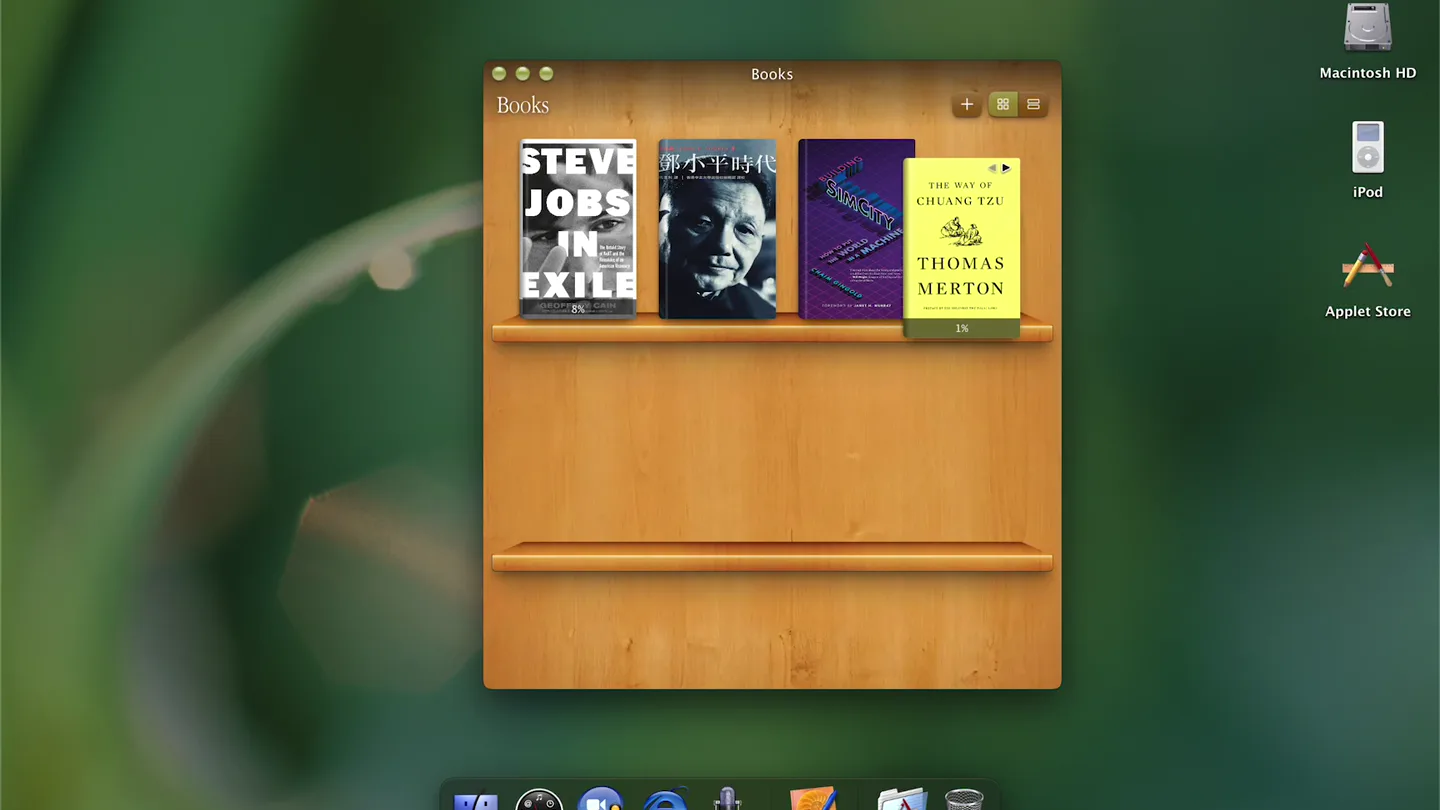
missing wooden shelves so i made Books in ryOS started in Cursor mobile, then hand-tuned the animations and textures until things felt right
Scene-by-scene timeline & spoken transcript
The Hook
Classic OS Bookshelf Intro
“(No spoken dialogue — Subtle riser leads to sub-bass impact at 0:01, setting a rhythmic tone.)”
- On screen
- Books File View Help Books STEVE JOBS IN EXILE THE WAY OF CHUANG TZU THOMAS MERTON Macintosh HD iPod Applet Store
- Camera
- Static, wide shot of a desktop interface, mimicking an early macOS environment.
- Motion
- Subtle UI element interaction, with a book cover slightly animating to indicate selection.
Product Reveal
Immersive Reading Experience & Customization
“(No spoken dialogue — Driving electronic beat with sub-bass impacts at 0:05, 0:07, 0:09, 0:11, 0:13, 0:15, 0:17, punctuating UI actions.)”
- On screen
- Steve Jobs in Exile Dan'l and Steve worked well together. The two shared an obsession with technology and with Bob Dylan. Dan'l had even written a political-science paper on the Bard as a Princeton undergraduate. Dan'l was the product of a childhood that he called a "circus". His father and uncles were professional wrestlers, and the family kept wild animals, including an African lion and a chimp, which roamed the house. When the chaos became too much, Dan'l would escape to the curb outside, flipping stones into the street. Despite the mayhem, Dan'l had a gift for learning. He became a serious swimmer and excelled at math. After graduating from Princeton, he went to work for Sony as a salesman of sound recorders made for busi-nesses—and the Sony office just so happened to be next door to Apple's first real headquarters. One day in 1977, Dan'l bumped into Steve for the first time. He recalled him as "stinky, with holes in the jeans." 8% Books File View Help Font Text Size Columns Theme Auto Light Sepia Dark Steve Jobs in Exile Macintosh HD iPod Applet Store
- Camera
- Static, then a slight zoom into the opened book window, followed by a menu overlay.
- Motion
- Smooth window transition, text scrolling, and a crisp dropdown menu animation demonstrating theme changes (Dark, Sepia, Light).
Feature Teaser
Multi-Language & Dynamic Content
“(No spoken dialogue — Consistent electronic beat with sub-bass impacts at 0:19, 0:21, 0:23, 0:25, building energy with a pronounced riser at 0:27.)”
- On screen
- Books File View Help Books 声明: 本书内容仅代表作者之立场 点,与Info Rainbow Limited无 关。 Macintosh HD iPod Applet Store
- Camera
- Static, then a quick transition to a different book, followed by a rapid scroll.
- Motion
- Fast-cut scene change, rapid text scrolling, and a subtle page-turn animation, showcasing content versatility.
Call to Action
Final Product Showcase & Brand Identity
“(No spoken dialogue — Powerful sub-bass drop at 0:28, followed by a final impact at 0:32, concluding the track with strong emphasis.)”
- On screen
- missing wooden shelves so i made Books in ryOS started in Cursor mobile, then hand-tuned the animations and textures until things felt right
- Camera
- Static shot of the product's core interface, then a full-screen text overlay.
- Motion
- Clean text reveal with a subtle fade-in, emphasizing the product's origin story and craftsmanship.
Motion design primitives
Synthesizable in Remotion · key components of the retro-os-product-launch template.
OSWindowTransition
A selected UI element (book cover) expands smoothly into a full-screen application window, maintaining its aspect ratio and position during the scale.
+ Code construction recipe
Use Remotion's `spring` function for smooth scaling and positioning. Interpolate `scale` and `translate` properties based on a shared animation progress. Ensure `overflow: hidden` on the parent container for clean transitions.
DropdownMenuReveal
A nested dropdown menu appears with a crisp, staggered fade-in and slide-down effect for each menu item, responding to a cursor hover or click.
+ Code construction recipe
Implement with `Sequence` and `spring` for each menu item. Stagger the `from` prop of `spring` for a cascading effect. Animate `opacity` from 0 to 1 and `translateY` from -10px to 0px.
TextScrollEffect
Text within a document window scrolls rapidly and smoothly, simulating a user quickly browsing through content.
+ Code construction recipe
Utilize `interpolate` to animate the `scrollTop` property of a scrollable `div`. Control the speed and easing curve to match the rapid, yet fluid, scrolling seen in the video. Consider `linear` or `easeOutCubic` for the interpolation.
Style DNA & aesthetic system
Visual aesthetic
Typography
Motion
Special effects
Pacing & rhythm
Conceptual story rhythm
- 1
Desktop Immersion
Purpose. To immediately ground the viewer in a familiar, nostalgic computing environment, setting the stage for the product.
Execution. Opening with a full-screen desktop view, showcasing the 'Books' application icon and a wooden bookshelf UI.
- 2
Deep Dive & Personalization
Purpose. To demonstrate the core functionality and user-centric features of the reading application.
Execution. Clicking a book to open it, scrolling through content, and showcasing theme customization options (Light, Sepia, Dark).
- 3
Global Reach & Content Versatility
Purpose. To highlight the product's ability to handle diverse content and languages.
Execution. Quickly switching to a book with non-English text and rapidly scrolling through its pages.
- 4
Craftsmanship & Vision
Purpose. To convey the passion and detailed effort behind the product's creation.
Execution. Concluding with a full-screen text overlay that explains the product's origin and the developer's dedication.
Remix in Animatiq Studio
Master remix prompt · agent-ready
Sample remix
Objective
Launch a new productivity app called 'TaskFlow' that mimics a retro-futuristic OS interface.How the recipe adapts
The 'TaskFlow' launch video would open with a desktop view of a retro-futuristic OS, showing the app icon. A 'TaskFlow' window would open smoothly, revealing a task list. The video would then demonstrate adding a task, with a dropdown menu for priority appearing with a staggered animation. Rapid scrolling through a long task list would showcase efficiency. The video would conclude with a full-screen text overlay explaining 'TaskFlow: Reimagining productivity with a touch of the past.'Remix blueprint · retro-os-product-launch
Scene durations (4 scenes, 33.6s)
Key Remotion components
Related Consumer & Apps Product Launches
Explore all Consumer & Apps launches →
Grand Theft Auto VI: An Extended Look premieres on Netflix Thursday, August 27.

Polymarket Perps is live with up to 20x leverage on crypto, stocks, commodities, and more. Long BTC, predict the Fed, or short the S&P reaction.

Pump.fun launches GO, a marketplace for posting and completing paid bounties for any task.