
Vibecode · Launch Video Breakdown: Hook, Pacing & Motion Design
Describe an app on your iPhone and Vibecode writes the Swift, then builds, tests, and installs it on the home screen. No Mac and no Xcode. Powered by Opus 5.5.
Scene-by-scene timeline & spoken transcript
The Hook
The iPhone App Paradox
“(No spoken dialogue — Low-frequency hum, distinct 'click' at 0:01, rapid high-energy riser/sweep from 0:04-0:05, culminating in sub-bass drop/impact at 0:05.)”
- On screen
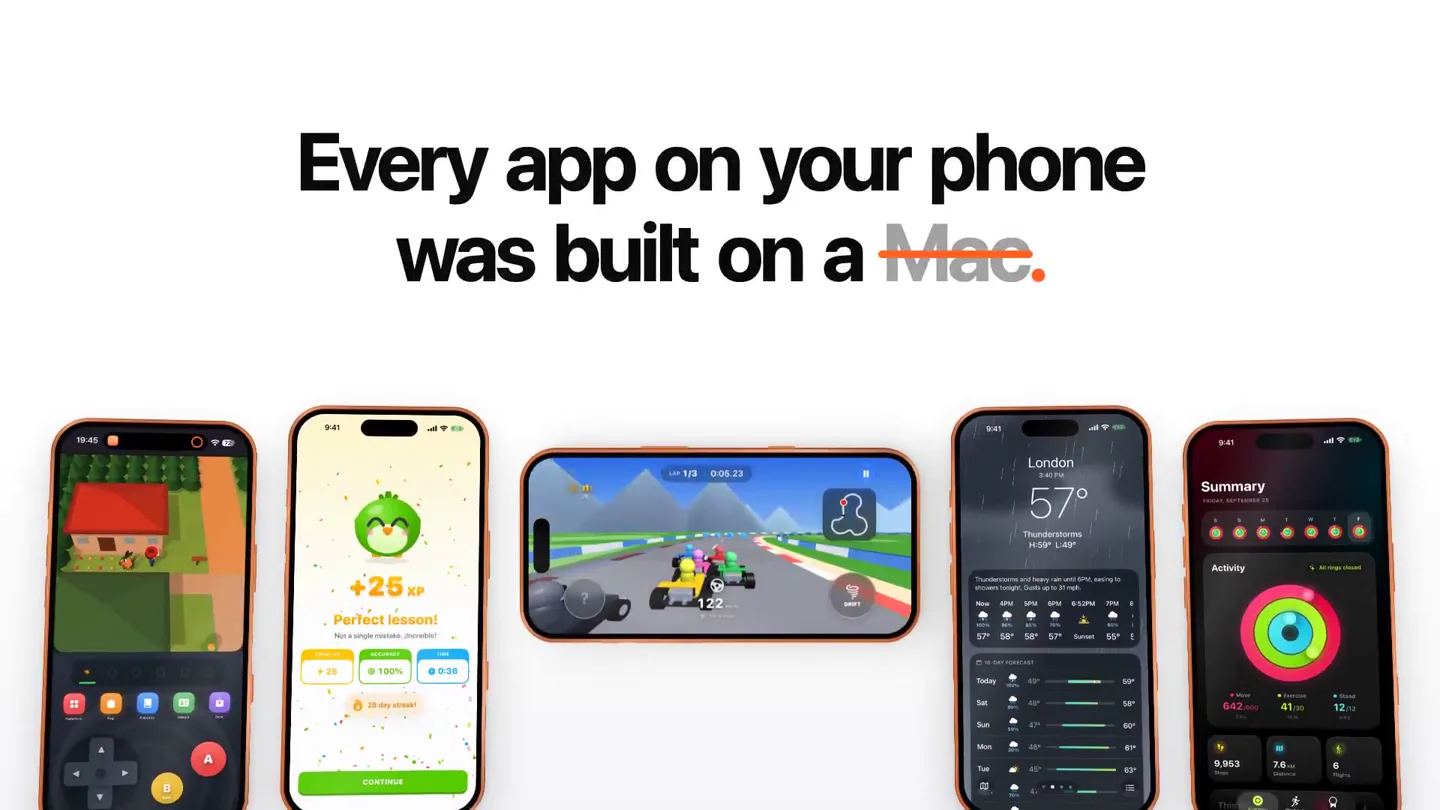
- Every app on your phone was built Today, Introducing Built on iPhone. Native iOS apps, made and installed from your phone.
- Camera
- Static wide shot of multiple iPhones, then a subtle zoom out and pan, followed by a quick cut to a full-screen text overlay.
- Motion
- Multi-device display, text reveal with subtle scaling, quick cuts, and a full-screen text transition with a fade-in effect.
Product Reveal
Vibecode: Describe, Build, Install, Play
“(No spoken dialogue — Driving electronic beat with consistent tempo.)”
- On screen
- build Say it. Describe it in plain English. Build it. Vibecode writes the Swift. Install it. Play it No Mac.
- Camera
- Close-up on a single iPhone, then a slight pan to reveal text, followed by a series of quick cuts between text and iPhone screens.
- Motion
- Rapid text reveals with a 'dot' accent, screen capture demonstrations with UI interactions, and quick transitions between product features.
Feature Teaser
No Mac, Just Your iPhone: Diverse App Examples
“(No spoken dialogue — Driving electronic beat with consistent tempo.)”
- On screen
- No Mac. Just your Here's what's Runners. Shooters. Skies Weather
- Camera
- Full-screen text, then a series of quick cuts showcasing different app types on the iPhone, with a subtle rotation and zoom on the device.
- Motion
- Full-screen text wipe, rapid-fire app demonstrations with category titles, and a dynamic rotation of the iPhone to reveal various app UIs.
Call to Action
Only on Vibecode: Download Now
“(No spoken dialogue — Driving electronic beat with consistent tempo, significant riser/sweep from 0:40-0:41, final sub-bass drop/impact at 0:41 leading to track conclusion.)”
- On screen
- Only on Only on Vibecode. Download Vibecode on the App Store now. Download on the App Store
- Camera
- Static shot of multiple iPhones fading in and out, then a full-screen text reveal with the brand logo, followed by a call to action with the App Store badge.
- Motion
- Fading in/out of multiple devices, brand logo reveal with a subtle glow, and a clear call to action with a prominent App Store button.
Motion design primitives
Synthesizable in Remotion · key components of the vibecode-style-product-launch template.
DynamicTextReveal
Text appears with a subtle scale-up and fade-in, often accompanied by a small, contrasting colored dot that animates in sync with the text.
+ Code construction recipe
Use `spring` for scale and opacity, `interpolate` for position. The colored dot can be a separate `AbsoluteFill` component with `scale` and `opacity` animations, synchronized with the text reveal.
MultiDeviceCarousel
Multiple iPhone devices are displayed, either static or subtly moving, showcasing different app interfaces. Devices can fade in/out or slide across the screen.
+ Code construction recipe
Employ `Sequence` and `AbsoluteFill` for device positioning. Use `interpolate` for `x` position, `opacity`, and `scale` to create sliding and fading effects. Ensure responsive scaling for different screen sizes.
FeatureHighlightCut
Quick cuts between full-screen text and close-up iPhone screen recordings, emphasizing a specific action or feature with minimal camera movement.
+ Code construction recipe
Utilize `Sequence` for rapid scene changes. For screen recordings, use `Video` components. Text overlays should use `AbsoluteFill` with `spring` animations for quick appearance and disappearance.
Style DNA & aesthetic system
Visual aesthetic
Typography
Motion
Special effects
Pacing & rhythm
Conceptual story rhythm
- 1
The Setup
Purpose. Establish the current state of app development and introduce the problem.
Execution. Showcase existing apps on iPhones, then introduce the 'Built on iPhone' concept with a fade-in text.
- 2
The Solution
Purpose. Demonstrate Vibecode's core functionality: describe, build, install, play.
Execution. Rapid sequence of text overlays ('Say it.', 'Build it.', 'Install it.', 'Play it.') paired with corresponding iPhone screen recordings.
- 3
The Advantage
Purpose. Highlight the key differentiator: no Mac needed, and showcase diverse app capabilities.
Execution. Full-screen text 'No Mac.' followed by quick cuts of various app types (Runners, Shooters, Skies) on the iPhone.
- 4
The Call to Action
Purpose. Reinforce brand identity and prompt users to download the app.
Execution. Brand logo reveal ('Only on Vibecode.') leading to the App Store download button.
Remix in Animatiq Studio
Master remix prompt · agent-ready
Sample remix
Objective
Launch an AI-powered design tool called 'CanvasAI' that generates UI mockups from natural language descriptions.How the recipe adapts
The video would open with a 'Every design starts with an idea' hook, showing various design tools. Then, it would transition to 'Describe it.' with a user typing a prompt into CanvasAI, followed by 'Generate it.' showing the AI creating a mockup. 'Refine it.' would demonstrate editing features. The 'No design software.' segment would highlight the browser-based nature, showcasing diverse design outputs like websites and mobile apps. The final call to action would be 'Only on CanvasAI. Start designing now.' with a prominent 'Try Free' button.Remix blueprint · vibecode-style-product-launch
Scene durations (4 scenes, 44s)
Key Remotion components
Related Developer Tools Product Launches
Explore all Developer Tools launches →
Agentic CLI for coding, building apps, and automating workflows.

New in Claude Code: your sessions can now message each other. Tell Claude to send a summary (not your history or files), and the other session picks it up mid-task.

Meet Qwen3.8-Max: A New Bar for Coding and Cowork. https://t.co/mJaA8vr6xT