
BuzzKit · Launch Video Breakdown: Hook, Pacing & Motion Design
BuzzKit is an open-source notification orchestration layer for push, live activities, and more.
Scene-by-scene timeline & spoken transcript
The Hook
Real-time Notification Overview
“(No spoken dialogue — ambient visual with a 110 BPM rhythm)”
- On screen
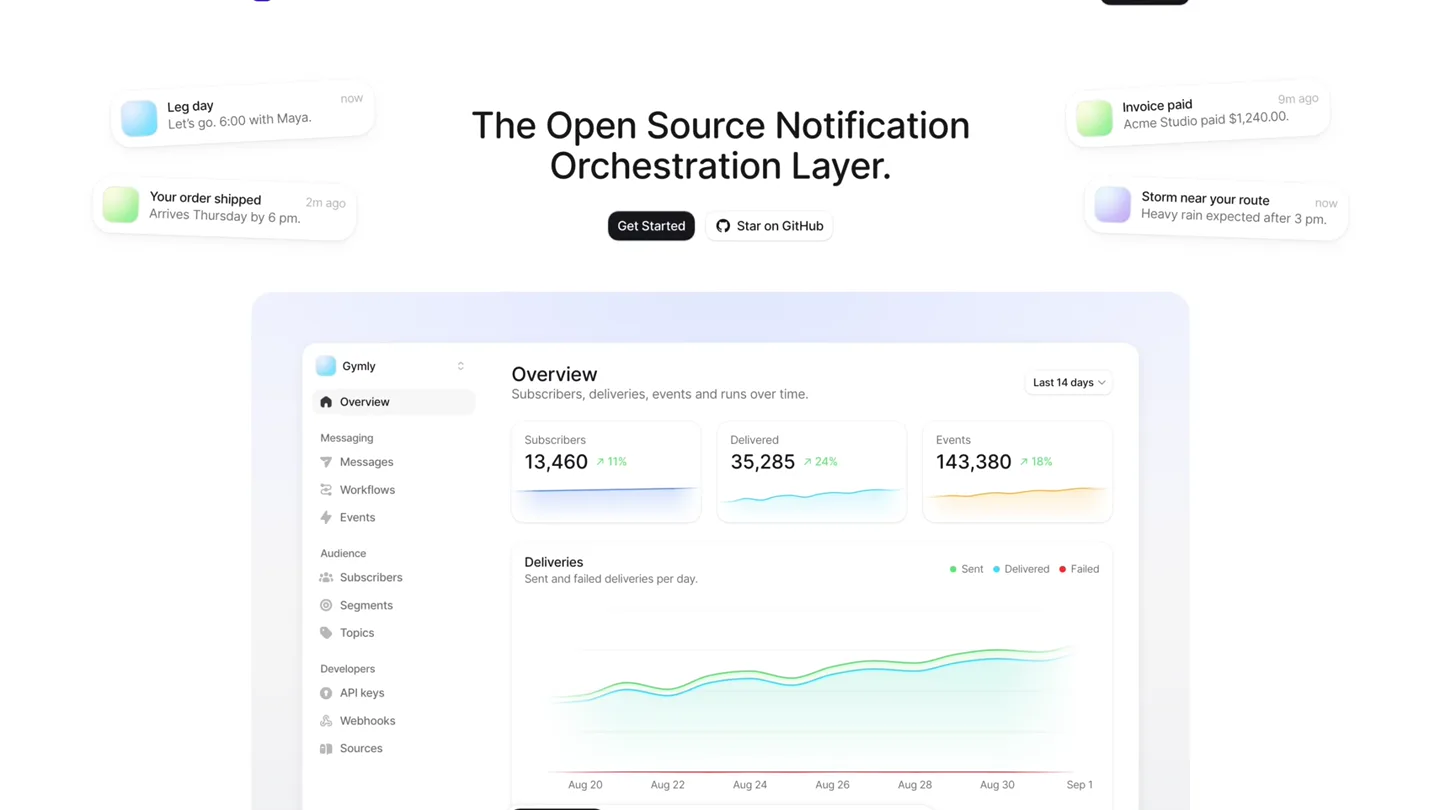
- BuzzKit Features Pricing Docs Get Started Leg day Let's go, 6:00 with Maya. now Your order shipped Arrives Thursday by 6 pm. 2m ago Invoice paid Acme Studio paid $1,240.00. 9m ago Storm near your route Heavy rain expected after 3 pm. now The Open Source Notification Orchestration Layer. Get Started Star on GitHub Gymly Overview Subscribers, deliveries, events and runs over time. Last 14 days Subscribers 13,460 11% Delivered 35,285 24% Events 143,380 18% Deliveries Sent and failed deliveries per day. Sent Delivered Failed Aug 20 Aug 22 Aug 24 Aug 26 Aug 28 Aug 30 Sep 1 Overview Workflows Segments Deliveries
- Camera
- Static, wide shot of a desktop UI, with elements animating within the frame.
- Motion
- Subtle UI element fades and number counters animating up, simulating real-time data updates.
Product Reveal
Workflow Orchestration
“(No spoken dialogue — ambient visual with a 110 BPM rhythm)”
- On screen
- BuzzKit Features Pricing Docs Get Started Rest day is over Your next workout is ready. Snooze Start workout Your order shipped Arrives Thursday by 6 pm. 2m ago Invoice paid Acme Studio paid $1,240.00. 9m ago DL 214 boarding Gate B12 - departs 18:40 Pace The Open Source Notification Orchestration Layer. Get Started Star on GitHub Gymly Workflows Trial nudge Active Once per subscriber, when trial.started fires. Pause Steps Runs Code Once at a time per subscriber Trigger on trial.started Branch opened-the-app-since yes no Wait 6 here now Send give-fi-a-day first-class-waiting Wait 1 Day Push a time. Gives saved you a spot. Overview Workflows Segments Deliveries n-reminders
- Camera
- Static, wide shot. Focus shifts to the 'Workflows' section of the UI.
- Motion
- Smooth tab transition, revealing a complex workflow builder with animated node connections and text updates.
Feature Teaser
Dynamic User Segmentation
“(No spoken dialogue — ambient visual with a 110 BPM rhythm)”
- On screen
- BuzzKit Features Pricing Docs Get Started Rest day is over Your next workout is ready. Snooze Start workout Leg day Let's go, 6:00 with Maya. now Invoice paid Acme Studio paid $1,240.00. 9m ago DL 214 boarding Gate B12 - departs 18:40 Pace Storm near your route Heavy rain expected after 3 pm. now The Open Source Notification Orchestration Layer. Get Started Star on GitHub Gymly Segments Active pro members Pro subscribers who trained this week and opened the app this month. Save Conditions Builder JSON Subscribers matching all of these conditions Attribute plan is pro Did event workout.completed at least 3 last 7 days Activity active in the last 30 days Add condition Matching now 1,291 subscribers Subscriber Country Channels Subscribed Last seen Overview Workflows Segments Deliveries
- Camera
- Static, wide shot. Focus shifts to the 'Segments' section of the UI.
- Motion
- Tab transition, revealing a dynamic segmentation builder with conditions animating into place and subscriber count updating.
Call to Action
Detailed Delivery Insights
“(No spoken dialogue — ambient visual with a 110 BPM rhythm)”
- On screen
- BuzzKit Features Pricing Docs Get Started Your order shipped Arrives Thursday by 6 pm. 2m ago Leg day Let's go, 6:00 with Maya. now Storm near your route Heavy rain expected after 3 pm. now DL 214 boarding Gate B12 - departs 18:40 Pace Rest day is over Your next workout is ready. Snooze Start workout The Open Source Notification Orchestration Layer. Get Started Star on GitHub Gymly Messages Leg day Completed Sent to the gym-reminders topic 12 minutes ago. Send again Overview Delivery Title Leg day Reachable 2,418 Body Let's go, 6:00 with Maya. Sent 2,412 Channel Push Pending 0 Sent to gym-reminders Failed 6 Deliveries Subscriber Status Sent Payload user_42 iOS 12m ago user_311 iOS Sent 12m ago user_178 Android Sent 12m ago {"title": "Leg day", "body": "Let's go, 6:00 "topic": "gym-reminders "deeplink": "app://worko Overview Workflows Segments Deliveries
- Camera
- Static, wide shot. Focus shifts to the 'Messages' and 'Deliveries' sections of the UI.
- Motion
- Tab transition, revealing a detailed message delivery log with data tables and payload details, followed by a quick return to the initial overview.
Motion design primitives
Synthesizable in Remotion · key components of the saas-ui-fast-cut-showcase template.
UIDataCounter
Numerical values within UI cards animate smoothly upwards, simulating real-time data updates. This is often accompanied by a subtle background fill animation.
+ Code construction recipe
Use `interpolate` with `spring` for the number animation, mapping a time value to the numerical range. For the background fill, use `interpolate` to animate `width` or `height` of a background `div`.
TabbedContentTransition
Clicking a tab smoothly transitions the main content area to a new view, often with a subtle fade or slide effect for the incoming content.
+ Code construction recipe
Implement using `AbsoluteFill` for each content section and animate `opacity` and `transform` (e.g., `translateX`) using `spring` or `ease-in-out` for a smooth cross-fade and slide effect.
NotificationCardPop
Small notification cards appear and disappear around the main UI, often with a slight scale-up and fade-in, then a fade-out or slide-off.
+ Code construction recipe
Utilize `spring` for `scale` and `opacity` on component mount, and then `interpolate` for `opacity` and `translateX` or `translateY` on unmount, creating a dynamic entrance and exit.
Style DNA & aesthetic system
Visual aesthetic
Typography
Motion
Special effects
Pacing & rhythm
Conceptual story rhythm
- 1
Problem Introduction
Purpose. Showcases the complexity of managing notifications across various channels and user segments.
Execution. Rapidly changing notification cards around the main UI, hinting at the overwhelming nature of unmanaged notifications.
- 2
Solution Overview
Purpose. Introduces BuzzKit as the central orchestration layer.
Execution. The main headline 'The Open Source Notification Orchestration Layer' remains static and central, anchoring the solution.
- 3
Feature Deep Dive
Purpose. Demonstrates key functionalities like workflows, segmentation, and delivery tracking.
Execution. Sequential, quick transitions between different UI tabs (Overview, Workflows, Segments, Messages/Deliveries) with internal animations highlighting specific features.
- 4
Impact & Call to Action
Purpose. Reinforces the value proposition and directs users to engage.
Execution. The 'Get Started' and 'Star on GitHub' buttons are consistently visible, serving as a persistent call to action, while the UI cycles through its core features.
Remix in Animatiq Studio
Master remix prompt · agent-ready
Sample remix
Objective
Launch a new open-source API monitoring tool, 'APIWatch', with a 15-second video highlighting its real-time data, workflow, and log analysis capabilities.How the recipe adapts
The UIDataCounter primitive will animate API call counts, latency metrics, and error rates. The TabbedContentTransition will switch between 'Dashboard', 'Alerts', and 'Logs' views. NotificationCardPop will display real-time API health alerts. The overall bright, minimalist UI and fast pacing will be retained, with the main headline adapted to 'The Open Source API Monitoring Layer'.Remix blueprint · saas-ui-fast-cut-showcase
Scene durations (4 scenes, 15s)
Key Remotion components
Related Developer Tools Product Launches
Explore all Developer Tools launches →
Agentic CLI for coding, building apps, and automating workflows.

New in Claude Code: your sessions can now message each other. Tell Claude to send a summary (not your history or files), and the other session picks it up mid-task.

Meet Qwen3.8-Max: A New Bar for Coding and Cowork. https://t.co/mJaA8vr6xT