
Caddy · Launch Video Breakdown: Hook, Pacing & Motion Design
Caddy is an app that answers email and keeps deadlines from slipping, so you stop living in the inbox.
Scene-by-scene timeline & spoken transcript
The Hook
The Urgent Problem
“(No spoken dialogue — Rapid drum roll and cymbal crash at 0:02, energetic big band music)”
- On screen
- (No on-screen text)
- Camera
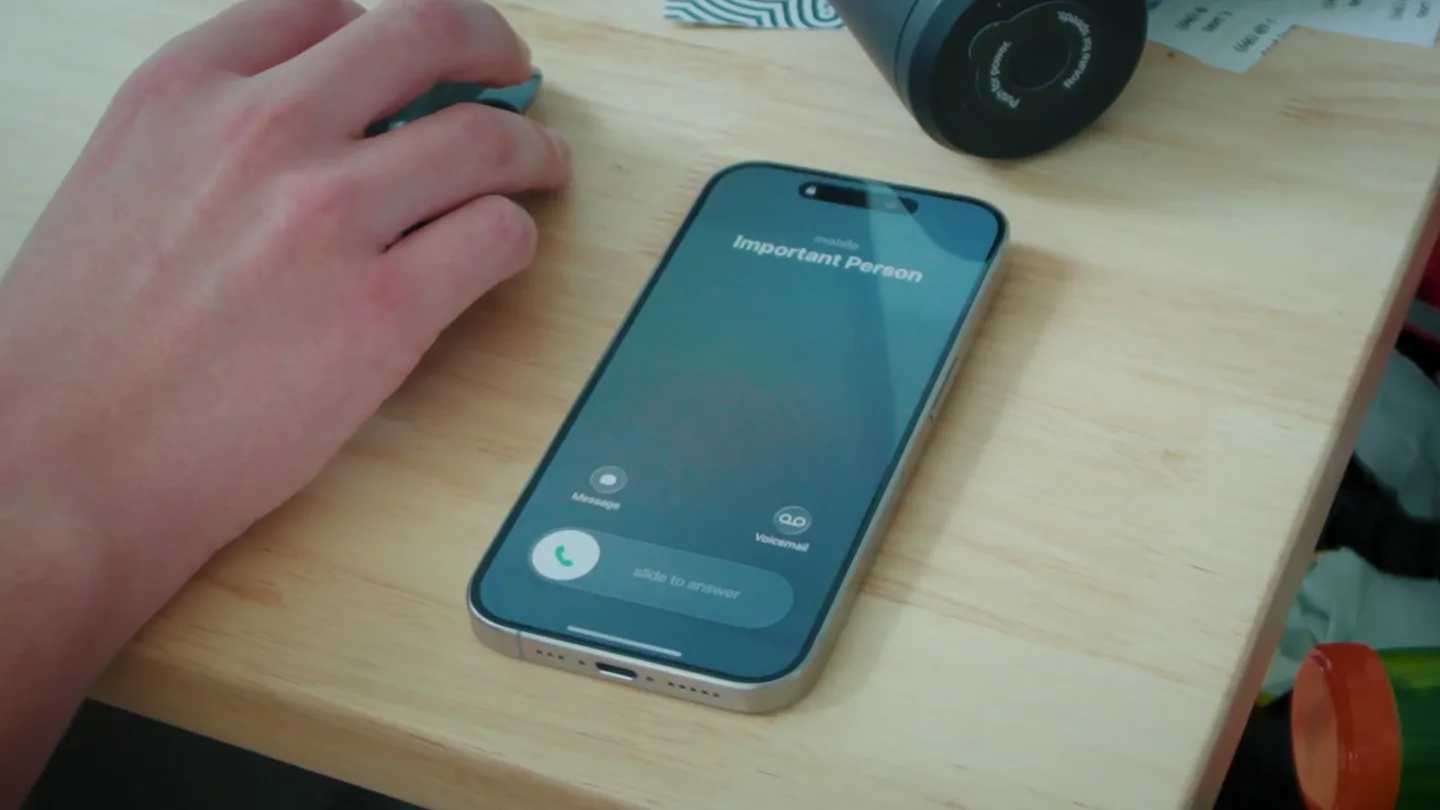
- Close-up on a hand interacting with a smartphone on a wooden desk, then a quick cut to a person walking through an office hallway.
- Motion
- Fast cuts, handheld camera feel, quick zoom-ins to emphasize urgency.
Problem Agitation
The Inbox Struggle
“yes, i know it's important right now Hey, what's the latest on the paperwork for James???? James is still waiting on your email! Do you want me to draft and send it for you?”
- On screen
- Caddy, Hey, what's the latest on the paperwork for James????, Message, James is still waiting on your email!, Do you want me to draft and send it for you?
- Camera
- Tracking shot of a person walking through an office, then a close-up on an elevator button, followed by a medium shot of the person looking at their phone with AR-style message overlays.
- Motion
- Augmented reality (AR) overlays for text messages, dynamic camera movement following the subject, quick cuts to maintain pace. Brass fanfare and drum fill at 0:10.
Product Reveal
Caddy's Instant Solution
“Yes, draft and send it asap!!!”
- On screen
- Caddy, Yes, draft and send it asap!!!, Delivered, Read 8:18 pm, View thread, james@areucrazy.com, AreuCrazy Docs, To: James, Cc/Bcc, Subject: AreuCrazy Docs, Hi James, Hope your week's going well! Attached are the documents I owed you! Apologies for getting these over a day later than promised; I appreciate your patience. Everything should be in order, but if anything's missing or you have any questions, just let me kn and I'll turn it around quickly. Thanks again, Connor
- Camera
- Medium shot of the person in an elevator, with AR message and email interface overlays. The camera blurs and refocuses on the person's surprised reaction.
- Motion
- Seamless AR UI integration, rapid text animation, email interface reveal, depth-of-field blur for emotional emphasis. Sustained brass swell and cymbal crash at 0:18.
Feature Teaser
Unbelievable Efficiency
“it's been like 30 seconds I can't believe it either it's crazy actually incredibly well done wait, what tool are you using?”
- On screen
- Caddy
- Camera
- Tracking shot of the person exiting a building and walking down the street, talking on the phone. The camera follows from behind, then cuts to a wider shot revealing the Caddy logo.
- Motion
- Dynamic outdoor tracking shots, subtle camera shakes to convey real-world setting, animated logo reveal with a fade-in. Final powerful brass hit and cymbal crash at 0:30.
Motion design primitives
Synthesizable in Remotion · key components of the ar-productivity-assistant-launch template.
ARMessageOverlay
Text messages and application interfaces appear as translucent, floating elements over real-world footage, mimicking augmented reality. Messages animate in and out, simulating a conversation flow.
+ Code construction recipe
Use Remotion's <AbsoluteFill> for video background. Overlay <Sequence> components with <Spring> animations for opacity and translateY to simulate messages appearing and disappearing. Utilize CSS `backdrop-filter: blur()` for the translucent effect. Text content can be dynamically rendered.
RapidUIReveal
Complex UI elements, like an email draft, quickly slide or scale into view, populating with text and details almost instantly. This conveys speed and efficiency.
+ Code construction recipe
Implement with <Sequence> and <Spring> for x/y position and scale transformations. Text content can be rendered using <Text> components with a short <Sequence> for character-by-character or line-by-line reveal, using `delay` and `duration` props.
DynamicCameraFocus
The camera rapidly shifts focus from a blurred background to a sharp foreground element (or vice-versa), often accompanied by a subtle zoom or pan, to draw attention to key moments or reactions.
+ Code construction recipe
Achieve this using CSS `filter: blur()` on the video element, animating the blur value with <Spring> or <interpolate>. Combine with <AbsoluteFill> and CSS `transform: scale()` for zoom effects, and `transform: translate()` for pans, all synchronized with key moments.
Style DNA & aesthetic system
Visual aesthetic
Typography
Motion
Special effects
Pacing & rhythm
Conceptual story rhythm
- 1
The Daily Grind
Purpose. Establish the relatable problem of being overwhelmed by tasks and communication, setting a scene of urgency and stress.
Execution. Quick cuts of a busy individual, phone calls, and the initial AR message overlays highlighting pending tasks.
- 2
The Moment of Truth
Purpose. Introduce Caddy as the immediate solution to the problem, showcasing its core functionality in a critical situation.
Execution. The user interacting with Caddy's AR interface, sending a crucial email with minimal effort, and a visible sigh of relief.
- 3
The Unbelievable Outcome
Purpose. Demonstrate the product's impact by showing the user's surprise and satisfaction, and the positive reaction from others.
Execution. The user's amazed reaction, a phone call expressing disbelief at the speed, and the Caddy logo reveal.
- 4
The Call to Curiosity
Purpose. Leave the audience wanting to know more about Caddy, creating intrigue and a desire to experience the solution.
Execution. A final question from an unseen character, 'wait, what tool are you using?', followed by the Caddy logo and tagline.
Remix in Animatiq Studio
Master remix prompt · agent-ready
Sample remix
Objective
Launch a new AI-powered personal assistant app called 'ZenFlow' that streamlines daily tasks and information flow.How the recipe adapts
The ARMessageOverlay primitive will be adapted to show ZenFlow's proactive suggestions and task summaries floating over the user's environment. RapidUIReveal will demonstrate how ZenFlow instantly organizes emails and schedules meetings. DynamicCameraFocus will highlight the user's relief and newfound clarity. The overall pacing will remain high-energy, reflecting the speed and efficiency of ZenFlow, with a similar big band audio style to convey innovation and excitement.Remix blueprint · ar-productivity-assistant-launch
Scene durations (5 scenes, 51s)
Key Remotion components
Related Productivity Product Launches
Explore all Productivity launches →
Don't type, just speak. Flawless voice-to-text across every app at 240 WPM.

One workspace for knowledge scattered across Slack, email, Docs, and Notion. Connect your tools and build apps and agents that stay live with your data.

Notion positions itself as the backbone of your dock — a brand film of the Notion icon among everyday apps, ending on “Works with everything.”