
Dheepan Ratnam · Launch Video Breakdown: Hook, Pacing & Motion Design
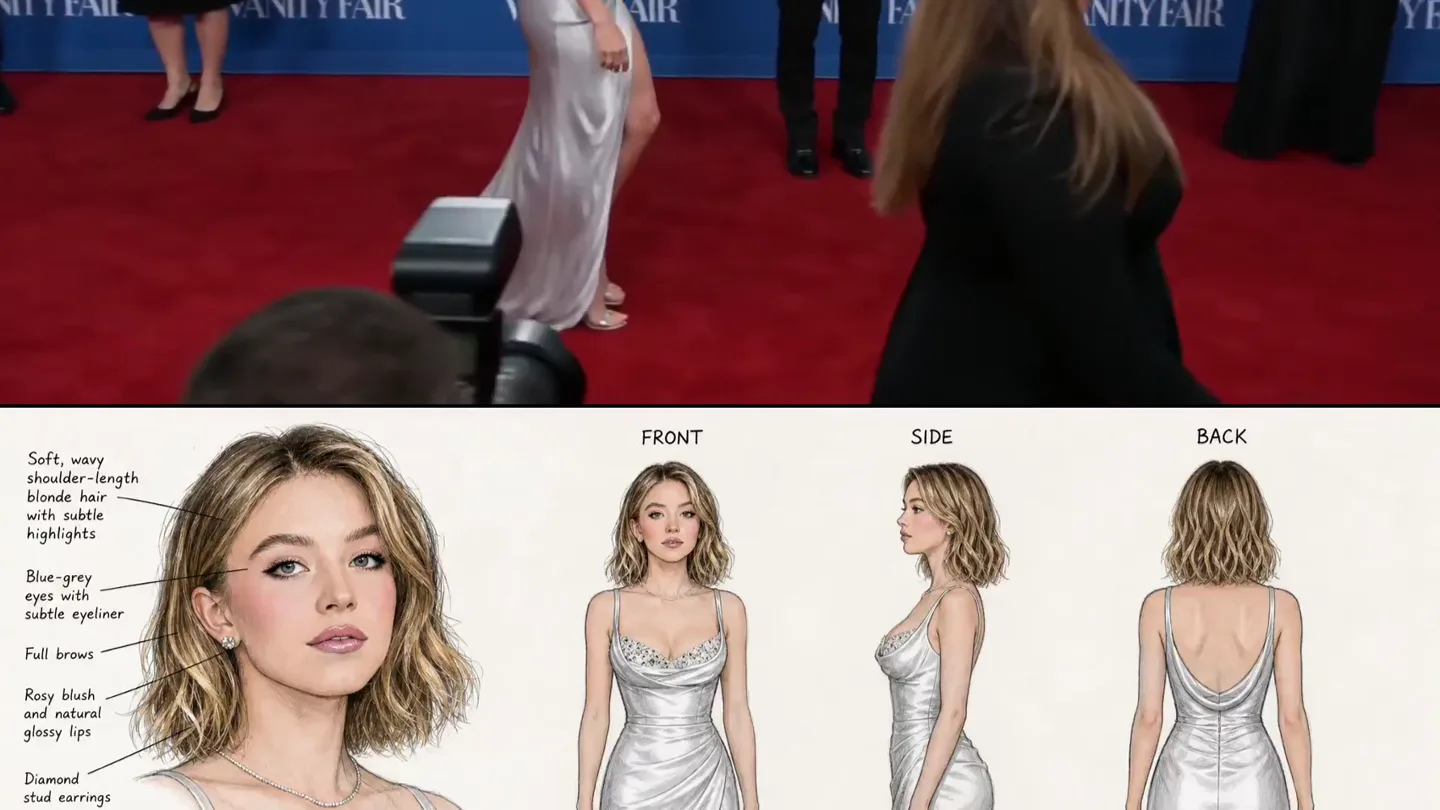
AI is wild Chatgpt 2.0 images + Seedance 2.0 tried to generate a red carpet AI video using this custom Sydney Sweeney character sheet. the result looks exactly like "we have sydney sweeney at home"…
Scene-by-scene timeline & spoken transcript
The Hook
AI-Generated Celebrity Walk
“(No spoken dialogue — indistinct crowd chatter and murmurs)”
- On screen
- VANITY FAIR, TNT, Cagiramin
- Camera
- Medium shot, tracking Sydney Sweeney from the side as she walks on a red carpet. Camera slightly pans to follow her movement.
- Motion
- Seamless AI character generation and integration into a live-action background, with subtle camera tracking.
Problem Agitation
Close-Up AI Imperfections
“I know”
- On screen
- VANITY FAIR, TNT, Cagiramin
- Camera
- Closer medium shot, slightly zoomed in on Sydney Sweeney's face and upper body, still tracking her movement. Brief shot from behind a person's shoulder.
- Motion
- Subtle AI artifacting and uncanny valley effect become more apparent with closer framing, highlighting the 'Sydney Sweeney at home' concept.
Product Reveal
Full AI Character Sheet Overlay
“I'm sorry”
- On screen
- VANITY FAIR, TNT, Cagiramin, SYDNEY SWEENEY, DETAILS, Soft, wavy shoulder-length blonde hair with subtle highlights, Fair skin with a warm undertone, Blue-gray eyes with subtle eyeliner, Rosy blush and natural glossy lips, Diamond stud earrings, Delicate diamond necklace, Full brows and natural makeup, Jeweled bodice with draping, Strappy silver high-heeled sandals
- Camera
- Medium shot, tracking Sydney Sweeney from the side, with a static overlay of a detailed character sheet on the bottom half of the screen.
- Motion
- Split-screen or overlay composite. Live-action AI footage on top, static detailed character sheet below. No explicit motion on the character sheet itself.
Feature Teaser
AI Character in Motion with Details
“(No spoken dialogue — indistinct crowd chatter continues)”
- On screen
- VANITY FAIR, TNT, Cagiramin, SYDNEY SWEENEY, DETAILS, Soft, wavy shoulder-length blonde hair with subtle highlights, Fair skin with a warm undertone, Blue-gray eyes with subtle eyeliner, Rosy blush and natural glossy lips, Diamond stud earrings, Delicate diamond necklace, Full brows and natural makeup, Jeweled bodice with draping, Strappy silver high-heeled sandals
- Camera
- Medium shot, tracking Sydney Sweeney from the side, with the character sheet overlay persisting. Camera briefly dips to show a photographer.
- Motion
- Continued composite of AI-generated video and static character sheet, emphasizing the AI's ability to generate a character based on detailed specifications.
Motion design primitives
Synthesizable in Remotion · key components of the ai-design-breakdown-montage template.
AICelebrityWalkComposite
An AI-generated character walks on a red carpet, seamlessly integrated into a live-action background. A detailed character sheet is overlaid on the bottom half of the screen, providing specifications for the AI model.
+ Code construction recipe
Use `AbsoluteFill` for the background video. Overlay a `Sequence` with `Img` for the AI character, applying `transform` properties for subtle tracking and `opacity` for blending. Implement a `Fixed` position `Div` for the character sheet, containing `Img` elements and `Text` components for details. Use `spring` for any subtle camera movements or character adjustments.
UncannyValleyZoom
The camera subtly zooms in on the AI-generated character, revealing minor imperfections or an 'uncanny valley' effect in the facial features or movement, contrasting with the high-fidelity background.
+ Code construction recipe
Apply `scale` and `translate` transformations to the AI character `Img` within a `Sequence`, using `interpolate` with an `ease-in-out` curve to simulate a gentle zoom. Consider applying a subtle `blur` or `sharpen` filter to the AI layer to enhance the 'at home' effect.
StaticDetailOverlay
A static, information-rich graphic overlay appears on the lower portion of the screen, detailing the specifications of the AI-generated character, while the video continues above.
+ Code construction recipe
Create a `Div` component with `position: 'absolute'`, `bottom: 0`, and a fixed `height`. Populate this `Div` with `Img` components for character illustrations and `Text` components for descriptive bullet points. Ensure the overlay has a semi-transparent background for readability over the video.
Style DNA & aesthetic system
Visual aesthetic
Typography
Motion
Special effects
Pacing & rhythm
Conceptual story rhythm
- 1
The AI Illusion
Purpose. Introduce the AI-generated character in a seemingly real-world context to establish the premise.
Execution. Opening shot of the AI character walking on the red carpet, integrated with real background elements.
- 2
The Uncanny Reveal
Purpose. Hint at the artificiality of the character, creating intrigue and setting up the 'Sydney Sweeney at home' concept.
Execution. Closer shots of the AI character where subtle imperfections become more noticeable, accompanied by indistinct dialogue.
- 3
The Blueprint Exposed
Purpose. Provide the technical context by revealing the character sheet, explaining how the AI was instructed.
Execution. Overlaying the detailed character sheet on the live AI footage, showing the specifications.
- 4
AI in Action, Explained
Purpose. Demonstrate the AI's output in motion while simultaneously detailing its input parameters.
Execution. Continued AI character walk with the character sheet overlay, reinforcing the connection between input and output.
Remix in Animatiq Studio
Master remix prompt · agent-ready
Sample remix
Objective
Showcase an AI-powered architectural visualization tool that generates building designs from text prompts.How the recipe adapts
The AICelebrityWalkComposite primitive adapts to an AI-generated building rendering slowly rotating or panning, integrated into a realistic environment. The UncannyValleyZoom becomes a subtle camera move highlighting a specific architectural detail, potentially revealing minor AI-generated quirks. The StaticDetailOverlay displays the architectural prompt (e.g., 'sustainable urban high-rise with green spaces') and material specifications (e.g., 'recycled steel, living facade'). The overall pacing remains slow and analytical, with ambient city sounds and AI-generated voiceovers describing the design principles.Remix blueprint · ai-design-breakdown-montage
Scene durations (4 scenes, 15s)
Key Remotion components
Related AI Agents Product Launches
Explore all AI Agents launches →
To ensure that artificial general intelligence benefits all of humanity

Gopuff introduces Go, an AI shopping assistant built with SpaceXAI: say what you need and the order is placed.

Iliad (Troy) trailer made by Grok Imagine 1.5, which was just released