
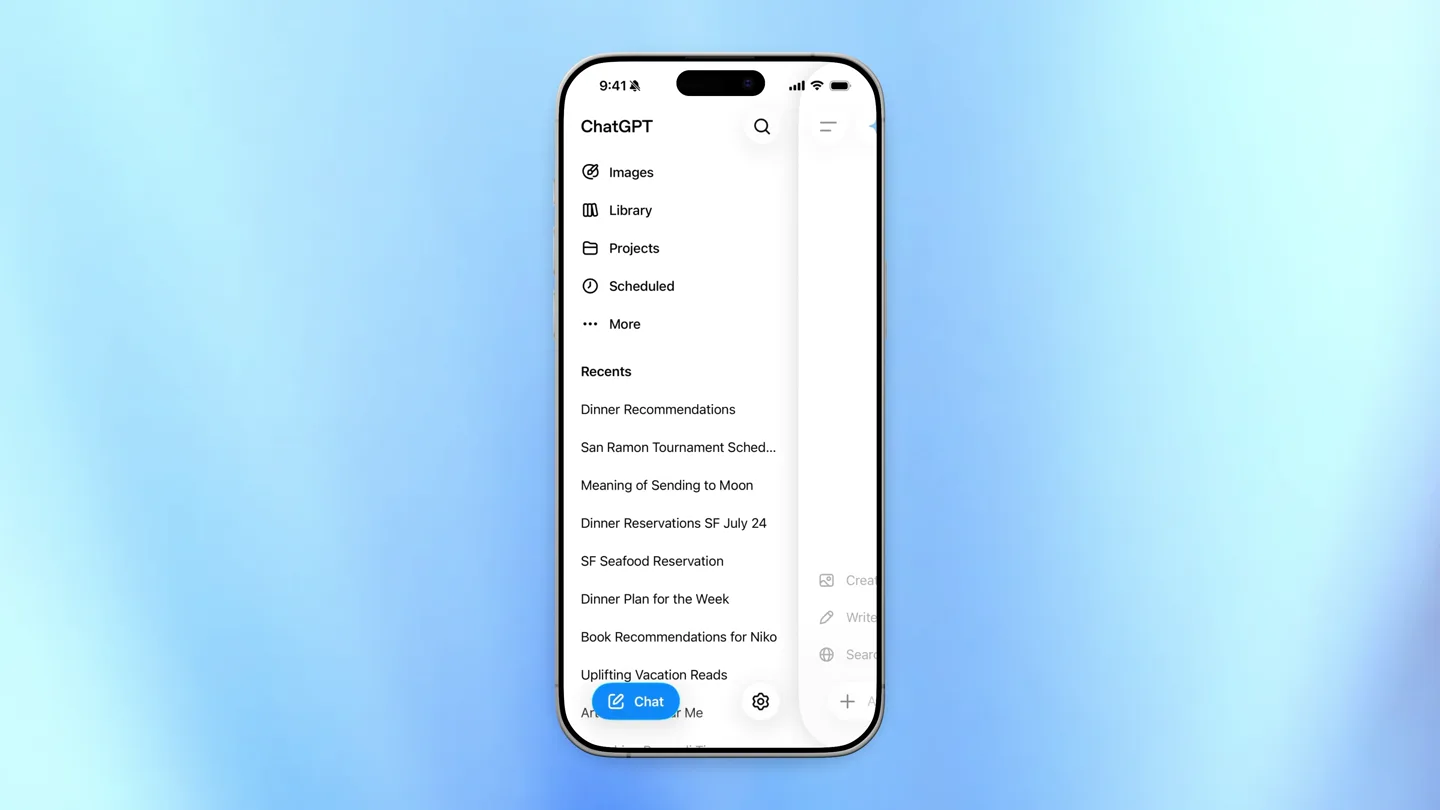
Scene-by-scene timeline & spoken transcript
The Hook
Introducing Scheduled Tasks
“(No spoken dialogue — The track begins with a sustained, evolving pad sound, creating an atmospheric and slightly mysterious tone. At 00:03, a subtle, high-frequency riser begins to build, culminating in a soft sub-bass impact at 00:04.)”
- On screen
- 9:41, Upgrade, Create an image or sticker, Write or edit, Search the web, Ask ChatGPT, I, The, I'm, Q W E R T Y U I O P, A S D F G H J K L, Z X C V B N M, 123
- Camera
- Static overhead shot of an iPhone screen, then a quick pan to reveal the ChatGPT menu.
- Motion
- UI navigation, menu reveal, quick cut.
Product Reveal
Setting Up a Scheduled Task
“(No spoken dialogue — A rhythmic, arpeggiated synth pattern establishes a consistent, driving pulse. Another high-energy riser starts at 00:07, leading to a more pronounced sub-bass drop and impact at 00:08, accompanied by a shimmering, almost bell-like synth texture.)”
- On screen
- 9:41, Scheduled, WEEKLY, Daily brief, Personalized daily briefing with updates about the topics that I care about most, Sale monitor, Watch my favorite stores and let me know when there's a good sale, Concert alerts, Let me know when artists I like announce concerts near me, Weekend ideas, Every Thursday, send me ideas for things to do nearby this weekend, Schedule a task, PAUSED, Weekend Long Read, Find one exceptional article or essay published within the previous 14 days, prioritizing my interests in culture, books..., Resume, Get started
- Camera
- Static overhead shot of the iPhone screen, showcasing scrolling and UI interaction.
- Motion
- Smooth vertical scrolling, text input simulation, UI element highlighting.
Feature Teaser
Interactive Task Customization
“(No spoken dialogue — The arpeggiated synth continues, joined by a deeper, more resonant synth bass line. A significant build-up occurs from 00:14 to 00:16, featuring a prominent riser and a powerful sub-bass drop/impact at 00:16.)”
- On screen
- 9:41, Every Thursday, recommend a few exciting things to do nearby that weekend, tailored to my interests, budget, and the weather., Ask ChatGPT, Searching the web, Asking questions, 1 of 3, How far should "nearby" extend for your weekend ideas?, Within 15 minutes, Within 30 minutes, Within 60 minutes, Up to 90 minutes, Add a preferred area, Skip, 2 of 3, What kinds of things should I prioritize?, Select all that apply, Food & restaurants, Outdoor / active, Arts, music & culture, Family / kid-friendly, Add another interest, Next
- Camera
- Static overhead shot of the iPhone screen, focusing on interactive prompts and selections.
- Motion
- Text typing animation, interactive button presses, dynamic content loading, smooth transitions between questions.
Call to Action
Task Confirmation and Completion
“(No spoken dialogue — The powerful sub-bass drop/impact at 00:16 introduces a new, more complex rhythmic layer with additional percussive elements and a wider stereo image. The energy sustains with a driving beat and evolving synth textures. A final, intense riser begins at 00:24, leading to a climactic sub-bass impact and a bright, expansive synth chord at 00:26, which then fades out.)”
- On screen
- 9:41, Every Thursday, recommend a few exciting things to do nearby that weekend, tailored to my interests, budget, and the weather., Asking questions, 2 of 3, What kinds of things should I prioritize?, Select all that apply, Food & restaurants, Outdoor / active, Arts, music & culture, Family / kid-friendly, Add another interest, Next, 3 of 3, What budget should I target per activity?, Free-$25, $25-$75, $75-$150, Flexible for a great find, Add a budget limit, Skip, > What kinds of things should I prioritize?, Outdoor / active, Family / kid-friendly, > What budget should I target per activity?, Free-$25, Thinking, Running app request, Done. I'll send you, Thursdays, Weekend Ideas, Done. I'll send you 3-5 varied weekend ideas every Thursday, within 30 minutes, focused on outdoor/active and family-friendly activities and generally free-$25. I'll also check the weather and make sure suggestions are currently open/available.
- Camera
- Static overhead shot of the iPhone screen, showing the final confirmation and task setup.
- Motion
- Text typing animation, progress indicators, final confirmation message reveal, subtle UI element animations.
Motion design primitives
Synthesizable in Remotion · key components of the aura-sync-routine-creator template.
UIDrawerSlide
A UI drawer slides smoothly from the left edge of the screen, revealing a list of menu options. It has a slight overshoot and settle effect.
+ Code construction recipe
Use `interpolate` with an `easeOutBack` easing function for the X-translation of the drawer component. The background dims slightly using `interpolate` for opacity.
TypingTextReveal
Text appears character by character, simulating real-time typing, often accompanied by a blinking cursor. This is used for both user input and AI responses.
+ Code construction recipe
Implement with `sequence` and `spring` for each character's opacity and scale, or use `interpolate` on the `substring` of the text content, revealing characters over time. A blinking cursor can be a separate `spring` animation for opacity.
InteractiveOptionSelect
When a user selects an option, a checkbox or radio button animates with a quick checkmark reveal, and the selected option might subtly highlight or change color.
+ Code construction recipe
Use `spring` for the checkmark icon's scale and opacity. The background color change of the selected option can be animated with `interpolate` using an `easeOut` curve.
Style DNA & aesthetic system
Visual aesthetic
Typography
Motion
Special effects
Pacing & rhythm
Conceptual story rhythm
- 1
Initial App Exploration
Purpose. To introduce the user to the app's main interface and highlight the new 'Scheduled' feature.
Execution. A quick pan to the menu, followed by a tap on 'Scheduled' to reveal the new functionality.
- 2
Task Setup Initiation
Purpose. To demonstrate the ease of starting a new scheduled task and the initial prompt.
Execution. Scrolling through existing scheduled tasks, then tapping 'Schedule a task' and seeing the first AI prompt.
- 3
Interactive Customization
Purpose. To showcase the AI's ability to ask clarifying questions and allow user input for task personalization.
Execution. The AI asking a series of questions with multiple-choice options, and the user making selections.
- 4
Confirmation and Activation
Purpose. To conclude the task setup process, confirm the AI's understanding, and show the task being activated.
Execution. The AI summarizing the task based on user input, followed by a 'Done' message and the task being added.
Remix in Animatiq Studio
Master remix prompt · agent-ready
Sample remix
Objective
Launch a new smart home automation app, 'AuraSync', demonstrating its intuitive routine creation.How the recipe adapts
The video would open with the AuraSync app UI. A UIDrawerSlide component would reveal the 'Routines' menu. The TypingTextReveal primitive would show the user naming a new routine, like 'Morning Wake-up'. InteractiveOptionSelect would then be used to choose smart lights, blinds, and a coffee maker, setting their actions and times. The final screen would confirm the 'Morning Wake-up' routine is active, mirroring the ChatGPT task confirmation.Remix blueprint · aura-sync-routine-creator
Scene durations (4 scenes, 29s)
Key Remotion components
Related AI Agents Product Launches
Explore all AI Agents launches →
To ensure that artificial general intelligence benefits all of humanity

Gopuff introduces Go, an AI shopping assistant built with SpaceXAI: say what you need and the order is placed.

Iliad (Troy) trailer made by Grok Imagine 1.5, which was just released