
Anthropic · Launch Video Breakdown: Hook, Pacing & Motion Design
Turn written content into professional designs with Claude + @canva Upload any document — blog post, product guide, meeting notes — and ask Claude to turn it into branded visuals
Scene-by-scene timeline & spoken transcript
The Hook
Integration Overview
“(No spoken dialogue — High-energy audio transition and riser, followed by a sub-bass drop/impact.)”
- On screen
- (No on-screen text)
- Camera
- Static, wide shot of three product logos connected by lines, implying integration.
- Motion
- Simple graphic animation with a subtle glow effect on the Anthropic logo.
Product Reveal
Claude + Canva Workflow Demonstration
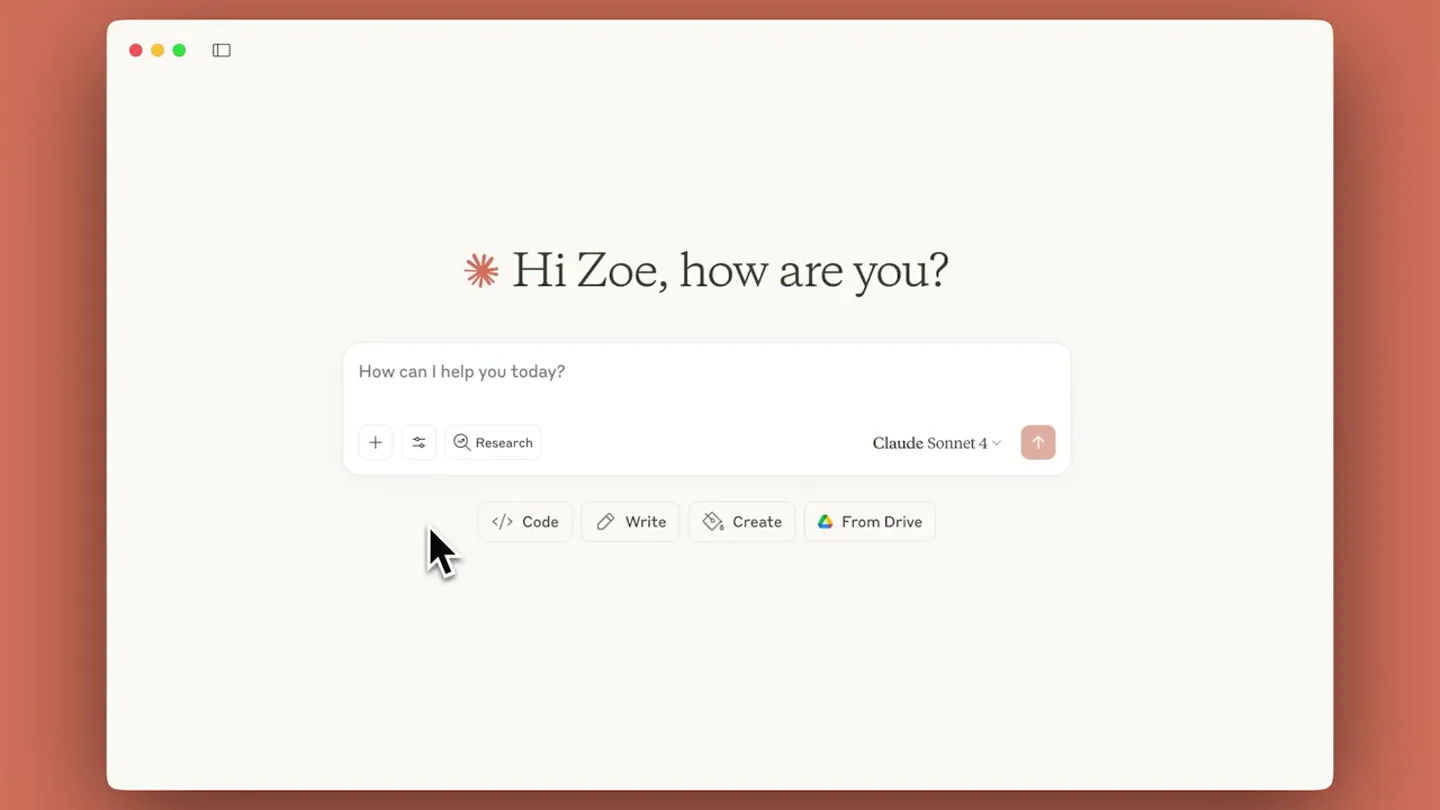
“(No spoken dialogue — Ambient electronic score with pizzicato synths and 808-style percussion.)”
- On screen
- Hi Zoe, how are you? How can I help you today? Claude Sonnet 4. Research. Search menu. Use style. Extended thinking. Web search. Drive search BETA. Gmail search. Calendar search. Canva. Connect. Upload a file. Add from GitHub. Add from Google Drive. Use a project. User guide: 5 steps to create a cozy reading nook for fall. DOC. Claude, can you create a branded infographic in Canva from this post? I'll help you create a branded infographic in Canva based on your cozy reading nook guide! Let me generate a fall-themed infographic that captures the essence of your 5-step guide. generate-design. Request. 'design_type': 'infographic', 'query': 'Fall reading nook guide infographic with 5 steps: choose perfect spot, comfortable seating, cozy textures, perfect lighting, personal touches. Autumn colors like rust, burgundy, mustard, forest green. Cozy seasonal aesthetic with reading chair, books, blankets, warm lighting. Clean modern layout with step-by-step visual flow'. Reply to Claude... Let me try a more focused approach for the infographic generation: 'query': '5 steps to create cozy reading nook for fall season. Step-by-step guide with autumn colors, reading chair, books, blankets, warm lighting elements. Professional infographic layout'. Response. Perfect! I've generated 3 different infographic design options for your '5 Steps to Create a Cozy Reading Nook for Fall' guide. Here are the designs. Design Options: Option 1: (Create Design 1)(https://www.canva.com/api/action?token=eyJhYmciOiJkaXhXSHlCJfbmMiOiJibU0iOmNlNjIwZjZhaXJ5IjoxNzU2NjI0MDk5MTM4MjQ0OSIsImV4cCI6MTcwNTYyNDQ5MTM4MjQ0OSIsImlhdCI6MTcwNTYyNDQ5MTM4MjQ0OSIsImlzcyI6ImNhbnZhLmNvbSIsIm5iZiI6MTcwNTYyNDQ5MTM4MjQ0OSIsInN1YiI6ImFwaSIsImF1ZCI6ImNhbnZhLmNvbSIsIm1lZGl1bSI6InJlZmVycmFsJnV0bV9jb250ZW50PS1vYy1hcGlfc3VnZ2VzdGlvbiJ9. Design 1: Clean modern layout with autumn color palette. Design 2: Professional step-by-step layout. Design 3: Branded minimalist approach. Each design features: Modern, clean typography with professional hierarchy. Autumn color palette incorporating the warm colors mentioned in your guide (rust, burgundy, mustard, forest green). Step-by-step visual flow. Branded appearance with consistent styling. Icons and visual elements representing seating, lighting, textures, and storage. Click on any of the design links above to open it in Canva where you can edit and customize them.
- Camera
- Close-up on a desktop UI, simulating user interaction with mouse clicks and typing. Pans and zooms to highlight specific UI elements.
- Motion
- Screen recording with animated mouse cursor and text typing effects. Smooth UI transitions and element highlights.
Feature Teaser
Side-by-Side Comparison & Connector Showcase
“(No spoken dialogue — High-energy audio transition and riser, followed by a sub-bass drop/impact.)”
- On screen
- User guide: 5 steps to create a cozy reading nook for fall. Infographic - Cozy Reading Nook. 5 STEPS TO CREATE. Autumn is the perfect time to create a cozy reading nook. Use warm colors like rust, burgundy, and mustard to bring a sense of comfort and tranquility. STEP-BY-STEP GUIDE. Choose comfortable seating that fits your style and space. Add page. Connectors. Unlock more with Claude when you connect your favorite tools. Manage connectors. Web. Desktop extensions. Search. Asana. Canva. Cloudflare. Filesystem. Gmail. Google Calendar. Google Drive. Intercom. Jira. Linear.
- Camera
- Split-screen view, then a full-screen shot of the 'Connectors' UI. Subtle camera movements to emphasize the integration.
- Motion
- Split-screen composition with synchronized scrolling. UI element reveals and checkmark animations.
Call to Action
Brand Reveal
“(No spoken dialogue — High-energy audio transition and riser, followed by a sub-bass drop/impact.)”
- On screen
- Claude
- Camera
- Static, centered shot of the brand logo and name.
- Motion
- Logo reveal with a subtle glow and scale animation.
Motion design primitives
Synthesizable in Remotion · key components of the ai-agent-workflow-showcase template.
UIDialogueTypewriter
Simulates real-time typing in a chat interface, with a blinking cursor and text appearing character by character. Accompanied by a subtle 'thinking' animation.
+ Code construction recipe
Use `Sequence` and `spring` for character reveal. Implement a `Loop` for the blinking cursor. Utilize `interpolate` for the 'thinking' animation's opacity and scale.
SplitScreenSyncScroll
Two distinct UI windows are displayed side-by-side, with their content scrolling in perfect synchronization, highlighting a comparison or transformation.
+ Code construction recipe
Employ `AbsoluteFill` for each screen. Use `useCurrentFrame` and `interpolate` to control the `scrollTop` property of each scrollable element, ensuring synchronized movement.
ConnectorGridReveal
A grid of application connector cards animates into view, with checkmarks appearing on connected services, emphasizing ease of integration.
+ Code construction recipe
Use `spring` for individual card entrance animations (scale and opacity). Animate checkmark opacity and scale with `Sequence` and `spring` after a delay.
Style DNA & aesthetic system
Visual aesthetic
Typography
Motion
Special effects
Pacing & rhythm
Conceptual story rhythm
- 1
The Integration Promise
Purpose. Immediately establishes the core value proposition: seamless integration between key tools.
Execution. Animated logos of Anthropic, Canva, and a generic document icon connected by lines, setting the stage for the workflow.
- 2
Problem-Solving in Action
Purpose. Demonstrates the product's utility by showing a common workflow problem being solved efficiently.
Execution. Detailed screen recording of a user interacting with Claude, uploading a document, and prompting it to create a design in Canva.
- 3
The Result & Validation
Purpose. Showcases the successful outcome and validates the product's capabilities.
Execution. Split-screen comparison of the original document and the AI-generated Canva design, followed by a list of design options.
- 4
Expand Your Horizons
Purpose. Highlights the broader ecosystem and encourages further exploration of integrations.
Execution. A full-screen view of the 'Connectors' UI, listing various integrated applications, concluding with the brand logo.
Remix in Animatiq Studio
Master remix prompt · agent-ready
Sample remix
Objective
An AI agent that automates task creation in Jira from Slack conversations and generates code snippets in GitHub based on project requirements.How the recipe adapts
The initial integration overview would show the AI agent logo connecting to Jira and GitHub. The workflow demonstration would feature a Slack conversation where the user prompts the AI, followed by the AI creating a Jira ticket and then generating a code snippet in a GitHub UI. The split-screen comparison could show the Slack conversation alongside the newly created Jira ticket or the project requirements next to the generated code. The 'Connectors' screen would highlight Jira, GitHub, and Slack as integrated tools. The overall aesthetic, pacing, and motion language would remain consistent.Remix blueprint · ai-agent-workflow-showcase
Scene durations (4 scenes, 51s)
Key Remotion components
Related AI Agents Product Launches
Explore all AI Agents launches →
To ensure that artificial general intelligence benefits all of humanity

Gopuff introduces Go, an AI shopping assistant built with SpaceXAI: say what you need and the order is placed.

Iliad (Troy) trailer made by Grok Imagine 1.5, which was just released