
Scene-by-scene timeline & spoken transcript
The Hook
Introducing Claude for Small Business
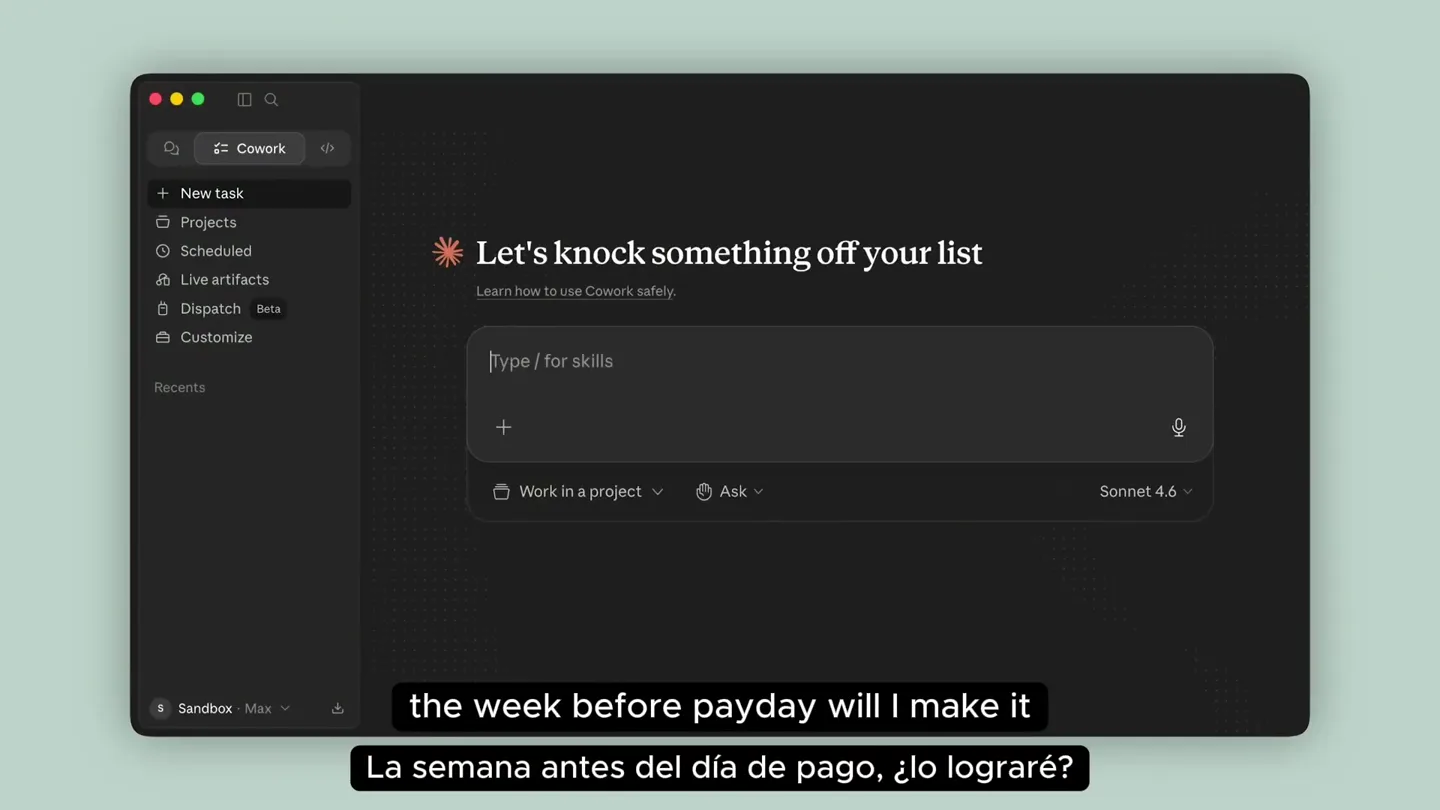
“Anthropic has just launched the world's cheapest and most effective employee. It's called “Claude for Small Business”. And here's what it can do: Manage invoices, payments, and finances. Create...”
- On screen
- Let's knock something off your list Learn how to use Cowork safely. Type / for skills Work in a project Ask Sonnet 4.6 Sandbox Max
- Camera
- Static shot of a desktop application interface, then a subtle zoom into the 'Connectors' section.
- Motion
- UI element highlighting, subtle zoom, and text input simulation.
Product Reveal
Connecting Financial Tools and Planning Payroll
“First, we'll connect our financial tools, QuickBooks and PayPal from the connectors panel on the left. Now, let's plan payroll. We'll use the slash command slash plan dash payroll. Claude will ask for your data sources and preferred format. We'll tell it to pull cash and timing from QuickBooks, and outstanding invoices from PayPal. Next, Cowork builds the forecast.”
- On screen
- Skills Connectors Web Canva DocuSign Gmail Google Calendar Google Drive HubSpot Intercom Intuit Mailchimp Intuit QuickBooks Notion PayPal Sandbox CUSTOM Canva Interactive Disconnect Browse, summarize, autofill, and even generate new Canva designs directly from Claude. Make Canva a native part of your AI workflow-an AI-powered design agent that helps you create polished visuals faster, with less friction. Tool permissions Choose when Claude is allowed to use these tools. Interactive tools Always allow Generate Design with AI Generate Structured Design with AI Request User Review of Presentation Outline Search Designs Let's knock something off your list Learn how to use Cowork safely. Can you help me plan my payroll? Build a 30 day cash flow and list all the outstanding invoices? + Ask Sonnet 4.6 Working folder Context Skills plan-payroll Plan payroll and cash flow Progress See task progress for longer tasks. Payroll details When does payroll need to run? 05/15/2026 Write a message... Ask Sonnet 4.6 Claude is AI and can make mistakes. Please double-check responses. How far out should the cash flow forecast go? 30 days 60 days 90 days Do you have a rough payroll amount in mind? e.g. $8,500 every two weeks - or leave blank and I'll pull it from QuickBooks Payroll details - Horizon: 90 - Payroll date: 2026-05-31 Thinking Loading tools Queue Pulling QuickBooks data Pull PayPal transactions & outstanding invoices Build 90-day cash flow forecast Rank & draft overdue invoice reminders Deliver payroll confidence summary Generated from your QuickBooks account Cash data is in. Now pulling the P&L and PayPal transactions simultaneously. Intuit QuickBooks Generating report... Pull QuickBooks cash flow & P&L data Pull PayPal transactions & outstanding invoices Building forecast Ranking outstanding invoices Deliver payroll confidence summary Used PayPal Sandbox integration, used a tool Now I have everything I need. Let me mark the data- collection tasks done and build the forecast. Used 4 tools Working on it...
- Camera
- Series of close-ups and pans within the UI, following the cursor's interaction with menus and input fields.
- Motion
- Simulated cursor interaction, UI element expansion/collapse, and progress bar animation.
Feature Teaser
Comprehensive Financial Analysis and Export
“You'll see the full 90-day cash forecast, outstanding receivables, and the full 90-day picture. Once Claude's done, you'll see the analysis. Lastly, you can ask Claude to export to an Excel spreadsheet so you can dig in yourself. We've forecasted cash for 90 days. What used to be hours of pulling bank tabs and overdue invoices is now a 5-minute review, not guessing at it.”
- On screen
- Used 4 tools All data collected. Now building the 90-day forecast and invoice dashboard. Cash on hand $16.9M As of May 8, 2026 Payroll coverage 260x Fully covered May 31 payroll (est.) ~$65K Based on April actuals Outstanding A/R $5.4M Uncollected 90-day cash forecast - May 8 through Aug 6 $250K $200K $150K $100K $50K $0 Feb 8-28 March April May 1-8 Payroll Repairs & maint. Advertising & consultancy Other Outstanding receivables A/R - construction billings (QuickBooks) Accumulated over 90 days, typical construction net-30 to net- 60 terms Customer pre-payments on account Already received and held as liability PayPal - Invoice #0110 Paid May 6, 2026 via PayPal Wallet (intercompany) Due to Keystone Construction (intercompany) $5,383,602 Pending collection $389,728 Received $5,000 Collected $100,154 Payroll verdict: fully covered - no gap, no risk. Here's the summary for Keystone Terra: Cash position is extremely strong. You're sitting at $16.9M in cash today, and the May 31 payroll run estimated at $65K based on April actuals of $57,494 + taxes/benefits. A/R upside scenario assumes 50% of $5.4M collected within 90 days. The one thing worth watching is $5.4M in outstanding A/R. This is typical for construction - billings go out, project own day on their own cycle. But $5.4M building up over 90 days without collection means someone likely owes you significant sums. If half of that converts within the 90-day window, your cash position actually improves to over $19M. It keeps aging. It's worth triggering a formal collections push. Outstanding invoices to act on: QuickBooks shows $5.4M in A/R billings and a $100,154 intercompany balance due from Keystone Construction. PayPal has no pending invoices - the only recent activity was Invoice #0110 ($5,000) which was collected May 6. Would you like me to draft collection reminders for the outstanding A/R? I can pull the specific invoice-level detail from QuickBooks and stage tone-matched reminders for your approval before anything sends. Used a tool Now, can you please export to an Excel spreadsh so you can dig in yourself Working folder Keystone_Terra_Payroll_CashF... build_xlsx.py Context Connectors PayPal Sandbox Intuit QuickBooks Skills xlsx plan-payroll Keystone Terra - Payroll & Cash Flow Report Report date: May 8, 2026 | Payroll date: May 31, 2026 | Forecast horizon: 90 days Cash on Hand $16,934,584 As of May 8 Est. May 31 Payroll $65,000 Est. from April Payroll Coverage 260x 249.4894417 Outstanding A/R $5,383,602 90-day A/R build 90-Day Burn (base) $500,000 No new revenue assumed PAYROLL VERDICT COVERED - Cash on hand is 260x the estimated payroll run. No liquidity risk through Aug 6, 2026 even assuming zero new revenue. Key Assumptions Assumption Monthly expense run rate ($) Daily cash burn ($) Estimated gross payroll wages Estimated payroll taxes & Total estimated payroll run ($) Value $210,000 $7,000 Notes / Source Source: QuickBooks P&L, Apr 2026 actuals Derived from monthly expense run rate + 30 Summary Cash Forecast P&L Actuals Receivables Keystone Terra - 90-Day Cash Flow Forecast (May 8 - Aug 6, 2026) Base case assumes no new revenue. Upside assumes 50% of $5.4M A/R converts. All $ in USD. Date May 08, 2026 May 15, 2026 May 22, 2026 May 29, 2026 May 31, 2026 Jun 05, 2026 Jun 12, 2026 Jun 19, 2026 Jun 26, 2026 Jul 03, 2026 Jul 10, 2026 Jul 17, 2026 Jul 24, 2026 Day # 0 7 14 21 23 28 35 42 49 56 63 70 77 Revenue (est.) Expenses (est.) Net Cash Flow Base Case Balance Upside Balance (50% A/R) - - - - - - - - - - - - - - ($49,000) ($49,000) ($49,000) ($79,000) ($35,000) ($49,000) ($49,000) ($49,000) ($49,000) ($49,000) ($49,000) ($49,000) ($49,000) ($49,000) ($49,000) ($49,000) ($49,000) ($79,000) ($35,000) ($49,000) ($49,000) ($49,000) ($49,000) ($49,000) ($49,000) ($49,000) ($49,000) $16,934,584 $17,094,947 $16,836,584 $16,787,584 $16,708,584 $16,673,584 $16,624,584 $16,575,584 $16,526,584 $16,477,584 $16,428,584 $16,379,584 $16,330,584 $16,934,584 $17,255,309 $16,997,301 $17,415,671 $17,396,489 $17,511,034 $17,671,396 $17,992,120 $18,152,483 $18,312,845 $18,473,207 $18,633,570 Keystone Terra - Profit & Loss | Feb 8 - May 8, 2026 Source: QuickBooks P&L, Feb 8 - May 8, 2026. All amounts in USD. Category Feb 8-28 March April May 1-8 90-Day Total REVENUE Sales Product of income Consulting & management Total Revenue $2,315 $20,002 $4,932,440 $34,529 $32 $7,001 $4,961,758 $34,529 $32 $2,315 $20,002 $4,967,000 $7,001 $4,996,319 COST OF GOODS SOLD Cost of goods sold Total COGS $25,308 $25,308 $25,308 $25,308 OPERATING EXPENSES Payroll - wages Payroll - taxes Keystone Terra - Outstanding Receivables & Invoice Register Description / Customer A/R - Construction billings (aggregate) Intercompany - Due from Keystone Construction PayPal Invoice #0110 Customer pre-payments (held on account) Total outstanding (pending + A/R upside if 50% collects within Amount ($) $5,383,602.04 $100,154.00 $5,000.00 $389,728.24 $5,483,756.04 $2,691,801.02 Status Pending collection Outstanding Collected Received / liability Source QuickBooks QuickBooks PayPal QuickBooks Days Outstanding 0-90+ ~90 N/A Notes Accumulated over 90-day period; typical intercompany balance on books; verify Received via PayPal Wallet, net of $174.99 Collected but not yet recognized as revenue; Summary Cash Forecast P&L Ac Receivables
- Camera
- Pans across the generated financial reports within the UI, then transitions to a full-screen view of an Excel spreadsheet.
- Motion
- Data visualization animation, smooth scrolling, and simulated tab switching within a spreadsheet application.
Call to Action
Claude: Your New Employee
“(No spoken dialogue — The music features a light, airy electronic score with pizzicato synths, a consistent sub-bass pulse, and subtle percussion. There are high-energy audio transitions at 0:08, 0:37, and 0:46, marked by a rising synth sweep and a gentle sub-bass impact. Another subtle riser is present at 1:22, leading into the recap. The overall sound design is clean and professional, supporting the informational content without being distracting.)”
- On screen
- Claude
- Camera
- Static shot of the Claude logo on a solid background.
- Motion
- Simple fade-in of the logo.
Motion design primitives
Synthesizable in Remotion · key components of the ai-agent-ui-showcase template.
UIDataFlow
Simulates user interaction within a software interface, including typing, clicking, and menu navigation, with elements expanding and collapsing to reveal information.
+ Code construction recipe
Use `Sequence` and `AbsoluteFill` for scene composition. Animate `opacity` and `transform` (scale, translate) for UI elements using `spring` or `interpolate` with `easing.easeOutCubic`. Implement `typewriter` effect for text input fields. Use `delay` for sequential actions.
ProgressTracker
Displays a dynamic progress sidebar with checklist items that animate from pending to complete, often accompanied by loading indicators.
+ Code construction recipe
Create a `ProgressBar` component with `interpolate` for width/fill. Use `Sequence` to animate checkmark icons (`opacity`, `scale`) and text color changes for completed steps. Implement a 'Thinking' or 'Loading tools' animation using a pulsating `opacity` or `scale` on an icon.
DataVisualizationReveal
Presents complex data in a clear, animated fashion, such as bar charts growing, numbers counting up, and spreadsheet cells highlighting or scrolling.
+ Code construction recipe
For charts, animate `height` or `width` of bars/columns using `spring`. For numerical data, use `interpolate` to count up numbers. For spreadsheets, use `Sequence` to simulate scrolling and `interpolate` for `backgroundColor` or `borderColor` to highlight specific cells or rows.
Style DNA & aesthetic system
Visual aesthetic
Typography
Motion
Special effects
Pacing & rhythm
Conceptual story rhythm
- 1
The AI Employee Introduction
Purpose. To immediately hook the viewer by presenting Claude as a revolutionary solution to common small business financial woes.
Execution. Opens with a static shot of the Claude UI, quickly followed by a simulated typing action that poses a common business problem, setting the stage for the AI's capabilities.
- 2
Seamless Integration & Setup
Purpose. To demonstrate the ease of connecting Claude with existing financial tools, alleviating concerns about complex setup.
Execution. A series of quick, guided UI interactions showing the connection of QuickBooks and PayPal, emphasizing simplicity and speed.
- 3
Automated Financial Planning in Action
Purpose. To showcase Claude's core functionality in planning payroll and forecasting cash flow, highlighting its efficiency and accuracy.
Execution. Detailed, step-by-step UI walkthrough of inputting payroll parameters, followed by animated progress indicators and the rapid generation of comprehensive financial reports.
- 4
Insightful Analysis & Actionable Outcomes
Purpose. To illustrate how Claude not only processes data but also provides clear, actionable insights and export options.
Execution. Scrolling through detailed financial summaries and an Excel export, demonstrating the depth of analysis and the ability to further investigate data, concluding with the Claude logo.
Remix in Animatiq Studio
Master remix prompt · agent-ready
Sample remix
Objective
Demonstrate an AI-powered project management tool called 'TaskFlow' that automates task assignment and progress tracking.How the recipe adapts
The UIDataFlow primitive will be adapted to show connecting Slack and Jira, then typing a project brief. The ProgressTracker will animate task assignment and completion status. The DataVisualizationReveal will show a Gantt chart dynamically updating and a performance dashboard with key metrics counting up, all within TaskFlow's dark mode UI. The final scene will feature the TaskFlow logo on a light green background.Remix blueprint · ai-agent-ui-showcase
Scene durations (4 scenes, 109s)
Key Remotion components
Related AI Agents Product Launches
Explore all AI Agents launches →
To ensure that artificial general intelligence benefits all of humanity

Gopuff introduces Go, an AI shopping assistant built with SpaceXAI: say what you need and the order is placed.

Iliad (Troy) trailer made by Grok Imagine 1.5, which was just released