
Anthropic · Launch Video Breakdown: Hook, Pacing & Motion Design
Claude now connects to Microsoft 365. Claude can search for information in SharePoint, OneDrive, Outlook and Teams, providing tailored responses seamlessly.
Scene-by-scene timeline & spoken transcript
The Hook
Introducing Claude's Microsoft 365 Integration
“(No spoken dialogue — Ambient electronic score with pizzicato synths and sub-bass, building energy with risers.)”
- On screen
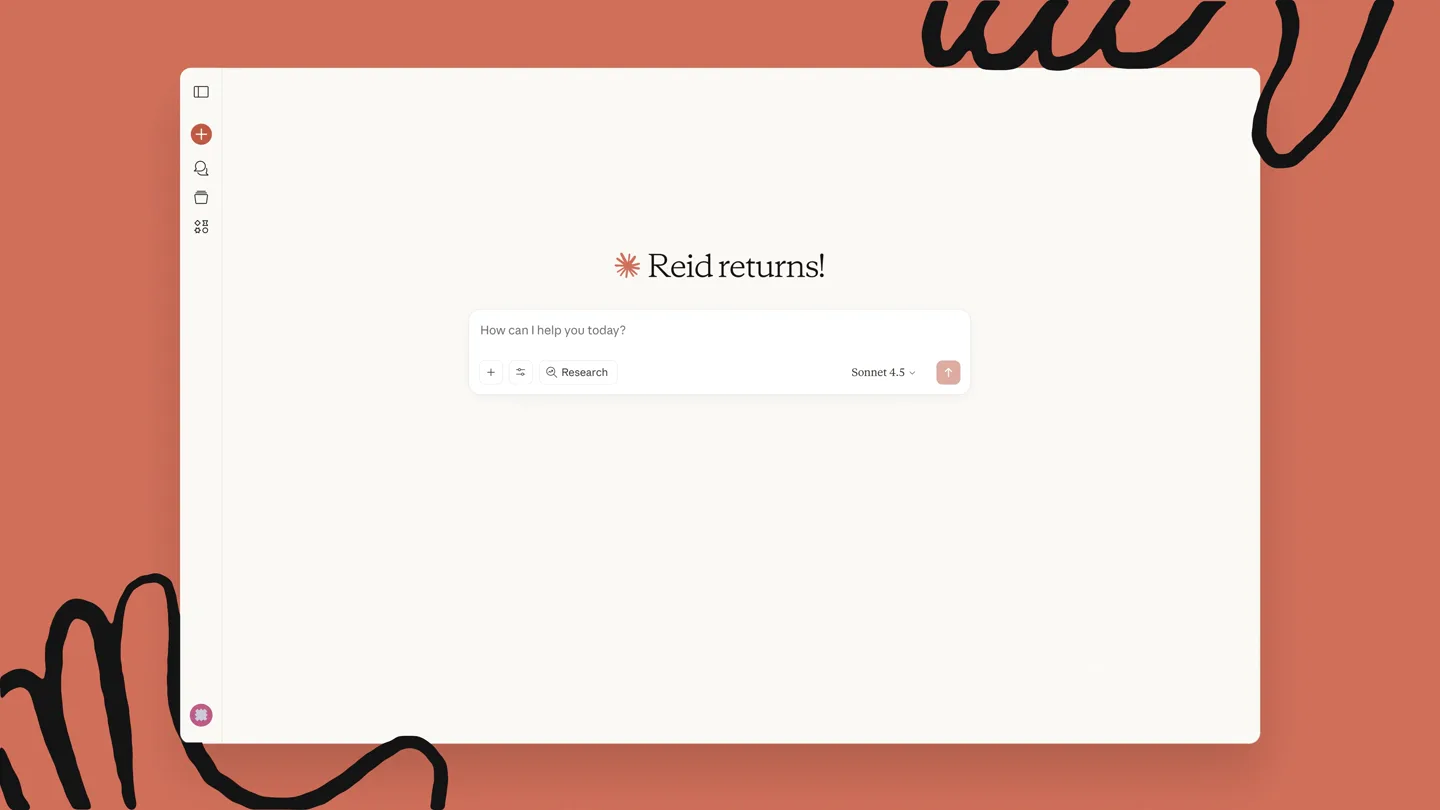
- Reid returns! How can I help you today? Research Sonnet 4.5
- Camera
- Static overhead shot of a clean UI, with a mouse cursor interacting with elements.
- Motion
- UI element reveals, cursor interaction, and text typing animations.
Product Reveal
Seamless Information Retrieval
“(No spoken dialogue — Electronic score maintains rhythm, subtle sound effects for UI interactions.)”
- On screen
- Search my emails and messages, calendar, and documents to help me prepare for our renewal meeting with Acme Co tomorrow. I need to know what we've discussed recently, any open action items, and details on our latest proposal. I'll help you prepare for your Acme Co renewal meeting. Let me search through to find relevant information.
- Camera
- Close-up on the chat interface, focusing on the user's query and Claude's response.
- Motion
- Text typing animation, dynamic content generation, and subtle UI transitions.
Feature Teaser
Deep Dive into Microsoft 365 Data
“(No spoken dialogue — Score intensifies with rhythmic 808s and high-energy transitions, sub-bass drops.)”
- On screen
- Outlook email search OneDrive search Outlook calendar search Chat message search 4 steps I've pulled together everything from your recent emails, calendar, Teams chats, and documents. Here's what you need to know: Acme Co Renewal Meeting - Strategic Synthesis Account Overview & Current State Acme Co is a mid-cap public financial services company (market cap ~$8.2B) that's been our client for 18 months. Current contract is $450K annually across marketing automation and analytics platforms, set to expire November 15th. Based on recent communications, they're evaluating a 3-year renewal with expansion potential up to $1.2M annually. Key stakeholders engaged: Sarah Chen, CMO (primary champion, joined 4 months ago) Michael Torres, VP of Digital Marketing (day-to-day contact, strong advocate) David Kim, CFO (budget approver, more conservative, focused on ROI metrics) Recent Business Context & Strategic Priorities Q3 Earnings (released Sept 28): Acme beat expectations with 12% YoY revenue growth, driven primarily by their new "Acme Flex" digital banking product launched in July. However, customer acquisition costs increased 23%, which CFO Kim flagged as a key concern for Q4. They're under pressure to improve marketing efficiency while scaling customer acquisition. Major Strategic Initiatives: 1. Acme Flex Expansion - Their flagship digital banking app targeting millennials/Gen Z. They announced plans to invest $50M in marketing for 2026 to capture 2% market
- Camera
- Dynamic zoom and pan across the generated report, highlighting key sections.
- Motion
- Rapid text reveals, scrolling content, and animated progress indicators.
Call to Action
Claude: Your AI Agent for Microsoft 365
“(No spoken dialogue — Score reaches a crescendo with a final sub-bass impact, then fades out.)”
- On screen
- Claude
- Camera
- Zoom out to reveal the Anthropic logo and Claude branding.
- Motion
- Logo animation, subtle glow effects, and a clean, impactful final reveal.
Motion design primitives
Synthesizable in Remotion · key components of the ai-agent-workspace-integration template.
UITypingReveal
Text appears character by character within a UI input field or chat bubble, simulating real-time typing. A blinking cursor often accompanies the text.
+ Code construction recipe
Utilize Remotion's 'Sequence' and 'spring' for character-by-character opacity and position animation. Implement a 'loop' for the blinking cursor using 'interpolate' and 'useCurrentFrame'.
DynamicContentScroll
Long-form text content or lists scroll smoothly into view, often with a slight easing effect, as if being generated or revealed in real-time.
+ Code construction recipe
Employ 'interpolate' for vertical translation (Y-axis) of content blocks. Use 'spring' for a natural, bouncy scroll effect. Masking techniques can be used to reveal content from the bottom up.
IconToggleTransition
UI toggle switches or icons animate smoothly between states (e.g., off to on), often accompanied by a subtle color change or scale effect.
+ Code construction recipe
Use 'spring' for the position and scale of the toggle element. 'interpolateColor' can be used for smooth color transitions between states. SVG path morphing could be used for more complex icon transformations.
Style DNA & aesthetic system
Visual aesthetic
Typography
Motion
Special effects
Pacing & rhythm
Conceptual story rhythm
- 1
The Setup
Purpose. Introduce the user interface and the initial interaction with Claude, setting the stage for the problem.
Execution. A clean UI appears, a cursor navigates to 'Add connectors', and 'Microsoft 365' is enabled.
- 2
The Query
Purpose. Demonstrate the user's need for information and Claude's ability to understand complex requests.
Execution. A detailed prompt is typed into Claude, followed by Claude's confirmation of understanding.
- 3
The Process
Purpose. Illustrate Claude's internal workings, showing its integration with various Microsoft 365 services.
Execution. Animated search bars for Outlook, OneDrive, and Teams appear, followed by a '4 steps' progress indicator.
- 4
The Solution
Purpose. Showcase the comprehensive, tailored response generated by Claude, solving the user's problem.
Execution. A detailed, well-structured report on the 'Acme Co Renewal Meeting' is generated and displayed.
Remix in Animatiq Studio
Master remix prompt · agent-ready
Sample remix
Objective
A user needs to prepare for a 'Project Alpha Kickoff' meeting and asks Synapse AI to summarize relevant information from their Google Workspace.How the recipe adapts
The video would open with a Synapse AI chat interface, similar to Claude's. The user would type a query about 'Project Alpha Kickoff'. Synapse AI would then show animated search bars for Gmail, Google Drive, Google Calendar, and Google Meet, followed by a '5 steps' progress indicator. Finally, a detailed report summarizing emails, documents, and calendar events related to Project Alpha would be generated and displayed, all within the established clean UI and warm color palette. The audio would mirror the original's dynamic electronic score.Remix blueprint · ai-agent-workspace-integration
Scene durations (4 scenes, 39s)
Key Remotion components
Related AI Agents Product Launches
Explore all AI Agents launches →
To ensure that artificial general intelligence benefits all of humanity

Gopuff introduces Go, an AI shopping assistant built with SpaceXAI: say what you need and the order is placed.

Iliad (Troy) trailer made by Grok Imagine 1.5, which was just released