
Coin Bureau · Launch Video Breakdown: Hook, Pacing & Motion Design
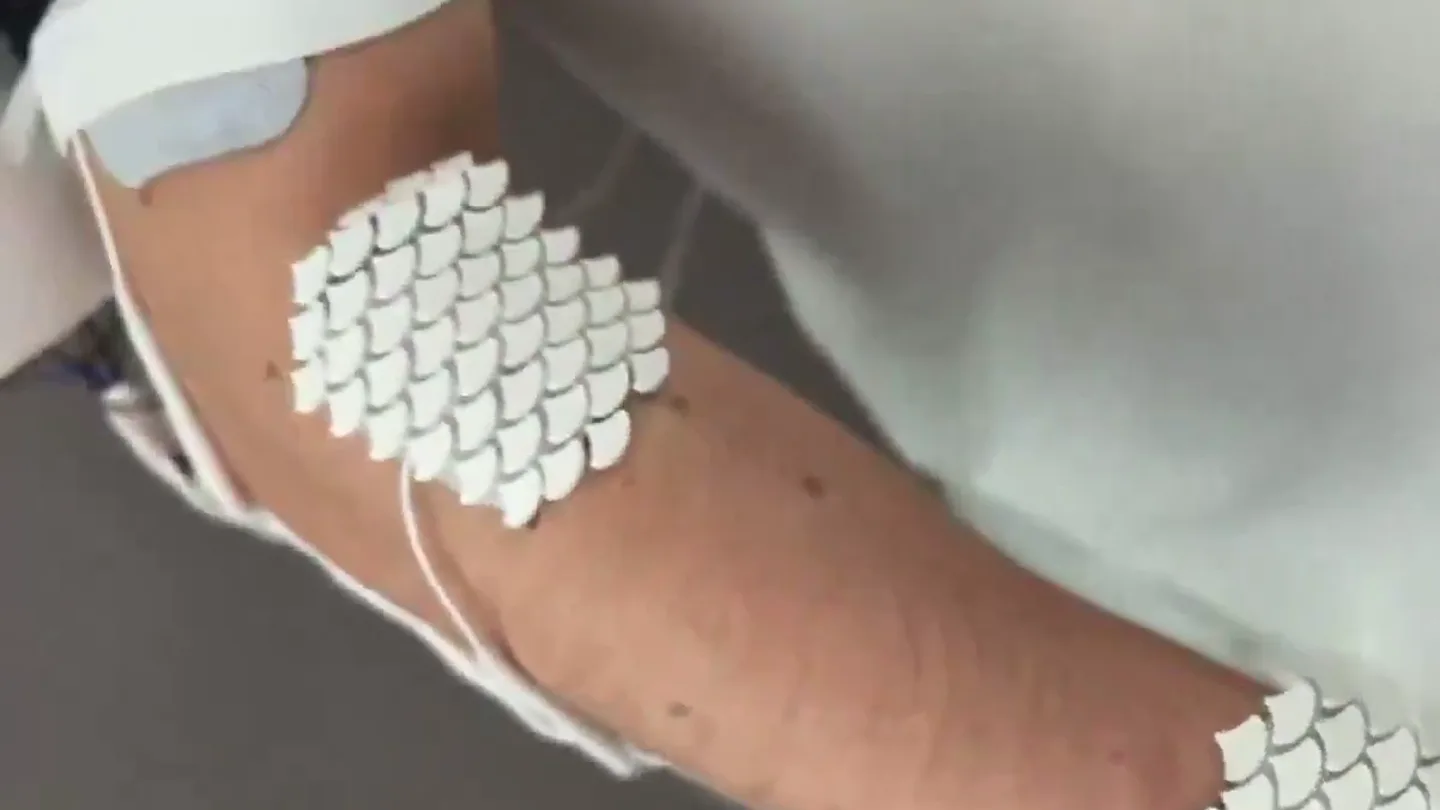
CLAUDE CAN NOW CONTROL THE HUMAN BODY MIT students built a device that lets Claude control your hand through small electric pulses. You speak a task, a camera sees what’s in front of you, and your…
Scene-by-scene timeline & spoken transcript
The Hook
AI Hand Control Introduction
“Hello AI. How does it feel to have a body?”
- On screen
- Hello AI AI moves wrist to say hello How does it feel to have a body? AI moves fingers for “OK” gesture
- Camera
- Medium close-up on a hand wearing a device, then a medium shot of a man interacting with the device. Camera is static.
- Motion
- Direct demonstration, subtle hand gestures, on-screen text overlays for context.
Product Reveal
Defining Human Operator & Skill Transfer
“(No spoken dialogue — The music features sustained, evolving synth pads, deep sub-bass drones, and subtle, high-frequency synth arpeggios. The overall mood is atmospheric and slightly eerie, with a consistent, slow tempo.)”
- On screen
- Human Operator is a human augmentation tool that allows AI to briefly take control of your body to help you learn or do things you cannot do. Re-enactment
- Camera
- Static shot of text on a black background, followed by various close-ups and medium shots of hands playing piano and drawing. Camera angles vary to show different perspectives of the action.
- Motion
- Text reveal, quick cuts between different skill demonstrations (piano, drawing) to show versatility, subtle camera movements to follow the action.
Feature Teaser
Future Use Case: AI Bartender
“Can you make me a cocktail? Hey AI, can you make me a rum and coke?”
- On screen
- Imagined future use case
- Camera
- Medium shot of two people in a kitchen, then close-ups of hands mixing a drink. Camera is mostly static, with slight adjustments to frame the action.
- Motion
- Scenario-based demonstration, close-up product interaction shots, on-screen text for context.
Call to Action
Product Name Reveal & Brand Identity
“(No spoken dialogue — The music features sustained, evolving synth pads, deep sub-bass drones, and subtle, high-frequency synth arpeggios. The overall mood is atmospheric and slightly eerie, with a consistent, slow tempo.)”
- On screen
- human operator
- Camera
- Static shot of the product name on a black background.
- Motion
- Simple text reveal, clean and direct branding.
Motion design primitives
Synthesizable in Remotion · key components of the ai-human-operator-style template.
ContextualTextOverlay
Short, descriptive text appears on screen, often at the bottom, providing context or identifying actions being performed by the AI-controlled hand.
+ Code construction recipe
Use a <Text> component with a simple `fadeIn` animation using `interpolate` for opacity, positioned absolutely at the bottom of the screen. Control visibility with `spring` for a subtle bounce effect on appearance.
SkillDemonstrationCut
Rapid, sequential cuts between different close-up shots of the AI-controlled hand performing various complex tasks like playing piano or drawing.
+ Code construction recipe
Implement a sequence of <Video> components, each playing a short clip, with `durationInFrames` set to create quick transitions. No explicit animation on the video itself, relying on fast scene changes.
ProductTitleReveal
The product name appears centrally on a black background, often in a clean, sans-serif typeface.
+ Code construction recipe
Utilize a <Text> component for the product name. Animate its `opacity` from 0 to 1 using `interpolate` over a short duration, possibly with a slight `scale` animation for emphasis, centered on a black <AbsoluteFill>.
Style DNA & aesthetic system
Visual aesthetic
Typography
Motion
Special effects
Pacing & rhythm
Conceptual story rhythm
- 1
The AI Awakens
Purpose. Introduce the core concept: an AI controlling a human body, immediately showcasing its capability.
Execution. Close-up of the device on a hand, followed by the user speaking to the AI and the hand responding with gestures.
- 2
Defining the Breakthrough
Purpose. Explain what the 'Human Operator' is and its potential for skill transfer and augmentation.
Execution. On-screen text defining the product, intercut with rapid demonstrations of the AI playing piano and drawing.
- 3
Future Possibilities
Purpose. Illustrate a practical, relatable, and slightly whimsical future application of the technology.
Execution. A staged scenario in a kitchen where the AI-controlled hand mixes a cocktail, with dialogue between two individuals.
- 4
Brand Identity
Purpose. Conclude with a clear, memorable presentation of the product's name.
Execution. The product name 'human operator' displayed prominently on a black screen.
Remix in Animatiq Studio
Master remix prompt · agent-ready
Sample remix
Objective
Launch a new smart gardening system that uses AI to automate plant care.How the recipe adapts
The video would open with a close-up of the smart gardening device interacting with a plant, perhaps adjusting water or light. On-screen text would introduce the 'AI Gardener'. The 'SkillDemonstrationCut' primitive would show rapid cuts of the system performing various tasks like precise watering, nutrient dispensing, and pest detection. The 'ContextualTextOverlay' would explain features like 'Automated pH balancing' or 'Optimal light spectrum adjustment'. The 'ProductTitleReveal' would display 'EcoGrow AI' at the end, maintaining the clean, sans-serif style on a dark background. The atmospheric music would evoke growth and innovation.Remix blueprint · ai-human-operator-style
Scene durations (4 scenes, 48s)
Key Remotion components
Related AI Agents Product Launches
Explore all AI Agents launches →
To ensure that artificial general intelligence benefits all of humanity

Gopuff introduces Go, an AI shopping assistant built with SpaceXAI: say what you need and the order is placed.

Iliad (Troy) trailer made by Grok Imagine 1.5, which was just released