
clawdhouse · Launch Video Breakdown: Hook, Pacing & Motion Design
A Claude Code mod: the mascot reads and codes with you, and supports 40 moods.
Scene-by-scene timeline & spoken transcript
The Hook
Introducing Clawd: Your Pixel AI Companion
“(No spoken dialogue — Retro chiptune melody with rapid synth riser at [0:02] and sub-bass drop/impact at [0:03].)”
- On screen
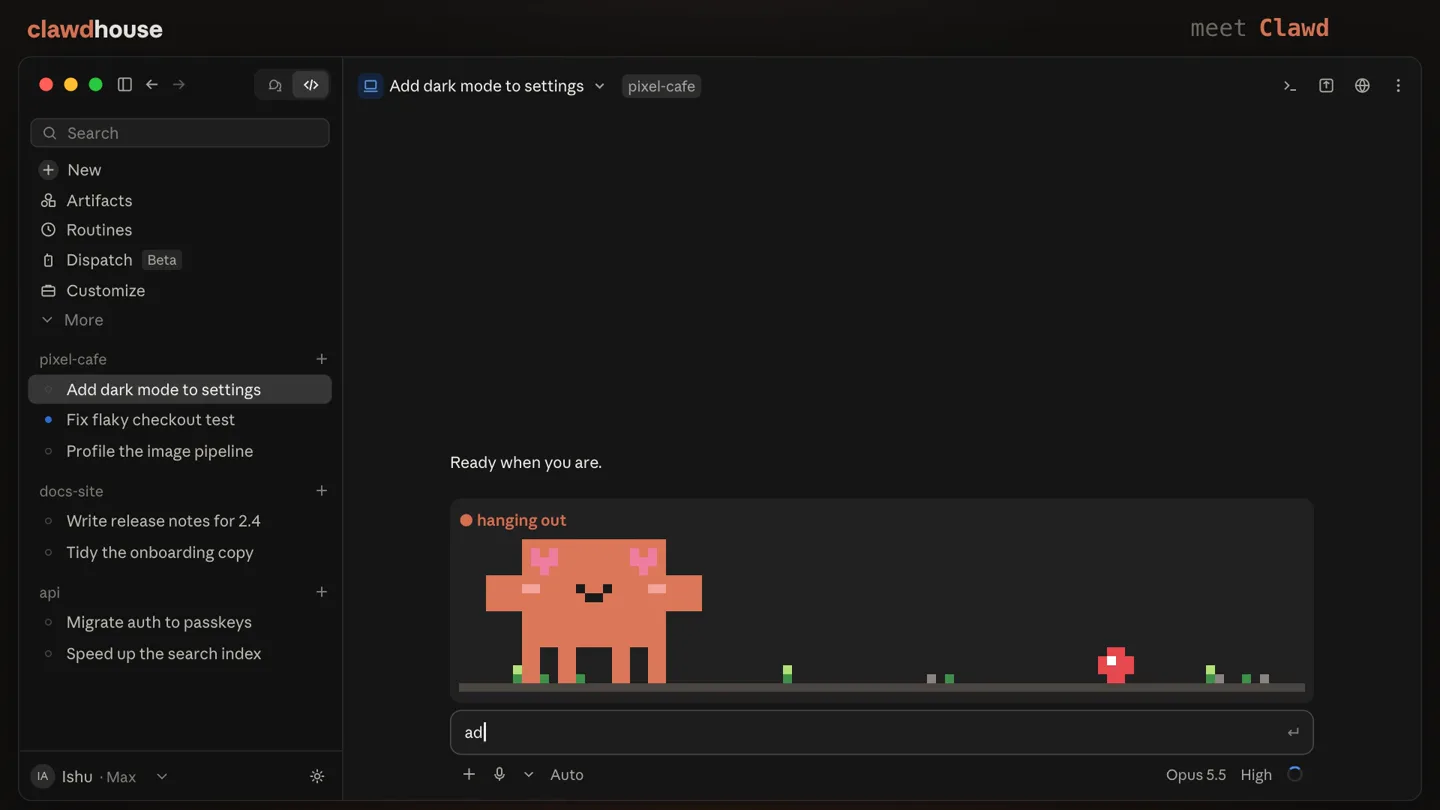
- clawdhouse A pixel Clawd who acts out what Claude is doing meet Clawd Ready when you are. hanging out add a dark mode toggle to settings
- Camera
- Static wide shot of a developer IDE, focusing on the integrated pixel art character and command line.
- Motion
- Subtle character idle animation, text typing animation in the command line, and a quick title card fade-in.
Product Reveal
Clawd's Dynamic Workflow & Moods
“(No spoken dialogue — Sustained retro chiptune melody with driving sub-bass and 808-style percussion.)”
- On screen
- clawdhouse /clawd pondering 04 / 40 add a dark mode toggle to settings 22s - 1.1k tokens - Thinking... deep in thought /clawd planning 08 / 40 Read a file, used 2 tools > Updating the to-do list > 46s - 2.4k tokens - Running tools... planning the to-do list /clawd writing 11 / 40 Ran 2 commands, read a file, used 3 tools > Editing settings.tsx 1m 4s - 3.3k tokens - Running tools... pixel-cafe dark-mode +24 -3 Create PR editing pixel-cafe/settings.tsx /clawd snapping 15 / 40 Ran 4 commands, read a file, edited 2 files, used 3 tools > Screenshotting the settings page > 1m 28s - 4.5k tokens - Running tools... taking a screenshot say cheese /clawd plugging 18 / 40 Ran 4 commands, read a file, edited 2 files, used 6 tools > Creating a Linear issue > 1m 46s - 5.5k tokens - Running tools... using a tool create_issue /clawd mailing 21 / 40 Ran 5 commands, read a file, edited 2 files, used 8 tools > Messaging design-review > 2m 4s - 6.4k tokens - Running tools... sending a message to design-review /clawd sad 25 / 40 Ran 7 commands, read a file, used 9 tools > Two snapshot tests still expect the light palette. Interrupted by user stopped Interrupted /clawd benchmarking 28 / 40 Ran 7 commands, read a file, used 9 tools > Two snapshot tests still expect the light palette. Interrupted by user Ran 2 commands > Benchmarking the theme switch > 2m 46s - 8.6k tokens - Running tools... timing it hyperfine node scripts/bench.js /clawd timing 32 / 40 Ran 7 commands, read a file, used 9 tools > Two snapshot tests still expect the light palette. Interrupted by user Ran 4 commands > Waiting for the dev server > 3m 10s - 9.8k tokens - Running tools... waiting on a timer sleep 30 /clawd talking 35 / 40 Ran 7 commands, read a file, used 9 tools > Two snapshot tests still expect the light palette. Interrupted by user Ran 5 commands, edited a file > Dark mode now follows the system setting, with a toggle in Settings > App 3m 28s - 10.7k tokens writing a reply /clawd happy 39 / 40 Ran 7 commands, read a file, used 9 tools > Two snapshot tests still expect the light palette. Interrupted by user Ran 5 commands, edited a file > Dark mode now follows the system setting, with a toggle in Settings > Appearance. Ran 3 commands > Done: Dark mode is live on the dark-mode branch. done! took 1m 12s
- Camera
- Static wide shot of the IDE, with the pixel character and command line as the primary focus.
- Motion
- Rapid sequence of text typing, pixel character animations (mood changes, tool interactions), and command output updates. Each action is synchronized with the chiptune rhythm.
Feature Teaser
Clawd's Reaction System
“(No spoken dialogue — Sub-bass drop/impact at [0:28] transitions to a more sustained synth pad, maintaining the chiptune aesthetic.)”
- On screen
- reaction found 02 / 12 reaction pass 05 / 12 running tests npm test reaction denied 09 / 12 Allow Claude to run this command? $ npm publish --tag next Allow once Always allow for this project Deny needs your OK Bash needs your OK reaction streak 12 / 12 running tests npm test
- Camera
- Static wide shot of the IDE, highlighting the 'reaction' counter and character expressions.
- Motion
- Quick cuts between different 'reaction' states (found, pass, denied, streak) with corresponding pixel character animations and on-screen text updates.
Call to Action
Get Clawdhouse Now
“(No spoken dialogue — Final sub-bass drop/impact at [0:32] followed by a prolonged synth decay, concluding the track.)”
- On screen
- all done! clawdhouse Get Clawd for your Claude Code /plugin_install clawdhouse
- Camera
- Static wide shot of the IDE, with a central overlay for the call to action.
- Motion
- A final pixel burst animation from the character, followed by a prominent call-to-action overlay with a clear installation command.
Motion design primitives
Synthesizable in Remotion · key components of the pixel-dev-companion-launch template.
PixelCharacterMood
A pixel art character animates with distinct expressions and actions (e.g., thinking, writing, sad, happy) corresponding to on-screen text and events.
+ Code construction recipe
Use a sprite sheet animation for the pixel character, controlled by a state machine in React. Interpolate between different sprite frames based on `AbsoluteFill` and `Sequence` components. Implement conditional rendering for accessories (e.g., clipboard, camera) based on the character's current action.
TerminalTypewriterEffect
Text appears character-by-character in a terminal-like interface, simulating real-time typing, often accompanied by a blinking cursor.
+ Code construction recipe
Utilize `spring` or `interpolate` to reveal text characters sequentially. A `Loop` component can manage the blinking cursor animation. Ensure text content is passed as a prop, allowing for dynamic command and output display.
DynamicMetricOverlay
Small, dynamic text elements (e.g., token counts, time elapsed, code changes) appear and update rapidly, often with subtle fade or slide animations.
+ Code construction recipe
Employ `spring` or `interpolate` for position and opacity changes when new metrics appear or update. Use `AbsoluteFill` for precise positioning within the UI. Data can be passed as props and updated via `useCurrentFrame` to synchronize with the timeline.
Style DNA & aesthetic system
Visual aesthetic
Typography
Motion
Special effects
Pacing & rhythm
Conceptual story rhythm
- 1
Introduction to Clawd
Purpose. Introduce the product and its core concept: an AI mascot that interacts with code.
Execution. Initial screen showing the IDE with the Clawd character, followed by a quick title card and the first interaction.
- 2
Demonstrating Workflow Integration
Purpose. Showcase Clawd's practical utility by illustrating various coding tasks and its corresponding reactions.
Execution. A rapid montage of Clawd performing actions like planning, writing, snapping screenshots, mailing, and handling interruptions, each with a unique pixel animation.
- 3
Highlighting Emotional Intelligence
Purpose. Emphasize Clawd's ability to react to different scenarios and user inputs, showcasing its 'moods' and interactive nature.
Execution. Quick cuts demonstrating 'reaction found,' 'pass,' 'denied,' and 'streak' states, with Clawd's expressions changing accordingly.
- 4
Call to Action & Resolution
Purpose. Conclude the demonstration with a clear instruction on how to acquire the product.
Execution. A final 'all done!' screen with a pixel burst, followed by a prominent overlay displaying the product name and installation command.
Remix in Animatiq Studio
Master remix prompt · agent-ready
Sample remix
Objective
A new CLI tool called 'GitGnome' that gamifies Git commands and provides real-time feedback on repository health.How the recipe adapts
The pixel character would be a gnome, animating with different tools (pickaxe for 'commit,' shovel for 'push,' magnifying glass for 'log'). Terminal typing would show Git commands. Dynamic metric overlays would display 'repo health score,' 'commit streak,' and 'pending merges.' The chiptune audio would be adapted to have more 'adventure game' elements. The call to action would be '/install gitgnome'.Remix blueprint · pixel-dev-companion-launch
Scene durations (4 scenes, 36.6s)
Key Remotion components
Related Developer Tools Product Launches
Explore all Developer Tools launches →
Agentic CLI for coding, building apps, and automating workflows.

New in Claude Code: your sessions can now message each other. Tell Claude to send a summary (not your history or files), and the other session picks it up mid-task.

Meet Qwen3.8-Max: A New Bar for Coding and Cowork. https://t.co/mJaA8vr6xT