
Cline · Launch Video Breakdown: Hook, Pacing & Motion Design
Cline Desktop is a native interface for working with open-weight models, including ClinePass and free models like DeepSeek-V4.1-Flash.
Scene-by-scene timeline & spoken transcript
The Hook
Product Title & Logo Reveal
“(No spoken dialogue — Ambient electronic score with pizzicato synths and sub-bass. Modern, energetic feel.)”
- On screen
- Introducing Cline Desktop App open source app for open-weight models Cline
- Camera
- Static wide shot, then a subtle zoom into the Cline logo.
- Motion
- Text fade-in, subtle logo scale animation with a slight blur effect, followed by a quick cut to the UI.
Product Reveal
Core Interaction & Model Selection
“(No spoken dialogue — Ambient electronic score with driving rhythmic pulse. Consistent 808-style kick drum.)”
- On screen
- workspace Ask to make changes, @mention files, reference #PRs, or run /commands. Cline Usage-Billing Claude Fable Latest Low plant-care-app main Search branches Loading. feat/care-calendar Use the provider & model you want ClinePass Kimi K3 Search models GLM-5.2 Top open weights model DeepSeek V4 Pro Frontier reasoning and coding with 1M context window GLM-5.3-Flash Latest natively multimodal model in the GLM-5 series Kimi K3 Leading open weights model (reliability might be unst... GLM-5.3 Z-AI's new top open-weights model Best open-weights model selection from Cline Add a calendar ar view for upcoming DeepSeek DeepSeek V4 Pro Low Thinking... Add a calendar view for upcoming plant care Agent is working... submit to queue another message
- Camera
- Close-up on the application UI, panning and zooming to highlight specific interactive elements.
- Motion
- Rapid UI element highlighting (mouse clicks, dropdowns), text typing animation, smooth camera pans, and quick cuts between UI states.
Feature Teaser
Advanced Capabilities Showcase
“(No spoken dialogue — Ambient electronic score with building energy. High-energy audio riser and sweep at 0:23.)”
- On screen
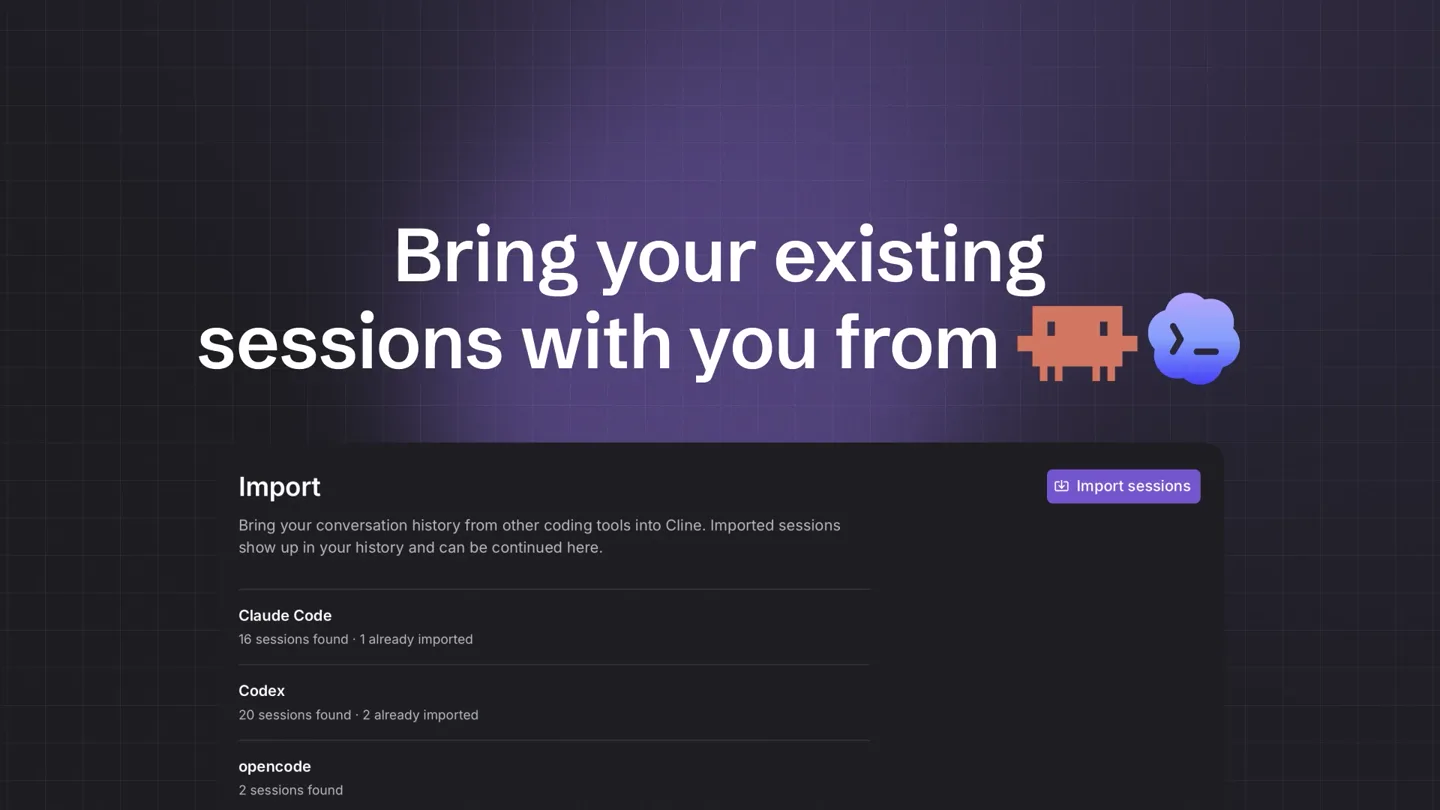
- Open source from extension to CLI to desktop. function formatDate(d) { return new Date(d).toLocaleDateString('en-US', { weekday: 'long', month: 'long', day: 'numeric', }); } Now the calendar rendering logic. I'll add it after cal.html, and hook into render(). Edited file app.js +4 _Documents/Projects/plant-care-app/app.js function render(state) { grid.hidden = view !== 'grid'; calendar.hidden = view !== 'calendar'; if (view === 'grid') { grid.innerHTML = renderGrid(state.plants); } if (view === 'calendar') { calendar.innerHTML = renderCalendar(state.plants); } } _Documents/Projects/plant-care-app/app.js if (plants.length > 0 && visible.length === 0) { if (view === 'grid' && plants.length > 0 && visible.length === 0) { grid.innerHTML = renderGrid(plants); } } Thinking... Agent is working... submit to queue another message Bring your existing sessions with you from Import Bring your conversation history from other coding tools into Cline. Imported sessions show up in your history and can be continued here. import sessions Claude Code 16 sessions found - 1 already imported Codex 20 sessions found - 2 already imported Schedule work to run on its own Schedule cline schedule + New Schedule Run agents on cron schedules for recurring automations like daily summaries and code reviews. AI Developer News Brief yolo Daily 9:00 AM Asia/Calcutta ID: sched_d1757c5e-3bc7-419f-8b2e-d117d7f5f397 Prompt: Summarize the top AI developer news from the last 24 hours, with the 5 most important updates and links to the original sources. Model: cline/anthropic/claude-fable-latest Last run: - Next run: 12/9/2026, 9:00:00 AM Tags: AI-NEWS SUGGESTED Extend what Cline can do Customize Marketplace Inspect built-in tools and tools contributed by plugins. Explore the marketplace for more options. Tools 10 Plugins 2 Skills 5 MCP 2 Hooks 0 Search tools Builtin Tools 10 Disable all ask_question Ask the user a single clarifying question with 2-5 selectable options. Turn your voice into prompts Voice input Speak instead of typing: the microphone in chat transcribes your voice with the model chosen here. Live models show text as you speak; others transcribe when the recording stops. Enable voice input Turns on the microphone button in chat. A default model is preselected - adjust it below. Provider
- Camera
- Dynamic cuts between full UI views and close-ups on specific features, with text overlays appearing and disappearing.
- Motion
- Fast-paced cuts, text reveals with subtle scaling, and quick transitions between different feature demonstrations. Sub-bass drop/impact at 0:24.
Call to Action
Final Product Reveal & Download
“(No spoken dialogue — Ambient electronic score with a driving, rhythmic pulse. The track culminates in a sub-bass drop/impact at 0:24.)”
- On screen
- Cline Desktop Cline Desktop App macOS & Windows (Beta) cline.bot/desktop
- Camera
- Static wide shot of the logo, then a subtle zoom out to reveal the full product name and call to action.
- Motion
- Logo re-reveal with a subtle glow, text fade-in for platform availability and URL, maintaining a clean, modern aesthetic.
Motion design primitives
Synthesizable in Remotion · key components of the developer-tool-fast-cut-launch template.
DynamicUITransition
Seamlessly transitions between different sections of a desktop application UI, often involving quick pans, zooms, and highlighting of interactive elements.
+ Code construction recipe
Utilize Remotion's <AbsoluteFill> and <Sequence> components. Implement `interpolate` for camera position (x, y, scale) and opacity changes. Use `spring` for button presses and dropdown animations to add a tactile feel. Employ `<Blur>` and `<Fade>` components for smooth scene changes.
TextRevealScale
Text appears on screen with a subtle scale-up and fade-in effect, often accompanied by a slight blur that resolves as the text becomes fully visible.
+ Code construction recipe
Wrap text in a `<div>` with `opacity` and `transform: scale()` properties. Animate these properties using `interpolate` or `spring` from `0` to `1` (opacity) and `0.9` to `1` (scale). Apply a temporary `filter: blur()` that animates to `0` for the reveal.
IconPulseGlow
A central icon or logo subtly pulses with a glow effect, often used for product branding or a final call to action.
+ Code construction recipe
Use an SVG icon. Animate its `filter: drop-shadow()` or `box-shadow` property to create a pulsing glow effect. Combine with a subtle `transform: scale()` animation using `spring` with a low damping ratio for a gentle, continuous pulse.
Style DNA & aesthetic system
Visual aesthetic
Typography
Motion
Special effects
Pacing & rhythm
Conceptual story rhythm
- 1
Introduction & Brand Identity
Purpose. Immediately establish the product name and brand, setting a modern, tech-forward tone.
Execution. Title card with product name, followed by a clean logo reveal with subtle animation.
- 2
Core Functionality Demonstration
Purpose. Showcase the primary user interaction and key value proposition (model selection, task execution).
Execution. Rapid-fire UI walkthrough, highlighting input fields, dropdowns, and real-time processing.
- 3
Feature Expansion & Versatility
Purpose. Illustrate the breadth of capabilities, from code generation to scheduling and extensibility.
Execution. Quick cuts between different feature screens, with concise text overlays explaining each benefit.
- 4
Call to Action & Availability
Purpose. Reinforce the brand and provide clear instructions for accessing the product.
Execution. Re-present the logo and product name, followed by platform availability and a download URL.
Remix in Animatiq Studio
Master remix prompt · agent-ready
Sample remix
Objective
Launch a new AI-powered code refactoring tool called 'SyntaxGenius'.How the recipe adapts
The DynamicUITransition primitive would be adapted to showcase code refactoring suggestions appearing in real-time within an IDE, with quick zooms on highlighted code blocks. The TextRevealScale primitive would introduce feature headlines like 'Intelligent Code Suggestions' and 'Multi-language Support'. The IconPulseGlow primitive would be used for the SyntaxGenius logo reveal at the end, emphasizing its AI core. The dark-mode aesthetic and grid overlay would be maintained, with the color palette adjusted to a deep blue and electric green to reflect the AI theme. The fast-paced editing and rhythmic electronic score would drive the narrative, demonstrating the tool's efficiency.Remix blueprint · developer-tool-fast-cut-launch
Scene durations (4 scenes, 32.6s)
Key Remotion components
Related Developer Tools Product Launches
Explore all Developer Tools launches →
Agentic CLI for coding, building apps, and automating workflows.

New in Claude Code: your sessions can now message each other. Tell Claude to send a summary (not your history or files), and the other session picks it up mid-task.

Meet Qwen3.8-Max: A New Bar for Coding and Cowork. https://t.co/mJaA8vr6xT