
OpenAI · Launch Video Breakdown: Hook, Pacing & Motion Design
Codex CLI now opens as a full-screen terminal, with clearer output and a way to manage parallel work from the command line.
Scene-by-scene timeline & spoken transcript
The Hook
Terminal Interface Reveal
“(No spoken dialogue — Silent video with ambient visual hum.)”
- On screen
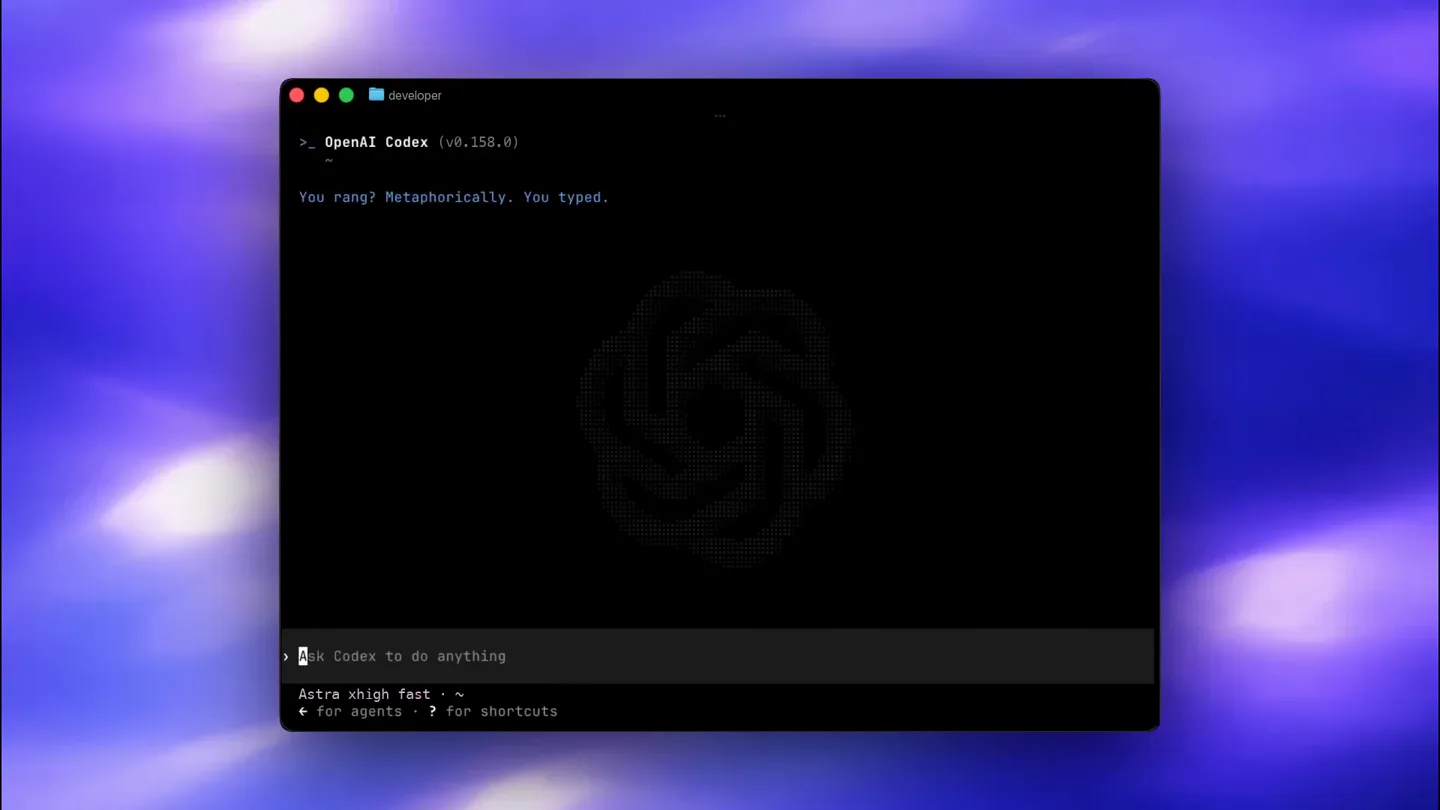
- developer >_ OpenAI Codex (v0.158.0) You rang? Metaphorically. You typed. >_ Ask Codex to do anything Astra xhigh fast ~
- Camera
- Static wide shot of a full-screen terminal window, slightly blurred background.
- Motion
- Subtle background blur, static foreground UI elements.
Product Reveal
Codex Logo Morph
“(No spoken dialogue — Silent video with ambient visual hum.)”
- On screen
- (No on-screen text)
- Camera
- Close-up on the OpenAI Codex logo, centered.
- Motion
- Dot matrix animation, morphing between abstract shapes and the OpenAI logo.
Feature Teaser
Iconic Shape Transitions
“(No spoken dialogue — Silent video with ambient visual hum.)”
- On screen
- (No on-screen text)
- Camera
- Static, centered view of the morphing dot matrix icon.
- Motion
- Sequential morphing of dot matrix patterns, creating a sense of transformation and capability.
Call to Action
Return to Terminal
“(No spoken dialogue — Silent video with ambient visual hum.)”
- On screen
- developer >_ OpenAI Codex (v0.158.0) You rang? Metaphorically. You typed. >_ Ask Codex to do anything Astra xhigh fast ~
- Camera
- Zoom out to reveal the full terminal window again, matching the opening shot.
- Motion
- Reverse animation of the dot matrix morph, transitioning back to the terminal UI.
Motion design primitives
Synthesizable in Remotion · key components of the developer-cli-launch-template template.
DotMatrixMorph
A grid of dots dynamically changes density and position to form different abstract shapes and logos, creating a fluid, digital transformation effect.
+ Code construction recipe
Use Remotion's <Canvas> component with WebGL shaders or SVG filters. Interpolate dot positions and opacities based on a target shape's pixel data. Implement a spring animation for smooth transitions between shapes.
TerminalUIReveal
A full-screen terminal window appears with a subtle background blur, displaying code-like text and a command prompt, emphasizing a developer-centric environment.
+ Code construction recipe
Layer a <AbsoluteFill> with a blurred background image. Overlay a <Text> component for terminal content, using a monospace font. Animate the terminal window's opacity and scale with a `spring()` function for a soft entrance.
DynamicTextTypewriter
Text appears character by character within the terminal, simulating real-time typing, enhancing the interactive feel of the command-line interface.
+ Code construction recipe
Utilize Remotion's `Sequence` and `interpolate` functions to reveal text characters sequentially. Apply a subtle `opacity` and `scale` animation for each character as it appears, mimicking a typewriter effect.
Style DNA & aesthetic system
Visual aesthetic
Typography
Motion
Special effects
Pacing & rhythm
Conceptual story rhythm
- 1
The Developer's Canvas
Purpose. Establish the core environment and target audience.
Execution. Opening shot of the full-screen terminal, setting a familiar scene for developers.
- 2
The Intelligent Core
Purpose. Introduce the AI's presence and capability.
Execution. Transition to the abstract, morphing OpenAI logo, symbolizing the underlying intelligence.
- 3
Transformation & Power
Purpose. Showcase the AI's dynamic and adaptable nature.
Execution. The logo morphs through various abstract shapes, hinting at diverse functionalities.
- 4
Back to Work
Purpose. Reaffirm the product's practical application within the developer workflow.
Execution. Return to the terminal interface, implying seamless integration and readiness for use.
Remix in Animatiq Studio
Master remix prompt · agent-ready
Sample remix
Objective
Launch a new command-line interface for a cloud infrastructure management tool called 'CloudForge CLI'.How the recipe adapts
The DotMatrixMorph primitive will animate the CloudForge logo, transitioning from abstract cloud shapes to the final logo. The TerminalUIReveal will showcase the CloudForge CLI, with custom commands and output. The DynamicTextTypewriter will simulate a user interacting with CloudForge commands, demonstrating its ease of use and power.Remix blueprint · developer-cli-launch-template
Scene durations (4 scenes, 10.5s)
Key Remotion components
Related Developer Tools Product Launches
Explore all Developer Tools launches →
Agentic CLI for coding, building apps, and automating workflows.

New in Claude Code: your sessions can now message each other. Tell Claude to send a summary (not your history or files), and the other session picks it up mid-task.

Meet Qwen3.8-Max: A New Bar for Coding and Cowork. https://t.co/mJaA8vr6xT