
Riley Brown · Launch Video Breakdown: Hook, Pacing & Motion Design
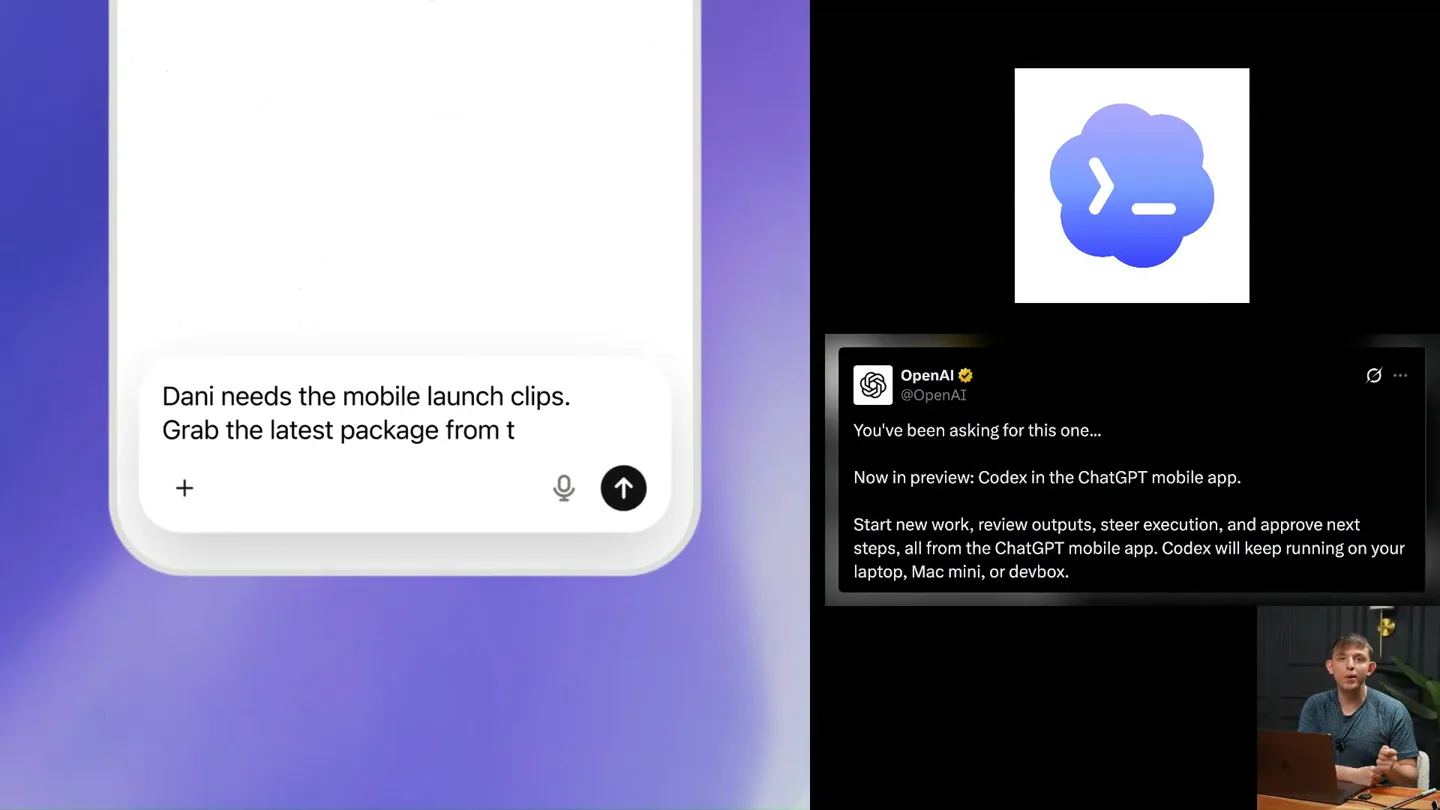
OpenAI released Codex Mobile App Directly on ChatGPT Here's everything you need to know: 1. How to set it up 2. How to fully vibecode from Codex Mobile 3. How to control your computer with Codex Mo…
Scene-by-scene timeline & spoken transcript
The Hook
Introducing Codex Mobile: Seamless Integration
“OpenAI released Codex Mobile App Directly on ChatGPT Here's everything you need to know: 1. How to set it up 2. How to fully vibecode from Codex Mobile 3. How to control your computer with Codex Mo…”
- On screen
- What should we work on? 5.5 Extra High Full access New chat Search Plugins Pinned To Do List 3 Pillar Create content vision one-pager Create company list spreadsheet Projects GenMedia Mini App New project 13 Paper Presentations Partnerships Content folder Chorus Comms New project 10 Brand Videos Remotion Chats Please make a spreadsheet of the differe... Build a reminders app please use chorus... Look up all the updates to codex remote... Add green intro version Create example docs Settings 9:41 Riley Brown Please make a spreadsheet of the... Mail The search is producing a solid set of direct sponsorship leads plus a few Google Groups digests. I'm deduping by actual transclient and reading the bodies for the shortlisted items so the spreadsheet can include names, sender emails, and what they asked for. Batch read email Batch read email Searched emails 'newer_than-3d-in-spa... I have the lead set now. I'm going to create an .xlsx with a summary tab and a detailed contact tab; duplicate follow-ups stay folded into one row per contact/thread, and Smooth Media group-digest leads are marked separately from direct inbox emails. Searched code for artifact/spreadsheet/run/i... Thinking Follow up 5.5 Extra High
- Camera
- Medium shot of presenter at desk, screen recording of desktop and mobile app side-by-side.
- Motion
- Split-screen display with live screen recording and presenter overlay. Text highlights and cursor movements guide attention.
Product Reveal
Setup and Core Functionality
“So let's get into it. First things first, how do you set it up? You need to restart Codex, update Codex, and update your phone app. Make sure you're signed in on the same account. Once you're in, you'll see the Codex interface on your mobile. You can organize chats by project, chronological list, or just chats first. You can ask it to do things like 'Please make a spreadsheet of the different leads' or 'Build a reminders app'. It's really powerful.”
- On screen
- Setting up for first time Restart Codex Update Codex Update Phone App OpenAI ChatGPT App by OpenAI OPEN make Sure Signed in on same account Codex Mac Chats Organize By project Chronological list Chats first Manage Cloud threads Archived chats Connections Search Chats Chat What it can do Documents Create and edit document artifacts Spreadsheets Create and edit spreadsheet files Presentations Create and edit presentations Browser Browse in app browser with Codex Chrome Plugins Full Permissions Cool Notifications Codex task finished Mobile Graphics Video Projects Remotion New project 13 Content Folder Chats Make a doc that says N Create company list spreadsheet Define grounding Add green intro version Create example docs Search Chats Chat 5.5 Extra High Full access
- Camera
- Close-up on screen recordings, occasionally cutting back to the presenter. Mobile app UI is prominently featured.
- Motion
- Zoom-ins on specific UI elements, animated text overlays highlighting key features, and simulated typing/interaction within the app.
Feature Teaser
Advanced Control and 'YOLO Mode'
“Now, what can it do? It can create documents, spreadsheets, presentations, and even browse the web. It has full permissions and cool notifications. You can ask it to do things like 'Make a pizza landing page' and it will run it locally. But what if you want to control your desktop app? That's where 'YOLO mode' comes in. If you don't YOLO, it doesn't work. You need to enable plugins like Vercel to deploy web apps and agents. This allows you to interact with your computer directly.”
- On screen
- brand-sponsorship-lead-research. Remote to control desktop app Shows Plugins not Skills Opens Docs (slowly) Good voice mode, Notifications Can't open local apps (unless) if don't yolo doesn't work Plugins Skills Make Codex work your way vercel Built by OpenAI Vercel Build and deploy web apps and agents Riley Brown What I make. I test new AI products, build real demos, and explain what is actually useful. The goal is a clear mental model and something you can copy into your own workflow. TEACH First-principles explanations for visual learners, with plain examples instead of jargon. BUILD Mini apps, Codex skills, automations, landing pages, diagrams, and working prototypes. PUBLISH Long-form videos, short-form clips, docs, scripts, and thumbnail assets. The operating loop. SEE THE SYSTEM MESSAGE ME Explain First-principles videos for visual learners. Build Mini apps, agent skills, and automations. Package Docs, diagrams, scripts, clips, and launch assets. Ship Turn confusing tools into workflow menu. trello-notes-app.vercel.app Trello Notes Sign in to save your board to Supabase. Email Password Sign in Demo login Create an account Full stack app 2. Hold Create an account for 3 seconds. It opens the Trello board immediately. I deployed it and verified the live long-press flow, mobile viewport, and zero console errors. This is a demo shortcut using local demo storage because the Supabase project still requires email confirmation for real accounts. Supabase anonymous demo auth is disabled on the project. Source checked: https://supabase.com/docs/guides/auth/auth -anonymous Not working just make it a button single tap make it fast Worked for 1m 56s Done. Use this link: https://trello-notes-app.vercel.app There's now a normal Demo login button. Single tap opens the board immediately. I verified it on the live site with no console errors. Ask for follow-up changes Annotating
- Camera
- Dynamic cuts between desktop and mobile views, with occasional full-screen overlays of explanatory text. Presenter remains visible in a corner.
- Motion
- Split-screen comparison, animated arrows and circles to highlight specific UI elements, and quick transitions between different app functionalities.
Call to Action
Unlocking AI Agents and Future Potential
“Hey, I'm at a party right now and I wanna show people a little photo album, right? I wanna show people an album. It's of all my recent photos in my downloads. So like, take the 50 most recent videos or images in the downloads, and I want you to make a little deployed photo album of this on YOLO mode, and I wanna be able to show it to them. So go into my downloads, find those images, put it in a little cool site, and add a little, add some captions beneath your favorite five. Thinking. Agents that do real work. Pick something you want done. Chorus sets up an AI agent to help with app building, research, thumbnails, and diagrams. Build iOS Apps. Turn an iPhone app idea, project, or build into something you can test on your own device. Ask for help building or signing an iOS app, then get a link you can use to install it on your phone. Try for free. Chorus. More agents from Chorus. Free to try. Sign in when you choose an agent. Start with an app idea, project, or existing build. The agent helps figure out what is missing and asks for only what it needs. When the build is ready, Chorus gives you an install link for your iPhone.”
- On screen
- What should we work on? 5.5 Extra High Full access Work in a project Reply to Cindy with a Vidu rate-card package Lock a HubSpot recording date from Lee's follow-up Get tomorrow's Waverunner invite and prep feedback Connect your favorite apps to Codex Agents Agents that do real work. Pick something you want done. Chorus sets up an AI agent to help with app building, research, thumbnails, and diagrams. FEATURED MORE Build iOS Apps Turn an iPhone app idea, project, or build into something you can test on your own device. Ask for help building or signing an iOS app, then get a link you can use to install it on your phone. Try for free Chorus AVAILABLE NOW More agents from Chorus. HOW IT HELPS Start with an app idea, project, or existing build. The agent helps figure out what is missing and asks for only what it needs. When the build is ready, Chorus gives you an install link for your iPhone.
- Camera
- Focus shifts to the presenter explaining complex concepts, then to a dedicated marketing slide for 'Chorus' agents. Mobile app interactions continue to illustrate points.
- Motion
- Animated text reveals, screen recordings demonstrating AI agent capabilities, and a clear call to action with product branding.
Motion design primitives
Synthesizable in Remotion · key components of the ai-product-walkthrough-split-screen template.
SplitScreenAppDemo
Displays a desktop application on the left and a mobile application on the right, with the presenter in the bottom right corner. Interactions on both screens are synchronized or sequentially highlighted.
+ Code construction recipe
Use Remotion's <AbsoluteFill> for the main layout. Implement two <Video> components for screen recordings, positioned with `left` and `right` CSS properties. Overlay a <Sequence> for the presenter's webcam feed. Use `interpolate` for smooth scaling and positioning of UI elements.
AnimatedTextOverlay
Key phrases or instructions appear on screen, often handwritten-style, to emphasize spoken points or guide the viewer's attention.
+ Code construction recipe
Utilize Remotion's <Text> component with custom fonts. Animate `opacity` and `transform` (e.g., `translateY` or `scale`) using `spring` or `interpolate` for a natural, appearing/disappearing effect. SVG paths can be used for handwritten line animations.
UIHighlightZoom
Specific buttons, text fields, or sections within the app UI are highlighted, often with a subtle zoom or a bounding box, to draw focus.
+ Code construction recipe
Create an overlay <AbsoluteFill> with a semi-transparent background. Use a <Rect> or <Path> component with `clipPath` or `maskImage` to create the highlight shape. Animate the `scale` and `position` of the highlight using `spring` for a soft, interactive feel.
Style DNA & aesthetic system
Visual aesthetic
Typography
Motion
Special effects
Pacing & rhythm
Conceptual story rhythm
- 1
The Setup
Purpose. Introduce the product and immediately demonstrate its core functionality and setup process.
Execution. Split-screen view of desktop and mobile apps, with the presenter explaining initial steps and showing basic interactions.
- 2
Core Capabilities
Purpose. Showcase the primary features and how the mobile app integrates with desktop workflows.
Execution. Detailed screen recordings of document creation, chat management, and plugin utilization, with animated text overlays highlighting key actions.
- 3
Advanced Control & Innovation
Purpose. Unveil more complex features like 'YOLO mode' and AI agent deployment, demonstrating the product's unique selling points.
Execution. Dynamic cuts between different app views, illustrating advanced functionalities and the seamless control over desktop applications.
- 4
Future Potential & Call to Action
Purpose. Inspire viewers with the broader implications of the technology and guide them towards further engagement.
Execution. Presenter elaborating on AI agents, followed by a dedicated marketing slide for 'Chorus' and a clear prompt for viewers to explore the platform.
Remix in Animatiq Studio
Master remix prompt · agent-ready
Sample remix
Objective
Launch a new AI-powered project management tool that integrates with Slack and Google Workspace.How the recipe adapts
The SplitScreenAppDemo primitive will showcase the desktop project management dashboard on the left and the mobile app's task management interface on the right, with the presenter explaining the integration. AnimatedTextOverlay will highlight features like 'AI-driven task prioritization' and 'Seamless Slack integration'. UIHighlightZoom will draw attention to specific buttons for creating new projects or connecting to Google Drive within both the desktop and mobile UIs. The overall pacing will remain instructional, guiding users through setup and core features.Remix blueprint · ai-product-walkthrough-split-screen
Scene durations (4 scenes, 861s)
Key Remotion components
Related Consumer & Apps Product Launches
Explore all Consumer & Apps launches →
Grand Theft Auto VI: An Extended Look premieres on Netflix Thursday, August 27.
Bolt v2 pairs Claude Code and Codex agents with built-in hosting, database and storage so apps ship without setup.

Making life multiplanetary