
Coinbase · Launch Video Breakdown: Hook, Pacing & Motion Design
A live demo for Coinbase's stablecoin payment web component: restyle with CSS variables, watch the event API, and run an end-to-end payment with zero real funds.
Scene-by-scene timeline & spoken transcript
The Hook
Introducing the Payment Component Playground
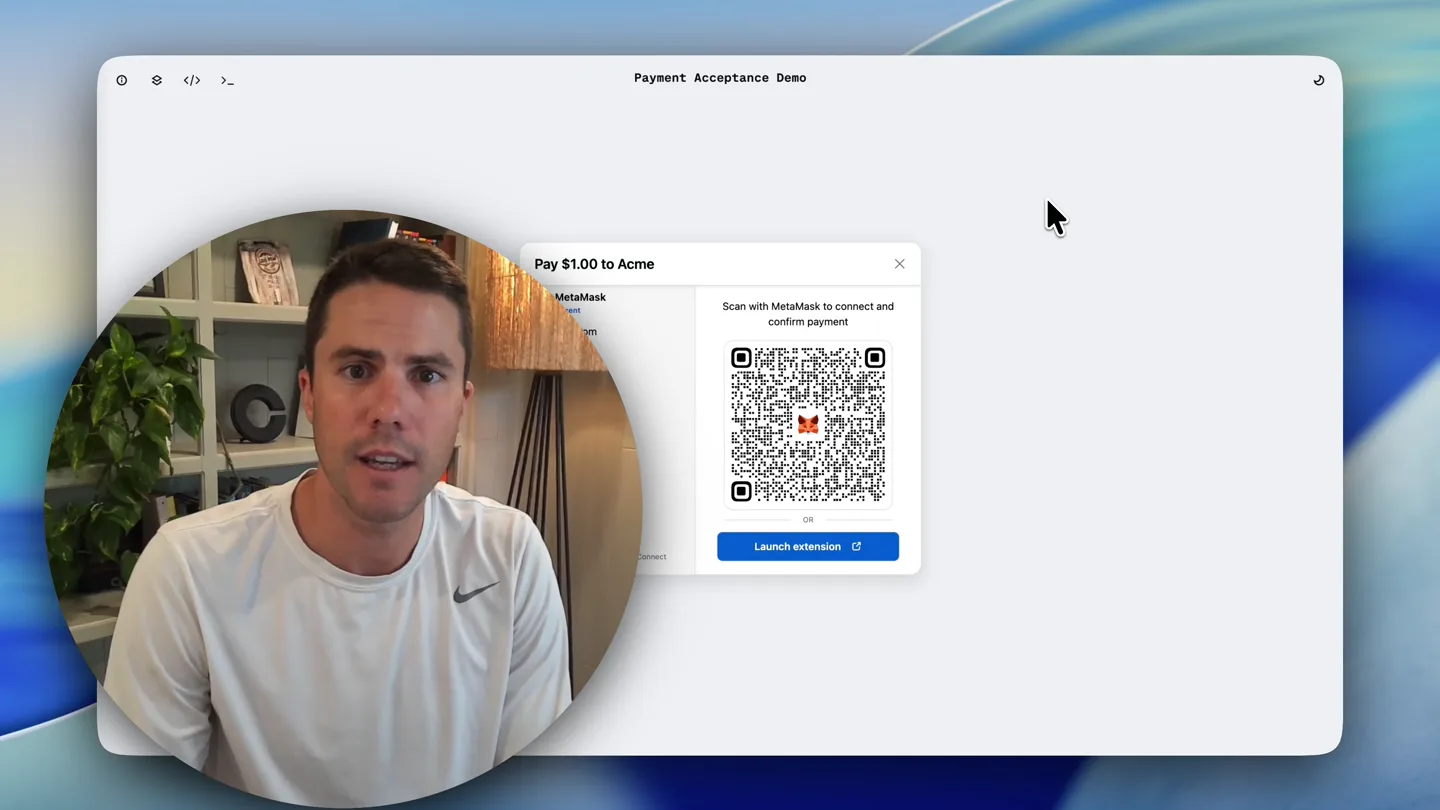
“Hey everyone, I'm excited to show you a live demo of Coinbase's new stablecoin payment web component. We've built a playground environment that lets you test out the API, customize the branding, and watch the event logs, all in a sandbox mode with zero real funds.”
- On screen
- Payment Acceptance Demo Pay $1.00 to Acme MetaMask installed Scan with MetaMask to connect and confirm payment Launch extension Phantom installed Rabby installed Base Pay Trust Wallet Rainbow OKX Wallet Other wallets 480+ wallets via WalletConnect
- Camera
- Medium shot of presenter in a circular overlay on the left, while a screen recording of the web component demo occupies the right two-thirds of the frame. The screen recording shows a payment modal.
- Motion
- Split-screen composition with a circular presenter overlay. The screen recording features a subtle zoom out to reveal more wallet options.
Feature Teaser
Customizing the Payment Component with CSS Variables
“Let's start by customizing the component. We can change the theme using CSS variables. Here, you can see how easy it is to switch between different presets like 'Dark Retro' or 'Wildflower', or even pick custom colors for your brand, surface, and text. You can also adjust button shapes and fonts.”
- On screen
- Theme Presets Default Coinbase Dark Dark Retro Moto Wildflower Colors Brand #E569F3 Surface #FFF4B1 Text #000000 Style Button shape Square Soft Rounded Pill Heading font System Sans Serif Button font System Sans Serif Payment Acceptance Demo Pay $1.00 to Acme MetaMask installed Scan with MetaMask to connect and confirm payment Launch extension Phantom installed Rabby installed Base Pay Trust Wallet Rainbow OKX Wallet Other wallets 480+ wallets via WalletConnect
- Camera
- The presenter remains in the circular overlay. The screen recording shifts focus to a 'Theme' customization panel on the left, while the payment component on the right updates dynamically.
- Motion
- Interactive UI demonstration with real-time visual feedback. The customization panel slides in from the left, and color pickers animate to show color selection.
Feature Teaser
Monitoring Events with the API
“Next, let's look at the event API. As you interact with the component, you can see all the events being logged here. This allows you to subscribe to and handle events in your application, giving you full control over the payment flow.”
- On screen
- Events These are the events emitted by the web component as the user interacts with your application. Learn how to subscribe to and handle events in your app. Listening 3 EVENTS #1 pageNavigated 2026-08-25 18:05:21.263 MDT { "page": "wallet_select_skeleton_view" } #2 rendered 2026-08-25 18:05:21.459 MDT { "installedWallets": [ "io.metamask", "app.phantom", "io.rabby" ] } #3 pageNavigated 2026-08-25 18:05:21.432 MDT { "page": "wallet_select_view" } Clear Payment Acceptance Demo Pay $1.00 to Acme MetaMask installed Scan with your phone to connect and confirm payment Launch extension Phantom installed Rabby installed Base Pay Trust Wallet Rainbow OKX Wallet Other wallets 480+ wallets via WalletConnect
- Camera
- The presenter remains in the circular overlay. The screen recording now shows an 'Events' log panel on the left, with new events appearing as the presenter interacts with the payment component on the right.
- Motion
- Live event logging demonstration. New log entries animate in from the bottom, simulating real-time API interaction.
Product Reveal
End-to-End Stablecoin Payment Demo
“Finally, let's run an end-to-end payment. I'll select Phantom wallet, connect, and confirm the transaction. You can see the events being logged in real-time. And just like that, your payment of one USDC was successful. This entire process happens in a sandbox, so no real funds are involved. It's a safe and easy way to integrate stablecoin payments into your application.”
- On screen
- Events These are the events emitted by the web component as the user interacts with your application. Learn how to subscribe to and handle events in your app. Listening 8 EVENTS #5 walletAction 2026-08-25 18:07:42.015 MDT { "action": "selected", "walletId": "com.trustwallet.app" } #6 walletAction 2026-08-25 18:07:42.613 MDT { "action": "selected", "walletId": "app.phantom" } #7 walletAction 2026-08-25 18:07:43.132 MDT { "action": "isConnect", "walletId": "io.metamask" } #8 walletAction 2026-08-25 18:07:44.110 MDT { "action": "isConnect", "walletId": "io.metamask" } Clear Payment Acceptance Demo payments-demo.coinbase.com Connect this website with MetaMask Accounts Permissions Account 1 Wallet 1 $7.09 Edit accounts Cancel Connect Connect with MetaMask Step 1 of 2 Confirm the request to continue Signature request Review request details before you confirm. Network Base Request from payments-demo.coinbase.com Interacting with USDC Message ReceiveWithAuthorization From: Account 1 Wallet 1 Nonce: 0xa037e14f4b202369a8f72f9b69979ddab ed6a7e09a7324e72b6827a829f To: Account 1 Wallet 1 ValidAfter: 0 ValidBefore: 1787760321 Value: 1000000 Confirm Your payment of 1.00 USDC was successful Create another Account 1 0x19a0...a58bA $7.09 -0.01 (-0.08%) Discover Buy Swap Send Receive Bitcoin tops $79,000 Up 25% week on week and 3 month high Tokens Perps DeFi NFTs Activity Network: Ethereum MetaMask USD Earn 3% bonus USDC -0.04% Tether USD +0.06% Ethereum Earn -0.57% MetaMask USD +0.00% Low value tokens (2) payments-demo.coinbase.com Account 1
- Camera
- The presenter remains in the circular overlay. The screen recording shows a full end-to-end payment flow, including wallet selection, connection, transaction confirmation, and a success message. The right side of the screen also shows a simulated wallet extension.
- Motion
- Multi-panel UI interaction. Elements like wallet connection prompts and transaction confirmations slide in and out, mimicking a real user experience. Event logs update in real-time.
Motion design primitives
Synthesizable in Remotion · key components of the developer-tool-sandbox-demo template.
CircularPresenterOverlay
A live video feed of the presenter is contained within a perfectly circular mask, positioned consistently in the bottom-left quadrant of the screen. This overlay maintains a fixed size and position throughout the video.
+ Code construction recipe
Use a Remotion <AbsoluteFill> for the main screen recording. Overlay a <Video> component for the presenter, apply a `borderRadius: '50%'` style for the circular mask, and position it using `left` and `bottom` CSS properties. Ensure `overflow: 'hidden'` on the container.
DynamicUIPanelSlide
UI panels, such as the 'Theme' customization or 'Events' log, slide smoothly into view from the left edge of the screen, pushing the existing content slightly or resizing the main demo area. They recede just as smoothly when no longer needed.
+ Code construction recipe
Implement using Remotion's `interpolate` function for the `transform: translateX()` CSS property. Animate from `'-100%'` to `'0%'` for entry and `0%` to `'-100%'` for exit, using an `easeOutCubic` or `easeInOutQuad` curve for smooth transitions. Coordinate with `width` or `flex-basis` changes for responsive layout.
RealtimeLogEntry
New entries in the 'Events' log appear dynamically, animating in from the bottom of the log panel with a subtle fade-in and upward translation, simulating real-time data streaming.
+ Code construction recipe
For each new log entry, render a component that uses `spring` or `interpolate` for `opacity` from `0` to `1` and `transform: translateY()` from `10px` to `0px`. Trigger this animation when a new event object is added to the state, ensuring a staggered effect for multiple entries.
Style DNA & aesthetic system
Visual aesthetic
Typography
Motion
Special effects
Pacing & rhythm
Conceptual story rhythm
- 1
The Setup & Sandbox Promise
Purpose. Introduce the product and immediately establish its core value proposition: a safe, no-risk environment for developers to experiment.
Execution. Presenter introduces the component while the main screen shows the payment UI. The circular presenter overlay establishes a personal, direct connection.
- 2
Customization & Control
Purpose. Demonstrate the flexibility and developer-friendliness of the component, highlighting how easily it can be integrated and branded.
Execution. UI panels slide in to reveal CSS variable customization options, with the payment component dynamically updating in real-time. This shows immediate visual feedback.
- 3
Transparency & Integration
Purpose. Showcase the robust API and event logging, assuring developers of deep control and visibility into the payment process.
Execution. The 'Events' log panel appears, populating with real-time data as the presenter interacts with the payment component, emphasizing the API's responsiveness.
- 4
Full Flow & Validation
Purpose. Conclude with a complete, end-to-end demonstration, reinforcing the product's functionality and the sandbox's utility.
Execution. A full payment simulation, from wallet selection to success confirmation, is shown, with concurrent event logging. This provides a comprehensive proof of concept.
Remix in Animatiq Studio
Master remix prompt · agent-ready
Sample remix
Objective
A new API gateway for real-time data streaming, allowing developers to configure data pipelines, monitor throughput, and test integrations in a sandbox environment.How the recipe adapts
The circular presenter overlay remains. The screen recording will show the API gateway's dashboard. Instead of payment customization, UI panels will slide in to demonstrate pipeline configuration with drag-and-drop elements. The 'Events' log will be adapted to show real-time data stream events and API calls. The end-to-end demo will simulate configuring a pipeline, streaming test data, and observing the data flow through the gateway, all within a sandbox.Remix blueprint · developer-tool-sandbox-demo
Scene durations (4 scenes, 112s)
Key Remotion components
Related Developer Tools Product Launches
Explore all Developer Tools launches →
xAI opens voice cloning on its API: build a custom voice in about two minutes or pick from 80+ voices in 28 languages.

Agentic CLI for coding, building apps, and automating workflows.
Sakana AI launches Fugu, a multi-agent orchestration system served through a single model API, led by its Fugu Ultra model.