
Command Code · Launch Video Breakdown: Hook, Pacing & Motion Design
Command Code Desktop is in beta for Mac, Linux, and Windows. The agentic app starts with code: multiple agents, files, Git, terminal, browser previews, plans, and /design edits.
Scene-by-scene timeline & spoken transcript
The Hook
Anticipation Build-up: Community Demand
“(No spoken dialogue — Driving electronic beat with 808s and trap-style drums, percussive elements building intensity.)”
- On screen
- shashank sn @itsupdpreneur can't wait!!! gijoe when can we get it in desktop app? Nayem desktop GUI WHEN??? alkaloid I am sooo excited for the new desktop app coming Big WDX new desktop app released? Rick A.F. @FoxRick01 Can't Wait Naveen Saradhi @naveen_saradhi_ Waiting for desktop app bukit @bukitsomento need web app
- Camera
- Static overhead shot, then a subtle zoom out as more UI elements appear.
- Motion
- Staggered reveal of multiple macOS-style window elements, each fading in and sliding from different directions, creating a dynamic grid of user comments.
Product Reveal
Command Code: The Agentic App
“(No spoken dialogue — Driving electronic beat with 808s and trap-style drums, percussive elements building intensity.)”
- On screen
- COMMAND Good Morning Describe it and I'll build it.. + Bu | portfolio-v1 main Full access V4 Flash Vision (exp) Effort Default
- Camera
- Static, then a subtle zoom into the text input field.
- Motion
- Text reveal with a glitch/stutter effect, followed by a typing animation in a command line interface, simulating user input and system response.
Feature Teaser
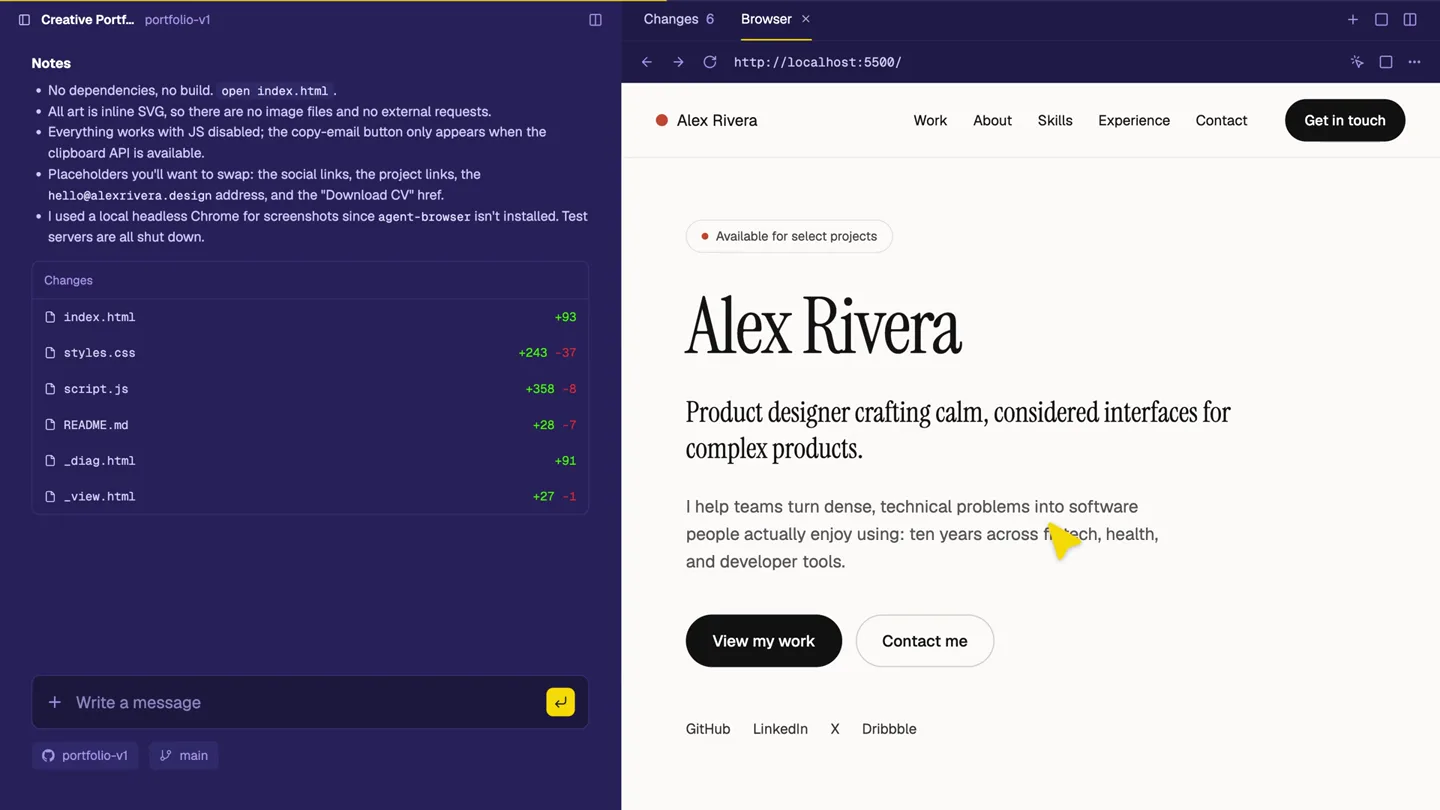
Built-in Browser Previews & Instant Design Edits
“(No spoken dialogue — Driving electronic beat with 808s and trap-style drums, percussive elements building intensity.)”
- On screen
- localhost:5500 Built-in Browser Previews Redesign With /design Instant Design Edits Alex Rivera Product designer crafting calm, considered interfaces for complex products. I help teams turn dense, technical problems into software people actually enjoy using: ten years across fintech, health, and developer tools. View my work Contact me GitHub LinkedIn Dribbble
- Camera
- Static, then a subtle pan and zoom to highlight specific UI interactions.
- Motion
- Split-screen reveal, showcasing code editor and live browser preview. Interactive UI elements highlight, demonstrating real-time design changes and color adjustments with a smooth, responsive feel.
Call to Action
Download Command Code Desktop
“(No spoken dialogue — Driving electronic beat with 808s and trap-style drums, percussive elements building intensity.)”
- On screen
- Download Command Code Get the desktop app Available for macOS, Windows, and Linux commandcode.ai/desktop
- Camera
- Static, centered on the call to action.
- Motion
- Clean, direct reveal of the call to action text and button, with platform icons subtly animating in. The overall aesthetic is minimalist and focused.
Motion design primitives
Synthesizable in Remotion · key components of the agentic-dev-tool-launch template.
StaggeredWindowReveal
Multiple macOS-style windows appear sequentially, sliding in from various directions and fading up, creating a dynamic, organized grid of content.
+ Code construction recipe
Use `spring()` for position and opacity, with `delay` and `stagger` functions to control the sequential appearance of each window component. Implement `AbsoluteFill` for background and `Window` components for each tweet/message box.
TypingCodeReveal
Text appears as if being typed in a command line, followed by a system response, then a split-screen transition to show code and a live preview.
+ Code construction recipe
Utilize `Sequence` and `interpolate()` for character-by-character text reveal. Combine with `spring()` for smooth transitions of UI elements like the split-screen layout and diff indicators. Use `CodeSurfer` for syntax highlighting.
InteractiveUIDemo
Highlights specific UI elements (e.g., text input, color picker) and demonstrates real-time changes in a browser preview, with a cursor interaction.
+ Code construction recipe
Employ `useCurrentFrame()` and `interpolate()` to animate cursor movement and UI element states (e.g., button presses, color changes). Use `AbsoluteFill` and `Img` for screen captures, with `spring()` for highlight box animations.
Style DNA & aesthetic system
Visual aesthetic
Typography
Motion
Special effects
Pacing & rhythm
Conceptual story rhythm
- 1
Community Buzz
Purpose. Establish demand and anticipation for the product by showcasing real user comments.
Execution. Staggered reveal of multiple tweet-like windows, creating a collage of user excitement.
- 2
Problem to Solution
Purpose. Introduce the core problem (building a portfolio site) and demonstrate the product's agentic solution.
Execution. Typing animation in a command line, showing the product generating code and tasks, transitioning to a split-screen view of code and browser.
- 3
Feature Showcase
Purpose. Highlight key functionalities like live previews and design edits.
Execution. Interactive UI demonstrations, showing real-time changes in a browser preview triggered by code or design commands, with a prominent cursor.
- 4
Call to Action
Purpose. Direct users to download the product.
Execution. Clean, minimalist screen with product name, download button, and supported platforms, reinforcing accessibility.
Remix in Animatiq Studio
Master remix prompt · agent-ready
Sample remix
Objective
Launch an AI-powered code refactoring tool called 'RefactorFlow' for web developers.How the recipe adapts
The StaggeredWindowReveal primitive would show developer testimonials praising 'RefactorFlow's' speed. The TypingCodeReveal would demonstrate a user inputting a refactoring command, followed by the AI instantly rewriting complex code. The InteractiveUIDemo would highlight before-and-after code comparisons in a split-screen, showing the AI's suggestions and the user accepting them with a click, emphasizing the efficiency gains. The color palette would shift to a dark blue background with bright green and yellow accents to signify code changes and success.Remix blueprint · agentic-dev-tool-launch
Scene durations (4 scenes, 46s)
Key Remotion components
Related Developer Tools Product Launches
Explore all Developer Tools launches →
Agentic CLI for coding, building apps, and automating workflows.

New in Claude Code: your sessions can now message each other. Tell Claude to send a summary (not your history or files), and the other session picks it up mid-task.

Meet Qwen3.8-Max: A New Bar for Coding and Cowork. https://t.co/mJaA8vr6xT