
Charlie Holtz · Launch Video Breakdown: Hook, Pacing & Motion Design
We've re-built Conductor from scratch to make it twice as fast. Creating tabs, switching workspaces, and rendering files are all 50% faster, memory usage is lower, and the app is 150 MB smaller. In…
Scene-by-scene timeline & spoken transcript
The Hook
Initial Code Diff & Performance Tease
“(No spoken dialogue — A sustained, evolving pad sound with a low-frequency drone creates an atmospheric mood. A subtle, high-frequency synth sweep builds in intensity, leading to a prominent sub-bass impact.)”
- On screen
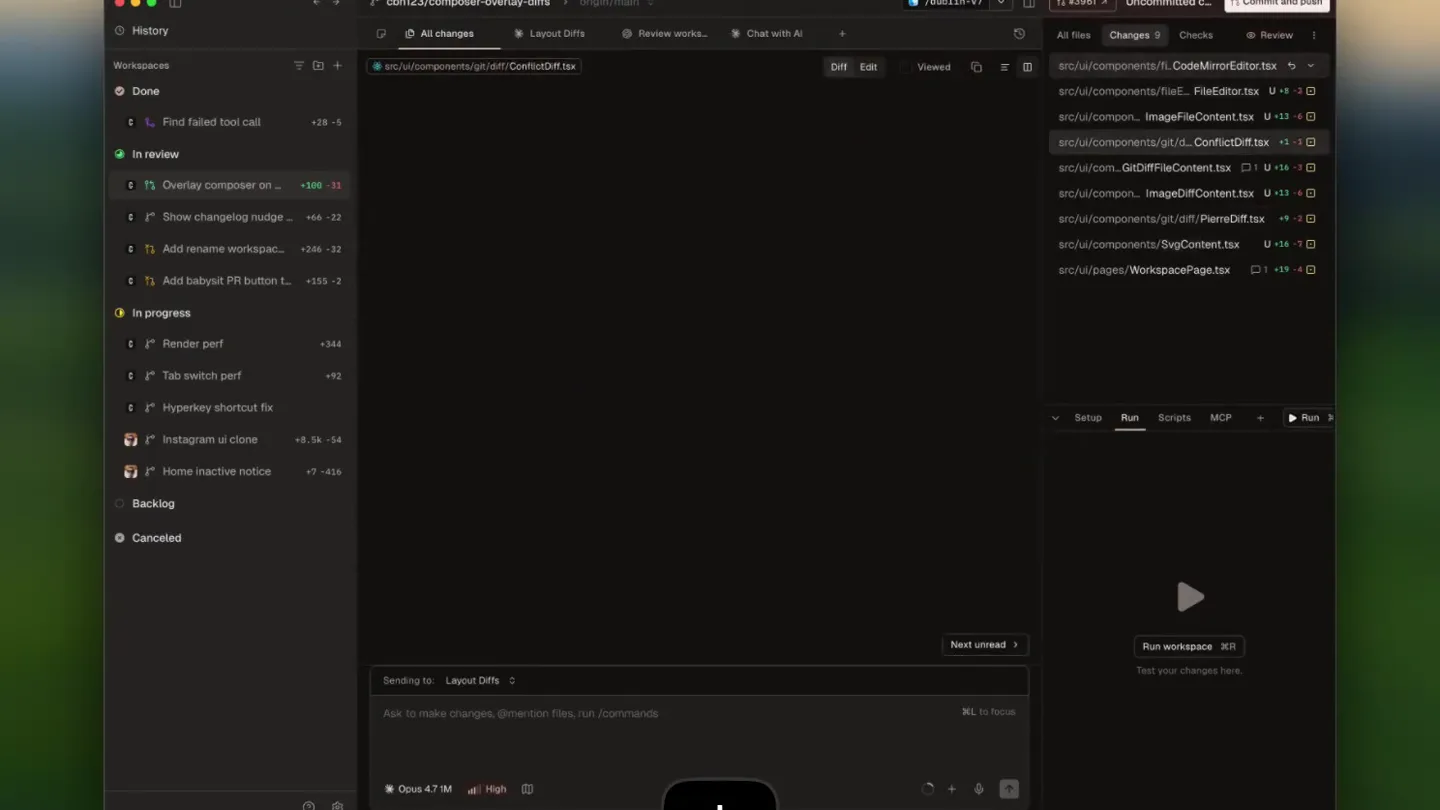
- cbh123/composer-overlay-diffs All changes Layout Diffs Review works... Chat with AI src/ui/components/fileEditor/CodeMirrorEditor.tsx 202 unmodifed lines 202 203 204 205 206 207 208 209 210 211 95 unmodifed lines 371 372 373 374 375 376 377 378 379 380 381 382 383 384 385 386 387 51 unmodifed lines 436 437 438 439 Sending to Layout Diffs Ask to make changes @mention files, run /commands Opus 4.7 M High src/ui/components/fileEditor/FileEditor.tsx src/ui/components/imageFileContent.tsx src/ui/components/grid/Grid.tsx src/ui/components/diff/DiffContent.tsx src/ui/components/imageDiffContent.tsx src/ui/components/diff/PierreDiff.tsx src/ui/components/SvgContent.tsx src/ui/pages/WorkspacePage.tsx Setup Run Scripts MCP Run Commit and push All files Changes Checks Review src/ui/components/fileEditor/CodeMirrorEditor.tsx src/ui/components/fileEditor/FileEditor.tsx src/ui/components/imageFileContent.tsx src/ui/components/grid/Grid.tsx src/ui/components/diff/DiffContent.tsx src/ui/components/imageDiffContent.tsx src/ui/components/diff/PierreDiff.tsx src/ui/components/SvgContent.tsx src/ui/pages/WorkspacePage.tsx Next unread Run workspace Test your changes here. (value) => onSaveRef.current.(value), onOpenSearch: () openSearch(), isReadOnly: false, enableSearch: true, overlayPaddingBottom: true, }, [mode, openSearch], }, }, onSave, openSearch, isReadOnly, enableSearch, overlayPaddingBottom = false, }, mode: EditorThemeMode, onSave: (value: string) => void, onOpenSearch: () => void, isReadOnly: boolean, enableSearch: boolean, overlayPaddingBottom: boolean; }, EditorState, EditorState.tabSize.of(4), lineHeight: "1.5", },".cm-content": { caretColor: "hsl(var(-- Next unread Run workspace Test your changes here. (value) => onSaveRef.current.(value), onOpenSearch: () openSearch(), isReadOnly: false, enableSearch: true, overlayPaddingBottom: true, }, [mode, openSearch], }, }, onSave, openSearch, isReadOnly, enableSearch, overlayPaddingBottom = false, }, mode: EditorThemeMode, onSave: (value: string) => void, onOpenSearch: () => void, isReadOnly: boolean, enableSearch: boolean, overlayPaddingBottom: boolean; }, EditorState, EditorState.tabSize.of(4), lineHeight: "1.5", },".cm-content": { caretColor: "hsl(var(--
- Camera
- Static overhead shot of a desktop IDE, focused on a code diff view. The camera maintains a fixed, slightly elevated perspective.
- Motion
- Subtle UI element highlighting and text changes within the code editor. A downward-pointing arrow icon appears at the bottom center, indicating a user interaction or a call to action for scrolling/navigation.
Feature Teaser
Rapid Code Navigation & Performance
“(No spoken dialogue — A resonant, metallic-like synth texture slowly fades after the sub-bass impact. Another sub-bass impact occurs at 00:04, accompanied by a short, percussive synth hit.)”
- On screen
- cbh123/composer-overlay-diffs All changes Layout Diffs Review works... Chat with AI src/ui/components/fileEditor/ImageFileContent.tsx Commit and push All files Changes Checks Review src/ui/components/fileEditor/CodeMirrorEditor.tsx src/ui/components/fileEditor/FileEditor.tsx src/ui/components/imageFileContent.tsx src/ui/components/grid/Grid.tsx src/ui/components/diff/DiffContent.tsx src/ui/components/imageDiffContent.tsx src/ui/components/diff/PierreDiff.tsx src/ui/components/SvgContent.tsx src/ui/pages/WorkspacePage.tsx Setup Run Scripts MCP Run Next unread Run workspace Test your changes here. Next unread Run workspace Test your changes here.
- Camera
- The camera remains static, maintaining the same overhead perspective of the IDE.
- Motion
- The code editor content rapidly scrolls and changes, simulating fast navigation or file switching. The downward arrow icon persists, reinforcing the idea of quick interaction. The UI elements like file tabs update instantly.
Feature Teaser
Instantaneous Diff Rendering
“(No spoken dialogue — A short, percussive synth hit follows the sub-bass impact. A final, more pronounced sub-bass impact with a quick decay is present at 00:06.)”
- On screen
- cbh123/composer-overlay-diffs All changes Layout Diffs Review works... Chat with AI src/ui/components/diff/PierreDiff.tsx Commit and push All files Changes Checks Review src/ui/components/fileEditor/CodeMirrorEditor.tsx src/ui/components/fileEditor/FileEditor.tsx src/ui/components/imageFileContent.tsx src/ui/components/grid/Grid.tsx src/ui/components/diff/DiffContent.tsx src/ui/components/imageDiffContent.tsx src/ui/components/diff/PierreDiff.tsx src/ui/components/SvgContent.tsx src/ui/pages/WorkspacePage.tsx Setup Run Scripts MCP Run 23 unmodifed lines 23 24 25 26 27 28 29 30 31 32 3 unmodifed lines 33 34 35 36 37 38 39 40 41 42 43 44 45 46 47 PierreDiffProps Next unread Run workspace Test your changes here. Next unread Run workspace Test your changes here. name: string; filePath: string; diffMode: "edit" | "unified"; workspaceId: string; // Can be used to add padding on trailing lines // can scroll above an overlay (e.g. the // composer) + contentPaddingBottom: number; }; const VIRTUALIZER_CONFIG = { overscrollSize: 500 } as const; overflow: "auto" as const, willChange: "scroll-position", }, const DEFAULT_CONTENT_PADDING_BOTTOM = 48; const PIEZZADIFF = memo((function PiezzaDiff({ oldContent, newContent, filePath, diffMode, workspaceId, }) { const DEFAULT_CONTENT_PADDING_BOTTOM, PiezzaDiff({ oldContent, newContent, filePath, diffMode, workspaceId, }) { contentPaddingBottom: number; name: string; filePath: string; diffMode: "edit" | "unified"; workspaceId: string; // Can be used to add padding on trailing lines // can scroll above an overlay (e.g. the // composer) + contentPaddingBottom: number; }; const VIRTUALIZER_CONFIG = { overscrollSize: 500 } as const; overflow: "auto" as const, willChange: "scroll-position", }, const DEFAULT_CONTENT_PADDING_BOTTOM = 48; const PIEZZADIFF = memo((function PiezzaDiff({ oldContent, newContent, filePath, diffMode, workspaceId, }) { const DEFAULT_CONTENT_PADDING_BOTTOM, PiezzaDiff({ oldContent, newContent, filePath, diffMode, workspaceId, }) { contentPaddingBottom: number;
- Camera
- The camera remains static, maintaining the same overhead perspective.
- Motion
- The code diff view updates instantly, highlighting changes in green and red. This rapid visual feedback emphasizes the speed of rendering and diff comparison. The downward arrow icon persists.
Product Reveal
Conductor's Speed & Efficiency
“(No spoken dialogue — A sustained, airy synth pad gradually fades out by 00:10, following the pronounced sub-bass impact.)”
- On screen
- cbh123/composer-overlay-diffs All changes Layout Diffs Review works... Chat with AI src/ui/components/diff/PierreDiff.tsx Commit and push All files Changes Checks Review src/ui/components/fileEditor/CodeMirrorEditor.tsx src/ui/components/fileEditor/FileEditor.tsx src/ui/components/imageFileContent.tsx src/ui/components/grid/Grid.tsx src/ui/components/diff/DiffContent.tsx src/ui/components/imageDiffContent.tsx src/ui/components/diff/PierreDiff.tsx src/ui/components/SvgContent.tsx src/ui/pages/WorkspacePage.tsx Setup Run Scripts MCP Run 23 unmodifed lines 23 24 25 26 27 28 29 30 31 32 3 unmodifed lines 33 34 35 36 37 38 39 40 41 42 43 44 45 46 47 PierreDiffProps Next unread Run workspace Test your changes here. Next unread Run workspace Test your changes here. name: string; filePath: string; diffMode: "edit" | "unified"; workspaceId: string; // Can be used to add padding on trailing lines // can scroll above an overlay (e.g. the // composer) + contentPaddingBottom: number; }; const VIRTUALIZER_CONFIG = { overscrollSize: 500 } as const; overflow: "auto" as const, willChange: "scroll-position", }, const DEFAULT_CONTENT_PADDING_BOTTOM = 48; const PIEZZADIFF = memo((function PiezzaDiff({ oldContent, newContent, filePath, diffMode, workspaceId, }) { const DEFAULT_CONTENT_PADDING_BOTTOM, PierreDiff({ oldContent, newContent, filePath, diffMode, workspaceId, }) { contentPaddingBottom: number; name: string; filePath: string; diffMode: "edit" | "unified"; workspaceId: string; // Can be used to add padding on trailing lines // can scroll above an overlay (e.g. the // composer) + contentPaddingBottom: number; }; const VIRTUALIZER_CONFIG = { overscrollSize: 500 } as const; overflow: "auto" as const, willChange: "scroll-position", }, const DEFAULT_CONTENT_PADDING_BOTTOM = 48; const PIEZZADIFF = memo((function PiezzaDiff({ oldContent, newContent, filePath, diffMode, workspaceId, }) { const DEFAULT_CONTENT_PADDING_BOTTOM, PierreDiff({ oldContent, newContent, filePath, diffMode, workspaceId, }) { contentPaddingBottom: number; ⌘ ⇧ {
- Camera
- The camera remains static, maintaining the same overhead perspective.
- Motion
- The downward arrow icon is replaced by a keyboard shortcut (⌘⇧{), indicating a specific command for rapid workspace switching or tab management. The code diff view remains active, reinforcing the product's core functionality.
Motion design primitives
Synthesizable in Remotion · key components of the instant-dev-workflow-showcase template.
RapidCodeDiffHighlight
Code lines within an IDE rapidly change, with additions highlighted in green and deletions in red, simulating instantaneous code diff rendering. The surrounding UI elements remain static, emphasizing the speed of the content update.
+ Code construction recipe
Utilize `interpolate` for `backgroundColor` and `opacity` on `<span>` elements wrapping code lines. Trigger these interpolations on `frame` changes, using `spring` for a quick, snappy transition. Implement a `Sequence` component to manage the timing of multiple code diff states.
InstantTabSwitch
File tabs at the top of the IDE instantly switch, changing the displayed file path and content without any visible transition delay. This conveys extreme responsiveness and efficiency in navigation.
+ Code construction recipe
Employ a `Conditional` rendering approach for the tab content, switching out components based on a `state` variable. For the tab text, use `AbsoluteFill` with `key` props to force re-mounts, ensuring no visual interpolation and an instant cut. No `spring` or `interpolate` for the tab change itself, only for the content within.
KeyboardShortcutOverlay
A stylized keyboard shortcut icon appears and disappears at the bottom center of the screen, indicating a specific user action. The icon is clean, minimal, and has a subtle, quick fade-in/fade-out animation.
+ Code construction recipe
Render an SVG or image component for the keyboard shortcut. Use `interpolate` for `opacity` from 0 to 1 and back to 0, with a `spring` function for a quick, bouncy appearance and disappearance. Position using `AbsoluteFill` and `justifyContent: 'flex-end'`, `alignItems: 'center'`.
Style DNA & aesthetic system
Visual aesthetic
Typography
Motion
Special effects
Pacing & rhythm
Conceptual story rhythm
- 1
The Performance Promise
Purpose. Immediately establish the product's core value proposition: speed and efficiency in a development environment.
Execution. Opening with a static, clean IDE view, followed by rapid, almost instantaneous code diff updates and UI navigation, underscored by impactful sound design.
- 2
Problem & Solution in Action
Purpose. Demonstrate common developer pain points (slow diffs, tab switching) being effortlessly solved by Conductor's speed.
Execution. Quick cuts between different code files and diff states, showing the UI responding without lag, highlighting the 'before and after' implicitly through sheer speed.
- 3
Key Feature Showcase
Purpose. Highlight specific functionalities like fast tab creation, workspace switching, and file rendering.
Execution. The persistent downward arrow and subsequent keyboard shortcut overlay visually guide the viewer to the actions being performed, emphasizing the ease and speed of these operations.
- 4
Efficiency & Control
Purpose. Conclude by reinforcing the user's enhanced control and productivity with the new, faster Conductor.
Execution. The final keyboard shortcut (⌘⇧{) signifies advanced user control and efficiency, leaving the viewer with an impression of powerful, streamlined workflow.
Remix in Animatiq Studio
Master remix prompt · agent-ready
Sample remix
Objective
Showcase DataFlow Pro's ability to instantly update complex dashboards and apply filters in real-time.How the recipe adapts
The RapidCodeDiffHighlight primitive will be adapted to show real-time data points or graph segments updating instantly with green/red indicators for new/changed data. InstantTabSwitch will become InstantDashboardSwitch, demonstrating seamless navigation between different complex data visualizations. The KeyboardShortcutOverlay will be used to highlight quick filter applications, like '⌘⇧F' for 'Apply Filter: Last 24 Hours', with the dashboard instantly re-rendering.Remix blueprint · instant-dev-workflow-showcase
Scene durations (4 scenes, 10.1s)
Key Remotion components
Related Consumer & Apps Product Launches
Explore all Consumer & Apps launches →
Grand Theft Auto VI: An Extended Look premieres on Netflix Thursday, August 27.
Polymarket Perps is live with up to 20x leverage on crypto, stocks, commodities, and more. Long BTC, predict the Fed, or short the S&P reaction.

Pump.fun launches GO, a marketplace for posting and completing paid bounties for any task.