
Conductor · Launch Video Breakdown: Hook, Pacing & Motion Design
Run a team of cloud agents from your iPhone, live now in the App Store.
Scene-by-scene timeline & spoken transcript
The Hook
Mobile Workflow Immersion
“(No spoken dialogue — Sustained, evolving synth pad creating an atmospheric soundscape.)”
- On screen
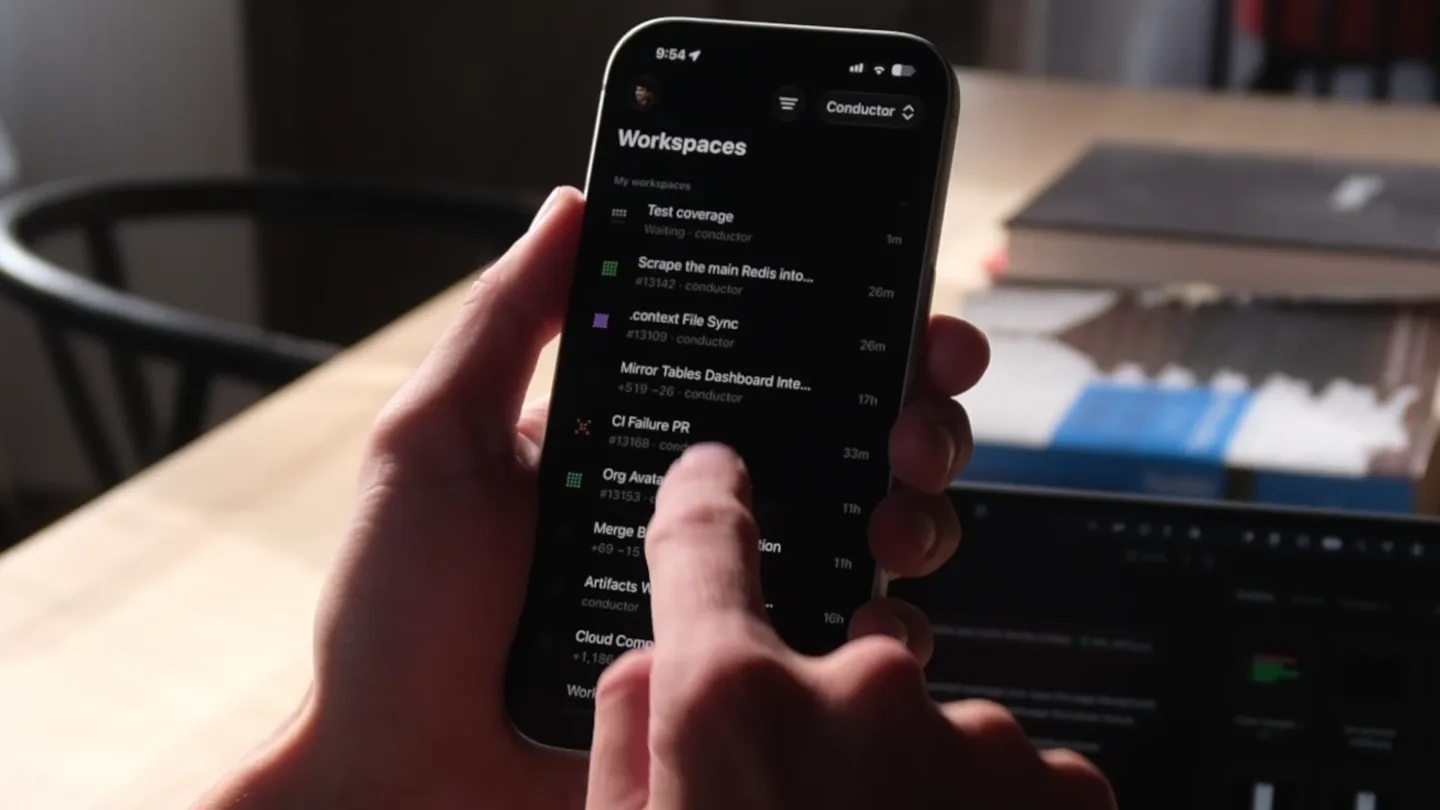
- Workspaces, My workspaces, Test coverage, Waiting - conductor, Scrape the main Redis into..., .context File Sync, #13142 - conductor, Mirror Tables Dashboard Inte..., #13168 - conductor, Org Avatar Upload Error, #13153 - conductor, Merge Button Sandbox Action, #69 - 15 - conductor, Artifacts Window Backgroun..., conductor, Cloud Computer Onboarding..., +1,186 - 337 - conductor, Workspace Archive PR Co..., + Create, <img. A browser doesn't run scripts in an image, even an SVG. Allowing blob: in script-src would be risky, but that isn't what this does. What we already allowed: img:-src already accepts data: and any https: image. So blob: doesn't open a new way to load or leak anything that wasn't already possible. PR status: Ct: all checks pass. A few were skipped automatically because they don't apply to this change. Reviews: No human reviews yet, and GitHub shows the PR as mergeable. Greplite scored it 5/5 with no issues. Its "High risk" label just means the change touches the CSP; it didn't find a problem. The Macroscope monitors and the Fallow audit had nothing to flag. Screenshot: your screenshot of the error is attached to the PR. Changelog: I used [None] because this only changes the webapp, not the Mac app. REMINDER: Edit the changelog entry before merging. When it looks good, remove [PROVISIONAL], Ready to merge, + Ask to make changes, Workspace status, Status, Ready to merge, fix(webapp): Allow blob image previews in the organization avatar picker, Author, tywenk, Pull request, #13153, Slide to merge
- Camera
- Close-up, handheld perspective on an iPhone, slowly zooming and panning to follow finger gestures within the app interface.
- Motion
- Smooth, organic camera movement mimicking user interaction, with subtle focus pulls to highlight UI elements.
Product Reveal
Action Confirmation & Reveal
“(No spoken dialogue — High-energy riser/sweep effect building tension, culminating in a significant sub-bass drop/impact.)”
- On screen
- Slide to merge
- Camera
- Tight close-up on the 'Slide to merge' interaction, then a rapid cut to a slightly wider shot as the text 'Say hello to Conductor Mobile.' appears.
- Motion
- Rapid cut synchronized with audio impact, followed by a quick, impactful text reveal with a subtle scale-up and fade-in.
Product Reveal
Brand Introduction
“(No spoken dialogue — Brief, resonant electronic tone, then transitions into a more percussive, rhythmic section with a driving electronic beat and synth elements.)”
- On screen
- Say hello to Conductor Mobile.
- Camera
- Slightly wider shot of the iPhone, then a hard cut to a black screen with centered text.
- Motion
- Hard cut to a clean, black background, allowing the product name to take center stage with a confident, static display.
Call to Action
Availability & Branding
“(No spoken dialogue — Driving electronic beat continues, ending with a final, sharp electronic 'ping' sound.)”
- On screen
- Now in the App Store
- Camera
- Static black screen with centered text.
- Motion
- Simple text fade-in, followed by a subtle, quick logo reveal at the very end, synchronized with the final audio ping.
Motion design primitives
Synthesizable in Remotion · key components of the mobile-app-reveal-impact template.
MobileUIFocusZoom
A handheld iPhone UI is shown, with the camera subtly zooming and panning to follow finger interactions, highlighting specific app elements and text fields.
+ Code construction recipe
Utilize `AbsoluteFill` for the phone screen, `interpolate` for camera `scale` and `translate` based on user interaction points. Implement `spring` for subtle, organic camera movements and `blur` effects for depth of field.
ImpactfulTextReveal
Text appears abruptly and confidently on screen, often after a significant audio cue, with a slight scale-up and fade-in effect.
+ Code construction recipe
Employ `Sequence` to time text appearance with audio events. Use `spring` for `scale` and `opacity` properties, with a short duration and high damping for a punchy, immediate feel.
SynchronizedHardCut
A rapid, instantaneous transition between two distinct scenes, precisely timed with a sharp audio impact or beat drop.
+ Code construction recipe
Implement `AbsoluteFill` for each scene. Use `Sequence` with `durationInFrames` set to 1 for the cut, ensuring exact synchronization with `Audio` component's `startFrom` property for sound effects.
Style DNA & aesthetic system
Visual aesthetic
Typography
Motion
Special effects
Pacing & rhythm
Conceptual story rhythm
- 1
Immersive UI Exploration
Purpose. To immediately demonstrate the product's core functionality and user experience in a realistic context.
Execution. Close-up, handheld shots of the iPhone, showcasing app navigation and interaction.
- 2
The 'Aha!' Moment
Purpose. To highlight a key, impactful action within the app and build anticipation for the reveal.
Execution. Focus on the 'Slide to merge' action, synchronized with a high-energy audio riser and sub-bass drop.
- 3
Product Name Introduction
Purpose. To formally introduce the product and its mobile capability.
Execution. Hard cut to a black screen with the product name displayed prominently in a sophisticated serif font.
- 4
Call to Action
Purpose. To guide the viewer on where to find the product.
Execution. Simple, clear text indicating App Store availability, followed by a subtle brand logo.
Remix in Animatiq Studio
Master remix prompt · agent-ready
Sample remix
Objective
Launch a new AI-powered smart home device called 'Aura Home AI' that simplifies home automation.How the recipe adapts
The video would open with a close-up of a hand interacting with the Aura Home AI mobile app, demonstrating a 'Smart Routine Creation' feature. The camera would subtly zoom and pan to highlight the intuitive UI. At the 6-second mark, a high-energy audio riser and sub-bass drop would coincide with a rapid cut to a black screen, revealing 'Aura Home AI' in a bold serif font. This would be followed by 'Available for Pre-Order Now' and a final brand logo reveal with an electronic ping.Remix blueprint · mobile-app-reveal-impact
Scene durations (4 scenes, 12.2s)
Key Remotion components
Related Developer Tools Product Launches
Explore all Developer Tools launches →
Agentic CLI for coding, building apps, and automating workflows.

New in Claude Code: your sessions can now message each other. Tell Claude to send a summary (not your history or files), and the other session picks it up mid-task.

Meet Qwen3.8-Max: A New Bar for Coding and Cowork. https://t.co/mJaA8vr6xT