
shadcn · Launch Video Breakdown: Hook, Pacing & Motion Design
A Mac app for capturing things you want to keep and prompts you want to try next while working with AI.
Scene-by-scene timeline & spoken transcript
The Hook
AI Prompt Capture & Refinement
“(No spoken dialogue — The track begins with a sustained, evolving pad sound, creating an atmospheric and slightly mysterious mood. At [00:07], a subtle riser begins to build, leading into a percussive impact at [00:08].)”
- On screen
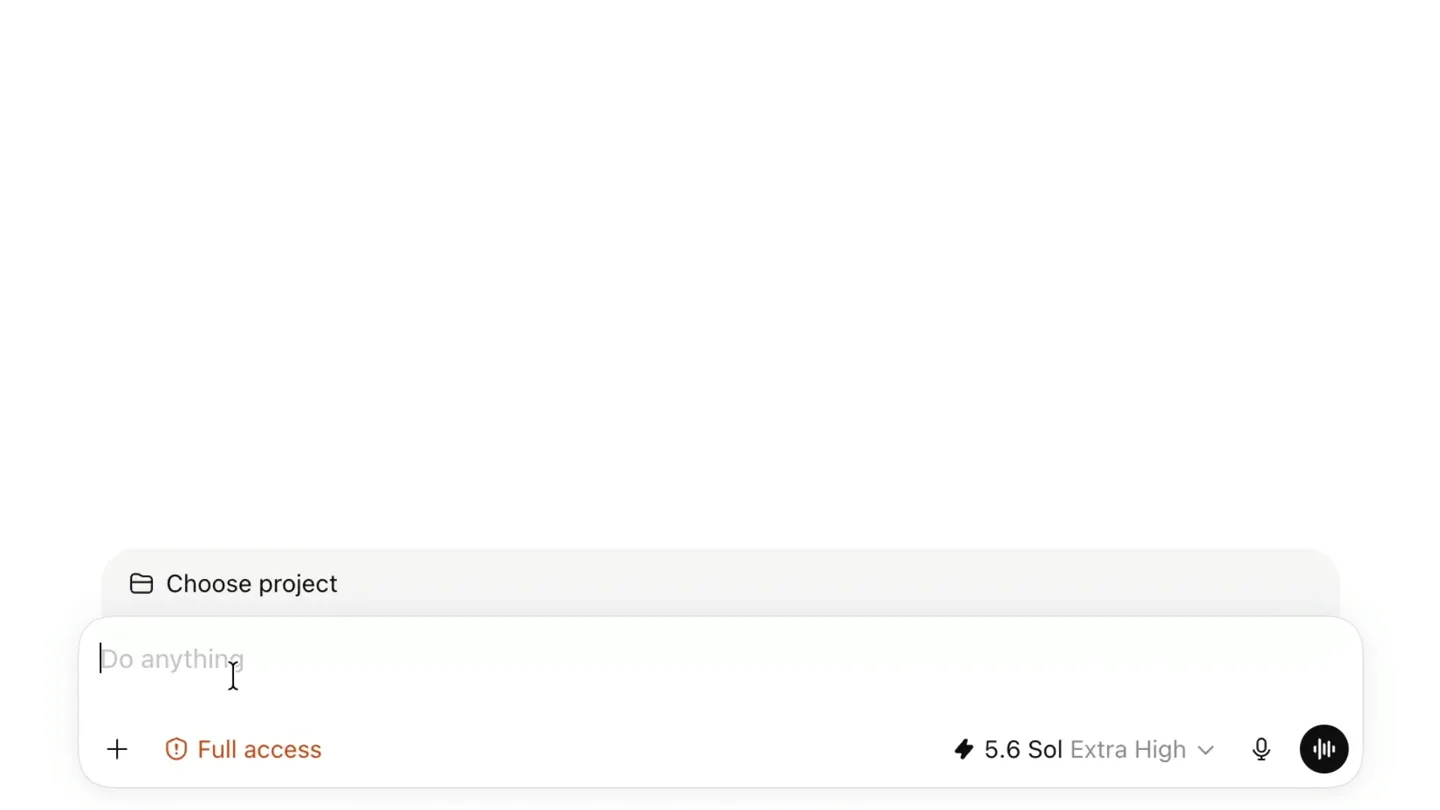
- What should we build? Choose project Do anything Full access 5.6 Sol Extra High RESEARCH Search Negation in inherited configs. The moment a config can extend a base or preset, someone needs to remove an extension the... CONFIGURATION FORMATS Add a note or a prompt (development) I'm exploring I'm exploring different configuration format... I'm exploring different configuration formats for a new developer tool. Show me a few approaches, explain the tradeoffs, and recommend one. Thinking Compare configuration formats Best qualities: • Excellent autocomplete and documentation. • Supports computed values, imports, conditions, and reusable helpers. • Very natural for a JavaScript/TypeScript audience. Tradeoffs: • Configuration becomes executable code. • Loading it requires a runtime or transpilation strategy. • Harder to consume from other languages. • Caching, sandboxing, reproducibility, and security become more complicated. • Users may put substantial application logic into the config. Recommendation Use TOML as the default declarative format, backed by a published schema and a command such as: sh tool config check
- Camera
- Static wide shot of a macOS desktop, then a close-up on the application window, followed by a subtle zoom out to reveal the full application interface.
- Motion
- Seamless UI interaction simulation with rapid text input, content generation, and dynamic highlighting. The camera subtly pans and zooms to follow the user's focus.
Problem Agitation
The Scattered AI Workflow
“(No spoken dialogue — A rhythmic, arpeggiated synth melody and a driving sub-bass line begin. Another significant riser occurs at [00:15], culminating in a powerful sub-bass drop and impact at [00:16], accompanied by a bright, shimmering synth chord.)”
- On screen
- ChatGPT. Claude. Cursor. Chrome. Apps. Chats. Tabs. Everywhere. Declarative configuration with plugin extensions matcher, or a conditional. Then you're Babel going from .babelrc to babel.config.js, or ESLint's multi-year flat config migration. The hybrid – JSON with a JS escape hatch – is the worst outcome, because every consumer of the file (editors, your own CLI, other tools, agents) has to handle both shapes and can no longer statically read the config. Validation happens after side effects. You can't validate options for plugins you haven't resolved yet. So either extensions ship their own schemas (a format you now own and version), or bad config surfaces as a runtime error inside someone else's code. This also kills the autocomplete story, which is usually the main reason to go declarative in the first place. Provenance drift. extensions: ["foo*"] declares intent but not origin. npm? your registry? a path? a URL? The dependency graph now exists in two places and they diverge. You've already got the right instinct with lock-file integrity – extensions need to land in the same resolution and integrity model as everything else, not a parallel one. Three things worth locking down before it ships: 1. A version field on the format. You will need it and you can't retrofit it. 2. An effective-config command ( config resolve --print or similar). Declarative config can't be console.log(); without a way to see the merged result, every support thread becomes archaeology. 3. Whether extensions may contribute top-level fields or are confined to their own namespace. Allowing it is convenient for about six months. The deeper question is whether "extensions" is one concept or several – a thing that transforms config, a thing that adds capability, and a thing that just registers assets here have very different composition rules, and one array flattens them into a single ordering problem. Outputs Create a file or site Sources Attach files or connect apps Search RESEARCH Negation in inherited configs. The moment a config can extend a base or preset, someone needs to remove an extension the... CONFIGURATION FORMATS Use TOML as the default declarative format, backed by a published schema keep the core configuration declarative even if you later add an optional TypeScript escape hatch Add a note or a prompt (development)
- Camera
- Rapid cuts between full-screen text overlays and close-ups of the application's sidebar, emphasizing the problem of scattered information.
- Motion
- Fast-paced text reveals with a subtle bounce, combined with quick UI element highlights and a 'snap' transition between scenes. The sidebar content scrolls and updates dynamically.
Product Reveal
Consolidate Your AI Prompts
“(No spoken dialogue — The energy continues to build with additional percussive elements and a more pronounced synth melody. A dramatic sweep and riser starts at [00:23], leading to a strong sub-bass impact at [00:24].)”
- On screen
- Write down the prompts already in your head, but not ready to send. keep the core configuration declarative even if you later add an optional TypeScript escape hatch Negation in inherited configs. The moment a config can extend a base or preset, someone needs to remove an extension the... Three things worth locking down before it ships: How should configuration How should configuration migrations work? Should plugins own th
- Camera
- Focus shifts to the sidebar, demonstrating the capture of prompts. The camera zooms in on specific UI elements as they are interacted with.
- Motion
- Smooth, deliberate cursor movements and clicks. Text input appears with a typewriter effect. UI elements expand and collapse with a gentle spring animation, emphasizing ease of use.
Feature Teaser
Seamless Integration & Productivity
“(No spoken dialogue — The track then transitions into a more intense, driving section with layered synths and a consistent, pulsing rhythm. A final, extended riser and sweep begins at [00:40], building to a climactic sub-bass drop and impact at [00:42], followed by a sustained, resonant synth chord that fades out.)”
- On screen
- Send them to your chat with one shortcut... How should configuration migrations work? Should plugins own their configuration schema? Add a note or a prompt (development) Copy Copy as List Mark as Done Space Expand Edit Edit in New Window Merge Notes Move to • Paths resolved relative to the configuration file. • A command that prints the fully resolved configuration. Choose something else when the audience changes: Situation Best choice Primarily hand-written, cross-language tool TOML Primarily machine-generated configuration JSON Existing infrastructure/CI ecosystem YAML JS/TS-only tool where computed configuration is essential TypeScript My strongest recommendation is to keep the core configuration declarative even if you later add an optional TypeScript escape hatch. It is much easier to add programmability than to recover portability and predictability after executable configuration becomes the default. 1. How should configuration migrations work? 2. Should plugins own their configuration schema? Full access 5.6 Sol Extra High Merge Notes Local Files Sections No Tracking Markdown No Account Copy as List Free Updates Search Keyboard-First Custom Shortcuts Native Mac App shadcn.com/copper
- Camera
- Dynamic sequence of UI interactions: right-click menus, drag-and-drop, and rapid scrolling. The camera maintains a close-up on the application, occasionally zooming out for context.
- Motion
- Contextual menu animations with a subtle fade and scale. Content appears to 'snap' into place. The final scenes feature a rapid montage of key features presented as bullet points, each appearing with a quick, crisp animation, culminating in a bold call to action.
Motion design primitives
Synthesizable in Remotion · key components of the mac-app-productivity-showcase template.
DynamicTypewriterInput
Text appears character by character, simulating real-time typing, often followed by a generated response that scrolls into view. This creates a sense of live interaction and content creation.
+ Code construction recipe
Use `Sequence` and `spring` for character-by-character opacity and slight Y-offset animation. For generated responses, use `interpolate` on `height` or `max-height` for a smooth reveal, combined with `scrollIntoView` for auto-scrolling.
ContextualMenuReveal
Right-click menus or dropdowns appear with a quick, elegant fade-in and slight scale-up animation, highlighting user interaction points.
+ Code construction recipe
Implement with `spring` for `opacity` and `scale` properties. Ensure the origin of the scale is set to the click point for a natural feel. Use `AbsoluteFill` for positioning and `z-index` for layering.
FeatureGridSnap
Key features or bullet points appear rapidly in a grid or list format, each item 'snapping' into place with a quick, crisp animation, often accompanied by a subtle sound effect.
+ Code construction recipe
Utilize `Sequence` to stagger the appearance of each item. For individual items, apply `spring` to `opacity` and `translateY` (or `translateX`) for a quick entrance. Consider a `delay` prop for each subsequent item.
Style DNA & aesthetic system
Visual aesthetic
Typography
Motion
Special effects
Pacing & rhythm
Conceptual story rhythm
- 1
The AI Workflow Challenge
Purpose. Introduce the problem of managing AI prompts and information across multiple applications.
Execution. Starts with a user interacting with an AI tool, then quickly transitions to a text overlay highlighting the fragmentation of AI workflows.
- 2
The Shadcn Solution
Purpose. Present shadcn as the central hub for capturing, organizing, and sending AI prompts.
Execution. Demonstrates the app's UI for capturing prompts from various sources and organizing them within the application's sidebar.
- 3
Key Features in Action
Purpose. Showcase the core functionalities and benefits of using shadcn for productivity.
Execution. A montage of rapid UI interactions, including copying prompts, sending them to chat, and highlighting features like 'Merge Notes' and 'Keyboard-First'.
- 4
Call to Action
Purpose. Direct viewers to learn more and download the product.
Execution. A clean, full-screen display of the product's website URL, reinforcing the brand.
Remix in Animatiq Studio
Master remix prompt · agent-ready
Sample remix
Objective
A new task management app, 'FlowState', that integrates with Google Calendar and Slack to streamline daily workflows.How the recipe adapts
The DynamicTypewriterInput primitive will be used for quickly adding tasks and setting deadlines. The ContextualMenuReveal will highlight options for assigning tasks or linking to calendar events. The FeatureGridSnap will showcase integrations with Google Calendar and Slack, appearing with a quick, satisfying animation. The overall pacing will mirror shadcn's, starting with a problem (scattered tasks) and moving into a solution (FlowState's integrated workflow), culminating in a call to action for the app.Remix blueprint · mac-app-productivity-showcase
Scene durations (5 scenes, 47.3s)
Key Remotion components
Related Productivity Product Launches
Explore all Productivity launches →
Anthropic introduces Cowork, which brings the Claude Code way of delegating tasks to everyday, non-technical work.

Don't type, just speak. Flawless voice-to-text across every app at 240 WPM.

One workspace for knowledge scattered across Slack, email, Docs, and Notion. Connect your tools and build apps and agents that stay live with your data.