
CoreSpeed · Launch Video Breakdown: Hook, Pacing & Motion Design
CoreSpeed connects your apps, keeps memory across agents, and exposes media gen, web, and social research through one MCP endpoint.
Scene-by-scene timeline & spoken transcript
The Hook
Seamless Agent Integration & Memory
“CoreSpeed connects your apps, keeps memory across agents, and exposes media gen, web, and social research through one MCP endpoint.”
- On screen
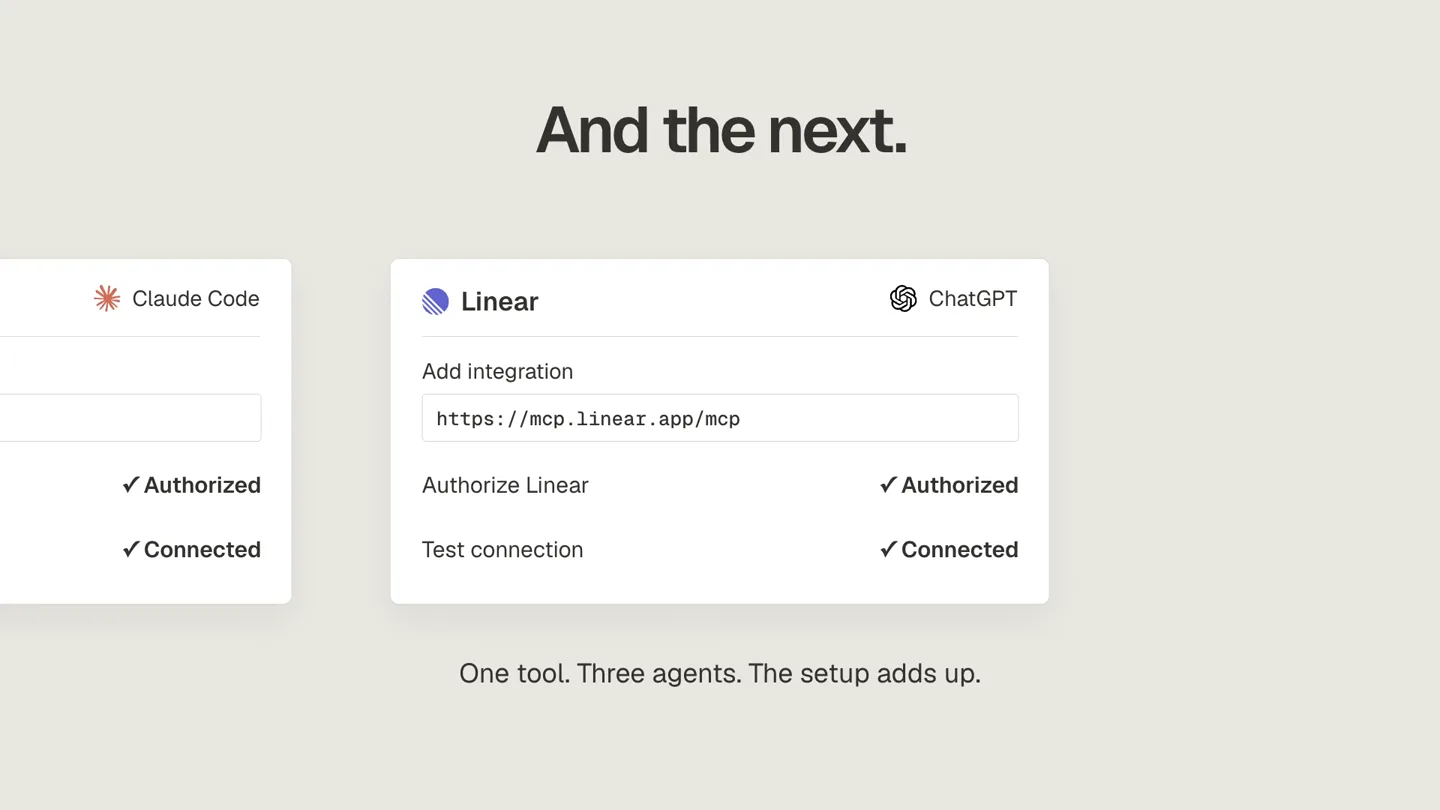
- Then the next agent. Claude Code Linear ChatGPT Add integration https://mcp.1 Authorize Linear Authorize > Test connection One tool. Three agents. The setup adds up. Working on the blogging page today — new hero + fixing the tag filters. Claude Code Action Outcome Read shared memory Completed Generate vid Total spend $842.60 Fetch laun Search the web Revise image Read shared memory Completed Completed Completed Completed Completed Gmail Customer inbox One workspace. Every agent. Claude Code > find launch feedback Searching Slack Team context Same issue here. The list stays stale. Sam It happens after feedback is sent. DEMO-42 Refresh feedback after submission Cause: stale customer-list cache. feedback/submit.ts await saveFeedback(input); return { saved: true }; GitHub Open the fix Media generation Release visual Complete Release visual generated Public posts D Dana @dana Public It really helps improve my efficiency. Social research Public reactions Searching Media Memory Usage & cost Social media research Blog moved to Fumadocs The old blogging page is retired. Dev Ayesa ChatGPT Margo Claude Jordan is the new Head of HR. ChatGPT
- Camera
- Static, then subtle zooms and pans across UI elements, followed by a wide shot of a node-based connection diagram.
- Motion
- Rapid UI element transitions, text typing animation, data visualization with animated nodes and connecting lines, and a 'mind map' style reveal of connected services.
Problem Agitation
Complex Agent Workflows Simplified
“CoreSpeed connects your apps, keeps memory across agents, and exposes media gen, web, and social research through one MCP endpoint.”
- On screen
- Claude Code DEMO-42 Finish feedback refresh fix Gmail Slack Linear Editing submit handler await saveFeedback(input); await refreshCustomerlist(); Session limit · Task paused API key limits Key Used this month Monthly limit ayesa-research 142,600 credits 200,000 credits $200.00 margo-media 650,000 credits 800,000 credits $800.00 alex-onboarding 50,000 credits 50,000 credits $50.00 API key limits Key Used this month Monthly limit ayesa-research 142,600 credits 200,000 credits $200.00 margo-media 650,000 credits 1,000,000 credits $1,000.00 alex-onboarding 50,000 credits 50,000 credits $50.00 Alex · onboarding Checking limit Activity Action Outcome Seedance 2.5 · Video generation Succeeded Social media research tool Succeeded Image generation Succeeded Next request Denied Total spend $842.60
- Camera
- Close-up on UI elements, then a wider shot of a data table, followed by a subtle pan to highlight specific rows.
- Motion
- Progress bar animations, data table row highlighting, and a 'checking limit' animation with a slider, demonstrating real-time feedback.
Product Reveal
CoreSpeed: The Central Hub
“(No spoken dialogue — The music features a driving, rhythmic synth bass line with a consistent, almost metronomic beat. Interspersed are subtle, high-frequency synth arpeggios and occasional, short, high-energy risers and sweeps that punctuate key points in the narration. There are no prominent sub-bass drops or impacts, but the overall mix maintains a clean, professional, and forward-moving feel. The sound design is minimalist, focusing on clarity and supporting the narration without overpowering it.)”
- On screen
- CORESPED Everyt CORESPED Everything your agent needs. corespeed.io
- Camera
- Zoom out to reveal the CoreSpeed logo and tagline, then a slow, deliberate zoom into the product name.
- Motion
- Text reveal animation (typing effect), logo animation, and a subtle background gradient shift.
Feature Teaser
Unified Agent Management
“(No spoken dialogue — The music features a driving, rhythmic synth bass line with a consistent, almost metronomic beat. Interspersed are subtle, high-frequency synth arpeggios and occasional, short, high-energy risers and sweeps that punctuate key points in the narration. There are no prominent sub-bass drops or impacts, but the overall mix maintains a clean, professional, and forward-moving feel. The sound design is minimalist, focusing on clarity and supporting the narration without overpowering it.)”
- On screen
- CORESPED Everything your agent needs. corespeed.io
- Camera
- Static shot of the CoreSpeed logo and tagline, then a subtle camera shake to emphasize the product's impact.
- Motion
- Subtle parallax scrolling of background elements, a 'glitch' effect on the logo, and a final fade-out to black.
Motion design primitives
Synthesizable in Remotion · key components of the corespeed-dataflow-dashboard template.
NodeConnectionFlow
Icons representing different applications or agents are connected to a central CoreSpeed icon via animated, curved lines, illustrating data flow and integration. New nodes and connections appear dynamically.
+ Code construction recipe
Use Remotion's <AbsoluteFill> for layout. Implement SVG paths for curved lines, animating the 'stroke-dashoffset' property to create a drawing effect. Use <spring> for icon entrance animations and <interpolate> for path drawing timing. Manage node positions with an array of objects and map over them to render icons and connections.
UITextTypewriter
Text appears character by character, mimicking a typewriter effect, often within UI elements like input fields or chat bubbles. This is combined with subtle cursor blinks.
+ Code construction recipe
Utilize Remotion's <Sequence> and <spring> for character-by-character reveals. Calculate the 'opacity' and 'transform' (e.g., translateY) for each character based on its index and the current frame. A blinking cursor can be a separate <AbsoluteFill> with an animated 'opacity' using <interpolate> and a 'loop' option.
DataProgressHighlight
Data tables or progress bars animate to show usage, limits, or task completion. Rows or specific data points highlight dynamically, often with a subtle background color change or a progress bar filling up.
+ Code construction recipe
For progress bars, use a <div /> with a 'width' property animated via <interpolate> or <spring> based on data values. For table row highlighting, animate the 'backgroundColor' of a row element using <spring> or <interpolate> when a specific data point is emphasized. Ensure smooth transitions between states.
Style DNA & aesthetic system
Visual aesthetic
Typography
Motion
Special effects
Pacing & rhythm
Conceptual story rhythm
- 1
The Integration Challenge
Purpose. Introduce the complexity of managing multiple AI agents and applications, setting up the problem CoreSpeed solves.
Execution. Rapid cuts between different application UIs, showing manual integration steps and fragmented workflows, culminating in a visual of many disconnected icons.
- 2
CoreSpeed's Unified Solution
Purpose. Present CoreSpeed as the central hub that connects and streamlines all agent activities and data.
Execution. A central CoreSpeed logo emerges, with animated lines drawing from various agent icons to it, then fanning out to integrated services, illustrating a unified ecosystem.
- 3
Intelligent Memory & Control
Purpose. Demonstrate CoreSpeed's ability to maintain memory across agents and provide granular control over usage and costs.
Execution. UI animations showing chat dialogues with memory recall, followed by interactive data tables with progress bars and sliders for API key limits and activity tracking.
- 4
Empowering Agent Workflows
Purpose. Showcase the practical benefits and efficiency gains for users through real-world task completion.
Execution. A sequence of quick UI interactions demonstrating tasks like 'find launch feedback,' 'generate media,' and 'social research,' all seamlessly executed within the CoreSpeed interface, ending with the product tagline.
Remix in Animatiq Studio
Master remix prompt · agent-ready
Sample remix
Objective
A new product, 'DataFlow,' that consolidates real-time sales, marketing, and operational data into a single, intelligent dashboard for C-suite executives.How the recipe adapts
The NodeConnectionFlow primitive will be adapted to show different data source icons (e.g., Salesforce, Google Analytics, SAP) connecting to a central 'DataFlow' dashboard icon. DataProgressHighlight will be used for animating KPI widgets and real-time data updates on the dashboard. UITextTypewriter will be used for dynamic report generation titles and executive summaries. The overall pacing will remain fast, emphasizing the speed of data consolidation and insight delivery. The color palette will shift to a cool blue accent for data points, maintaining the professional, minimalist feel.Remix blueprint · corespeed-dataflow-dashboard
Scene durations (4 scenes, 74s)
Key Remotion components
Related AI Agents Product Launches
Explore all AI Agents launches →
To ensure that artificial general intelligence benefits all of humanity

Introducing Claude Fable 5: a Mythos-class model that we’ve made safe for general use. Its capabilities exceed those of any model we’ve ever made generally available. https://t.co/2AvmEjHIX8

To understand the true nature of the universe.