
Neal Agarwal · Launch Video Breakdown: Hook, Pacing & Motion Design
Introducing Cursor Camp, a website to hang out with other cursors. Out now, enjoy :)
Scene-by-scene timeline & spoken transcript
The Hook
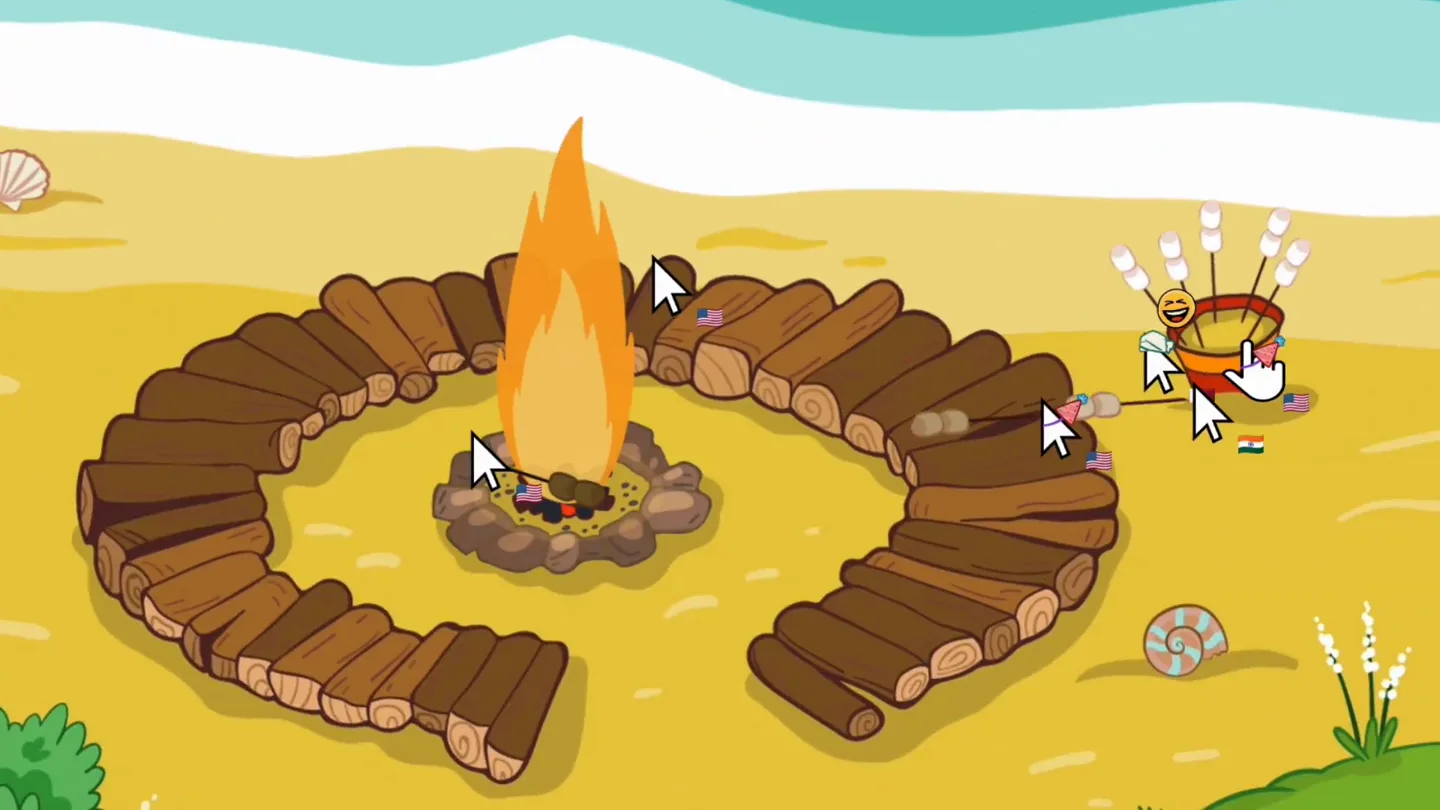
Cursor Camp Title Reveal
“(No spoken dialogue — Sustained, evolving synth pad and subtle riser build to a significant sub-bass drop/impact.)”
- On screen
- CURSOR Camp
- Camera
- Static overhead shot, slightly angled isometric perspective.
- Motion
- Text reveal with animated arrows pointing to the title, cursors with flags moving around the scene.
Product Reveal
Interactive Campfire & Emotes
“(No spoken dialogue — Rhythmic, pulsing synth arpeggio and driving beat with an impactful sub-bass hit at 0:06.)”
- On screen
- (No on-screen text)
- Camera
- Static overhead shot, slightly angled isometric perspective.
- Motion
- Cursors interact with campfire logs, an emote wheel appears and disappears, cursors pick up and drop items.
Feature Teaser
Playground Interactions
“(No spoken dialogue — High-energy riser builds from 0:08 to 0:09, culminating in a powerful sub-bass drop/impact at 0:09.)”
- On screen
- (No on-screen text)
- Camera
- Static overhead shot, slightly angled isometric perspective.
- Motion
- Cursors interact with playground equipment like a merry-go-round and slide, demonstrating collaborative play.
Feature Teaser
Diverse Environments & Exploration
“(No spoken dialogue — Driving rhythm continues with various synth textures and percussive elements, concluding with a strong sub-bass impact and sharp riser.)”
- On screen
- (No on-screen text)
- Camera
- Static overhead shot, slightly angled isometric perspective, then a cut to a dark cave scene.
- Motion
- Cursors navigate a river in a boat, then explore a dark cave with a flashlight effect, revealing hidden elements.
Motion design primitives
Synthesizable in Remotion · key components of the cursor-camp-inspired-interactive-launch template.
CursorInteraction
Multiple cursors, each with a small flag indicating nationality, move around the scene and interact with objects by clicking, dragging, or hovering, triggering UI elements or object states.
+ Code construction recipe
Use `interpolate` for cursor path animation, `spring` for click/hover feedback on objects. Implement state management for object interactions (e.g., `useState` for emote wheel visibility). Flags can be rendered as child components of the cursor.
DynamicEnvironmentPan
The camera remains static, but the scene content appears to scroll or pan, revealing new areas and interactive elements within a larger, continuous world.
+ Code construction recipe
Render a large SVG or canvas background. Animate the `transform` (translate) property of the entire scene container using `interpolate` to simulate camera movement across the static background. Ensure elements within the scene are positioned relative to this larger canvas.
InteractiveLightBeam
A spotlight effect emanates from a cursor, illuminating parts of a dark scene and revealing hidden details or objects as the cursor moves.
+ Code construction recipe
Create a dark overlay with a transparent circular or conical mask. Position this mask dynamically based on cursor coordinates using `interpolate`. Apply a `radial-gradient` or SVG filter for the light beam effect, animating its intensity or spread with `spring`.
Style DNA & aesthetic system
Visual aesthetic
Typography
Motion
Special effects
Pacing & rhythm
Conceptual story rhythm
- 1
The Grand Entrance
Purpose. Immediately capture attention and introduce the product's core identity.
Execution. A bold, animated title reveal with guiding arrows and active cursors, set against a vibrant, inviting scene.
- 2
Interactive Showcase
Purpose. Demonstrate the product's core interactive features and social aspects.
Execution. Cursors engaging with a campfire, triggering an emote wheel, and picking up items, highlighting user collaboration.
- 3
World Exploration
Purpose. Illustrate the breadth of environments and activities available within the product.
Execution. Rapid cuts showcasing cursors interacting with playground equipment, navigating a river, and exploring a cave.
- 4
Discovery & Delight
Purpose. Conclude with a sense of wonder and the potential for new experiences.
Execution. The flashlight effect in the cave revealing hidden gems, leaving the viewer intrigued about further exploration.
Remix in Animatiq Studio
Master remix prompt · agent-ready
Sample remix
Objective
Launch a new collaborative online whiteboard tool called 'Idea Canvas'.How the recipe adapts
The CursorInteraction primitive would be adapted to show multiple cursors drawing, moving sticky notes, and reacting with emojis on a shared canvas. The DynamicEnvironmentPan could simulate zooming and panning across a large whiteboard. Instead of a campfire, cursors would gather around a central 'idea node' that expands. The overall aesthetic would retain the hand-drawn feel but with a cleaner, more professional color palette suitable for a productivity tool, while keeping the energetic pacing.Remix blueprint · cursor-camp-inspired-interactive-launch
Scene durations (4 scenes, 19s)
Key Remotion components
Related Tech & SaaS Product Launches
Explore all Tech & SaaS launches →
Against all odds. Congrats @elonmusk and @SpaceX.
Unreal Engine 6 has been announced with Rocket League.

Trade 24/7 with a social feed and onchain signals.