
Cursor · Launch Video Breakdown: Hook, Pacing & Motion Design
Cursor can now create a new web app from scratch, store the code in Origin, and deploy to Vercel in one flow.
Scene-by-scene timeline & spoken transcript
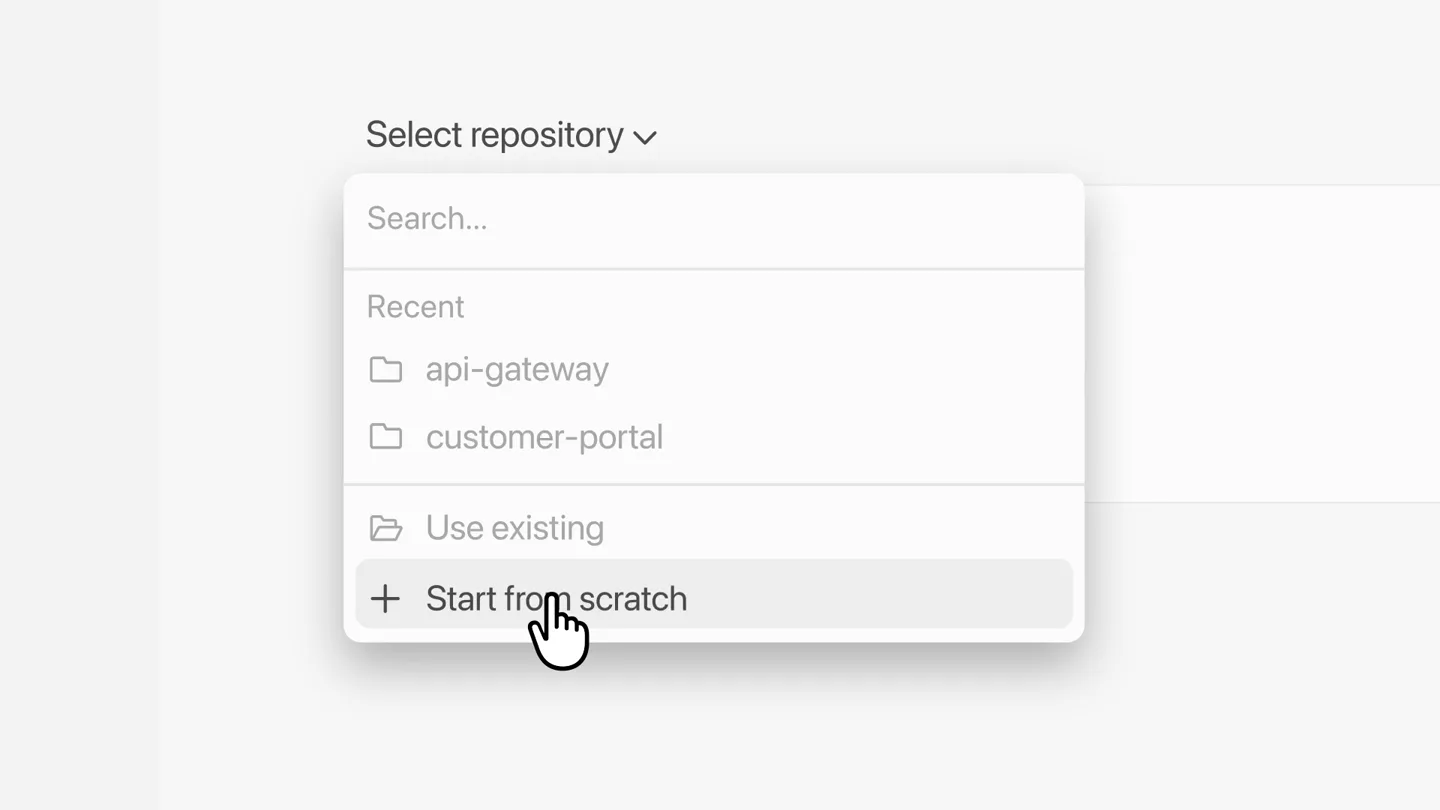
The Hook
Effortless Web App Creation
“(No spoken dialogue — The track begins with a sustained, evolving pad sound, creating an atmospheric and slightly mysterious mood.)”
- On screen
- New Chat, Search, Automations, Customize, Chats, campaign-dashboard, Make the dashboard..., content-planner, webinar follow-up tool, Cameron Collis, Anysphere, Select repository, Auto Balance
- Camera
- Close-up on UI element, then a slight zoom out to reveal more of the application window.
- Motion
- UI interaction with cursor, dropdown menu animation, subtle zoom.
Product Reveal
AI-Powered Project Generation
“(No spoken dialogue — A subtle, high-frequency riser begins to build, leading into a significant sub-bass drop/impact at 00:05. This is followed by a rhythmic, arpeggiated synth pattern.)”
- On screen
- No repo setup required, Start from scratch, Create website for archit, Create website for architecture firm with a minimal, Create website for architecture firm with a minimal, art-directed editorial, Minimal Portfolio, Planning next moves, Changes, Browser, Terminal, File, Create repo, Send follow up
- Camera
- Static shot on a text input field, then a quick cut to a wider view of the application with generated content.
- Motion
- Rapid text typing animation, UI element reveal, quick scene cut.
Feature Teaser
Instant Preview and Repository Creation
“(No spoken dialogue — Another, more pronounced riser starts at 00:10, culminating in a powerful sub-bass impact and a bright, percussive synth hit at 00:11. The arpeggiated synth continues, becoming more prominent.)”
- On screen
- Minimal Portfolio, Create a minimal, art-directed landing page for an architecture firm with an editorial feel, Worked for 51s, Built the portfolio landing page, Meridian Portfolio, Ready to preview, Open, Changes, Browser, Publish, http://localhost:3000, Meridian, An architecture studio shaping rooms, gardens, and the quiet weather of interiors., Build for daylight. Design for decades., Meridian is an architecture practice working across homes, gardens, and cultural spaces. Where proportion, natural light, and restraint turn a building into somewhere you don't want to leave., Start free, See the product, Create repo, Send follow up, Save your work in Cursor
- Camera
- Zoom into a preview window, then a close-up on a 'Create repo' button.
- Motion
- Seamless UI transition from internal app view to browser preview, cursor interaction, text reveal.
Call to Action
End-to-End Deployment & Ecosystem Integration
“(No spoken dialogue — A final, intense riser builds from 00:19, leading to a climactic sub-bass drop and a bright, sustained synth chord at 00:20, which then fades out.)”
- On screen
- Save your work in Cursor, Publish to Vercel, Prompt, preview and publish, all from Cursor, Orders, 12.924, Latch, Catalog, Requests, NORTHLINE INTERNAL, Request access, Choose a system, say why you need it, and the owner will review. Most standard requests clear the same day., Search resources, owners, or codes, 182, Top product sales, Returns, 321
- Camera
- Static text overlay, then a graphic illustrating integration, followed by a dynamic montage of product UI elements, ending on the Cursor logo.
- Motion
- Icon animation, rapid montage of UI elements with subtle parallax, logo reveal with a quick fade.
Motion design primitives
Synthesizable in Remotion · key components of the cursor-ai-devtool-launch template.
UITextTypewriter
Text appears character by character in an input field, simulating real-time typing, followed by a quick expansion of the input box to accommodate more text.
+ Code construction recipe
Use `interpolate` for character opacity and position, `spring` for input box width/height expansion. Implement a `Sequence` component to control typing speed and pauses.
SeamlessAppToBrowserTransition
A section of the application UI smoothly transforms or slides to reveal a full browser window displaying the generated web app, maintaining context.
+ Code construction recipe
Employ `AbsoluteFill` with `interpolate` for position and scale. Use `z-index` to layer the app and browser views. A `spring` animation can be used for the final 'snap' into the browser view.
IconFlowDiagram
Two distinct product icons appear, connected by a dashed arrow that animates to show direction, symbolizing integration and workflow.
+ Code construction recipe
Render SVG icons and a dashed SVG path. Animate the `stroke-dashoffset` property of the path to create the 'drawing' effect for the arrow. Icons can `spring` into place.
Style DNA & aesthetic system
Visual aesthetic
Typography
Motion
Special effects
Pacing & rhythm
Conceptual story rhythm
- 1
Initiate & Ideate
Purpose. Show the user starting a new project from scratch with a simple prompt.
Execution. Cursor interaction with 'Start from scratch', followed by rapid text input in a clean UI.
- 2
Generate & Preview
Purpose. Demonstrate the AI's ability to quickly build a web app and provide an instant preview.
Execution. Transition from text prompt to a fully rendered web page within the app, then opening in a browser.
- 3
Save & Integrate
Purpose. Highlight the seamless saving of work and integration with other developer tools.
Execution. Clicking 'Create repo' and then a visual diagram showing integration with Origin and Vercel.
- 4
Consolidate & Call
Purpose. Summarize the end-to-end workflow and reinforce the product's value proposition.
Execution. A montage of various UI elements and a final text overlay summarizing the core benefit, ending with the brand logo.
Remix in Animatiq Studio
Master remix prompt · agent-ready
Sample remix
Objective
A new AI-powered code refactoring tool that integrates with GitHub and deploys to AWS.How the recipe adapts
The UITextTypewriter primitive would show a user typing a refactoring prompt. The SeamlessAppToBrowserTransition would adapt to show the refactored code in an IDE preview, then a GitHub pull request. The IconFlowDiagram would illustrate the integration from the refactoring tool to GitHub and then to AWS Lambda, using their respective logos.Remix blueprint · cursor-ai-devtool-launch
Scene durations (4 scenes, 24.7s)
Key Remotion components
Related Developer Tools Product Launches
Explore all Developer Tools launches →
xAI opens voice cloning on its API: build a custom voice in about two minutes or pick from 80+ voices in 28 languages.

Agentic CLI for coding, building apps, and automating workflows.
Sakana AI launches Fugu, a multi-agent orchestration system served through a single model API, led by its Fugu Ultra model.