
Dashform · Launch Video Breakdown: Hook, Pacing & Motion Design
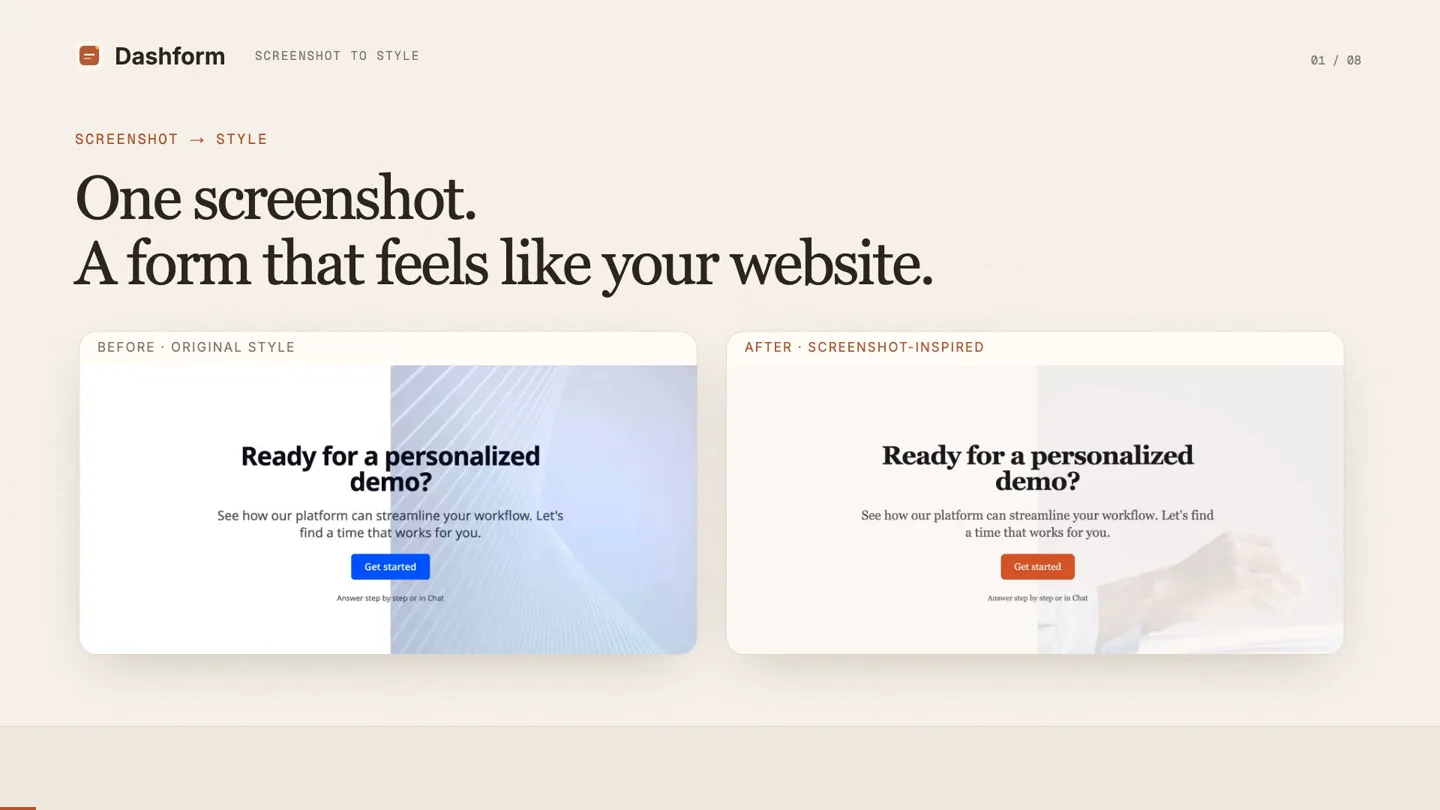
Dashform takes a screenshot of your website and creates a form that matches its visual style, so the funnel does not look like another company built it.
Scene-by-scene timeline & spoken transcript
The Hook
Instant Visual Harmony
“Dashform takes a screenshot of your website and creates a form that matches its visual style, so the funnel does not look like another company built it.”
- On screen
- Dashform SCREENSHOT TO STYLE 01 / 88 SCREENSHOT → STYLE One screenshot. A form that feels like your website. BEFORE - ORIGINAL STYLE AFTER - SCREENSHOT-INSPIRED Ready for a personalized demo? See how our platform can streamline your workflow. Let's find a time that works for you. Get started Answer step by step or in Chat Ready for a personalized demo? See how our platform can streamline your workflow. Let's find a time that works for you. Get started Answer step by step or in Chat
- Camera
- Static wide shot of two form previews, one 'Before' and one 'After'.
- Motion
- Split-screen comparison with subtle text fades and button color changes.
Product Reveal
AI-Powered Style Matching
“Start with your website. Edit, chat, attach a screenshot. The reference image appears as an attachment in chat. Attach a screenshot that clearly shows your website's colors, typography, and overall look. Tell AI what to match. Use the screenshot as the design reference. Add one simple instruction: Update form theme and backgrounds to match the screenshot style. The image provides the visual direction, so you don't need to describe every design detail.”
- On screen
- Dashform SCREENSHOT TO STYLE 02 / 88 01 / ADD A REFERENCE Start with your website. Edit → Chat → attach a screenshot. Saas Demo Request AI Form Live Edit Agent Connect Share Replies Chat Content Translations Theme Settings Preview Edit No form messages Start a conversation to modify the form YOUR SCREENSHOT, ATTACHED IN CHAT image.png Describe how you would like to modify the form... Dashform SCREENSHOT TO STYLE 03 / 88 02 / GIVE ONE INSTRUCTION Tell AI what to match. Use the screenshot as the design reference. TYPE THIS IN CHAT Update form theme and backgrounds to match the screenshot style. image.png Update form theme and backgrounds to match the screenshot style. Describe how you would like to modify the form...
- Camera
- Close-up on a UI element, then a wider shot of the application interface, followed by a zoom into the chat input field.
- Motion
- Sequential UI walkthrough with text typing animation and element highlighting.
Feature Teaser
AI Design Interpretation & Preview
“Let AI read the design. A coordinated update to the visual style. Here, AI identifies a warmer palette, darker text, serif typography, and a terracotta accent. It explains the planned changes in the chat before updating the preview. Watch the visual style change. Now look at the preview. The heading switches to a serif style, and the button picks up the orange accent.”
- On screen
- Dashform SCREENSHOT TO STYLE 04 / 88 03 / STYLE DIRECTION Let AI read the design. A coordinated update to the visual style. #FAF9F7 #2C2C2C #D9673A A softer, warmer feel. Warm background Serif headings Orange accent Style choices shown in this recording Dashform SCREENSHOT TO STYLE 05 / 88 04 / PREVIEW THE RESULT Watch the visual style change. Saas Demo Request AI Form Live Edit Agent Connect Share Replies WAITING TIME SHORTENED Chat Content Translations Theme Settings Preview Edit Form retrieved I can see your current form is styled in cool blue tones. Based on the Claude homepage screenshot you shared—which uses a warm, inviting palette with earthy tones, sophisticated typography, and a clean, spacious design—I'll update your form's appearance to match that vibe. Here's what I'll change: Color palette: Warm background (cream/off-white) instead of bright white Deep charcoal text for sophistication Warm terracotta accent color (matching Claude's coral button) Refined button text styling Typography & spacing: Professional serif font to match the elegant feel Adjusted button styling for a more refined look Backgrounds: I'll search for clean, minimal background images that align with Claude's aesthetic (hand gesture, thinking concepts, professional environments) Form updated Updated steps and theme Done! I've refreshed your form to match the Claude aesthetic. Visual updates: Background color is now a warm cream (#FAF9F7) instead of stark white, creating a sophisticated, welcoming feel Text color is now deep charcoal (#2C2C2C) for elegance and readability Accent color changed to a warm terracotta (#D9673A)—matching Claude's coral button Font switched to Merriweather (serif), giving it the refined, thoughtful look of the Claude homepage Button corners slightly rounded for a polished touch Text animation set to blur-reveal for a modern, smooth entrance effect Background images: Your opening and closing pages now feature a professional hand-and-workspace image (photographer: cottonbro studio) Question pages use a thoughtful, contemplative business moment image that reinforces the 'thinking partner' vibe Opacity levels are subtle (10-15%) in backgrounds complimenting the form's content Ready for a personalized demo? See how our platform can streamline your workflow. Let's find a time that works for you. Get started
- Camera
- Focus on color palette reveal, then a full UI view with a chat window expanding, followed by a form preview update.
- Motion
- Progressive reveal of color swatches, chat window expansion, and a smooth cross-fade transition for the form's visual update.
Call to Action
Refine and Publish
“Same message. A new visual style. Headline and CTA retained. Colors, typography, and background updated. Compare the before and after changes. Make it yours. Keep refining in the same chat. For example: Make the background lighter and keep the button orange. Then review every step and the mobile preview. Review the questions and mobile preview before you publish. Your website style. Your form. Upload a screenshot. Describe the change. Review the result, then publish. Draft changes go live after you publish. One screenshot, one instruction, and a form that feels closer to your website. Try it in Dashform.”
- On screen
- Dashform SCREENSHOT TO STYLE 05 / 88 BEFORE / AFTER Same message. A new visual style. BEFORE AFTER Ready for a personalized demo? See how our platform can streamline your workflow. Let's find a time that works for you. Get started Ready for a personalized demo? See how our platform can streamline your workflow. Let's find a time that works for you. Get started Headline and CTA retained + Colors, typography and background updated Dashform SCREENSHOT TO STYLE 07 / 88 05 / FINE-TUNE Make it yours. Keep refining in the same chat. EXAMPLE FOLLOW-UP Make the background lighter and keep the button orange. Then review every step and the mobile preview. Answer step by step or in Chat Dashform SCREENSHOT TO STYLE 08 / 88 READY WHEN YOU ARE Your website style. Your form. Upload a screenshot. Describe the change. Review the result, then publish. Try it at getaiform.com Draft changes go live after you publish. Ready for a personalized demo? See how our platform can streamline your workflow. Let's find a time that works for you. Get started
- Camera
- Split-screen comparison, then a close-up on a chat instruction, followed by a final product display with a call to action.
- Motion
- Side-by-side comparison, text typing animation, and a final static product shot with a prominent CTA button.
Motion design primitives
Synthesizable in Remotion · key components of the ai-design-tool-showcase template.
SplitScreenComparison
Two distinct content panels are displayed side-by-side, allowing for a direct visual comparison of 'Before' and 'After' states. Elements within each panel can animate independently.
+ Code construction recipe
Use Remotion's <AbsoluteFill> with two child <Sequence> components, each containing its own content. Animate opacity and transform properties for elements within each sequence using `interpolate` or `spring` for smooth transitions. Use `spring` for button color changes.
UITypingReveal
Text appears character by character, simulating real-time typing in a chat or input field. This is often accompanied by a blinking cursor.
+ Code construction recipe
Implement with `useCurrentFrame()` and `interpolate` to control the `substring` length of the text. A blinking cursor can be achieved with `spring` or `interpolate` on its opacity, toggling between 0 and 1.
ProgressiveSwatchReveal
Color swatches or design elements are revealed sequentially, often with a subtle fade-in or scale-up animation, to highlight key design attributes.
+ Code construction recipe
Use `Sequence` components for each swatch with a delayed `from` prop. Animate `opacity` and `scale` using `spring` for a gentle entrance. Hex codes can be passed as props to a reusable swatch component.
Style DNA & aesthetic system
Visual aesthetic
Typography
Motion
Special effects
Pacing & rhythm
Conceptual story rhythm
- 1
The Problem & Solution
Purpose. Immediately showcases the core problem (inconsistent forms) and the elegant solution (Dashform's AI-powered styling).
Execution. A direct 'Before & After' split-screen comparison of forms, visually demonstrating the product's value proposition upfront.
- 2
Step-by-Step Workflow
Purpose. Guides the viewer through the product's simple, intuitive process, building confidence in its ease of use.
Execution. Detailed UI walkthroughs with typing animations and element highlighting, showing how to upload a screenshot and give instructions.
- 3
AI Intelligence & Result
Purpose. Highlights the AI's capability to interpret design and deliver a refined output, then reveals the transformed form.
Execution. Progressive reveal of color palette analysis, chat explanations of AI changes, and a smooth transition to the restyled form preview.
- 4
Refinement & Call to Action
Purpose. Emphasizes user control and encourages immediate engagement with the product.
Execution. Demonstration of fine-tuning capabilities via chat, followed by a final product shot with a clear call to action and URL.
Remix in Animatiq Studio
Master remix prompt · agent-ready
Sample remix
Objective
A new AI tool called 'BrandGenie' that generates social media ad creatives from a brand's style guide.How the recipe adapts
The SplitScreenComparison primitive would show a generic ad template 'Before' and a BrandGenie-generated ad 'After' that perfectly matches the brand's colors and fonts. The UITypingReveal would demonstrate typing 'Generate 3 Instagram ads for our new product launch' into BrandGenie's chat interface. The ProgressiveSwatchReveal would highlight BrandGenie's analysis of the brand's primary, secondary, and accent colors from the uploaded style guide. The overall pacing would remain slow and instructional, guiding the user through the BrandGenie interface from upload to final ad generation, emphasizing ease of use and brand consistency.Remix blueprint · ai-design-tool-showcase
Scene durations (4 scenes, 100s)
Key Remotion components
Related AI Agents Product Launches
Explore all AI Agents launches →
To ensure that artificial general intelligence benefits all of humanity

Introducing Claude Fable 5: a Mythos-class model that we’ve made safe for general use. Its capabilities exceed those of any model we’ve ever made generally available. https://t.co/2AvmEjHIX8

To understand the true nature of the universe.