
Datalab · Launch Video Breakdown: Hook, Pacing & Motion Design
Datalab Marker v2 turns PDF, images, DOCX, and PPTX into clean Markdown. Up to 23.7 pages/s, 90+ languages, open-source.
Scene-by-scene timeline & spoken transcript
The Hook
Instant PDF to Markdown Conversion
“(No spoken dialogue — Sub-bass drop, high-energy riser, then electronic clicks at 0:02, 0:03, 0:04.)”
- On screen
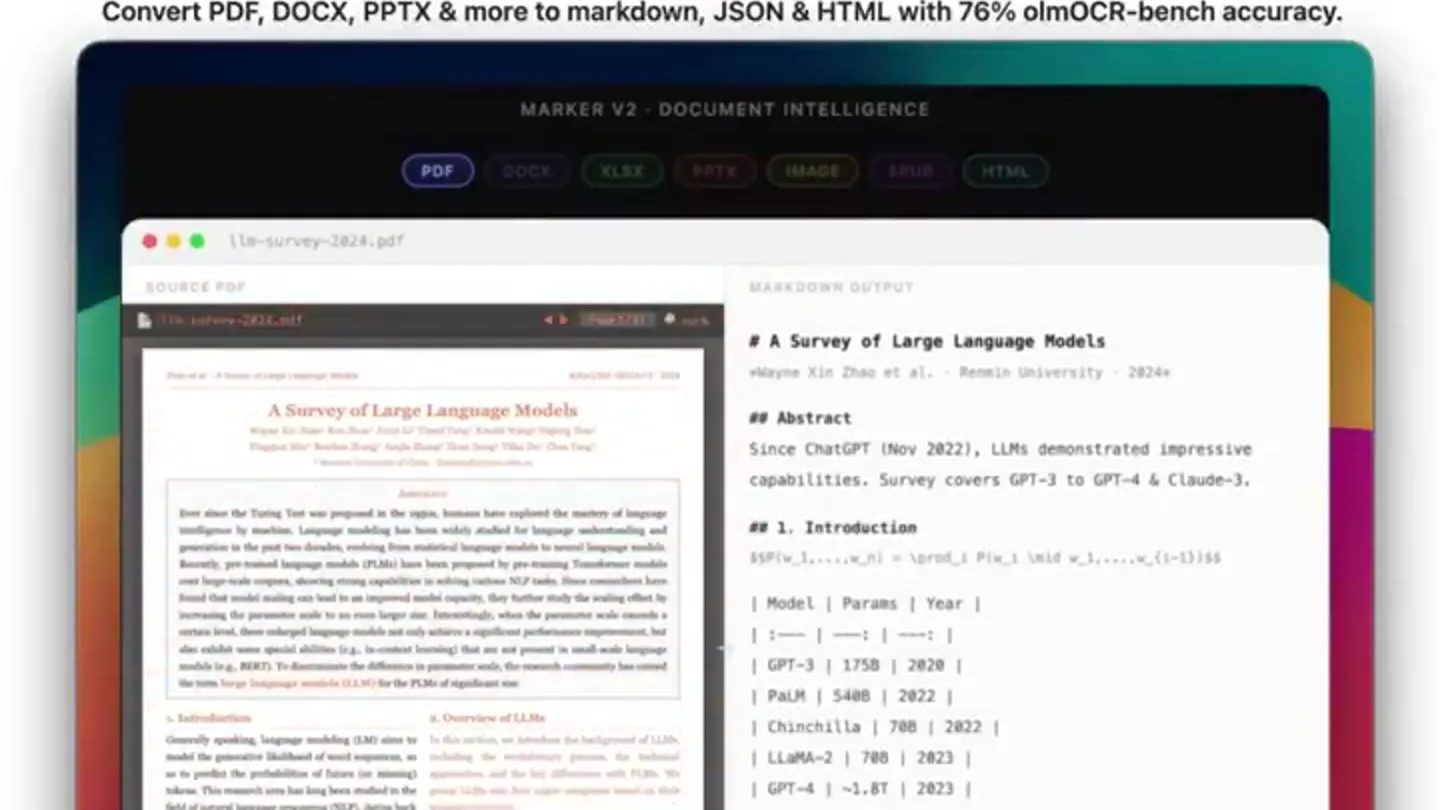
- Datalab Marker v2 Document Intelligence Convert PDF, DOCX, PPTX & more to markdown, JSON & HTML with 76% olmOCR-bench accuracy. MARKER V2 - DOCUMENT INTELLIGENCE PDF DOCX XLSX PPTX IMAGE EPUB HTML SOURCE PDF MARKDOWN OUTPUT file-survey-2024.pdf A Survey of Large Language Models # A Survey of Large Language Models Wayne Xin Zhao et al. Renmin University 2024 ## Abstract Since ChatGPT (Nov 2022), LLMs demonstrated impressive capabilities. Survey covers GPT-3 to GPT-4 & Claude-3. ## 1. Introduction $\text{P}(x_i | x_{<i}, \theta) = \frac{\exp(f_{\theta}(x_i, x_{<i}))}{\sum_{x'_i} \exp(f_{\theta}(x'_i, x_{<i}))}$ | Model | Params | Year | |---|---|---| | GPT-3 | 175B | 2020 | | PaLM | 540B | 2022 | | Chinchilla | 70B | 2022 | | LLaMA-2 | 70B | 2023 | | GPT-4 | ~1.8T | 2023 | ## 2. Scaling Laws $\text{E}[\text{L}(N, D)] \approx (\frac{N}{N_0})^{-\alpha} + (\frac{D}{D_0})^{-\beta}$ [Figure 1: Scaling laws - test loss vs model size](fig1.png) [Figure 3: Scaling Laws (Kaplan et al., 2020)](fig3.png) $\text{arXiv:2203.18223v3}$ pg 3 refs: [1]-[5] PDF parsed Text, Tables & equations extracted Markdown 1.8s
- Camera
- Static, wide shot of a browser window. The camera is fixed, presenting a clear, direct view of the UI.
- Motion
- Split-screen content reveal with a 'typing' animation effect on the right (Markdown output) and a 'parsing' progress bar at the bottom. The left (source PDF) remains static. A subtle glow emanates from the active 'PDF' tab.
Feature Teaser
Multi-Format Document Parsing
“(No spoken dialogue — Electronic clicks at 0:05, 0:06, 0:07, 0:08, 0:09, 0:10, 0:11.)”
- On screen
- Datalab Marker v2 Document Intelligence Convert PDF, DOCX, PPTX & more to markdown, JSON & HTML with 76% olmOCR-bench accuracy. MARKER V2 - DOCUMENT INTELLIGENCE PDF DOCX XLSX PPTX IMAGE EPUB HTML SOURCE DOCX MARKDOWN OUTPUT product-requirements.docx # Product Requirements Document @Marker API v2.0 M. Okonkwo Status: IN REVIEW ## Table of Contents 1. Overview ................................................................................................................................................................................................................................................................................................................................................................................................................................................................................................................................................................................................................................................................................................................................................................................................................................................................................................................................................................................................................................................................................................................................................................................................................................................................................................................................................................................................................................................................................................................................................................................................................................................................................................................................................................................................................................................................................................................................................................................................................................................................................................................................................................................................................................................................................................................................................................................................................................................................................................................................................................................................................................................................................................................................................................................................................................................................................................................................................................................................................................................................................................................................................................................................................................................................................................................................................................................................................................................................................................................................................................................................................................................................................................................................................................................................................................................................................................................................................................................................................................................................................................................................................................................................................................................................................................................................................................................................................................................................................................................................................................................................................................................................................................................................................................................................................................................................................................................................................................................................................................................................................................................................................................................................................................................................................................................................................................................................................................................................................................................................................................................................................................................................................................................................................................................................................................................................................................................................................................................................................................................................................................................................................................................................................................................................................................................................................................................................................................................................................................................................................................................................................................................................................................................................................................................................................................................................................................................................................................................................................................................................................................................................................................................................................................................................................................................................................................................................................................................................................................................................................................................................................................................................................................................................................................................................................................................................................................................................................................................................................................................................................................................................................................................................................................................................................................................................................................................................................................................................................................................................................................................................................................................................................................................................................................................................................................................................................................................................................................................................................................................................................................................................................................................................................................................................................................................................................................................................................................................................................................................................................................................................................................................................................................................................................................................................................................................................................................................................................................................................................................................................................................................................................................................................................................................................................................................................................................................................................................................................................................................................................................................................................................................................................................................................................................................................................................................................................................................................................................................................................................................................................................................................................................................................................................................................................................................................................................................................................................................................................................................................................................................................................................................................................................................................................................................................................................................................................................................................................................................................................................................................................................................................................................................................................................................................................................................................................................................................................................................................................................................................................................................................................................................................................................................................................................................................................................................................................................................................................................................................................................................................................................................................................................................................................................................................................................................................................................................................................................................................................................................................................................................................................................................................................................................................................................................................................................................................................................................................................................................................................................................................................................................................................................................................................................................................................................................................................................................................................................................................................................................................................................................................................................................................................................................................................................................................................................................................................................................................................................................................................................................................................................................................................................................................................................................................................................................................................................................................................................................................................................................................................................................................................................................................................................................................................................................................................................................................................................................................................................................................................................................................................................................................................................................................................................................................................................................................................................................................................................................................................................................................................................................................................................................................................................................................................................................................................................................................................................................................................................................................................................................................................................................................................................................................................................................................................................................................................................................................................................................................................................................................................................................................................................................................................................................................................................................................................................................................................................................................................................................................................................................................................................................................................................................................................................................................................................................................................................................................................................................................................................................................................................................................................................................................................................................................................................................................................................................................................................................................................................................................................................................................................................................................................................................................................................................................................................................................................................................................................................................................................................................................................................................................................................................................................................................................................................................................................................................................................................................................................................................................................................................................................................................................................................................................................................................................................................................................................................................................................................................................................................................................................................................................................................................................................................................................................................................................................................................................................................................................................................................................................................................................................................................................................................................................................................................................................................................................................................................................................................................................................................................................................................................................................................................................................................................................................................................................................................................................................................................................................................................................................................................................................................................................................................................................................................................................................................................................................................................................................................................................................................................................................................................................................................................................................................................................................................................................................................................................................................................................................................................................................................................................................................................................................................................................................................................................................................................................................................................................................................................................................................................................................................................................................................................................................................................................................................................................................................................................................................................................................................................................................................................................................................................................................................................................................................................................................................................................................................................................................................................................................................................................................................................................................................................................................................................................................................................................................................................................................................................................................................................................................................................................................................................................................................................................................................. ## 1. Overview Marker v2: document intelligence pipeline for PDFs, DOCX, XLSX, PPTX, images, HTML, EPUB - Markdown. ## 2. Functional Requirements | ID | Requirement | Priority | Status | |---|---|---|---| | FR-01 | PDF, DOCX, XLSX, HTML, EPUB, IMG | P0 | ✅ | | FR-02 | Markdown + tables + LaTeX | P0 | ✅ | | FR-03 | 76% olmOCR-bench balanced | P0 | ✅ | | FR-04 | REST API via FastAPI | P1 | ✅ | | FR-05 | JSON + bounding boxes | P1 | ✅ | --Batch up to 50- to 500+ concurrent requests DOCX parsed
- Camera
- Static, wide shot. The camera remains fixed on the browser window.
- Motion
- Sequential tab switching (PDF to DOCX to XLSX) with corresponding content updates. Each tab change triggers a 'typing' animation for the Markdown output and a 'parsing' progress bar. A subtle glow highlights the active tab.
Feature Teaser
Advanced Document Structure Recognition
“(No spoken dialogue — Electronic clicks at 0:12, 0:13, 0:14, 0:15, 0:16, 0:17, 0:18, 0:19.)”
- On screen
- Datalab Marker v2 Document Intelligence Convert PDF, DOCX, PPTX & more to markdown, JSON & HTML with 76% olmOCR-bench accuracy. MARKER V2 - DOCUMENT INTELLIGENCE PDF DOCX XLSX PPTX IMAGE EPUB HTML SOURCE PPTX MARKDOWN OUTPUT marker-v2-launch.pptx # Marker v2 Launch # Slide 3 - Why Existing Parsers Fall Short - Multi-column PDFs: garbled reading order - Scanned docs: most tools skip OCR silently - LaTeX equations: lost in text-layer extraction - Tables spanning pages lose structure - No OSS tool handles all 7 formats end-to-end [Benchmark chart: olmOCR-bench scores](chart.png) | System | Score | |---|---| | Marker v2 | 76.0% | | Minerva | 73.7% | | Docling | 36.3% | | Liteparse | 22.1% | PPTX parsed SOURCE IMAGE MARKDOWN OUTPUT transformer-architecture.png # TRANSFORMER ARCHITECTURE ## Encoder (Nx Layers) Input Embedding - Positional Encoding Multi-Head Self-Attention - Add & Norm Feed Forward Network - Add & Norm ## Decoder (Nx Layers) Output Embedding - Positional Encoding Masked Multi-Head Self-Attention - Add & Norm Cross-Attention (K,V from Encoder) - Add & Norm Feed Forward Network - Add & Norm Linear - Softmax - Output Probabilities ## Cross-Attention Bridge Encoder: K, V = Decoder: Q at each cross-attn layer. IMAGE parsed
- Camera
- Static, wide shot. The camera remains fixed on the browser window.
- Motion
- Sequential tab switching (XLSX to PPTX to IMAGE) with corresponding content updates. Each tab change triggers a 'typing' animation for the Markdown output and a 'parsing' progress bar. A subtle glow highlights the active tab.
Call to Action
Comprehensive Document Conversion & API
“(No spoken dialogue — Electronic clicks at 0:20, 0:21, 0:22, 0:23, 0:24, 0:25. Final sub-bass impact and high-energy riser at 0:25.)”
- On screen
- Datalab Marker v2 Document Intelligence Convert PDF, DOCX, PPTX & more to markdown, JSON & HTML with 76% olmOCR-bench accuracy. MARKER V2 - DOCUMENT INTELLIGENCE PDF DOCX XLSX PPTX IMAGE EPUB HTML SOURCE EPUB MARKDOWN OUTPUT deep-learning.epub # Deep Learning ## Chapter 8: Deep Feedforward Networks MLPs approximate f(x) = y if x is learned 0. Interacting flows forward - no feedback connections. ## 8.1 Example: Learning XOR XOR is not linearly separable - needs hidden layer. | x1 | x2 | y | |---|---|---| | 0 | 0 | 0 | | 0 | 1 | 1 | | 1 | 0 | 1 | | 1 | 1 | 0 | ## 8.2 Gradient-Based Learning Neural net loss is non-convex - gradient descent. Not closed-form. Iterative optimizers minimize cost. EPUB parsed SOURCE HTML MARKDOWN OUTPUT pdfconverter-api.html # PdfConverter Main entry point for converting documents to Markdown, JSON, HTML, or Chunks. ## Installation ```python from marker.pdfconverter import PdfConverter converter = PdfConverter(model_weights='default') markdown = converter.convert(pdf_file) ``` ## Parameters | Parameter | Type | Description | |---|---|---| | `artifact_dict` | `dict` | Model weights from `create_model` | | `config_parser` | `Format` | `page_range`, `OCR_settings` | | `processor_list` | `list` | `None` | Override processor pipeline | HTML parsed
- Camera
- Static, wide shot. The camera remains fixed on the browser window.
- Motion
- Sequential tab switching (EPUB to HTML) with corresponding content updates. Each tab change triggers a 'typing' animation for the Markdown output and a 'parsing' progress bar. A subtle glow highlights the active tab. The final scene emphasizes the API documentation.
Motion design primitives
Synthesizable in Remotion · key components of the dual-terminal-data-flow template.
DualTerminalRaceSplit
A split-screen interface where a 'source' document is displayed on the left, and its 'markdown output' is dynamically generated on the right with a typing effect. A progress bar or 'parsed' label appears at the bottom, indicating completion.
+ Code construction recipe
Utilize `Sequence` and `AbsoluteFill` for layout. Implement `TypewriterEffect` for the Markdown output using `spring` or `interpolate` for character reveal. Use `LinearGradient` or `BoxShadow` for the active tab glow. `ProgressBar` component with `interpolate` for width animation.
TabbedContentReveal
A series of tabs at the top of a UI element, where clicking each tab instantly switches the content displayed below, accompanied by a subtle highlight on the active tab.
+ Code construction recipe
Use `AbsoluteFill` for the main container. Implement a `Tabs` component with `useState` to manage active tab state. Apply `spring` or `tween` for the active tab's background color or `BoxShadow` glow. Content changes should be instant or use a quick `FadeIn` effect.
DynamicParsingFeedback
A small, transient text overlay (e.g., 'PDF parsed', 'DOCX parsed') appears near the bottom of the screen, indicating the successful processing of a document, often accompanied by a brief progress bar.
+ Code construction recipe
Create a `FloatingText` component with `AbsoluteFill` and `spring` for a quick fade-in and fade-out animation. Position it dynamically based on the active content. A `ProgressBar` component can be used with `interpolate` for a short duration.
Style DNA & aesthetic system
Visual aesthetic
Typography
Motion
Special effects
Pacing & rhythm
Conceptual story rhythm
- 1
The Problem & Solution Hook
Purpose. Immediately showcase the core value proposition: converting complex documents into clean Markdown.
Execution. Opening with a PDF being instantly parsed into Markdown, demonstrating the speed and accuracy.
- 2
Feature Showcase: Versatility
Purpose. Highlight the product's ability to handle various document formats beyond just PDFs.
Execution. Rapidly cycling through DOCX, XLSX, PPTX, and IMAGE conversions, each with dynamic Markdown output.
- 3
Feature Showcase: Depth
Purpose. Emphasize the intelligence of the parsing, handling complex structures like tables, equations, and code.
Execution. Demonstrating EPUB and HTML parsing, revealing structured Markdown output including code blocks and API documentation.
- 4
Call to Action / Technical Detail
Purpose. Provide a glimpse into the underlying technology and how developers can integrate it.
Execution. Concluding with the HTML tab showing API documentation and installation instructions, reinforcing the developer tool aspect.
Remix in Animatiq Studio
Master remix prompt · agent-ready
Sample remix
Objective
A developer wants to visualize complex SQL queries as interactive data flow diagrams.How the recipe adapts
The left pane will show a SQL query editor, and the right pane will dynamically render a data flow diagram as the query is 'parsed'. Tabs will switch between different SQL dialects (e.g., PostgreSQL, MySQL, Snowflake) or different visualization types (e.g., ERD, DAG). The 'parsed' feedback will indicate diagram generation completion.Remix blueprint · dual-terminal-data-flow
Scene durations (4 scenes, 26s)
Key Remotion components
Related Developer Tools Product Launches
Explore all Developer Tools launches →
xAI opens voice cloning on its API: build a custom voice in about two minutes or pick from 80+ voices in 28 languages.

Agentic CLI for coding, building apps, and automating workflows.

Sakana AI launches Fugu, a multi-agent orchestration system served through a single model API, led by its Fugu Ultra model.