
dev-browser · Launch Video Breakdown: Hook, Pacing & Motion Design
The fastest way for an agent to use a browser is to write code.
Scene-by-scene timeline & spoken transcript
The Hook
AI Agent Initiates Browser Automation
“(No spoken dialogue — ambient typing sounds and subtle UI clicks)”
- On screen
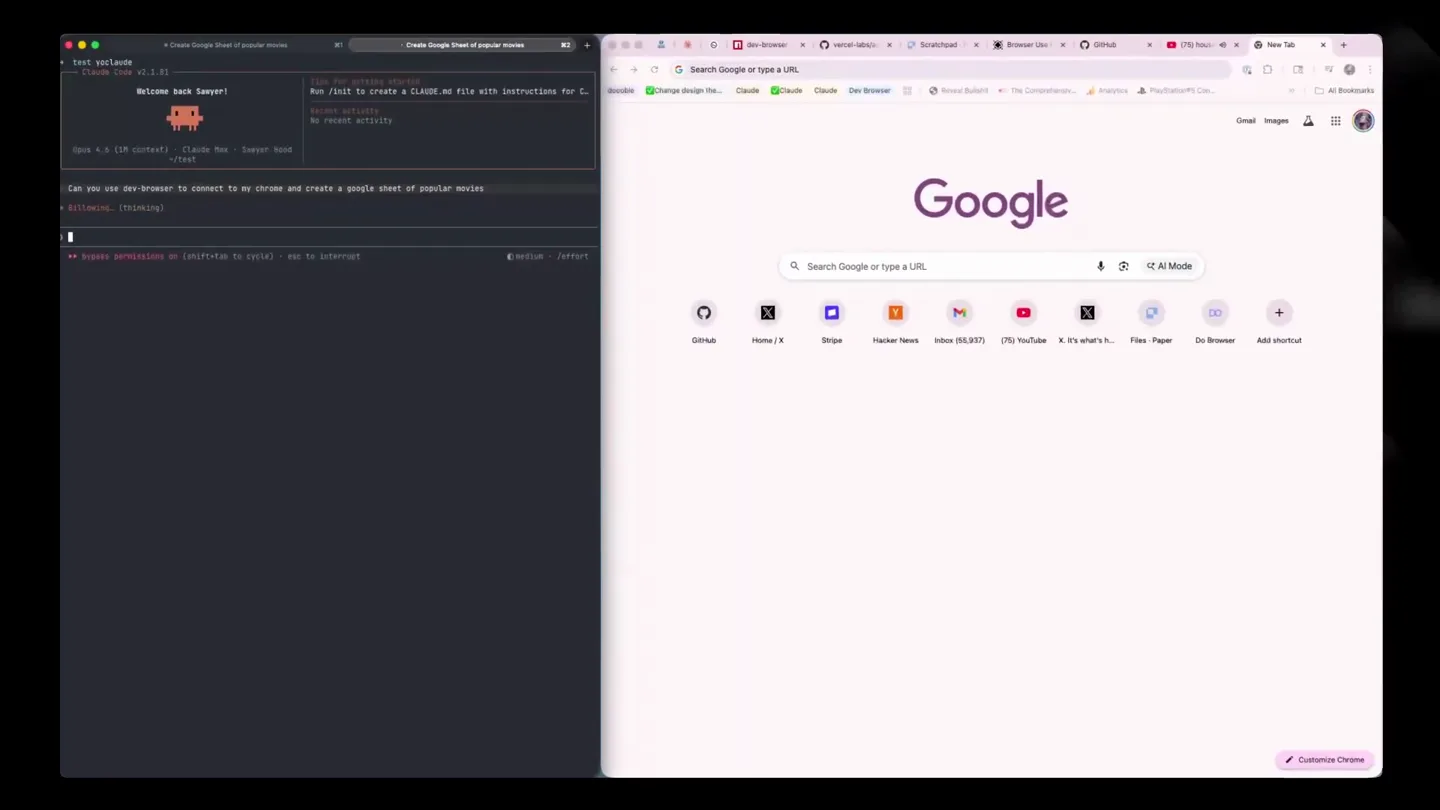
- test voclaude Claude Code v2.1.81 Welcome back Sawyer! Opus 4.6 (1M context) · Claude Max · Sawyer Hood ~/test Can you use dev-browser to connect to my chrome and create a google sheet of popular movies ▶▶ bypass permissions on (shift+tab to cycle) ctrl+n to search history Tips for getting started Run /init to create a CLAUDE.md file with instructions for C... Recent activity No recent activity Google AI Mode Customize Chrome
- Camera
- Static wide shot of a split-screen desktop, showing a terminal on the left and a Chrome browser on the right.
- Motion
- Text typing animation in the terminal, followed by a subtle UI shift as the browser loads.
Problem Agitation
Permission Grant & Initial Browser Actions
“(No spoken dialogue — ambient typing sounds and subtle UI clicks)”
- On screen
- test voclaude Claude Code v2.1.81 Welcome back Sawyer! Opus 4.6 (1M context) · Claude Max · Sawyer Hood ~/test Can you use dev-browser to connect to my chrome and create a google sheet of popular movies ▶ skill.dev-browser: Successfully loaded skill! Let me check if dev-browser is installed and how to use it. Bash(dev-browser --help >-h) | echo "NOT_INSTALLED" Dev Browser is a CLI for controlling local or external browsers with Javascript scripts. Scripts run in a sandboxed virtual runtime that has no ... +48 lines (ctrl+o to expand) Dev-browser is installed. Let me first try to connect to your running Chrome, then navigate to Google Sheets and create the spreadsheet. Bash(dev-browser --connect --timeout 30 << 'EOF' const tab = await browser.listPages(); { "id": "DCE62E752E9EAF9DF53F3A4B0D451000", +48 lines (ctrl+o to expand) Connected to your Chrome. Now let me navigate to Google Sheets and create a new spreadsheet. Bash(dev-browser --connect --timeout 30 << 'EOF' const page = await browser.getPage("sheets"); { "url": "https://docs.google.com/spreadsheets/d/1FMbMuqRXLEkI6PTCvAM0hFjjZ5LWjHqBuLwbuF1IEAk/edit?gid=0#gid =0", +2 lines (ctrl+o to expand) New spreadsheet created. Let me take a snapshot to understand the UI, then populate it with movie data. Bash(dev-browser --connect --timeout 30 << 'EOF' const page = await browser.getPage("sheets"); L Running. Billowing. (36s ↓ 546 tokens - thinking) L Tip: Use /btw to ask a quick side question without interrupting Claude's current work ▶▶ bypass permissions on (shift+tab to cycle) · esc to interrupt Google Allow remote debugging? Are you sure you want to connect dev-browser to Chrome? Allow Cancel Chrome is being controlled by automated test software Turn off in settings Untitled spreadsheet File Edit View Insert Format Data Tools Extensions Help Accessibility Sheet1
- Camera
- Static wide shot, with a temporary modal overlay on the browser side. The terminal continues to display new commands and output.
- Motion
- Modal pop-up animation, followed by automated browser navigation and UI element interaction (e.g., creating a new spreadsheet).
Product Reveal
Data Population & Spreadsheet Interaction
“(No spoken dialogue — ambient typing sounds and subtle UI clicks)”
- On screen
- test voclaude Claude Code v2.1.81 Welcome back Sawyer! Opus 4.6 (1M context) · Claude Max · Sawyer Hood ~/test Can you use dev-browser to connect to my chrome and create a google sheet of popular movies ▶ skill.dev-browser: Successfully loaded skill! Let me check if dev-browser is installed and how to use it. Bash(dev-browser --help >-h) | echo "NOT_INSTALLED" Dev Browser is a CLI for controlling local or external browsers with Javascript scripts. Scripts run in a sandboxed virtual runtime that has no ... +48 lines (ctrl+o to expand) Dev-browser is installed. Let me first try to connect to your running Chrome, then navigate to Google Sheets and create the spreadsheet. Bash(dev-browser --connect --timeout 30 << 'EOF' const tab = await browser.listPages(); { "id": "DCE62E752E9EAF9DF53F3A4B0D451000", +48 lines (ctrl+o to expand) Connected to your Chrome. Now let me navigate to Google Sheets and create a new spreadsheet. Bash(dev-browser --connect --timeout 30 << 'EOF' const page = await browser.getPage("sheets"); { "url": "https://docs.google.com/spreadsheets/d/1FMbMuqRXLEkI6PTCvAM0hFjjZ5LWjHqBuLwbuF1IEAk/edit?gid=0#gid =0", +2 lines (ctrl+o to expand) New spreadsheet created. Let me take a snapshot to understand the UI, then populate it with movie data. Bash(dev-browser --connect --timeout 30 << 'EOF' const page = await browser.getPage("sheets"); L Running. Billowing. (45s ↓ 546 tokens - thinking) L Tip: Use /btw to ask a quick side question without interrupting Claude's current work ▶▶ bypass permissions on (shift+tab to cycle) · esc to interrupt Popular Movies File Edit View Insert Format Data Tools Extensions Help Accessibility Title Year Genre Director Rating The Shawshank 1994 Drama Frank Darabont 9.3 The Godfather 1972 Crime/Drama Francis Ford Co 9.2 The Dark Knight 2008 Action/Crime Christopher Nola 9 Pulp Fiction 1994 Crime/Drama Quentin Tarantin 8.9 Schindler's List 1993 Biography/Dram Steven Spielberg 8.8 The Lord of the I 2001 Fantasy Peter Jackson 9 Forrest Gump 1994 Drama/Romanc Robert Zemeckis 8.8 Inception 2010 Action/Sci-Fi Christopher Nola 8.8 Fight Club 1999 Crime/Thriller David Fincher 8.7 Goodfellas 1990 Biography/Crime Martin Scorsese 8.7 The Matrix 1999 Action/Sci-Fi The Wachowskis 8.7 Interstellar 2014 Adventure/Sci-Fi Christopher Nola 8.8 The Silence of R 1991 Crime/Thriller Jonathan Demm 8.6 Saving Private R 1998 Drama/War Steven Spielberg 8.6 Gladiator 2000 Action/Drama Ridley Scott 8.5 The Green Mile 1999 Crime/Drama Frank Darabo Convert to table Sheet1
- Camera
- A subtle zoom-in on the spreadsheet, highlighting the data entry. The terminal remains visible, showing ongoing process updates.
- Motion
- Automated data entry animation, where rows and columns of movie data are rapidly populated into the Google Sheet.
Feature Teaser
Finalizing Data & Agent Confirmation
“(No spoken dialogue — ambient typing sounds and subtle UI clicks)”
- On screen
- test voclaude Claude Code v2.1.81 Welcome back Sawyer! Opus 4.6 (1M context) · Claude Max · Sawyer Hood ~/test Can you use dev-browser to connect to my chrome and create a google sheet of popular movies ▶ skill.dev-browser: Successfully loaded skill! Let me check if dev-browser is installed and how to use it. Bash(dev-browser --help >-h) | echo "NOT_INSTALLED" Dev Browser is a CLI for controlling local or external browsers with Javascript scripts. Scripts run in a sandboxed virtual runtime that has no ... +48 lines (ctrl+o to expand) Dev-browser is installed. Let me first try to connect to your running Chrome, then navigate to Google Sheets and create the spreadsheet. Bash(dev-browser --connect --timeout 30 << 'EOF' const tab = await browser.listPages(); { "id": "DCE62E752E9EAF9DF53F3A4B0D451000", +48 lines (ctrl+o to expand) Connected to your Chrome. Now let me navigate to Google Sheets and create a new spreadsheet. Bash(dev-browser --connect --timeout 30 << 'EOF' const page = await browser.getPage("sheets"); { "url": "https://docs.google.com/spreadsheets/d/1FMbMuqRXLEkI6PTCvAM0hFjjZ5LWjHqBuLwbuF1IEAk/edit?gid=0#gid =0", +2 lines (ctrl+o to expand) New spreadsheet created. Let me take a snapshot to understand the UI, then populate it with movie data. Bash(dev-browser --connect --timeout 30 << 'EOF' const page = await browser.getPage("sheets"); L Running. Data entry complete. 15 rows entered Now let me bold the header row to make it look nice. Bash(dev-browser --connect --timeout 30 << 'EOF' const page = await browser.getPage("sheets"); Header row bolded Let me take a screenshot to verify everything looks good. Bash(dev-browser --connect --timeout 30 << 'EOF' /Users/sawyerhood/.dev-browser/tmp/users/result.png Billowing. (1s ↓ 546 tokens - thinking) L Tip: Use /btw to ask a quick side question without interrupting Claude's current work ▶▶ bypass permissions on (shift+tab to cycle) · esc to interrupt Popular Movies File Edit View Insert Format Data Tools Extensions Help Accessibility Title Year Genre Director Rating The Shawshank 1994 Drama Frank Darabont 9.3 The Godfather 1972 Crime/Drama Francis Ford Co 9.2 The Dark Knight 2008 Action/Crime Christopher Nola 9 Pulp Fiction 1994 Crime/Drama Quentin Tarantin 8.9 Schindler's List 1993 Biography/Dram Steven Spielberg 8.8 The Lord of the I 2001 Fantasy Peter Jackson 9 Forrest Gump 1994 Drama/Romanc Robert Zemeckis 8.8 Inception 2010 Action/Sci-Fi Christopher Nola 8.8 Fight Club 1999 Crime/Thriller David Fincher 8.7 Goodfellas 1990 Biography/Crime Martin Scorsese 8.7 The Matrix 1999 Action/Sci-Fi The Wachowskis 8.7 Interstellar 2014 Adventure/Sci-Fi Christopher Nola 8.8 The Silence of R 1991 Crime/Thriller Jonathan Demm 8.6 Saving Private R 1998 Drama/War Steven Spielberg 8.6 Gladiator 2000 Action/Drama Ridley Scott 8.5 The Green Mile 1999 Crime/Drama Frank Darabo Convert to table Sheet1
- Camera
- The camera holds steady, showcasing the completed spreadsheet and the terminal confirming the actions.
- Motion
- Subtle UI feedback, such as the header row bolding, and text updates in the terminal confirming task completion.
Motion design primitives
Synthesizable in Remotion · key components of the ai-dev-browser-automation template.
DualTerminalBrowserSplit
A persistent split-screen layout with a dark-themed terminal on the left and a light-themed browser on the right, maintaining a clear visual hierarchy.
+ Code construction recipe
Utilize Remotion's <AbsoluteFill> and <Sequence> components to create two distinct, fixed-width columns. Implement a custom `Terminal` component for the left side, handling text typing animations and scrollable content. The right side will host a `BrowserFrame` component, capable of rendering web content and overlaying UI elements.
AutomatedUITyping
Text appears character by character in the terminal, simulating real-time typing, often followed by a rapid display of command output.
+ Code construction recipe
Employ Remotion's `interpolate` function with `spring` for character-by-character text reveal. Use a `delay` prop for each line or block of text to simulate processing time. For command output, a faster `spring` or `linear` interpolation can be used to quickly reveal the results.
DynamicBrowserInteraction
The browser window dynamically responds to commands from the terminal, including navigation, modal pop-ups, and automated data entry into web forms or spreadsheets.
+ Code construction recipe
Create a `BrowserWindow` component that can receive props to simulate URL changes, display modal overlays, and render dynamic content. For data entry, use `interpolate` to animate the appearance of text within spreadsheet cells, mimicking rapid typing or pasting. SVG filters can be used for subtle hover states or focus indicators on UI elements.
Style DNA & aesthetic system
Visual aesthetic
Typography
Motion
Special effects
Pacing & rhythm
Conceptual story rhythm
- 1
The Setup
Purpose. Introduce the AI agent and the user's initial request, establishing the core problem of manual browser tasks.
Execution. The split-screen terminal and browser appear, with the user typing a natural language command into the terminal.
- 2
The Connection
Purpose. Demonstrate the AI's ability to connect to and control the browser, highlighting the 'dev-browser' tool.
Execution. Terminal output confirms skill loading and browser connection, followed by a permission modal in the browser that is automatically accepted.
- 3
The Automation
Purpose. Showcase the AI performing complex browser actions, specifically creating and populating a Google Sheet.
Execution. The browser navigates to Google Sheets, creates a new spreadsheet, and then rapidly populates it with data, all driven by terminal commands.
- 4
The Result
Purpose. Conclude with the successful completion of the task, emphasizing the efficiency and power of the AI agent.
Execution. The completed, formatted Google Sheet is displayed, and the terminal confirms all actions are finished, including a final screenshot.
Remix in Animatiq Studio
Master remix prompt · agent-ready
Sample remix
Objective
An AI-powered code refactoring tool that optimizes legacy codebases.How the recipe adapts
The split-screen layout will feature a terminal on the left where a user types a command like 'refactor-legacy-code --project=my-old-app'. The right side, a web-based IDE, will show a block of spaghetti code. As the terminal processes, the IDE will visually animate the code transforming into a clean, optimized version, with new lines appearing and old lines fading out, demonstrating the refactoring in action. The same typing and rapid UI update primitives will be used.Remix blueprint · ai-dev-browser-automation
Scene durations (4 scenes, 30.4s)
Key Remotion components
Related Developer Tools Product Launches
Explore all Developer Tools launches →
Agentic CLI for coding, building apps, and automating workflows.

Sakana AI launches Fugu, a multi-agent orchestration system served through a single model API, led by its Fugu Ultra model.
Get paid to wait The Claude Code spinner might be the most watched line on Earth. So I turned it into an ad marketplace. Advertisers bid on it. You keep 50% of the money. Install the extension → ge…