
Cognition · Launch Video Breakdown: Hook, Pacing & Motion Design
Devin now has a Mac VM with an iOS simulator. It can build and test apps on its own, send a screen recording on Slack, and share a TestFlight link.
Scene-by-scene timeline & spoken transcript
The Hook
Unboxing the Future of Development
“(No spoken dialogue — Driving trap beat with 808 sub-bass, crisp hi-hats, and snare drum begins.)”
- On screen
- Devin TRACKING # 12 8X7 14E 03 9126 5987 X7 LTS SPH: 6734821552 DATE: 05/19/26 DIMS: 10 X 8 X 4 IN USPS TRACKING # eVS 9261 2999 9837 6200 0054 32 TGR5 B054 PARCEL SELECT INTL. POST AIR MAIL PRIORITY HANDLE W Refresh iOS testflight invite
- Camera
- Close-up shots of hands interacting with a package and a Mac Mini, then a wide shot revealing a modern office setup.
- Motion
- Fast-paced cuts, handheld camera feel, rack focus, and subtle camera pushes to emphasize product interaction.
Product Reveal
Introducing Devin's macOS VM
“(No spoken dialogue — Trap beat continues with synth melodies and pads.)”
- On screen
- hello, de Devin Agent Ask Ask Devin to build, fix or work Fusion Virtual environment Ubuntu Security profile Default Hosted Ubuntu macOS New Windows
- Camera
- Static wide shot of a monitor, then close-up screen recordings with mouse cursor interaction.
- Motion
- Seamless screen capture integration, UI element highlighting via cursor, and smooth transitions between UI states.
Feature Teaser
Devin Builds and Tests iOS Apps
“(No spoken dialogue — Vocal ad-libs and 'scratch' sound effect added to the trap beat.)”
- On screen
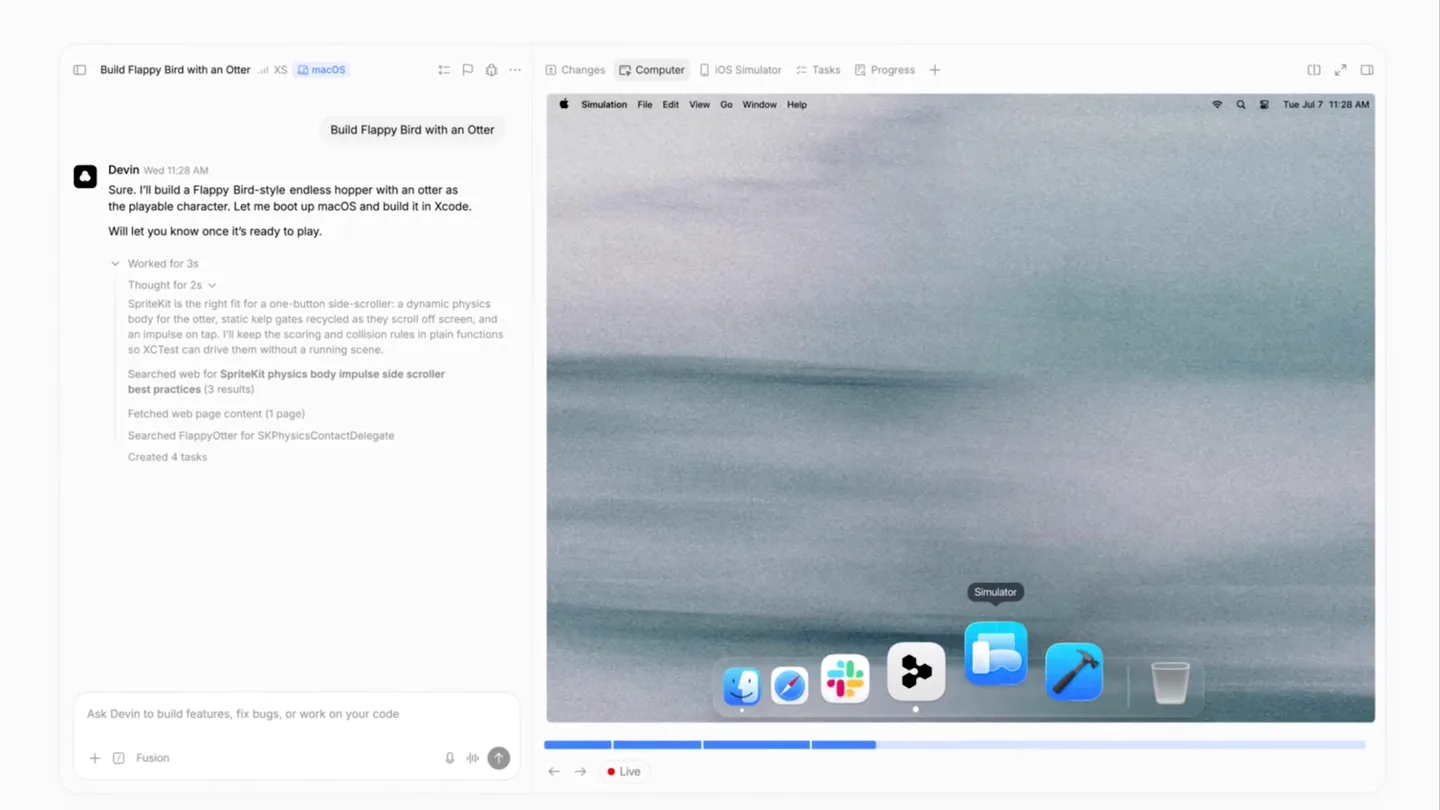
- Build Flappy Bird with an Otter Devin Wed 11:28 AM Sure. I'll build a Flappy Bird-style endless hopper with an otter as the playable character. Let me boot up macOS and build it in Xcode. Will let you know once it's ready to play. Worked for 1s Thought for 3s SpriteKit is the right fit for a one-button side-scroller, a dynamic physics body for the otter, static kelp gates recorded as they scroll off screen, and an impulse on tap. I'll keep the scoring and collision rules in plain functions so XCTest can drive them without a running scene. Searched web for SpriteKit physics body impulse side scroller best practices (3 results) Fetched web page content (1 page) Created FlappyOtterApp.swift +24 Created GameScene.swift +127 Created Otter.swift +78 Created KelpGate.swift +61 Changes Computer iOS Simulator Tasks Progress Simulation File Edit View Go Window Help Simulator Live Devin AGENT 3:51 PM I'm done building the Flappy Otter game. Check out this recording I made. 0:03 I also published the latest version to TestFlight. Have fun playing! testflight.apple.com/v1/app/6808105641 0:05 0:07
- Camera
- Zoomed-in screen recordings, focusing on chat interactions, code generation, and iOS simulator output.
- Motion
- Dynamic UI animations, text typing effects, progress bar fills, and smooth transitions between different application views.
Call to Action
Experience Devin: Build, Test, Share
“I'm done building the Flappy Otter game. Check out this recording I made. I also published the latest version to TestFlight. Have fun playing!”
- On screen
- FLAPPY OTTER TAP TO PLAY Devin
- Camera
- Close-up shot of a physical iPhone displaying the app, followed by a blurred background with the Devin logo.
- Motion
- Real-world product integration, subtle depth of field, and a final logo reveal with a soft blur transition.
Motion design primitives
Synthesizable in Remotion · key components of the ai-dev-tool-launch-template template.
ProductUnboxSequence
A rapid sequence of close-up shots showing hands unboxing a product, connecting cables, and placing it on a desk, culminating in a wide shot of the complete setup.
+ Code construction recipe
Use a sequence of `AbsoluteFill` components with `Img` or `Video` sources. Implement `spring()` for subtle camera movements (e.g., slight zooms, pans) and `interpolate()` for quick opacity fades between cuts. Utilize `z-index` for layering elements like sticky notes. Apply a `blur()` filter for depth of field effects.
InteractiveUISimulation
A dynamic screen recording showcasing UI interactions, including typing text, dropdown menu selections, and real-time application output within a chat interface.
+ Code construction recipe
Employ `Sequence` for precise timing of UI events. Use `spring()` for cursor movements and button presses. Implement `interpolate()` for text typing effects (character by character reveal) and `measureText()` for dynamic text box resizing. Utilize `AbsoluteFill` for screen captures and `OffthreadVideo` for embedded video playback within the UI.
AppDemoShowcase
A seamless transition from a digital screen recording of an app to a physical device displaying the same app, followed by a brand logo reveal.
+ Code construction recipe
Combine `Video` components for screen recordings and `Img` for static device shots. Use `interpolate()` for scaling and positioning the digital screen onto the physical device. Apply `blur()` and `opacity()` transitions for the final logo reveal, ensuring the logo scales up with a `spring()` animation.
Style DNA & aesthetic system
Visual aesthetic
Typography
Motion
Special effects
Pacing & rhythm
Conceptual story rhythm
- 1
The Physical Introduction
Purpose. Ground the abstract concept of AI in a tangible, relatable physical product (Mac Mini) and a familiar action (unboxing).
Execution. Quick cuts of hands unboxing, connecting, and setting up a Mac Mini, establishing a real-world context.
- 2
The Digital Transformation
Purpose. Transition from hardware to software, showcasing the product's core UI and its innovative capabilities.
Execution. Seamless screen recordings demonstrating Devin's interface, virtual environment selection, and task initiation.
- 3
The Proof of Concept
Purpose. Demonstrate the product's power by showing a complex task (app development) being executed autonomously.
Execution. Detailed UI animations of Devin building an iOS app, showing code generation, and running it in a simulator.
- 4
The Outcome & Call to Action
Purpose. Highlight the tangible results and ease of sharing, reinforcing the product's value proposition.
Execution. Slack messages with screen recordings and TestFlight links, culminating in a physical phone displaying the finished app and a brand logo reveal.
Remix in Animatiq Studio
Master remix prompt · agent-ready
Sample remix
Objective
Launch video for 'CanvasAI', an AI-powered graphic design assistant that generates marketing collateral from text prompts.How the recipe adapts
Remix blueprint · ai-dev-tool-launch-template
Scene durations (5 scenes, 45s)
Key Remotion components
Related Developer Tools Product Launches
Explore all Developer Tools launches →
Agentic CLI for coding, building apps, and automating workflows.

AI is already smart enough. Real-world tasks are still slow, expensive and unreliable, because we hand AI a computer built for humans, then wrap it in a heavy harness. AI doesn’t need to get smarter

Big day 🔥 🚀 Introducing Dolphin AI - an agentic AI studio for complete video production. The story of Dolphin is very interesting. It didn’t start as a product. It started as an internal tool. W