
dial · Launch Video Breakdown: Hook, Pacing & Motion Design
dial is a macOS menu-bar time tracker. One click starts or switches, and your time never leaves your Mac.
Scene-by-scene timeline & spoken transcript
The Hook
Effortless Time Tracking
“(No spoken dialogue — Riser leading into sub-bass drop/impact, driving syncopated rhythm with 808s)”
- On screen
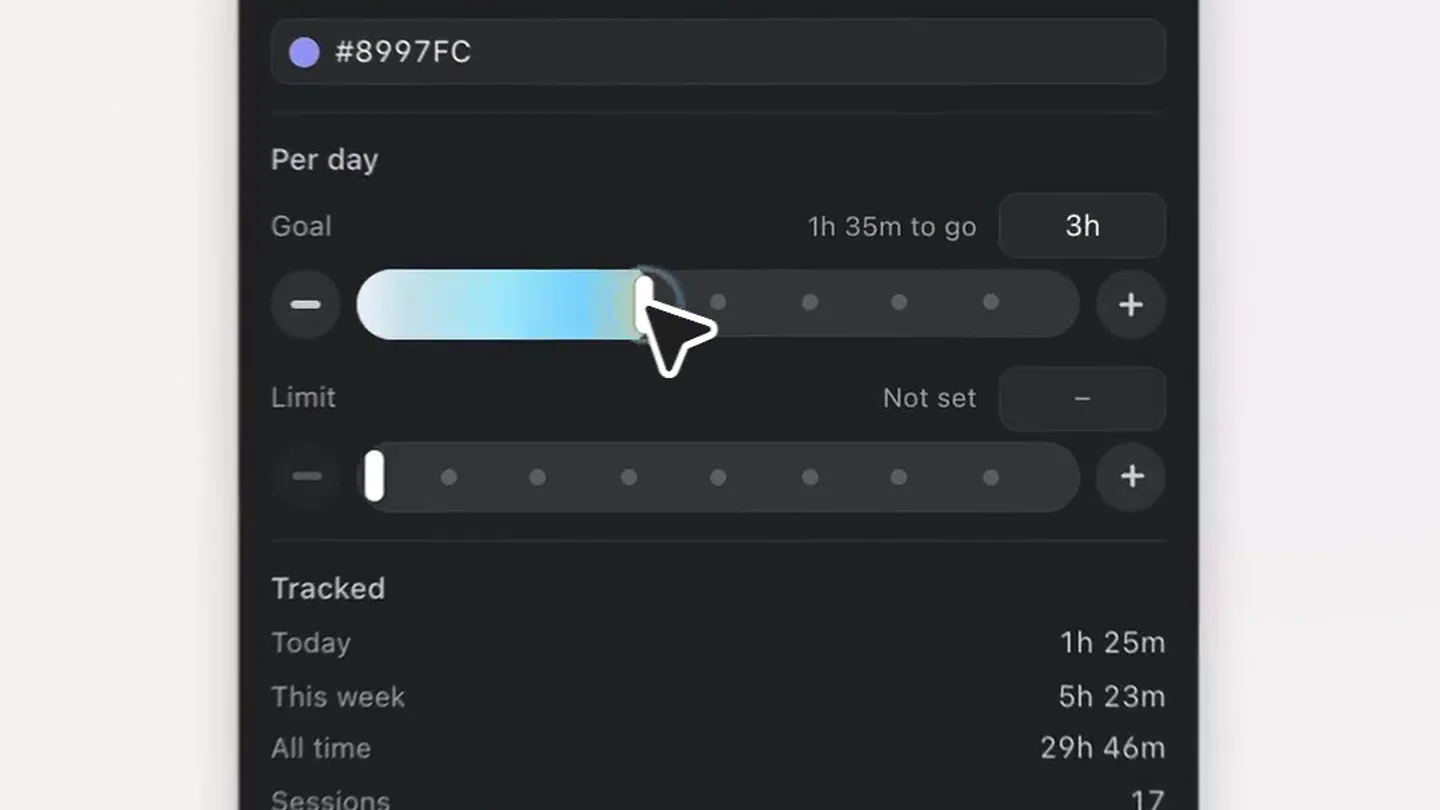
- Dial Make time. Tracked today 4:43 Paused Start Mokka Coffee Co., 30m. Drag an edge if the times are off. Edit 13:08 16:08 – 16:38 18:00 Overview Timeline Projects Today 4h 43m Studio Sphere 2h 6m 45% Boardly #8997FC Per day Goal 1h 35m to go 3h Limit Not set Tracked Today 1h 25m This week 5h 23m All time 29h 46m Sessions 17 First tracked 2. Sept. Last tracked 12:25 Delete project Archive Done
- Camera
- Static overhead shot of the macOS menu bar app, then a quick zoom into a project settings panel.
- Motion
- Rapid UI element transitions, quick cuts, and a subtle camera zoom to highlight interaction points.
Feature Teaser
Visualizing Your Day
“Bring it back”
- On screen
- Your day, in motion. Flight BER → LIS 13 15 17
- Camera
- Close-up on a timeline view, panning horizontally to reveal more data.
- Motion
- Horizontal parallax scroll, dynamic data visualization, and text reveal animations.
Product Reveal
Project Management Overview
“(No spoken dialogue — Riser leading into sub-bass drop/impact)”
- On screen
- Every project, in view. Boardly -5 since 05:16 PM +5 1:35 33 25:31 Stop Overview Timeline Projects Manual + Folder Boardly Studio Sphere 2h 23m of 5h 2h 6m of 2h Dream SystemOS 24m of 1h30 30m Amie New project 18m Of 4h + New project Intro Call 0:47 99% Away for 12min Keep?
- Camera
- Static overhead shot of the app, then a quick transition to an abstract 3D representation of the app icon.
- Motion
- UI element pop-ins, quick scene cuts, and a 3D object reveal with subtle rotation.
Feature Teaser
Recover Missed Time
“Look at all”
- On screen
- Catch the time you missed. 1 suggestion to review 12:39 AM Flight BER → LIS 10m In your calendar, and nothing was tracked against it Pick a project Skip Add Boardly
- Camera
- Static overhead shot of the app, focusing on a specific feature.
- Motion
- Interactive UI elements, dropdown menu animation, and text highlight.
Call to Action
Download Now
“(No spoken dialogue — Driving syncopated rhythm fades out)”
- On screen
- Dial Download now 3h dial.software 8h
- Camera
- Static shot of the brand logo and call to action, with a subtle background animation.
- Motion
- Subtle background animation with a radial progress indicator, button hover effect, and text fade-in.
Motion design primitives
Synthesizable in Remotion · key components of the mac-menu-bar-utility-launch template.
UISnapTransition
Rapid, almost instantaneous transitions between different UI states or app screens, often accompanied by a subtle blur or scale effect.
+ Code construction recipe
Utilize Remotion's <Sequence> and <AbsoluteFill> components. Implement `spring()` for scale and opacity changes on mount/unmount, with a very low `damping` and `stiffness` for a snappy feel. Use `interpolate()` for quick position shifts.
DynamicDataTimeline
Horizontal scrolling timeline with animated bars representing time segments, dynamically expanding or contracting based on user interaction or data changes.
+ Code construction recipe
Employ `useCurrentFrame()` and `interpolate()` for horizontal scrolling based on time. Use SVG rectangles for timeline bars, animating their `width` and `x` position with `spring()` for a fluid, responsive feel. Implement `<Text>` components for labels with `opacity` and `y` position animations.
AbstractIconReveal
A 3D representation of an app icon or key visual element emerges from a flat surface, rotating slightly to reveal its depth and form.
+ Code construction recipe
Use `ThreeCanvas` or `WebGL` for rendering a 3D model of the icon. Animate its `rotation` and `position` using `spring()` with a moderate `damping` to give it a physical, weighty feel. Apply subtle `ambientLight` and `directionalLight` for depth.
Style DNA & aesthetic system
Visual aesthetic
Typography
Motion
Special effects
Pacing & rhythm
Conceptual story rhythm
- 1
Instant Gratification
Purpose. Immediately showcase the core value proposition: quick, effortless time tracking.
Execution. Rapid UI interaction demonstrating one-click start/switch, with a quick zoom to highlight ease of use.
- 2
Comprehensive Overview
Purpose. Illustrate the depth of features beyond simple tracking, such as project management and timeline visualization.
Execution. Fast cuts between different app sections (timeline, projects) with dynamic data displays and interactive elements.
- 3
Problem Solved
Purpose. Address a common pain point: forgetting to track time and the ability to recover it.
Execution. Demonstration of the 'Catch the time you missed' feature, showing intelligent suggestions and easy project assignment.
- 4
Call to Action
Purpose. Direct the viewer to download the product.
Execution. Brand logo and 'Download now' button prominently displayed, with a subtle, engaging background animation.
Remix in Animatiq Studio
Master remix prompt · agent-ready
Sample remix
Objective
Launch a new macOS menu-bar utility called 'FocusFlow' that helps users manage their focus sessions and block distractions.How the recipe adapts
The 'FocusFlow' video would open with a rapid UI snap transition showing a one-click start of a focus session from the menu bar. Dynamic data timelines would visualize focus streaks and blocked distractions. An abstract 3D icon reveal would introduce the 'Deep Focus' mode. The 'Catch the time you missed' primitive would adapt to 'Recover Lost Focus' by showing suggestions for re-engaging. All transitions would be high-energy, synchronized with a similar driving audio track, and maintain the dark mode aesthetic with vibrant green and blue accents.Remix blueprint · mac-menu-bar-utility-launch
Scene durations (5 scenes, 13s)
Key Remotion components
Related Productivity Product Launches
Explore all Productivity launches →
Don't type, just speak. Flawless voice-to-text across every app at 240 WPM.

One workspace for knowledge scattered across Slack, email, Docs, and Notion. Connect your tools and build apps and agents that stay live with your data.

Notion positions itself as the backbone of your dock — a brand film of the Notion icon among everyday apps, ending on “Works with everything.”