
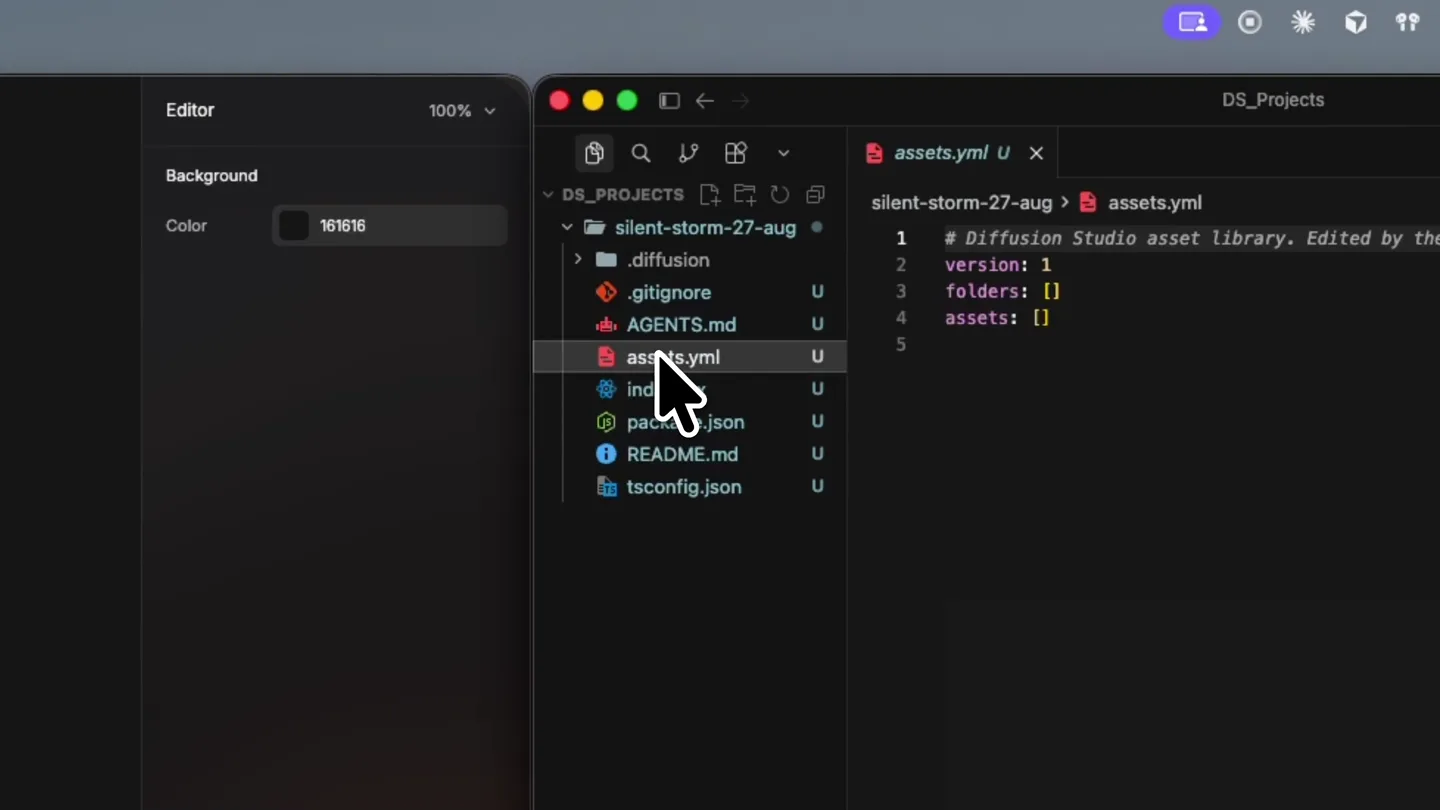
Diffusion Studio · Launch Video Breakdown: Hook, Pacing & Motion Design
YC F24 Diffusion Studio ships an open-source video editor that turns every edit into inspectable, reusable code for agents.
Scene-by-scene timeline & spoken transcript
The Hook
Code-Driven Video Editing Interface
“(No spoken dialogue — The track features a driving, four-on-the-floor kick drum, a prominent sub-bass line, and arpeggiated synth melodies. A high-energy audio transition with a riser and sub-bass drop occurs at 0:13.)”
- On screen
- (No on-screen text)
- Camera
- Static wide shot of a desktop interface, then a slight zoom into the video editor panel.
- Motion
- Seamless UI transitions, cursor interaction, and subtle background blur to highlight active windows.
Product Reveal
Countdown to Launch
“5, 4, 3, 2, 1”
- On screen
- 5, 4, 3, 2, 1
- Camera
- Dynamic close-up on a rocket launch, with the camera tracking its ascent.
- Motion
- Large, bold, center-aligned countdown numbers with a quick, impactful scale-down animation on each beat, synchronized with the audio.
Feature Teaser
Code-Generated Video Montage
“Let's go!”
- On screen
- 10 STARSHIP LAUNCHES
- Camera
- Static wide shot of a grid of video clips, then a dynamic zoom into individual clips.
- Motion
- Grid layout of multiple video clips, each playing simultaneously, with a central text overlay that appears with a subtle fade-in and scale.
Call to Action
Seamless Code-to-Video Workflow
“(No spoken dialogue — The track builds with filtered synth pads and percussive elements, maintaining a consistent, energetic feel. A final impactful sub-bass drop and sweep occurs at 0:28.)”
- On screen
- (No on-screen text)
- Camera
- Smooth pan across the desktop interface, highlighting the code editor and video preview.
- Motion
- Fluid UI navigation, highlighting the direct connection between code changes and visual output, with subtle glow effects on interactive elements.
Motion design primitives
Synthesizable in Remotion · key components of the diffusion-studio-ai-launch template.
CodeDrivenUIPan
A desktop UI with multiple windows (code editor, video editor, file browser) where a cursor interacts with elements, and windows smoothly pan or resize to reveal content.
+ Code construction recipe
Utilize Remotion's <AbsoluteFill> for the desktop background. Implement <Sequence> for each UI window. Use `interpolate` for cursor movement and window position/scale changes. Apply CSS `filter: blur()` for inactive windows and `transition` for smooth resizing.
ImpactfulCountdown
Large, bold numbers appear sequentially over dynamic background footage, each number scaling down quickly and fading out as the next appears, synchronized with audio beats.
+ Code construction recipe
Overlay <Text> components with `position: absolute` and `font-size` for large numbers. Use `spring` or `interpolate` with an `easeOutCubic` curve for rapid scale-down and opacity changes. Synchronize `startFrame` of each number's animation with audio cues.
DynamicVideoGrid
A grid of small, simultaneously playing video clips, with a central text overlay. Individual clips can be highlighted or zoomed into.
+ Code construction recipe
Render multiple <Video> components within a CSS Grid layout. Use `loop` prop for continuous playback. Implement a central <Text> component with `opacity` and `scale` animations. For highlighting, use `scale` and `z-index` with `spring` for smooth transitions.
Style DNA & aesthetic system
Visual aesthetic
Typography
Motion
Special effects
Pacing & rhythm
Conceptual story rhythm
- 1
The Developer's Canvas
Purpose. Introduce the core interface and the concept of code-driven video editing.
Execution. Opening with a blurred desktop, then focusing on the Diffusion Studio UI, showing file navigation and basic editing actions.
- 2
The Countdown to Creation
Purpose. Build anticipation and demonstrate the power of programmatic control over video.
Execution. A dramatic rocket launch sequence overlaid with a bold, animated countdown, directly controlled from the code editor.
- 3
The Agent's Output
Purpose. Showcase the product's ability to generate complex video compositions from code.
Execution. A grid of multiple video clips playing simultaneously, with a central text overlay, illustrating the '10 Starship Launches' concept.
- 4
The Seamless Workflow
Purpose. Reinforce the integration of code and visual output, emphasizing efficiency.
Execution. Fluid transitions between the code editor and the video preview, demonstrating real-time updates and programmatic control.
Remix in Animatiq Studio
Master remix prompt · agent-ready
Sample remix
Objective
Showcase 'QuantumFlow AI' deploying a new image recognition model.How the recipe adapts
The CodeDrivenUIPan primitive would show a developer writing Python code for model deployment, with the cursor interacting with a terminal window. The ImpactfulCountdown would animate 'Model Deploying in 5...4...3...2...1' over a background of abstract neural network visualizations. The DynamicVideoGrid would then display a grid of images being processed by the newly deployed model, with bounding boxes appearing in real-time, demonstrating the model's output.Remix blueprint · diffusion-studio-ai-launch
Scene durations (4 scenes, 42s)
Key Remotion components
Related Developer Tools Product Launches
Explore all Developer Tools launches →
Agentic CLI for coding, building apps, and automating workflows.
Sakana AI launches Fugu, a multi-agent orchestration system served through a single model API, led by its Fugu Ultra model.

AI is already smart enough. Real-world tasks are still slow, expensive and unreliable, because we hand AI a computer built for humans, then wrap it in a heavy harness. AI doesn’t need to get smarter