
frikinomad · Launch Video Breakdown: Hook, Pacing & Motion Design
From failed ideas → first real launch Introducing Dynamic Maps: your AI-powered travel planner. Turn your wildest trip ideas into interactive journeys - chat, plan, and watch routes come alive. Beta out now: https://t.co/UNQ98jcmi9 DMs open for feedback Extended limit https://t.co/gmi3XJOIeV
Scene-by-scene timeline & spoken transcript
The Hook
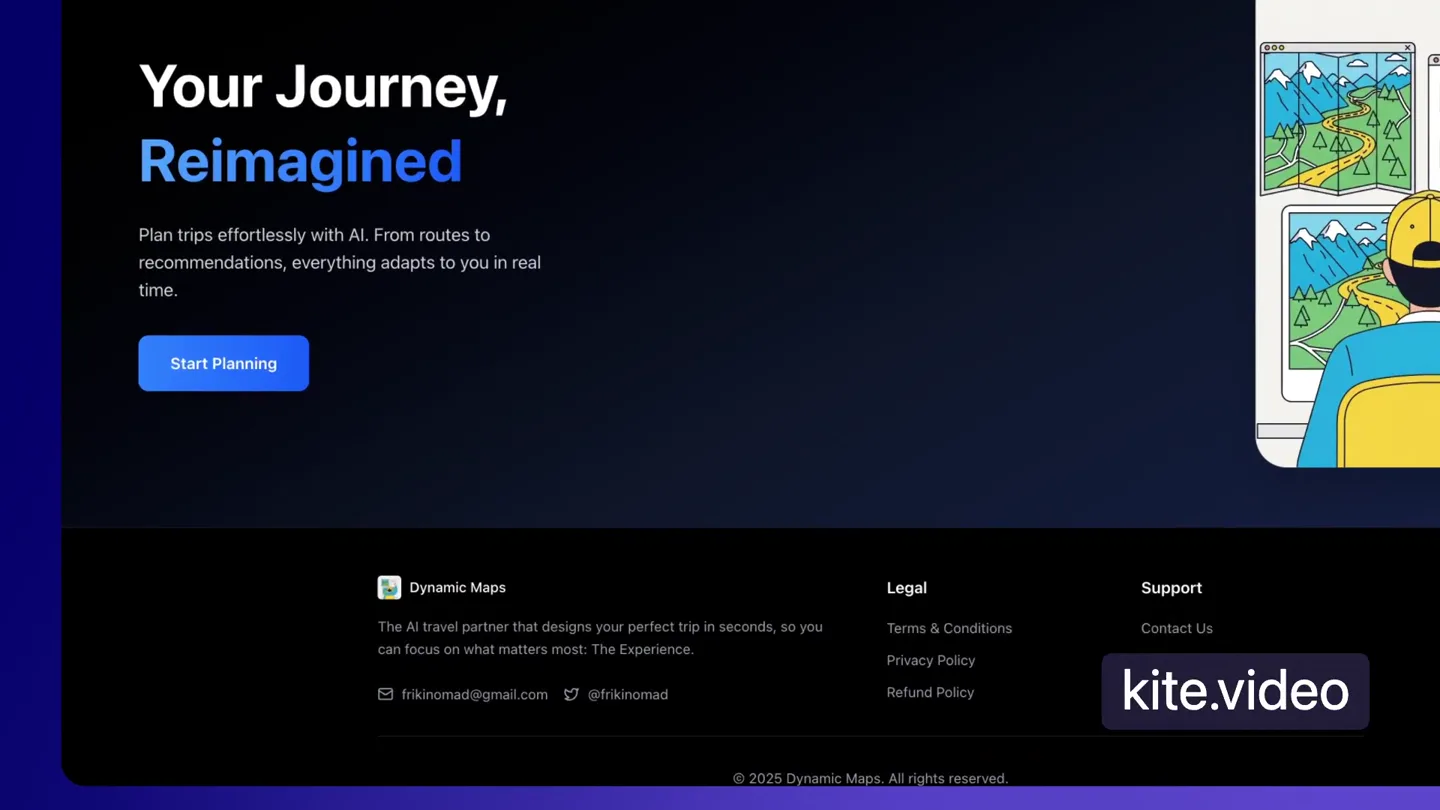
Your Journey, Reimagined
“(No spoken dialogue — A driving, four-on-the-floor kick drum and sub-bass line enter with rhythmic arpeggiated synth melodies, building energy with a riser.)”
- On screen
- Your Journey, Reimagined Plan trips effortlessly with AI. From routes to recommendations, everything adapts to you in real time. Start Planning Dynamic Maps The AI travel partner that designs your perfect trip in seconds, so you can focus on what matters most. The Experience. frikinomad@gmail.com @frikinomad Legal Terms & Conditions Privacy Policy Refund Policy Support Contact Us © 2025 Dynamic Maps. All rights reserved. kite.video
- Camera
- Static shot of a desktop UI, with a mouse cursor hovering over a 'Start Planning' button. The camera then pans slightly to the left, revealing more of the UI.
- Motion
- UI element highlight, subtle camera pan, cursor interaction.
Product Reveal
AI-Powered Planning & Chat
“(No spoken dialogue — The energetic electronic music continues with shakers and claps adding to the propulsive rhythm. A subtle audio sweep occurs at 0:23.)”
- On screen
- Plan your perfect trip with Dynamic Maps Hi Rishi! Where are we exploring today? plan a 3 day tr Vibe plan your journey plan a 3 day trip to new york city for food lovers Plan a trip from Paris to Rome... Current Journey Saved Dynamic Maps dynamicmaps.xyz/travelPlanner Home Planner Pricing Chelsea Market ### Day 2: Exploring International Cuisines - Breakfast: Indulge in some authentic dim sum downtown. - Lunch: Taste Thai cuisine at an iconic restaurant in Little Italy. - Dinner: Experience fine dining at a French restaurant. - Activity: Attend a cooking class focusing on international dishes. ### Day 3: A Taste of Local Delicacies - Breakfast: Try pastries and coffee from a popular NYC cafe. - Lunch: Sample Jewish deli specialties like a pastrami sandwich. - Dinner: End with a dinner cruise featuring local dishes. - Activity: Visit and explore gourmet shops and street markets. Would you like to find specific restaurants and book experiences, or do you have any adjustments to the plan? Plan a trip from Paris to Rome... Current Journey Saved kite.video
- Camera
- The camera zooms into a chat interface on the left, showing a user typing a query. It then pans to reveal a detailed map on the right, and then zooms out to show the full browser window with a generated itinerary.
- Motion
- Zoom in/out, horizontal pan, text typing animation, UI element reveal.
Feature Teaser
Personalized Recommendations & Route Creation
“(No spoken dialogue — The driving electronic beat maintains its energy, with the sub-bass and arpeggiated synths prominent.)”
- On screen
- plan a route for day 1 Get personalized recommendations personalized ommendations Discover (238) for "bagel shop" Broad Nosh Bagels Deli & Catering 58th Street 216 W 58th St, New York, NY 10019, United States Best Bagel & Coffee 225 W 38th St A, New York, NY 10001, United States Liberty Bagels Wall Street 32 Broadway, New York, NY 10004, United States Baker's Dozen Bagels 66-08 Fresh Pond Rd, Ridgewood, NY 11385, United States Let's plan a detailed route for Day 1, focusing on New York City's signature foods. Here's a proposed plan for the day: 1. Breakfast at a Classic NYC Bagel Shop 2. Lunch with New York-style Pizza 3. Dinner at a New York Steakhouse 4. Explore Chelsea Market on a Food Tour Create y Route & kite.video
- Camera
- The camera focuses on the map, showing points of interest appearing and a route being drawn. It then zooms into a specific location on the map, highlighting a pop-up with details.
- Motion
- Map animation, pin drop effect, route drawing, UI pop-up, zoom and pan.
Call to Action
Save Your Journey & Experience the Magic
“(No spoken dialogue — A significant sub-bass drop/impact occurs at 0:40, followed by a brief pause before the beat re-enters. The music continues with high energy, and a subtle sweep is heard at 0:56.)”
- On screen
- To plan the route, I'll first find specific places for each meal/activity. Let's start by finding a classic NYC bagel shop near Chelsea Market for breakfast, as it sets a good central point for the day's activities. I'll proceed with that now. Current Driving Clear Save (2) 75 9th Ave, New York, NY 10011, USA Bagels & Schmear 116 E 28th St, New York, NY 10016, United States Plan a trip from Paris to Rome... Save Your Journey Route Preview 75 9th Ave, New York, NY 10011, USA Bagels & Schmear Adventure Name New York Trip Da Cancel Save YAY! kite.video
- Camera
- The camera follows a mouse cursor interacting with UI elements to save a route. It then transitions to an animated illustration of a person happily viewing a map and chat interface, with the illustration zooming out.
- Motion
- UI interaction, text input animation, illustrative scene transition, zoom out.
Motion design primitives
Synthesizable in Remotion · key components of the ai-productivity-flowstate template.
DynamicMapRouteDraw
A map interface is displayed, and a dotted line animates to draw a route between multiple points of interest, often accompanied by pin drops or location markers appearing sequentially.
+ Code construction recipe
Use Remotion's <Path> component with `stroke-dasharray` and `stroke-dashoffset` properties interpolated over time to create a 'drawing' effect. Coordinate data for the path can be passed as props. Animate marker opacity and scale with `spring()` for a 'pop-in' effect.
ChatbotTypingReveal
Text appears character by character in a chat input field, simulating real-time typing, followed by a 'send' action and a response appearing as a new chat bubble.
+ Code construction recipe
Implement a `Sequence` component for each character or word. Use `interpolate()` for `opacity` and `scale` for a subtle reveal. A `delay` prop can control the typing speed. For the response, animate `y` position and `opacity` for a smooth entrance.
UIDetailZoomPan
The camera smoothly zooms into specific interactive elements or sections of a user interface, then pans across to reveal related information or actions, maintaining a fluid, continuous motion.
+ Code construction recipe
Utilize Remotion's `AbsoluteFill` with `transform` properties (scale, translateX, translateY) interpolated using `easeOutCubic` or `easeInOutQuad` for smooth transitions. Group UI elements within `AbsoluteFill` to manage their relative positions during the zoom/pan.
Style DNA & aesthetic system
Visual aesthetic
Typography
Motion
Special effects
Pacing & rhythm
Conceptual story rhythm
- 1
The Vision
Purpose. Introduce the core problem and the product's overarching solution, setting an aspirational tone.
Execution. Opening with a compelling headline and a high-level overview of the app's capabilities, accompanied by an illustrative scene of a user interacting with the product.
- 2
Interactive Planning
Purpose. Demonstrate the ease and power of AI-driven trip planning through a conversational interface.
Execution. Showcasing a user typing a query into a chat, followed by the AI generating a detailed itinerary and displaying it alongside an interactive map.
- 3
Personalized Discovery
Purpose. Highlight the product's ability to provide tailored recommendations and build dynamic routes.
Execution. Animating the map with points of interest appearing, routes being drawn, and specific location details popping up, all in response to user input.
- 4
Seamless Experience
Purpose. Conclude by showing the final output and the user's satisfaction, reinforcing the product's value.
Execution. Demonstrating the saving of a planned journey, followed by a return to the initial illustrative scene, now with the user expressing delight.
Remix in Animatiq Studio
Master remix prompt · agent-ready
Sample remix
Objective
Launch an AI-powered project management tool called 'FlowState AI' that automates task scheduling and resource allocation.How the recipe adapts
The DynamicMapRouteDraw primitive will be adapted to show a project timeline with tasks as nodes and dependencies as animated lines connecting them, visualizing automated scheduling. The ChatbotTypingReveal will demonstrate the AI assistant responding to natural language queries about project status or resource needs. The UIDetailZoomPan will navigate through different project dashboards, zooming into specific task cards or team member profiles to highlight AI-driven insights. The color palette will shift to a professional yet vibrant scheme, and the Grotesque Sans-serif font will remain for clarity.Remix blueprint · ai-productivity-flowstate
Scene durations (4 scenes, 63s)
Key Remotion components
Related Consumer & Apps Product Launches
Explore all Consumer & Apps launches →
Grand Theft Auto VI: An Extended Look premieres on Netflix Thursday, August 27.
Polymarket Perps is live with up to 20x leverage on crypto, stocks, commodities, and more. Long BTC, predict the Fed, or short the S&P reaction.

Pump.fun launches GO, a marketplace for posting and completing paid bounties for any task.