
Treg · Launch Video Breakdown: Hook, Pacing & Motion Design
Enrich Arena lets 60+ vendors compete on price, quality, hit rate, and speed so you get the best quality leads at the lowest cost. Fully open sourced.
Scene-by-scene timeline & spoken transcript
The Hook
Introducing Enrich Arena: Vendor Competition
“(No spoken dialogue — Sustained low-frequency drone and high-pitched synth pad, transitioning to a sharp 'whoosh' and driving electronic beat with 808 kicks and pulsing synth bassline.)”
- On screen
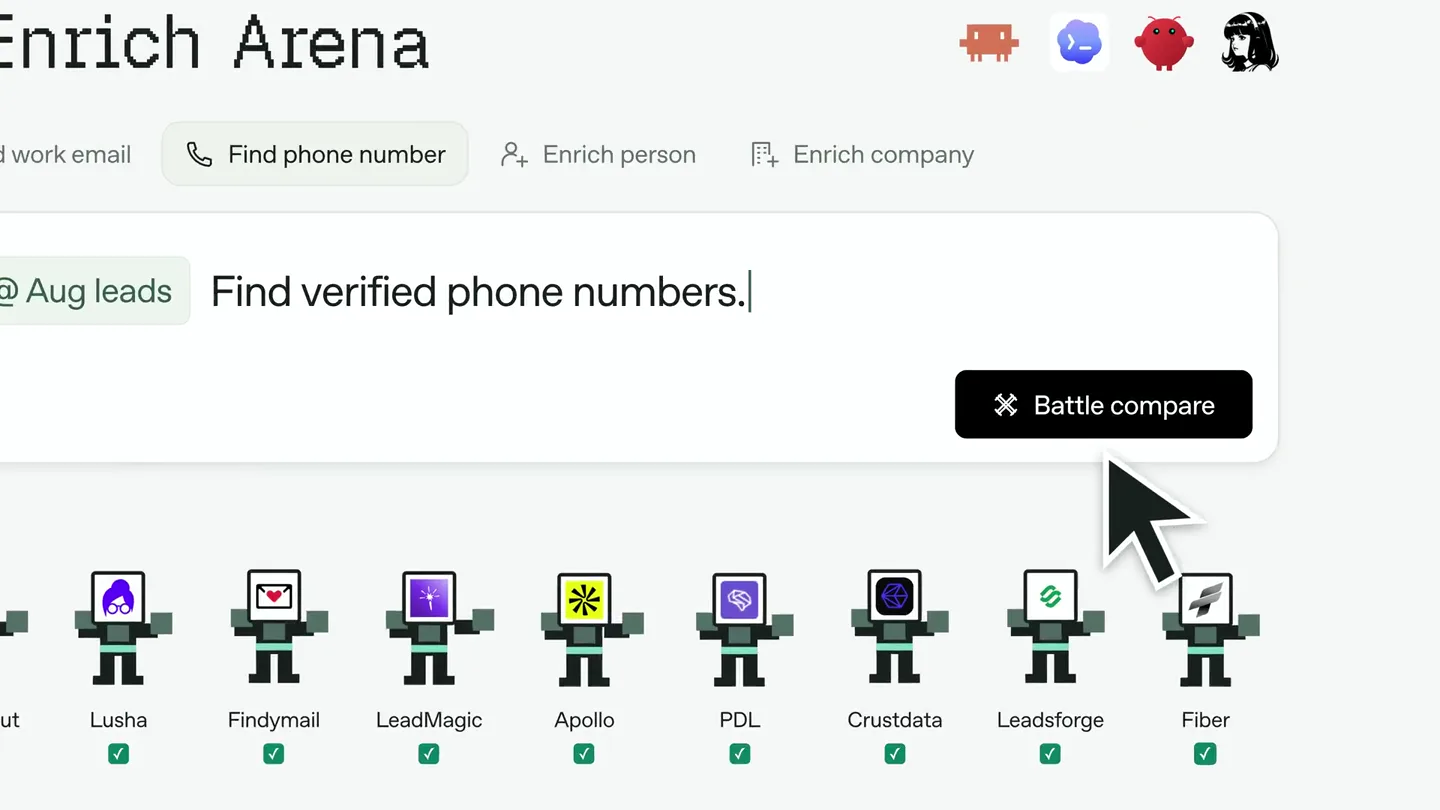
- Enrich Arena Find work email Find phone number Enrich person Enrich company Drop a Google Sheet Battle compare @Aug leads Find verified phone number ContactOut Lusha Findymail LeadMagic Apollo PDL Crustdata Leadsforge Fiber @Aug leads Find verified phone numbers.
- Camera
- Static overhead shot of a clean UI, then a slight zoom out to reveal a circular arena of vendor icons, followed by a subtle camera drift.
- Motion
- UI element reveals, icon pop-ins with subtle bounce, text typing animation, and a circular arrangement reveal with a slight camera pan.
Product Reveal
Real-time Vendor Performance Comparison
“(No spoken dialogue — High-energy riser builds to a sub-bass drop and impact at 0:07, followed by intricate percussion and evolving synth textures.)”
- On screen
- Let vendors compete. Find phone numbers • 4 vendors, working in parallel Phone lookup • 20 leads Aug leads Contact Tomba Lusha Findymail LeadMagic Maya Chen Stripe Finding phone... Sam Rivera Linear Finding phone... Alex Morgan Notion Finding phone... Jamie Park Figma Finding phone... Taylor Reed Vercel Finding phone... Aug leads 20 leads • same batch 0/20 In progress 0/20 In progress +1 415 555 0186 × Invalid number +1 415 555 0109 ✓ Validated +1 415 555 0120 × Invalid number +1 415 555 0111 × Failed +1 415 555 0112 ✓ Validated 10/20 In progress 10/20 In progress 9/20 In progress 9/20 In progress +1 415 555 0108 ✓ Validated +1 415 555 0109 ✓ Validated +1 415 555 0110 ✓ Validated +1 415 555 0111 ✓ Validated +1 415 555 0112 ✓ Validated 34% Verified hit rate 57% Verified hit rate 42% Verified hit rate 20/20 In progress Illustrative batch - verified hit rate = validated numbers / 20 leads Find the best option. Aug leads Contact Maya Chen Stripe Sam Rivera Linear Alex Morgan Notion Jamie Park Figma Taylor Reed Vercel Findymail +1 415 555 0108 ✓ Validated +1 415 555 0109 ✓ Validated +1 415 555 0110 ✓ Validated +1 415 555 0111 ✓ Validated Not found 85% Verified hit rate OR
- Camera
- Static overhead shot of a dynamic data table, then a focused zoom on a single vendor's results, followed by a hard cut to a black screen with 'OR'.
- Motion
- Progress bar animations, real-time data updates (numbers changing, checkmarks/crosses appearing), column reveals, and a highlight animation for the best performing vendor.
Feature Teaser
Automated Lead Routing for Cost Efficiency
“(No spoken dialogue — Riser at 0:10 followed by a drop at 0:11, maintaining a consistent, driving rhythm.)”
- On screen
- Auto route to the best. Aug leads • 20 leads • cheapest first LeadMagic $0.02 / lead 20 leads to try Findymail $0.05 / lead 8 leads to try Lusha $0.10 / lead 3 leads to try ✓ 12 validated 8 move on → Only 8 left Finding + validating... ✓ 5 validated 3 move on → Only 3 left ✓ 3 validated Batch complete 12 / 20 validated Aug leads • batch results $0.40 $0.40 + $0.40 + $0.30 $1.07 Illustrative batch + rates • validation + reachability
- Camera
- Static overhead shot of a flowchart-like UI, showing data flowing between nodes.
- Motion
- Sequential progress bar fills, data transfer animations (blocks moving between nodes), and real-time cost calculation updates with a final sum reveal.
Call to Action
Versatile, Cost-Effective, Open-Source Solution
“(No spoken dialogue — More intense build-up at 0:14 culminating in a powerful sub-bass impact at 0:15. A final, extended riser begins at 0:22 and peaks with a massive sub-bass drop and impact at 0:26.)”
- On screen
- One skill. Any enrichment job. Enrich person Enrich company Find LinkedIn profile Find people at company No subscription. Pay for results only. Apollo $59/mo Hunter $24/mo Lusha $49/mo CompanyEnrich $49/mo Crunchbase $99/mo People Data Labs $99/mo Clay $149/mo Tomba $89/mo Findymail $99/mo with Treg $0.0089 per lead Tomba - phone validation Treg OpenRouter for tools $ set up treg - treg.to/llms.txt treg • open source • works with
- Camera
- Static shots with text and UI elements appearing, followed by a static shot of a terminal-like interface.
- Motion
- Text reveals with color changes, price comparison animations (strike-throughs, new price reveal), and a terminal typing animation with a blinking cursor.
Motion design primitives
Synthesizable in Remotion · key components of the treg-enrich-arena-style template.
DynamicDataGrid
A grid-based UI where individual cells update with text, icons, and progress bars, simulating real-time data processing and validation. Rows and columns can expand or highlight.
+ Code construction recipe
Utilize `map` over data arrays to render grid cells. Animate cell content (text, icons) with `spring` for subtle bounces on update. Use `interpolate` for progress bar fills and color changes. Implement `AnimatePresence` for row/column additions and removals.
FlowchartProgressor
A series of interconnected nodes representing steps in a process. Data blocks animate along connecting lines, and node states (e.g., validated, in progress) update with visual cues like color changes and checkmarks.
+ Code construction recipe
Render nodes and lines as SVG paths or React components. Animate data blocks along paths using `interpolate` for position and `delay` for sequential movement. Use `useState` to manage node states and `spring` for state transition animations (e.g., checkmark pop-in, color fade).
TerminalTypewriter
A command-line interface where text appears character by character, simulating typing, followed by a blinking cursor. Associated icons or results can appear below the command line.
+ Code construction recipe
Implement a custom `Typewriter` component using `useState` and `useEffect` to control character visibility with `delay` and `duration`. Animate the cursor's opacity with `loop` for blinking. Use `Sequence` to time the appearance of subsequent elements.
Style DNA & aesthetic system
Visual aesthetic
Typography
Motion
Special effects
Pacing & rhythm
Conceptual story rhythm
- 1
The Competitive Arena
Purpose. Introduce the core problem of lead enrichment and Treg's unique solution: vendor competition.
Execution. UI showing lead input, then expanding to reveal multiple vendor icons in a circular 'arena', implying competition.
- 2
Real-time Performance Showdown
Purpose. Demonstrate how Treg allows users to compare vendor performance (hit rate, quality) in real-time.
Execution. Dynamic data table showing multiple vendors processing leads in parallel, with real-time updates on validation status and hit rates, culminating in a highlight of the best performer.
- 3
Automated Optimization
Purpose. Showcase Treg's ability to automatically route leads to the best or cheapest vendor, optimizing cost and efficiency.
Execution. Flowchart animation illustrating leads moving between vendors based on cost and validation, with a running total of validated leads and total cost.
- 4
Value Proposition & Call to Action
Purpose. Summarize Treg's benefits (versatility, cost-effectiveness, open-source) and provide a clear call to action.
Execution. Rapid-fire text reveals highlighting key benefits, a price comparison graphic, and a terminal command line showing how to get started, reinforcing the open-source nature.
Remix in Animatiq Studio
Master remix prompt · agent-ready
Sample remix
Objective
A new AI-powered code review tool that compares multiple static analysis engines.How the recipe adapts
The DynamicDataGrid primitive would show code snippets being analyzed by different AI engines, with real-time updates on detected issues and severity scores. The FlowchartProgressor would illustrate the code review pipeline, showing code moving through different analysis stages and then to a human reviewer. The TerminalTypewriter would demonstrate how to integrate the tool via a command-line interface, showing commands for initiating scans and configuring rules. The color palette would shift to a dark mode with vibrant accent colors for code syntax highlighting and issue severity indicators, maintaining the clean, minimalist aesthetic.Remix blueprint · treg-enrich-arena-style
Scene durations (4 scenes, 26s)
Key Remotion components
Related Productivity Product Launches
Explore all Productivity launches →
Don't type, just speak. Flawless voice-to-text across every app at 240 WPM.

One workspace for knowledge scattered across Slack, email, Docs, and Notion. Connect your tools and build apps and agents that stay live with your data.

Notion positions itself as the backbone of your dock — a brand film of the Notion icon among everyday apps, ending on “Works with everything.”