
Muhammad Ayan · Launch Video Breakdown: Hook, Pacing & Motion Design
🚨BREAKING: The first AI agent that does your ENTIRE outbound sales job just launched. https://t.co/zdbybOqgVa Introducing AutoGTM by Explee, an AI that doesn't just find leads, it researches, writes, and sends personalized cold emails. 24/7. Here's how it works (and why it https://t.co/l1FdhS5CRb
Scene-by-scene timeline & spoken transcript
The Hook
AI Agent Introduction
“(No spoken dialogue — A high-energy riser leads into a driving electronic score with a prominent sub-bass line.)”
- On screen
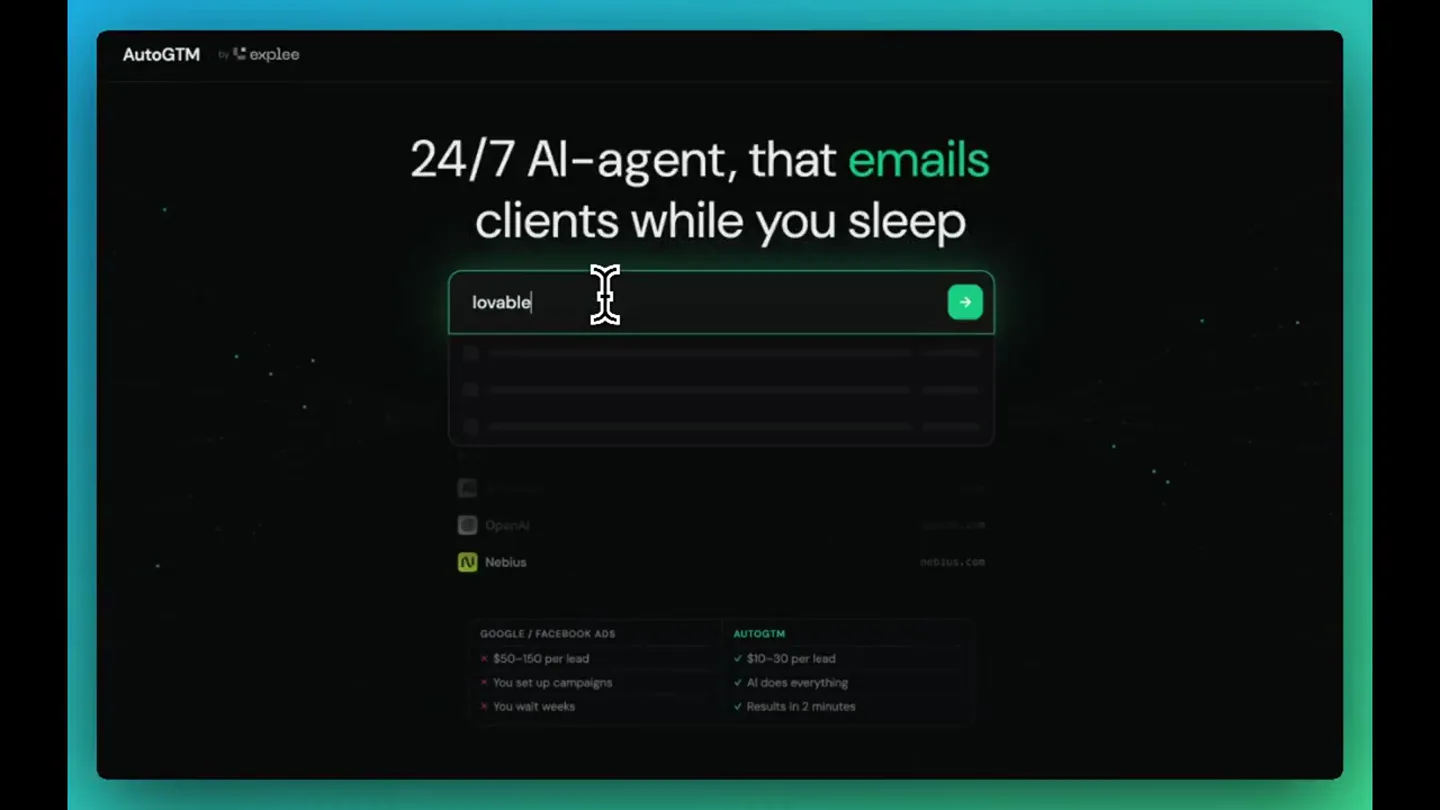
- 24/7 AI agent that finds clients while you sleep explee
- Camera
- Static wide shot of the product's landing page, then a subtle zoom into the search bar.
- Motion
- Text reveal with a subtle glow, followed by a quick zoom and a typing animation in a search bar.
Product Reveal
Market Research & ICP Sharpening
“First, it does market research, sharpens your ICP, and finds high-intent prospects.”
- On screen
- AutoGTM by explee 24/7 AI-agent, that emails clients while you sleep lovab GOOGLE / FACEBOOK ADS $50 - $180 per lead You set up campaigns You wait weeks AUTOGTM $10-$30 per lead AI does everything Results in 2 minutes Lovable lovable.dev AI-powered app builder using chat interface. Developed by European founders focusing on quick development and efficient product creation. 2023 694 emp Stockholm Seed Round Active Outreach - 51 domains magalu.site lovablebuilders.com adasmodules.com lovablenetwork.com joinbap.org +46 more MONTHLY TRAFFIC 30.1M/mo ^ 363% PRODUCT Chat-driven AI app builder COMPETITORS 20 found webflow.com flutterflow.io builder.io framer.com softr.io replit.com bubble.io glideapps.com stackblitz.com adalo.com thunkable.com QUERIES AI app builder chat to code conversational app generator Step 1.3 - Identifying your ideal customer segments Research Prepare Outreach Company Competitors Segments Domains Calendar Solo Founders 85.0K Rapidly prototype and launch products without hiring developers, validate ideas fast PAIN Can't code but need to ship product quickly CRITERIA Pre-seed or bootstrapped Non-technical background Active idea validation stage Startup CTOs Accelerate internal tools and features before committing resources PAIN Engineering bandwidth stretched thin, building exploratory builds CRITERIA Seed to Series A SaaS Small engineering team Rapid iteration culture
- Camera
- Dynamic camera pans and zooms across a detailed UI, simulating user interaction.
- Motion
- Rapid UI element highlighting, cursor interaction, and smooth camera movements to guide the viewer through the product's features. Sub-bass drop/impact at 0:08.
Feature Teaser
Personalized Outreach & Email Generation
“Then it writes and sends personalized cold emails 24/7.”
- On screen
- Selecting domains for your cold outreach No purchases will be made without your confirmation. We're finding available domains to protect your domain reputation. Domain suggestions meetlovable.io try-lovable.io lovable-team.com try-lovable.com hellolovable.dev AutoGTM by explee Lovable lovable.dev AI-powered app builder using chat interface. Developed by European founders focusing on quick development and efficient product creation. 2023 694 emp Stockholm Seed Round MONTHLY TRAFFIC 30.1M/mo ^ 363% COMPETITORS webflow.com flutterflow.io builder.io framer.com softr.io replit.com bubble.io glideapps.com stackblitz.com adalo.com thunkable.com SEGMENTS Solo Founders 85.0K Startup CTOs Product Managers 39.0K Digital Agencies 60.0K Freelance Developers 90.0K Enterprise Innovators 15.0K Step 3.3 - Searching and verifying emails for 'Startup CTOs' Research Prepare Outreach Company Competitors People Emails Domains Calendar Companies People Emails CodeSandbox A cloud-based coding platform creating secure, instant virtual machines in 10 seconds. Amsterdam, Nethe 22K ^ 24% Zencoder AI coding platform combining autonomous agents and workflow orchestration for rapid development. Campbell, United K 47K ^ 45% Northflank A developer platform deploying & workflows across clouds with GPU support, microVMs, and serverless. London, United Ki 346K ^ 40% DronaiQ An AI-powered coding assistant that helps non-technical users build websites and apps via natural language. San Francisco, Uni 28K ^ 73% ToolJet A low-code platform that builds internal tools and admin panels 10x faster using AI-powered components. Mumbai, India 52K ^ 69% Maestro Labs | The L An AI-powered email and meeting tools for businesses, integrating with CRM. San Francisco, Uni 10K ^ 90% Draftbit A no-code app builder combining visual design with AI and expert support, offering full code export. Chicago, United S 10K ^ 14% Dart AI-powered project management tool with automated task generation and integrations. Stockholm, Swede 15K ^ 6% Qovery An AI-powered Kubernetes management platform that automates infrastructure. New York, United S 82K ^ 13% NURE AI Enterprise AI platform optimizing document management, market research, and sales. Amsterdam, Nethe 70K ^ 4% Zudiy A low-code platform for citizen developers to build secure, cross-platform enterprise apps. United States 65K ^ 10% Choicely AI-powered no-code platform creating native mobile apps in minutes via visual editor and drag-and-drop interface. Finland 67K ^ 9% Unblocked AI-powered code context platform that integrates GitHub, Slack, and Confluence to streamline development. Vancouver, Canad 50K ^ 8% Encore A cloud development platform that automates infrastructure via code in AWS/GCP, offering 10x faster deployment. Stockholm, Swede 57K ^ 10% Pokae AI AI workflow automation platform connecting various tools and services. United States 40K ^ 7% Agent Activity Complete Segment Generation fetch_profile find_companies build_segments set_domains Enrich Emails Search Companies 148 The people results weren't well-targeted. "early stage B2B SaaS startup internal tooling" B2B SaaS Seed - Series A Search People 18 Contacts Summary of Findings Companies Found: 148 Seed-Series A B2B SaaS Startups The search surfaced 148 companies matching Lovable's ICP - early-stage, tech-forward B2B SaaS startups with small engineering teams, highlights from the sample include: Company Location Size IfTrue.co US 5 CloudFramework Spain 11 HarmonyCB US 5 Northflank UK 27 DronaiQ India 14 These companies share key Lovable ICP traits: small engineering teams, developer-centric culture, and a strong need to ship fast with limited bandwidth. People Found: 18 contacts across 12 companies The people search returned 18 contacts, though the quality of matches was mixed - some results returned non-technical roles (accountants, etc.), suggesting the underlying company pool had some noise. Cleaner targeting would benefit from: Filtering to US/EU geographies specifically Anchoring on domains with confirmed tech leadership signals (e.g., LinkedIn employee presence, hiring for engineers) Recommendations for Lovable's Outreach 4-source waterfall enrichment Hunter.io EmailHunter LeadMagic Findymail Each email tagged with confidence tier - we balance catch-all, verified, unverified, fractions Target bounce rate <3% Cindy M. Junior Software Engineer - Devii.io cindy@devii.io Building internal tools at Devii? Devii's instant API deployment is impressive - getting SQL databases production-ready in under 2 minutes is no small feat for a 7-person team. With engineering stretched thin, building internal tools or prototypin
- Camera
- Rapid, almost frenetic pans and zooms across the UI, highlighting data points and email generation.
- Motion
- Fast-paced UI navigation, text typing animation, and dynamic data population. A sub-bass drop/impact occurs at 0:15.
Call to Action
Calendar Filled with Meetings
“And fills your calendar with relevant meetings.”
- On screen
- Stockholm GMT+2 40 slots available / week 7 demos booked Mon Tue Wed Thu Fri 8AM 9AM 10AM 11AM 12PM Demo: Anthropic, Dario 1PM 2PM Demo: OpenAI, Sam 3PM Demo: Glean, Arvind 4PM 5PM 6PM Demo: Cohere, Aidan Demo: Perplexity, Aravind Stockholm GMT+2 40 slots available / week 12 demos booked Mon Tue Wed Thu Fri 8AM 9AM Demo: Deepgram, Scott 10AM Demo: W&B, Lukas 11AM 12PM Demo: Anthropic, Dario 1PM 2PM Demo: OpenAI, Sam 3PM Demo: Jasper, Dave 4PM Demo: Glean, Arvind Demo: Character, Noam 5PM 6PM Demo: Cohere, Aidan Demo: Perplexity, Aravind Demo: Adept, David Demo: Hugging Face, Cle Stockholm GMT+2 40 slots available / week 17 demos booked Mon Tue Wed Thu Fri 8AM 9AM Demo: Synthesia, Victor Demo: Replicate, Ben 10AM Demo: Deepgram, Scott Demo: Mistral, Arthur Demo: Cohere, Aidan 11AM Demo: Midjourney, David Demo: W&B, Lukas Demo: Scale AI, Alex 12PM Demo: Anthropic, Dario Demo: Perplexity, Aravind 1PM 2PM Demo: OpenAI, Sam 3PM Demo: Jasper, Dave 4PM Demo: Glean, Arvind Demo: Character, Noam 5PM 6PM Demo: Adept, David Demo: Hugging Face, Cle Demo: Runway, Cristóbal You used AI to build it explee Use AI to sell it explee
- Camera
- Zoom out from a calendar view, then a final static shot of the product tagline and logo.
- Motion
- Rapidly populating calendar entries, simulating a fast-filling schedule, followed by a clean fade to the final text and logo.
Motion design primitives
Synthesizable in Remotion · key components of the ai-agent-sales-accelerator template.
DynamicUIPanZoom
The camera rapidly pans and zooms across a complex user interface, highlighting specific elements and data points as if a user is quickly navigating the application.
+ Code construction recipe
Utilize `interpolate` for camera position (x, y) and scale, synchronized with `spring` for smooth, yet quick, transitions between UI states. Implement `useCurrentFrame` to drive the animation timeline, ensuring precise timing with audio cues. SVG filters for subtle glow effects on highlighted elements.
TypingTextReveal
Text appears character by character, simulating real-time typing, often within input fields or as part of a dynamic data display.
+ Code construction recipe
Employ `Sequence` and `AbsoluteFill` for text layers. Use `interpolate` on `opacity` and `clipPath` or `width` properties of text elements to reveal characters sequentially. A blinking cursor effect can be achieved with a simple `loop` and `opacity` toggle.
RapidCalendarPopulate
Calendar entries quickly appear and fill up a schedule grid, demonstrating a rapid increase in booked meetings or events.
+ Code construction recipe
Create an array of calendar event components. Use `Sequence` and `spring` with varying `delay` values for each event to make them appear in quick succession. An optional `scale` or `opacity` animation can be applied on entry for a more dynamic feel.
Style DNA & aesthetic system
Visual aesthetic
Typography
Motion
Special effects
Pacing & rhythm
Conceptual story rhythm
- 1
The Bold Claim
Purpose. Immediately grab attention by stating the product's core value proposition and breakthrough.
Execution. Clean text reveal with product logo, followed by a quick zoom into the product UI.
- 2
The Process Unveiled
Purpose. Demonstrate the product's step-by-step functionality, building credibility and understanding.
Execution. Rapid UI pans and zooms, highlighting key features like market research, ICP identification, and prospect finding.
- 3
The Core Action
Purpose. Showcase the product's primary function – personalized outreach and email generation.
Execution. Dynamic UI interaction, typing animation for email content, and verification steps.
- 4
The Result & Reinforcement
Purpose. Prove the product's effectiveness with tangible results and a memorable closing statement.
Execution. Calendar rapidly filling with meetings, concluding with a powerful tagline and logo fade-in.
Remix in Animatiq Studio
Master remix prompt · agent-ready
Sample remix
Objective
Launch an AI-powered project management tool that automates task assignment and reporting.How the recipe adapts
The DynamicUIPanZoom primitive will be adapted to navigate TaskFlow's project dashboards and task lists, highlighting AI-driven suggestions. TypingTextReveal will show AI generating task descriptions or report summaries. RapidCalendarPopulate will be re-purposed to show tasks being automatically scheduled and completed on a project timeline, demonstrating efficiency. The dark UI with vibrant green will shift to a dark UI with vibrant blue to match the new brand.Remix blueprint · ai-agent-sales-accelerator
Scene durations (4 scenes, 22s)
Key Remotion components
Related AI Agents Product Launches
Explore all AI Agents launches →
To ensure that artificial general intelligence benefits all of humanity

Gopuff introduces Go, an AI shopping assistant built with SpaceXAI: say what you need and the order is placed.

Iliad (Troy) trailer made by Grok Imagine 1.5, which was just released