
Flux · Launch Video Breakdown: Hook, Pacing & Motion Design
A marketing film for Flux, the phone link for Omarchy.
Scene-by-scene timeline & spoken transcript
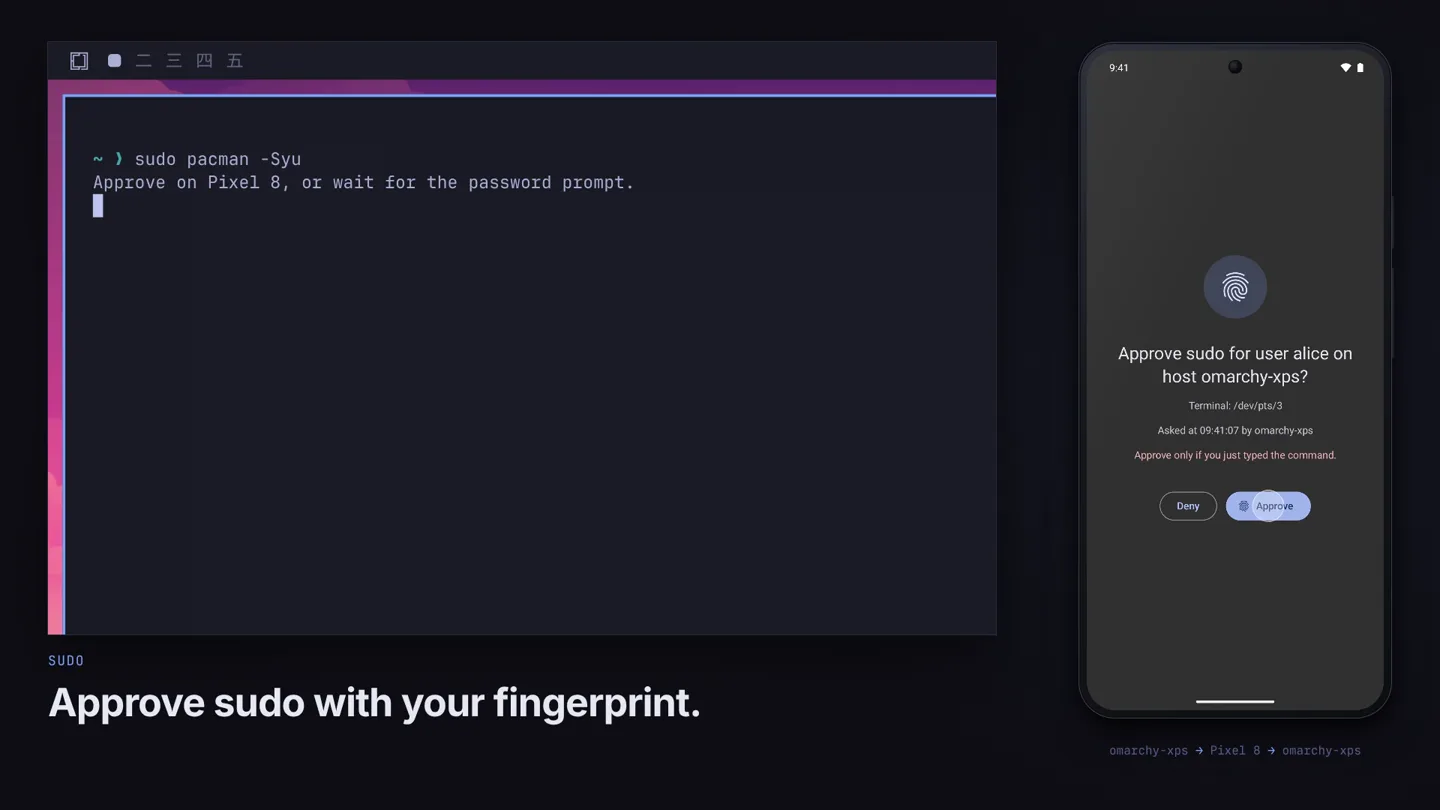
The Hook
Seamless Fingerprint Authentication
“(No spoken dialogue — Mellow, ambient electronic score with pizzicato synths and sub-bass begins.)”
- On screen
- sudo pacman -Syu Approve on Pixel 8, or wait for the password prompt. SUDO Approve sudo with your fingerprint. Approve sudo for user alice on host omarchy-xps? Terminal: /dev/pts/3 Asked at 09:41:07 by omarchy-xps Approve only if you just typed the command. Deny Approve omarchy-xps → Pixel 8 → omarchy-xps
- Camera
- Static wide shot of a desktop terminal and a mobile phone screen side-by-side.
- Motion
- Split-screen UI demonstration with real-time interaction feedback. Text appears with a subtle typewriter effect.
Feature Teaser
Cross-Device Productivity Suite
“(No spoken dialogue — Ambient electronic score continues with gentle piano melody.)”
- On screen
- WEBCAM Use your phone as a webcam. MICROPONE Use your phone as a microphone. SCREEN MIRROR Show your phone screen on Omarchy. SCREENSHOTS Phone screenshots arrive on your desktop. TEXT SCAN Scan text with your phone camera. FILES Send files both ways. CLIPBOARD Copy on your phone. Paste on Omarchy. NOTIFICATIONS Reply to phone messages from Omarchy. MEDIA Control desktop music. CALLS Calls pause your music. COMMANDS Run desktop commands from your phone. FIND MY PHONE Ring your phone from your desktop. SETUP Pair once with a matching key. flux Your phone and your desktop work together. Install Flux on both sides. ON OMARCHY ON ANDROID
- Camera
- Static wide shot, occasionally zooming slightly into specific UI elements on either the desktop or phone screen.
- Motion
- Rapid-fire feature demonstrations using split-screen UI. Text overlays animate in with a subtle fade-up and scale. UI elements highlight and animate to show functionality.
Product Reveal
Unified Ecosystem Integration
“(No spoken dialogue — Score maintains its calm, reflective mood.)”
- On screen
- (No on-screen text)
- Camera
- Dynamic camera movements, panning and zooming across the desktop and phone screens, emphasizing the connection.
- Motion
- Fluid transitions between different feature showcases. UI elements animate with soft, organic movements, highlighting the seamless interaction.
Feature Teaser
Advanced Cross-Device Capabilities
“(No spoken dialogue — The ambient score continues, subtly evolving.)”
- On screen
- (No on-screen text)
- Camera
- Similar to the previous feature teaser, but with more intricate UI interactions and multi-step workflows demonstrated.
- Motion
- Complex UI animations demonstrating multi-step processes, such as file transfers with progress bars, or notification replies with text input. Focus on clarity and ease of use.
Call to Action
Experience Flux: Your Connected Workflow
“(No spoken dialogue — Score gently fades out with a lingering piano melody.)”
- On screen
- flux Your phone and your desktop work together. Install Flux on both sides. ON OMARCHY ON ANDROID
- Camera
- Slow zoom out to reveal the full Flux branding and installation instructions.
- Motion
- Final branding reveal with a subtle glow effect. Text animates in with a smooth, deliberate fade and scale, emphasizing the call to action.
Motion design primitives
Synthesizable in Remotion · key components of the synapse-smart-home-hub-launch template.
DualScreenSync
Two distinct UI screens (desktop and mobile) are presented side-by-side, with actions on one screen triggering immediate, synchronized visual feedback on the other. Elements like text input, file transfers, or notifications appear to flow between the devices.
+ Code construction recipe
Use two <AbsoluteFill> components for the desktop and mobile screens. Animate UI elements using <Sequence> and <spring> for synchronized appearance and disappearance. Utilize <interpolate> for smooth position and opacity changes of elements moving between screens. SVG filters can simulate subtle glows or highlights on active UI components.
TypewriterFadeIn
On-screen text appears character by character, simulating a typewriter effect, often accompanied by a subtle fade-in and slight scale-up for emphasis.
+ Code construction recipe
Wrap text in a component that iterates over characters. Use <Sequence> and <spring> for each character's appearance, with a slight delay for the typewriter effect. Apply opacity and scale transformations using <interpolate> for the fade-in and scale-up. Consider a monospaced font for authenticity.
ContextualHighlight
Specific UI elements or areas of interest are subtly highlighted or outlined with a glowing border, drawing the viewer's attention to the active part of the interface.
+ Code construction recipe
Create an overlay <AbsoluteFill> with a transparent background. Use an SVG <rect> or <path> with a stroke and a glow filter (e.g., feGaussianBlur, feFlood, feComposite) to create the highlight. Animate the position, size, and opacity of this highlight using <spring> or <interpolate> to follow the active UI element.
Style DNA & aesthetic system
Visual aesthetic
Typography
Motion
Special effects
Pacing & rhythm
Conceptual story rhythm
- 1
The Connected Command
Purpose. Immediately showcases a powerful, secure cross-device interaction to hook the viewer.
Execution. Fingerprint authentication on phone instantly approves a desktop terminal command, demonstrating core functionality.
- 2
Feature Carousel
Purpose. Rapidly introduces a breadth of practical, everyday use cases for the product.
Execution. Quick cuts demonstrating phone as webcam/mic, screen mirroring, file transfer, text scanning, and clipboard sync.
- 3
Integrated Workflow
Purpose. Highlights the seamless flow of information and control between devices.
Execution. Notifications, media control, and desktop commands are managed from the phone, showing a unified experience.
- 4
The Unified Call
Purpose. Reinforces the product's core value proposition and provides a clear next step.
Execution. Final branding reveal with the tagline 'Your phone and your desktop work together' and installation instructions.
Remix in Animatiq Studio
Master remix prompt · agent-ready
Sample remix
Objective
A smart home hub called 'Synapse' that integrates all smart devices into a single, intuitive interface.How the recipe adapts
The DualScreenSync primitive would show a user interacting with the Synapse app on their phone, and the corresponding changes (e.g., lights turning on, thermostat adjusting) would animate on a tablet-based smart home dashboard. TypewriterFadeIn would introduce features like 'Voice Control Integration' or 'Automated Routines'. ContextualHighlight would draw attention to specific device icons or status indicators as they are controlled. The overall aesthetic would retain the dark, modern feel with subtle glows on active smart devices.Remix blueprint · synapse-smart-home-hub-launch
Scene durations (5 scenes, 78s)
Key Remotion components
Related Productivity Product Launches
Explore all Productivity launches →
Don't type, just speak. Flawless voice-to-text across every app at 240 WPM.

One workspace for knowledge scattered across Slack, email, Docs, and Notion. Connect your tools and build apps and agents that stay live with your data.

Notion positions itself as the backbone of your dock — a brand film of the Notion icon among everyday apps, ending on “Works with everything.”