
Scene-by-scene timeline & spoken transcript
The Hook
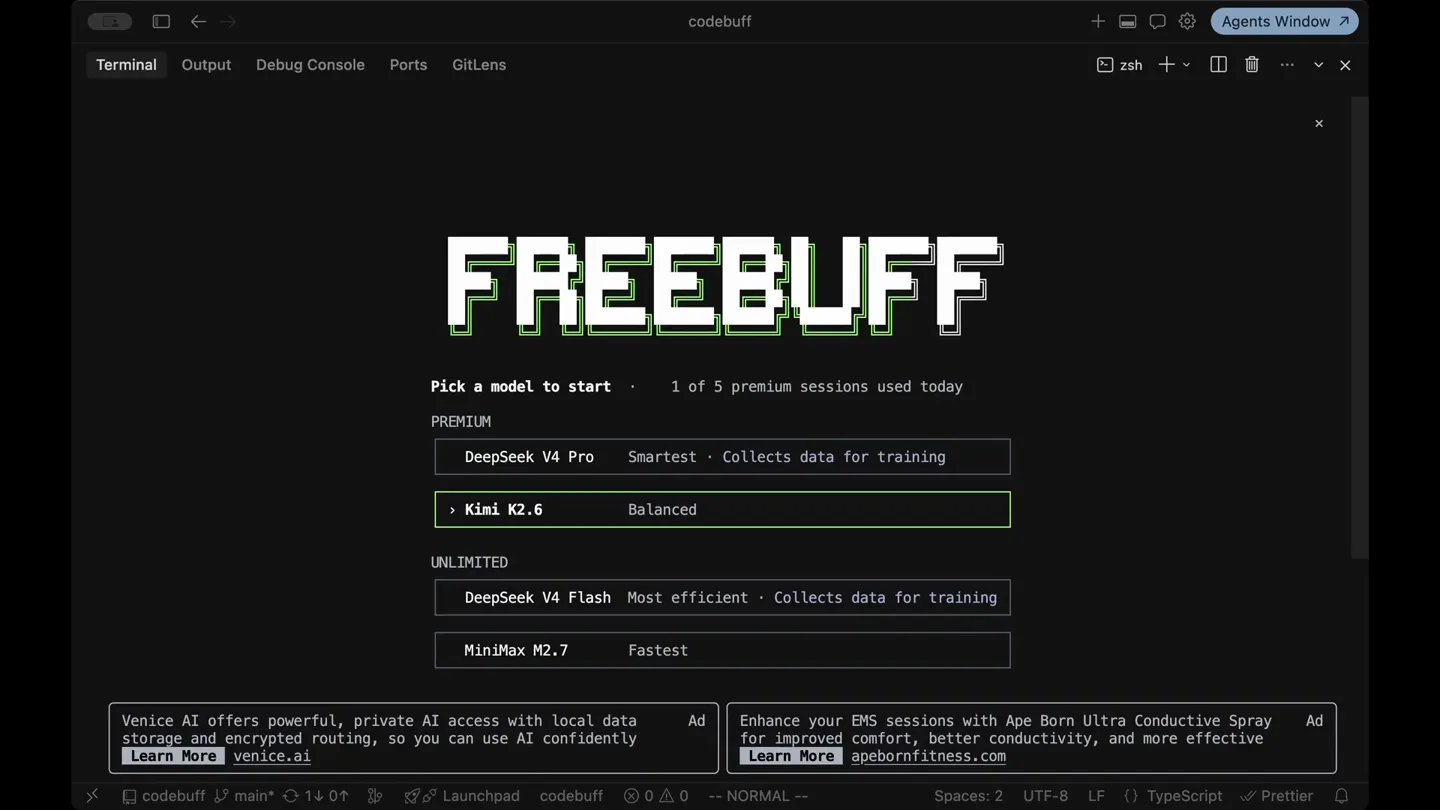
Agent Selection & Brand Reveal
“(No spoken dialogue — The track begins with a sustained, evolving pad sound, creating an atmospheric and slightly mysterious mood. A subtle, high-frequency riser begins to build.)”
- On screen
- codebuff Terminal Output Debug Console Ports GitLens zsh Agents Window? FREEBUFF Pick a model to start 1 of 5 premium sessions today PREMIUM DeepSeek V4 Pro Smartest • Collects data for training Kimi K2.6 Balanced UNLIMITED DeepSeek V4 Flash Most efficient • Collects data for training MiniMax M2.7 Fastest Venice AI offers powerful, private AI access with local data storage and encrypted routing, so you can use AI confidently Learn More venice.ai Ad Enhance your EMS sessions with Ape Born Ultra Conductive Spray Ad for improved comfort, better conductivity, and more effective Learn More apebornfitness.com codebuff main* 1 0 ↑ ↓ Launchpad codebuff 0 Δ 0 NORMAL Spaces: 2 UTF-8 LF TypeScript Prettier
- Camera
- Static, wide shot of a terminal interface.
- Motion
- Subtle UI element highlighting and selection animation, with a pixelated text effect for the brand name.
Product Reveal
Agent Activation & Command Prompt
“(No spoken dialogue — A soft, percussive synth pulse continues, accompanied by a low-frequency sub-bass drone that adds depth.)”
- On screen
- codebuff Terminal Output Debug Console Ports GitLens zsh Agents Window? FREEBUFF Pick a model to start 1 of 5 premium sessions today PREMIUM DeepSeek V4 Pro Smartest • Collects data for training Kimi K2.6 Balanced UNLIMITED DeepSeek V4 Flash Most efficient • Collects data for training MiniMax M2.7 Fastest Venice AI offers powerful, private AI access with local data storage and encrypted routing, so you can use AI confidently Learn More venice.ai Ad Enhance your EMS sessions with Ape Born Ultra Conductive Spray Ad for improved comfort, better conductivity, and more effective Learn More apebornfitness.com codebuff main* 1 0 ↑ ↓ Launchpad codebuff 0 Δ 0 NORMAL Spaces: 2 UTF-8 LF TypeScript Prettier
- Camera
- Static, wide shot of the terminal interface.
- Motion
- UI interaction showing selection of 'DeepSeek V4 Pro' with a green highlight, followed by a screen transition to a command prompt.
Feature Teaser
Initial Interaction & AI Response
“(No spoken dialogue — A significant high-energy audio transition occurs, featuring a prominent riser that culminates in a powerful sub-bass drop/impact. This impact is followed by a more intense, driving electronic beat with a prominent kick drum and layered synth elements.)”
- On screen
- codebuff Terminal Output Debug Console Ports GitLens zsh Agents Window? FREEBUFF Freebuff will run commands on your behalf to help you build. Directory ~/codebuff DeepSeek V4 Pro 1h left x End session |
- Camera
- Static, wide shot of the terminal interface.
- Motion
- Text typing animation in the terminal, simulating user input and then an AI 'thinking' state with a loading indicator.
Call to Action
AI Agent in Action
“(No spoken dialogue — The track maintains its driving rhythm until a final, impactful sub-bass hit, which then fades out.)”
- On screen
- codebuff Terminal Output Debug Console Ports GitLens zsh Agents Window? FREEBUFF Freebuff will run commands on your behalf to help you build. Directory ~/codebuff [09:05 PM] hi x! Thinking ZERO provides everything developers need: service discovery, authentication handling, API management, and orchestration View Docs ZERO Ad Building AI agents that need external service access? ZERO removes the technical barriers blocking your agents from See How It Works ZERO Ad | Enter a coding task or / for commands
- Camera
- Static, wide shot of the terminal interface.
- Motion
- Rapid text generation, simulating the AI agent's response and interaction within the terminal, concluding with a call to action prompt.
Motion design primitives
Synthesizable in Remotion · key components of the terminal-agent-launch template.
PixelatedTextReveal
Text appears with a pixelated, blocky effect, then resolves into sharp, legible characters, often with a subtle outline or glow.
+ Code construction recipe
Utilize Remotion's <Text> component with a custom shader or SVG filter for pixelation. Animate the 'pixelSize' or 'resolution' property from a large value to 1, potentially using a 'spring' or 'easeOutCubic' interpolation. Apply a subtle 'drop-shadow' or 'outline' CSS property for the final state.
TerminalUIHighlight
Interactive UI elements (like buttons or list items) are highlighted with a distinct border or background color, often accompanied by a small arrow or cursor.
+ Code construction recipe
Implement a conditional rendering or CSS class toggle based on a 'currentSelection' state. Animate the 'border-color' or 'background-color' property using 'interpolate' with 'easeOutSine'. A small SVG arrow can be animated to slide in from the left using 'translateX'.
TypingTextEffect
Text characters appear sequentially as if being typed, often with a blinking cursor at the end of the current line.
+ Code construction recipe
Use Remotion's 'Sequence' and 'spring' or 'interpolate' to reveal characters one by one. A separate 'Cursor' component (a simple blinking rectangle) can be animated with 'opacity' or 'scaleX' to simulate blinking, positioned at the end of the currently typed text.
Style DNA & aesthetic system
Visual aesthetic
Typography
Motion
Special effects
Pacing & rhythm
Conceptual story rhythm
- 1
The Setup
Purpose. Introduce the product's environment and core offering (AI agents).
Execution. Displaying the Freebuff brand and the selection of AI models within a terminal interface.
- 2
The Interaction
Purpose. Demonstrate the user initiating a task with the AI agent.
Execution. User typing a simple command ('hi x!') into the terminal.
- 3
The Response
Purpose. Showcase the AI agent's intelligence and capability.
Execution. The AI agent 'thinking' and then generating a helpful, conversational response.
- 4
The Call to Action
Purpose. Reinforce the product's utility and prompt further engagement.
Execution. The AI agent offering further assistance, ending with the command prompt ready for more input.
Remix in Animatiq Studio
Master remix prompt · agent-ready
Sample remix
Objective
Launch a new cloud-based IDE called 'DevSphere' that offers real-time collaborative coding and integrated debugging.How the recipe adapts
The 'DevSphere' logo would appear with the PixelatedTextReveal effect. The TerminalUIHighlight would be used to show selection of different coding environments or debugging tools. The TypingTextEffect would demonstrate real-time code suggestions and collaborative input from multiple users, with different colored cursors for each collaborator. The overall dark theme and high-contrast text would be maintained, with blue or purple accents instead of green to differentiate the brand. The audio would still feature a driving electronic beat, but with more ethereal synth elements to convey the 'cloud' aspect.Remix blueprint · terminal-agent-launch
Scene durations (4 scenes, 19s)
Key Remotion components
Related AI Agents Product Launches
Explore all AI Agents launches →
To ensure that artificial general intelligence benefits all of humanity

Gopuff introduces Go, an AI shopping assistant built with SpaceXAI: say what you need and the order is placed.

Iliad (Troy) trailer made by Grok Imagine 1.5, which was just released