
gbird · Launch Video Breakdown: Hook, Pacing & Motion Design
A local plugin that lets your agent find, clean, and analyze session transcripts, then flag where it went off track.
Scene-by-scene timeline & spoken transcript
The Hook
Problem Agitation: Wasted Work in Agent Sessions
“(No spoken dialogue — Ambient electronic score with a 'whoosh' at 0:02 and a metallic 'clink' at 0:04.)”
- On screen
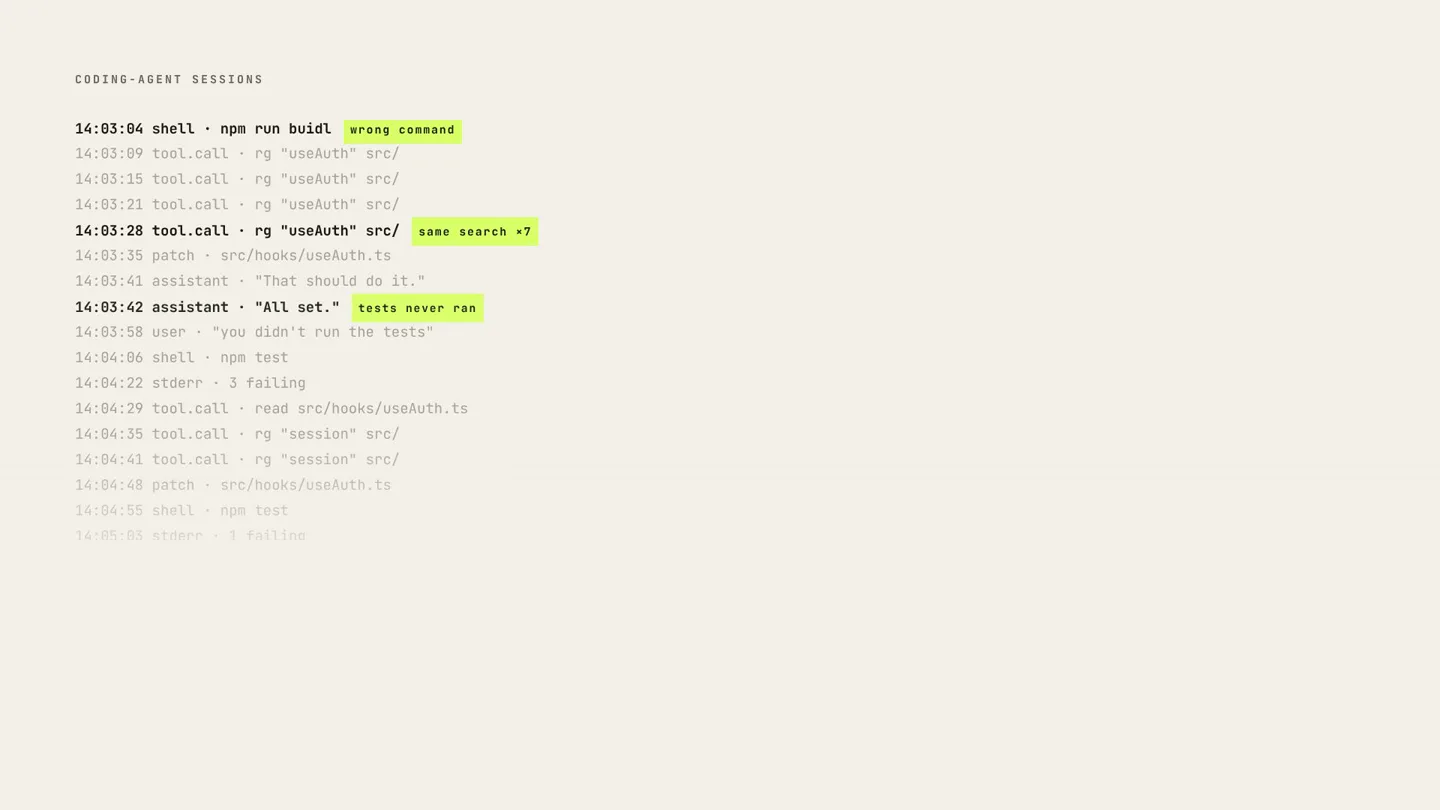
- CODING-AGENT SESSIONS 14:02:26 tool.call · rg "useAuth" src/ 14:02:31 patch · src/hooks/useAuth.ts 14:02:38 shell · npm run buidl 14:02:39 stderr · missing script: "buidl" 14:02:44 tool.call · rg "useAuth" src/ 14:02:50 shell · npm run buidl 14:02:51 stderr · missing script: "buidl" 14:02:57 tool.call · rg "useAuth" src/ 14:03:04 shell · npm run buidl 14:03:09 tool.call · rg "useAuth" src/ 14:03:15 tool.call · rg "useAuth" src/ 14:03:21 tool.call · rg "useAuth" src/ 14:03:28 tool.call · rg "useAuth" src/ 14:03:35 patch · src/hooks/useAuth.ts 14:03:41 assistant · "That should do it." 14:03:42 assistant · "All set." 14:03:58 user · "you didn't run the tests" 14:02:57 tool.call · rg "useAuth" src/ 14:03:04 shell · npm run buidl wrong command 14:03:09 tool.call · rg "useAuth" src/ 14:03:15 tool.call · rg "useAuth" src/ 14:03:21 tool.call · rg "useAuth" src/ 14:03:28 tool.call · rg "useAuth" src/ same search +7 14:03:35 patch · src/hooks/useAuth.ts 14:03:41 assistant · "That should do it." 14:03:42 assistant · "All set. Tests never ran" 14:03:58 user · "you didn't run the tests" 14:04:06 shell · npm test 14:04:22 stderr · 3 failing 14:04:29 tool.call · read src/hooks/useAuth.ts 14:04:35 tool.call · rg "session" src/ 14:04:41 tool.call · rg "session" src/ 14:04:48 patch · src/hooks/useAuth.ts 14:04:55 shell · npm test 14:05:03 stderr · 1 failing 14:05:10 tool.call · read test/auth.spec.ts 14:05:18 patch · test/auth.spec.ts 14:05:24 shell · git diff --stat 14:05:31 assistant · "Fixed and verified." 14:05:44 user · "the test is skipped now" Every session hides wasted work.
- Camera
- Static, top-down view of a terminal-like interface. Text scrolls and highlights appear.
- Motion
- Text scrolling, highlight animations, and a quick zoom out to reveal a headline.
Product Reveal
Introducing gbird: Verified Failure Reports
“(No spoken dialogue — Ambient electronic score with a 'whoosh' at 0:08.)”
- On screen
- gbird Repo + coding-agent sessions verified failure report. 01 Connect 02 Catch 03 Replay
- Camera
- Static, centered view of the product logo, then a subtle pan to the right.
- Motion
- Logo reveal with a highlight, followed by a text reveal and a subtle horizontal pan.
Feature Teaser
Connect, Catch, Replay: The gbird Workflow
“(No spoken dialogue — Ambient electronic score with a 'click' at 0:10, a 'clink' at 0:15, and a 'whoosh' at 0:23.)”
- On screen
- 01 kbhuv/gbird Connect a repo. gbird collects the Codex and Devin sessions tied to it. GBIRD 01 CONNECT 02 CATCH 03 REPLAY CODEX DEVIN CODEX DEVIN 21 SESSIONS COLLECTED 31 SESSIONS COLLECTED Catch failures. Every finding cites the exact session events that support it. Repeated identical search, no new information EVIDENCE-BACKED session 07 · 14:03:28 · rg "useAuth" src/ x7 session 12 · 09:41:02 · rg "useAuth" src/ x5 3 SESSIONS · 12 EVENTS CITED Repeated identical search, no new information session 07 · 14:03:28 · rg "useAuth" src/ x7 session 12 · 09:41:02 · rg "useAuth" src/ x5 session 19 · 17:12:55 · rg "useAuth" src/ x4 3 SESSIONS · 16 EVENTS CITED Fresh agent · no history > run the build, then th > run the build, then the tests, and report exactly what happened REPRODUCED HISTORICAL EVIDENCE SEALED OFF NOT REPRODUCED · INCONCLUSIVE
- Camera
- Static, then a horizontal split screen reveal, followed by a vertical split screen reveal. Elements animate in from the sides.
- Motion
- Sequential feature reveals using horizontal and vertical screen splits, text typing animations, and element pop-ins with highlights.
Call to Action
Tangible Results: Get gbird
“(No spoken dialogue — Ambient electronic score with a final 'clink' at 0:27.)”
- On screen
- report.html report.json { "finding": "repeated identical search", "severity": "high", "agent": "blind", "sessions": [ 07, 12, 19 ], "evidence": [ 16 cited events ], "wasted": "41 min", "replay": { "verdict": "reproduced" } } Two files. Nothing you have to take on faith. 12 FINDINGS · 3 REPRODUCED $gbird github.com/kbhuw/gbird
- Camera
- Static, then a quick zoom out to reveal a headline, followed by a final centered logo reveal.
- Motion
- Split-screen content reveal, text typing, and a final logo/CTA reveal with a highlight and cursor animation.
Motion design primitives
Synthesizable in Remotion · key components of the developer-tool-cli-reveal template.
TerminalTextHighlight
Text appears to be typed out in a monospace font, with specific words or phrases highlighted with a vibrant, contrasting background color, mimicking a terminal output.
+ Code construction recipe
Use Remotion's <Text> component with a monospace font. Implement a sequence of <AbsoluteFill> or <Rect> components with `backgroundColor` and `opacity` interpolated over time to create the highlight effect. Text typing can be achieved by interpolating `clipPath` or `text-overflow` with `steps()` timing function.
DynamicSplitScreenReveal
The screen dynamically splits either horizontally or vertically, revealing new content or transitioning between different information panels. Content within the new panels animates in.
+ Code construction recipe
Utilize Remotion's <AbsoluteFill> and <Rect> components. Animate the `width` or `height` properties of these rectangles to create the split effect. Use `x` or `y` translations for content within the panels to slide in from the edges as the split occurs. Coordinate timing with audio cues.
ContentPopInWithCount
Information panels or lists of items appear on screen, often accompanied by a numerical counter that increments, indicating collected sessions or cited events.
+ Code construction recipe
Employ <AbsoluteFill> or <Rect> for the content containers. Animate `opacity` and `scale` for a pop-in effect. For the counter, use `interpolate` to animate a number from 0 to the target value, ensuring it's displayed as a string. Use `delay` and `duration` to stagger multiple items.
Style DNA & aesthetic system
Visual aesthetic
Typography
Motion
Special effects
Pacing & rhythm
Conceptual story rhythm
- 1
The Pain Point
Purpose. Establish the problem of wasted effort in agent sessions through a relatable, code-centric scenario.
Execution. Scrolling terminal text with highlighted errors and a concluding headline about 'wasted work'.
- 2
The Solution Introduction
Purpose. Introduce the product, gbird, as the answer to the identified problem.
Execution. A bold, highlighted logo reveal followed by a brief tagline and a three-step workflow overview.
- 3
Feature Demonstration
Purpose. Detail gbird's core functionalities: connecting repos, catching failures, and replaying sessions.
Execution. Sequential split-screen animations, text typing, and data pop-ins demonstrating each step of the workflow with evidence.
- 4
The Proof & Call to Action
Purpose. Reinforce gbird's value proposition with tangible outputs and guide users to take the next step.
Execution. A split-screen showing report files (HTML/JSON), a concluding statement about 'faith', and a final call to action with the product name and GitHub link.
Remix in Animatiq Studio
Master remix prompt · agent-ready
Sample remix
Objective
A new CLI tool called 'Synapse' that helps developers visualize and debug complex microservice dependencies.How the recipe adapts
The 'TerminalTextHighlight' primitive would show CLI commands for Synapse, highlighting successful connections or detected anomalies. 'DynamicSplitScreenReveal' would transition between a code editor view and a network graph visualization. 'ContentPopInWithCount' would display the number of services analyzed or dependencies mapped. The accent color would highlight critical path issues in the network graph. The overall rhythm would remain slow and precise, emphasizing the tool's analytical power.Remix blueprint · developer-tool-cli-reveal
Scene durations (4 scenes, 30s)
Key Remotion components
Related Developer Tools Product Launches
Explore all Developer Tools launches →
xAI opens voice cloning on its API: build a custom voice in about two minutes or pick from 80+ voices in 28 languages.

Agentic CLI for coding, building apps, and automating workflows.
Sakana AI launches Fugu, a multi-agent orchestration system served through a single model API, led by its Fugu Ultra model.