
Scene-by-scene timeline & spoken transcript
The Hook
Side-by-Side AI Generation Comparison
“(No spoken dialogue — Driving electronic beat with sub-bass and rhythmic synth arpeggios. Pizzicato synths provide a playful, staccato melody.)”
- On screen
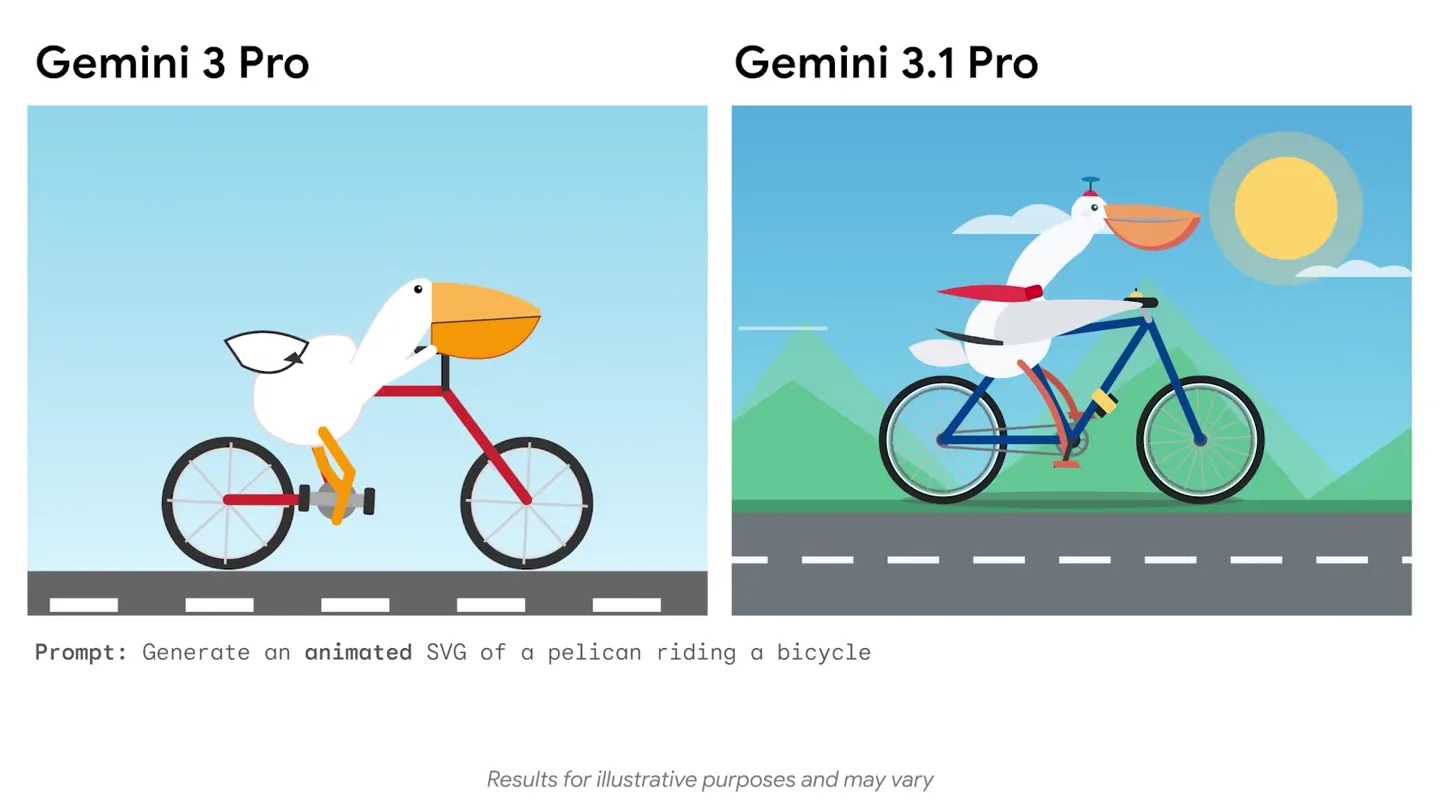
- Gemini 3 Pro Gemini 3.1 Pro Prompt: Generate an animated SVG of a pelican riding a bicycle Results for illustrative purposes and may vary
- Camera
- Static, wide shot comparing two distinct animated SVG outputs side-by-side.
- Motion
- Split-screen comparison, subtle character animation within each panel, text overlay for prompt and disclaimers.
Product Reveal
Enhanced AI Creativity Showcase
“(No spoken dialogue — Electronic beat continues, building energy. Riser at 0:10 leads to a sub-bass drop/impact at 0:11.)”
- On screen
- Gemini 3 Pro Gemini 3.1 Pro Prompt: Generate an animated SVG of a frog on a vintage penny-forthing bicycle Results for illustrative purposes and may vary Prompt: Generate an animated SVG of a giraffe driving a tiny car Results for illustrative purposes and may vary
- Camera
- Static, wide shot comparing two distinct animated SVG outputs side-by-side, with quick cuts between different animal scenarios.
- Motion
- Rapid scene cuts, split-screen comparison, character animation, dynamic background elements (e.g., moving clouds, sun flares, speed lines) in the '3.1 Pro' panel.
Feature Teaser
Dynamic Visual Storytelling
“(No spoken dialogue — Electronic beat intensifies after the sub-bass drop. Riser builds from 0:20 to 0:21.)”
- On screen
- Gemini 3 Pro Gemini 3.1 Pro Prompt: Generate an animated SVG of an ostrich on roller skates Results for illustrative purposes and may vary Prompt: Generate an animated SVG of a turtle kickflipping a skateboard Results for illustrative purposes and may vary Prompt: Generate an animated 4:3 SVG of a dachshund driving a stretch limousine Results for illustrative purposes and may vary
- Camera
- Static, wide shot comparing two distinct animated SVG outputs side-by-side, with quick cuts between different animal scenarios.
- Motion
- Fast-paced scene cuts, split-screen comparison, character animation with enhanced details and environmental context in the '3.1 Pro' panel, dynamic lighting and particle effects.
Call to Action
The Future of AI Generation
“(No spoken dialogue — Powerful sub-bass impact at 0:21, followed by the driving electronic beat continuing to the end.)”
- On screen
- (No on-screen text)
- Camera
- Implied continuation of the split-screen comparison, leading to a potential brand reveal or call to action (not shown in provided frames).
- Motion
- Anticipated final product reveal or branding sequence, likely leveraging the established dynamic motion language.
Motion design primitives
Synthesizable in Remotion · key components of the dual-panel-ai-comparison template.
DualPanelComparison
Two distinct content panels are displayed side-by-side, each showcasing a different version of an animated SVG output based on the same prompt. The left panel (Gemini 3 Pro) shows a simpler, more static animation, while the right panel (Gemini 3.1 Pro) features a richer, more dynamic, and contextually detailed animation.
+ Code construction recipe
Utilize a Flexbox or Grid layout for the two panels. Each panel contains an SVG component. Animate SVG properties (e.g., position, rotation, scale, path data) using `interpolate` or `spring` for character movement and environmental elements. Implement conditional rendering or prop passing to switch between 'Pro' and '3.1 Pro' SVG versions.
DynamicEnvironmentEnhancement
The '3.1 Pro' panel consistently features a more vibrant and animated background, including moving clouds, sun flares, speed lines, and contextual elements like trees or cityscapes, contrasting with the simpler, static backgrounds of the 'Pro' panel.
+ Code construction recipe
For the '3.1 Pro' panel, use multiple SVG layers for background elements. Animate cloud positions with `interpolate` for continuous scrolling. Implement a `spring` for subtle sun flare pulsations. Use SVG path animations or CSS transforms for speed lines. Integrate a `Canvas` component for more complex particle effects or dynamic lighting.
CharacterActionEnrichment
Characters in the '3.1 Pro' panel exhibit more complex and expressive animations, including additional accessories (hats, capes, sunglasses), dynamic poses, and interactions with their environment (e.g., a pelican pedaling, a frog with a flowing cape, a turtle kickflipping with glowing wheels).
+ Code construction recipe
Within the SVG components, animate individual character parts (limbs, accessories) using `interpolate` for keyframe animations or `spring` for more natural, physics-based movements. Use SVG filters (e.g., `feGaussianBlur`, `feDropShadow`) for glowing effects or motion blur. Implement conditional rendering for accessories based on the '3.1 Pro' version.
Style DNA & aesthetic system
Visual aesthetic
Typography
Motion
Special effects
Pacing & rhythm
Conceptual story rhythm
- 1
The Baseline
Purpose. Establish the 'before' state and the core challenge of AI generation, showing the limitations of the previous version.
Execution. The left panel (Gemini 3 Pro) consistently displays simpler, less detailed, and often less contextually rich SVG animations.
- 2
The Breakthrough
Purpose. Introduce the new product's enhanced capabilities by directly contrasting it with the baseline, highlighting the leap in quality.
Execution. The right panel (Gemini 3.1 Pro) immediately showcases significantly more complex, dynamic, and visually appealing SVG animations for the same prompt.
- 3
The Showcase
Purpose. Demonstrate the breadth and versatility of the new product across various creative prompts and scenarios.
Execution. Rapid-fire cuts between multiple side-by-side comparisons, each featuring a different animal and action, all rendered with the enhanced '3.1 Pro' style.
- 4
The Impact
Purpose. Reinforce the product's power and leave a lasting impression of its advanced capabilities.
Execution. The energetic audio track, combined with the continuous display of impressive '3.1 Pro' outputs, builds to a powerful audio impact, signifying a major upgrade.
Remix in Animatiq Studio
Master remix prompt · agent-ready
Sample remix
Objective
Showcase a new AI model, 'HorizonGen 2.0', that generates photorealistic landscape images from text prompts, comparing it to 'HorizonGen 1.0'.How the recipe adapts
The 'DualPanelComparison' primitive will display 'HorizonGen 1.0' on the left with simpler, less detailed landscapes and 'HorizonGen 2.0' on the right with highly detailed, atmospherically rich photorealistic landscapes. 'DynamicEnvironmentEnhancement' will be adapted to include realistic lighting, volumetric fog, and subtle wind effects in the '2.0' landscapes. 'CharacterActionEnrichment' will be replaced by 'LandscapeDetailEnrichment', focusing on animating elements like flowing water, swaying trees, or moving clouds within the photorealistic scenes. The fast-paced cuts will remain, showcasing various landscape types like mountains, beaches, and forests.Remix blueprint · dual-panel-ai-comparison
Scene durations (5 scenes, 30s)
Key Remotion components
Related AI Agents Product Launches
Explore all AI Agents launches →
To ensure that artificial general intelligence benefits all of humanity

Gopuff introduces Go, an AI shopping assistant built with SpaceXAI: say what you need and the order is placed.

Iliad (Troy) trailer made by Grok Imagine 1.5, which was just released