
Chetaslua · Launch Video Breakdown: Hook, Pacing & Motion Design
Gemini 3.5 Flash on @arena → Minecraft in a single prompt. Best implementation of minecraft ever seen by any ai model till date for one shot What actually surprised me: >zero external assets (no .p…
Scene-by-scene timeline & spoken transcript
The Hook
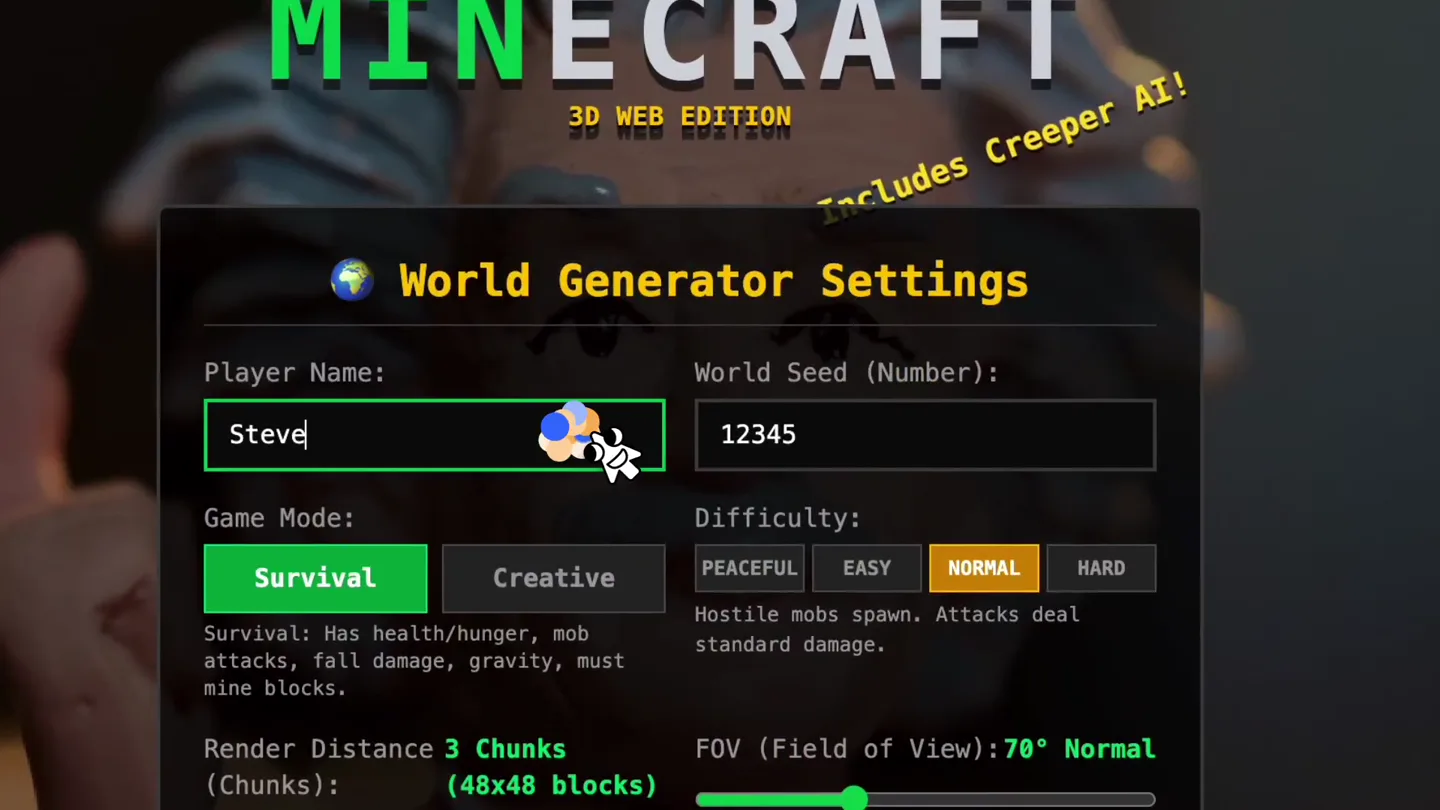
AI Agent Configures Minecraft World
“(No spoken dialogue — The track features a sparse, evolving electronic soundscape. It begins with sustained synth pads and subtle percussive clicks.)”
- On screen
- MINECRAFT 3D WEB EDITION Includes Creeper AI! World Generator Settings Player Name: Steve Game Mode: Survival Creative Survival: Has health/hunger, mob attacks, fall damage, gravity, must mine blocks. Render Distance 3 Chunks (Chunks): (48x48 blocks) World Seed (Number): 12345 Difficulty: PEACEFUL EASY NORMAL HARD Hostile mobs spawn. Attacks deal standard damage. FOV (Field of View): 70° Normal chetaslua Back Create World & Start! Minecraft Web Sandbox v2.5 Inspired by Mojang Studios AB Built with Arena Content is user-generated and unverified [System] Welcome to Minecraft 3D Web Sandbox! [System] Press T for Chat Commands. E for Inventory. ESC to Pause. [System] Generating world with seed 12345... [System] GameMode: CREATIVE. Press 'T' for cheats! chetaslua (Creative Flight) Score: 0 E Inventory T Console Chat ESC Pause Menu 1-9 Select Hotbar SPACE Jump (Double = Fly) [System] Flight Mode: DISABLED PLAYER INVENTORY & CRAFTING 2x2 Pocket Crafting Creative Block (Click to Picker Quick Recipes: 1 Log (Wood) = 4 Planks 4 Planks = 2 Glass 1 Cobblestone = 1 Brick Main Inventory Quick Hotbar TIP: Drag & Drop is fully simulated. Select any block from top right to build infinite structures in Creative Mode! To exit full screen, press and hold esc GAME PAUSED Resume Game Toggle Mode (Survival) Heal Player & Clear Save & Exit to Title Singleplayer Multiplayer (Servers) Settings Credits INSTANT PLAY MODE Explore, build blocks, fight creepers & zombies! Seed- based generator. Press W/A/S/D to move, L-CLICK to break, R-CLICK to place. Multiplayer Server List Note: Multiplayer mode is currently offline/simulated in the Web Sandbox version. Join servers to play with bots! Official Craft Server 142/500 Welcome to the ultimate web block server! 24ms MineWood Survival PvP 89/250 Anarchy & Factions! Max 1.19 | NO LAG 42ms Creative Voxel Builders 12/50 Show your pixel art, sandbox unlimited 88ms Dodatana Lab (DEV!) 0/10 Back to Menu Connect / Direct Join Steve (Survival Mode) Score: 0 019e2beb-1c5c-7c02-9eb1-5778b7080a7c.arena.site - To show your cursor, press esc [System] GameMode: SURVIVAL. Press 'T' for cheats! [System] Flight Mode: DISABLED
- Camera
- The camera initially frames a Minecraft world generator settings screen, then transitions to a first-person perspective within the generated Minecraft world, showing UI elements and gameplay.
- Motion
- UI element interaction with cursor, rapid scene cuts, first-person gameplay simulation, text overlay for system messages.
Problem Agitation
AI Agent Navigates and Interacts
“(No spoken dialogue — A significant sub-bass drop occurs at [00:18], followed by a series of rapid, high-frequency clicks and sweeps [00:22-00:26]. Another sub-bass impact is heard at [00:33], with more percussive elements and a rising synth sweep leading to a final impactful sub-bass hit at [00:38].)”
- On screen
- Steve (Survival Mode) Score: 3 You Died! Ouch! Fall damage, lava or hostile mobs took your health. Final Score: 3 blocks Seed: 12345 Respawn Steve! Return to Lobby Built with Arena Content is user-generated and unverified [System] Welcome to Minecraft 3D Web Sandbox! [System] Press T for Chat Commands. E for Inventory. ESC to Pause. [System] Generating world with seed 12345... [System] GameMode: CREATIVE. Press 'T' for cheats! [System] GameMode: SURVIVAL. Press 'T' for cheats! [System] Flight Mode: DISABLED
- Camera
- First-person perspective, showing the AI agent moving through the Minecraft world, placing blocks, encountering a red humanoid figure, and eventually dying.
- Motion
- Simulated gameplay, particle effects on interaction, rapid camera movements to simulate player action, game over screen transition.
Product Reveal
Complex Builds and AI Capabilities
“(No spoken dialogue — The latter half of the track continues with ambient pads, more percussive clicks, and additional sub-bass impacts and sweeps, creating a sense of tension and release.)”
- On screen
- (No on-screen text)
- Camera
- Dynamic camera movements showcasing complex structures being built rapidly, including a house, a bridge, and a tower, from various angles.
- Motion
- Time-lapse building, rapid camera pans and zooms, block-by-block construction animation, showcasing scale and complexity.
Feature Teaser
Advanced AI Interaction and Creativity
“(No spoken dialogue — A prominent riser and sub-bass impact occur at [01:01], followed by a series of rapid, almost glitch-like percussive hits and a final powerful sub-bass impact at [01:09] and [01:11].)”
- On screen
- (No on-screen text)
- Camera
- Fluid camera movements demonstrating the AI agent's ability to build intricate structures, navigate challenging environments, and engage in creative construction, ending with a wide shot of a completed, complex structure.
- Motion
- Smooth camera tracking, complex object instantiation, environmental interaction, showcasing the AI's creative output and problem-solving.
Motion design primitives
Synthesizable in Remotion · key components of the ai-codecraft-pixel-build template.
MinecraftUIMouseInteraction
Simulates a mouse cursor interacting with Minecraft-style UI elements, including text input, button clicks, and dropdown selections, with subtle hover states and click animations.
+ Code construction recipe
Use `AbsoluteFill` for the background. Implement UI elements as `div`s with `border-radius` and `box-shadow` for depth. Animate cursor position using `interpolate` with `easeOutCubic`. Button clicks can trigger `scale` and `opacity` changes with `spring` for a tactile feel. Text input can be simulated by rendering characters sequentially with `delay`.
VoxelBuildSequence
Displays rapid, block-by-block construction of complex 3D structures within a voxel environment, often with a time-lapse effect and dynamic camera angles.
+ Code construction recipe
Utilize a 3D canvas (e.g., `three.js` integrated with Remotion) to render voxel blocks. Animate block placement by dynamically adding `Mesh` objects to the scene. Camera movement (pan, zoom, orbit) can be controlled via `interpolate` on `Camera` position and target. Use `sequence` to orchestrate the timing of block additions and camera moves.
FirstPersonGameplayOverlay
Simulates a first-person perspective in a game, featuring a dynamic crosshair, on-screen system messages, and a hotbar, with camera movements mimicking player navigation.
+ Code construction recipe
Overlay UI elements (crosshair, hotbar, text boxes) as `div`s with `position: absolute`. Animate camera rotation and position using `interpolate` for smooth movement. System messages can appear and fade out using `opacity` and `translateY` animations with `spring` for a natural feel. Hotbar selection can be highlighted with `scale` and `box-shadow`.
Style DNA & aesthetic system
Visual aesthetic
Typography
Motion
Special effects
Pacing & rhythm
Conceptual story rhythm
- 1
Setup & Configuration
Purpose. Introduces the AI's ability to understand and configure complex game settings from a single prompt.
Execution. Starts with a UI screen, showing the AI 'typing' and selecting options, then transitions to the generated world.
- 2
Initial Interaction & Challenge
Purpose. Demonstrates basic AI navigation and interaction, highlighting both success and failure (e.g., dying in-game) to show realistic agent behavior.
Execution. First-person gameplay, moving through the world, placing blocks, encountering obstacles, and a 'You Died!' screen.
- 3
Creative Construction Showcase
Purpose. Reveals the AI's advanced capabilities in building complex and creative structures rapidly.
Execution. Time-lapse sequences of intricate buildings (houses, bridges, towers) being constructed block by block from various dynamic camera angles.
- 4
Mastery & Vision
Purpose. Concludes by emphasizing the AI's mastery over the environment and its potential for complex, autonomous creation.
Execution. Fluid camera movements showcasing the AI's ability to build intricate structures, navigate challenging environments, and engage in creative construction, ending with a wide shot of a completed, complex structure.
Remix in Animatiq Studio
Master remix prompt · agent-ready
Sample remix
Objective
Launch a new AI-powered web development platform called 'CodeCraft' that generates full-stack applications from natural language prompts.How the recipe adapts
The 'MinecraftUIMouseInteraction' primitive will be adapted to simulate an AI agent interacting with a web IDE, typing code, and clicking buttons to configure application settings. 'VoxelBuildSequence' will be re-imagined as 'ComponentBuildSequence', where UI elements and backend services are visually 'snapped' into place like blocks, showcasing rapid application assembly. 'FirstPersonGameplayOverlay' will become 'FirstPersonDevEnvironment', with system messages indicating code generation progress and bug fixes, and a 'hotbar' of AI-generated components. The pixelated aesthetic will be applied to code blocks and UI elements, and the fast-paced editing will highlight the speed of AI development.Remix blueprint · ai-codecraft-pixel-build
Scene durations (4 scenes, 77s)
Key Remotion components
Related AI Agents Product Launches
Explore all AI Agents launches →
To ensure that artificial general intelligence benefits all of humanity

Gopuff introduces Go, an AI shopping assistant built with SpaceXAI: say what you need and the order is placed.

Iliad (Troy) trailer made by Grok Imagine 1.5, which was just released