
Scene-by-scene timeline & spoken transcript
The Hook
Real-time Transcription Demo
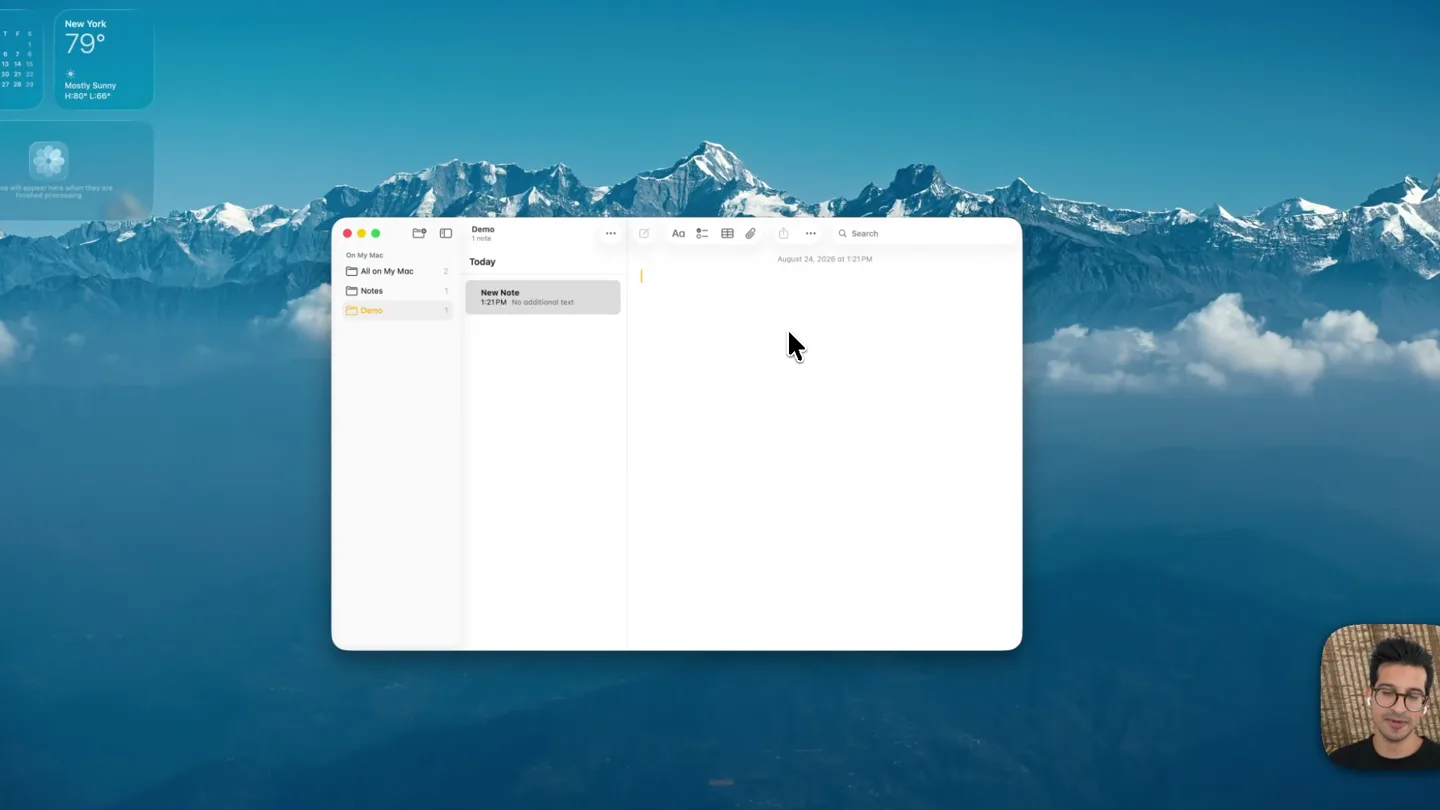
“Hey, I'm testing Gemini 3.5 transcribe. Let's see it in action. Let's schedule that meeting for 3:00 p.m.”
- On screen
- AUGUST New York 79° 24 Cloudy, Sunny H:85° L:69° Photos and documents were deleted from here and moved to the Trash. Demo 1 note Today New Note 1:21 PM No additional text Hey, I'm testing Gemini 3.5 transcribe. Let's see it in action. August 24, 2026 at 1:21 PM Let's schedule that meeting for 3:00 p.m. Images Movies config.json other
- Camera
- Static wide shot of a macOS desktop, with a picture-in-picture of the presenter in the bottom right. The main focus is on the 'Notes' application.
- Motion
- Seamless real-time text generation within a native application UI, simulating live dictation. A subtle pulsing microphone icon appears at the bottom center during dictation.
Feature Teaser
Custom Vocabulary Integration
“So, I'm going to add a custom vocabulary word, AI Studio, to the dictionary. And now, when I say AI Studio, it'll be spelled correctly.”
- On screen
- AUGUST New York 80° 24 Cloudy, Sunny H:85° L:69° Images Movies config.json other Don't show me this again. Send to Trash. Jot Dictionary Add a word or phrase... Gemini hears it as... (optional) History Settings General Dictation Privacy & Storage Advanced About Teach it your words Names, jargon, product terms — add them once, they're spelled right in every dictation. 0 words AI Studio 1 word Import CSV... Export CSV...
- Camera
- The camera remains static, but a new application window ('Jot') slides in from the right, partially overlapping the 'Notes' app. The presenter remains in the bottom right.
- Motion
- Smooth, rapid window transition with a slight blur effect as the 'Jot' app slides into view. Text input within the 'Jot' app is instantaneous, demonstrating the custom vocabulary feature.
Product Reveal
Intelligent Contextual Correction
“We need to schedule a call to talk about the latest features on AI Studio.”
- On screen
- AUGUST New York 80° 24 Cloudy, Sunny H:85° L:69° Images Movies config.json other Demo 1 note Today New Note 1:21 PM No additional text Hey, I'm testing Gemini 3.5 tr... 1:35 PM Let's schedule that meeti... Hey, I'm testing Gemini 3.5 transcribe. Let's see it in action. August 24, 2026 at 1:35 PM Let's schedule that meeting for 3:00 p.m. We need to schedule a call to talk about the latest features on AI Studio. Jot History 53 words dictacted 5 dictations 140 avg WPM Search your dictations Today We need to schedule a meeting to talk about AIS. Notes - 1:35PM We need to schedule a call to talk about AIS. Notes - 1:35PM Let's schedule that meeting for 3:00 p.m. Notes - 1:35PM Hey, I'm testing Gemini 3.5 transcribe. Let's see it in action. Notes - 1:35PM
- Camera
- The 'Jot' app slides back to reveal the 'Notes' app fully, then slides back in to show the 'History' tab. The presenter remains in the bottom right.
- Motion
- Fluid horizontal sliding transitions between application views. Text appears instantly, showcasing the app's ability to correct 'AIS' to 'AI Studio' based on the custom vocabulary, highlighting intelligent contextual understanding.
Call to Action
Build Your Own Transcription App
“(No spoken dialogue — The audio track features an ambient electronic score with a consistent, driving tempo. Instrumentation includes pizzicato synths, a prominent sub-bass, and subtle 808-style percussion. High-energy audio transitions are marked by risers and sweeps, often culminating in sub-bass drops or impacts, particularly at key demonstration points. The overall sound design is clean and modern, supporting the product launch theme.)”
- On screen
- This section is beyond the provided frames. Based on the duration and context, it would likely feature more demonstrations, possibly a call to action to use the open-source model, and potentially a final branding screen.
- Camera
- This section is beyond the provided frames. It would likely involve continued screen capture, possibly zooming into specific UI elements or showing code snippets.
- Motion
- This section is beyond the provided frames. It would likely continue the pattern of seamless UI interactions, real-time text generation, and potentially incorporate more abstract motion graphics to highlight the underlying AI technology.
Motion design primitives
Synthesizable in Remotion · key components of the ai-desktop-demo-template template.
RealtimeTextStream
Text appears character-by-character or word-by-word, simulating live dictation or typing, within a UI element. A blinking cursor often accompanies the text generation.
+ Code construction recipe
Use Remotion's `Sequence` and `spring` or `interpolate` for character/word opacity and position. A `typewriter` effect can be achieved by mapping characters to specific `from` and `to` frames, revealing them sequentially.
AppWindowSlide
Application windows smoothly slide horizontally or vertically into and out of view, often with a subtle blur or scale transition, revealing or concealing underlying content.
+ Code construction recipe
Implement with `AbsoluteFill` components for each window. Animate `transform: translateX` or `translateY` using `spring` for smooth, natural movement. Apply a `filter: blur` that interpolates with the slide animation.
PulsingMicrophoneIcon
A microphone icon at the bottom of the screen subtly expands and contracts, indicating active listening or recording, often with a color change.
+ Code construction recipe
Create an SVG microphone icon. Animate its `scale` property using `loop` and `spring` with a low damping ratio for a gentle pulse. Change `fill` color based on recording state using `interpolateColor`.
Style DNA & aesthetic system
Visual aesthetic
Typography
Motion
Special effects
Pacing & rhythm
Conceptual story rhythm
- 1
Introduction & Core Demo
Purpose. Immediately showcases the product's primary function (real-time transcription) to hook the viewer.
Execution. Presenter dictating into a 'Notes' app, with text appearing instantly and accurately.
- 2
Feature Deep Dive: Customization
Purpose. Highlights a key differentiator – the ability to customize vocabulary for enhanced accuracy.
Execution. Seamless transition to a 'Dictionary' settings panel, demonstrating adding a custom word ('AI Studio').
- 3
Feature Deep Dive: Intelligence
Purpose. Demonstrates the AI's contextual understanding and ability to apply custom vocabulary intelligently.
Execution. Dictating a phrase where the AI corrects a common abbreviation ('AIS') to the custom word ('AI Studio').
- 4
Call to Action & Open Source
Purpose. Encourages developers to build with the underlying technology, fostering adoption and community.
Execution. Likely involves showing code, API documentation, or a final screen with a call to action to access the open-source project.
Remix in Animatiq Studio
Master remix prompt · agent-ready
Sample remix
Objective
Launch a new AI-powered code completion and refactoring tool integrated into VS Code.How the recipe adapts
The macOS desktop environment would be replaced with a VS Code interface. The presenter would demonstrate real-time code completion suggestions appearing instantly as they type, and a refactoring window sliding in to show intelligent code transformations. Custom vocabulary would adapt to custom function names or project-specific jargon. The pulsing microphone icon would become a pulsing AI assistant icon within the editor status bar.Remix blueprint · ai-desktop-demo-template
Scene durations (5 scenes, 126s)
Key Remotion components
Related AI Agents Product Launches
Explore all AI Agents launches →
To ensure that artificial general intelligence benefits all of humanity

Gopuff introduces Go, an AI shopping assistant built with SpaceXAI: say what you need and the order is placed.

Iliad (Troy) trailer made by Grok Imagine 1.5, which was just released